Read the statement by Michael Teeuw here.
After update 2.23.0 crash
-
@sdetweil By chance, do you know of a command I can run to kill any running Node processes? I’m trying to run your upgrade script and its unable to upgrade Node because a process is already running. Googling gives me code to use within an application but that doesn’t seem like it’ll work from the CLI.
doing test run = false update log will be in /home/pi/MagicMirror/installers/upgrade.log Check current Node installation ... Node currently installed. Checking version number. Minimum Node version: v16.13.1 Installed Node version: v10.24.1 Node should be upgraded. A Node process is currently running. Can't upgrade. Please quit all Node processes and restart the update. running process(s) are pi 881 879 0 09:05 ? 00:00:00 node ./node_modules/.bin/electron js/electron.js -
@JerryP Always use Sam’s update script. I used it last night and updated from 2.21.0 to 2.23.0 no issues. Often modules with a package.json requires an npm install in that folder and the upgrade script takes care of all of that.
-
@Wenike do this
from a terminal window
ps -ef | grep nodethis will show you the node processes running and parms to what they are running (file path)
if all looks understandable and u can’t terminate them thru app shutdown (pm2 stop all will stop all.managed apps, mm included), do
ps -ef | grep node | awk '{ print $2 }' | xargs kill -9this will hard kill all the node processes
-
the script does a new npm install in modules that have a package.json
but I know the post install process is wrong for this module
my fork fixes that
https://github.com/sdetweil/MMM-PIR-Sensor -
@sdetweil Perfect, fixed it. Thanks!
-
@JerryP said in After update 2.23.0 crash:
sudo git pull
just one more thing
NEVER use sudo with MM no need for it.
all it does is lead to trouble -
@sdetweil Thank you very much. Had the same error (cannot find module envsub) on updating the MagicMirror to the new version and this step (rm -rf node_modules and then npm install again) solved the issue for me.
-
@hrjmsh you should use my upgrade script
-
@sdetweil I did, both with and without changes applied. Unfortunately, it didn’t work for me. The only thing that worked was the solution you provided by removing the node_modules and then reinstalling npm.
-
@hrjmsh can u send me the MagicMirror/installers/upgrade.log
same userid at gmail
never seen this problem
-
@hrjmsh Thank you so much!!! (rm -rf node_modules and then npm install again) worked like a charm!
-
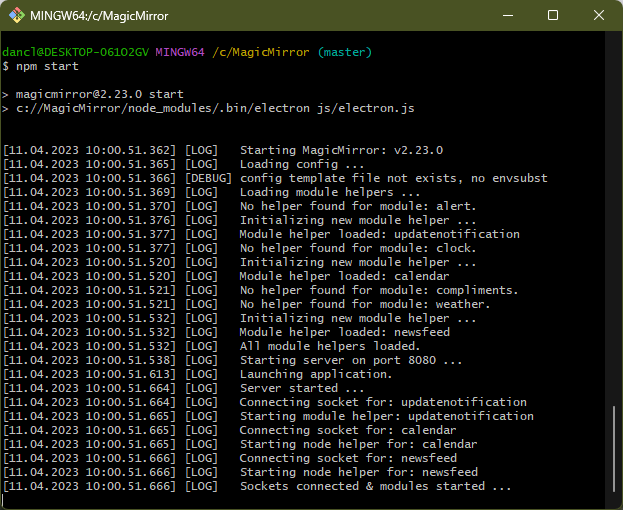
After installing the latest update (04/11/2023 10:00) I can not get Magic Mirror to start on my Windows systems. In this case I’m using the default CSS and config with no added modules. See attached photo. Please help.
-
@DanClarkCBET3 yes, there is a reported issue on Windows
https://github.com/MichMich/MagicMirror/issues/3083I was able to change some code (listed) to resolve it, but so far it only fails on windows. so we are not sure of the cause.
no fix currently planned
-
@sdetweil Thanks for the link. The suggested changes corrected my problem. Now the only problem I have is that the Alt key is not working but that is not a big problem.
-
@DanClarkCBET3 ctrl-m will minimize
-
@DanClarkCBET3 a fix has been pushed to the develop branch for the next release. the code is different
to test the develop branch see
https://forum.magicmirror.builders/topic/14327/testing-new-fixes-or-solving-current-problems-with-next-release-code

Hello! It looks like you're interested in this conversation, but you don't have an account yet.
Getting fed up of having to scroll through the same posts each visit? When you register for an account, you'll always come back to exactly where you were before, and choose to be notified of new replies (either via email, or push notification). You'll also be able to save bookmarks and upvote posts to show your appreciation to other community members.
With your input, this post could be even better 💗
Register Login