Read the statement by Michael Teeuw here.
MMM-MovieListings
-
Description:
A module for displaying movies that are currently airing in theaters near you. I decided to only show the top 20 movies as these are the ones being aired in most movie theaters around you.
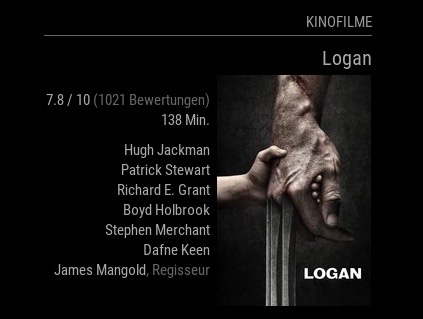
Currently two different views are supported (a simple list with as many movies as you’d like to show at once) and a more advanced poster view, like shown here:
Screenshot:
Download:
[card:Tueti/MMM-MovieListings]
Version 1
- A third view (a detailed list, without an image but more info that movie titles only) is on the table and will be added probably next week.
-
@Tueti hello, how can i install this module? i get with ssh en error that tis link no .git link are?
thanks
-
Hi @fischi87,
the installation should be normal git and therefore exactly as with any other module:
- First move into the correct directory =>
cd ~/MagicMirror/modules - Fetch data from Github =>
git clone https://github.com/Tueti/MMM-MovieListings.git - Move into module directory and install dependencies =>
cd MMM-MovieListings && npm install
This can either be run on the device that runs your MagicMirror or via ssh connected to that device. Are you able to install any other modules or could you post your commands and the console output here?
Thank you!
ChristianP.S.: I updated the README.md now, thanks for the hint that it wasn’t included :)
- First move into the correct directory =>
-
@Tueti thank for ur reply. im so sorry i forgot to write “git clone” i just wrote " git" i solved right now. thanks
-
Glad it helped :D
-
@Tueti hello again, i tried to display ur module but i got always this error:
error: kann .git/FETCH_HEAD nicht öffnen: Keine Berechtigungand yes i have a api v3 :-)
-
@fischi87 did you
sudothe git clone?As a work around I think it would help if you reset the permissions for the .git directory:
cd ~/MagicMirror/modules/MMM-MovieListingsand thensudo chown -R pi:pi .git/(only if you left the user of your raspberry pi as pi - else use the username of your user).But I will investigate this issue, that is weird indeed. Sorry for that :/
-
I re-uploaded the entire module again to a fresh git repository (same url: https://github.com/Tueti/MMM-MovieListings), so if the work around does not work, please try re-installing and let me know if that solved the issue.
-
when ich try git pull because of a update i get this
pi@Magic-Mirror:~/MagicMirror/modules/MMM-MovieListings $ git pull

*** Please tell me who you are.

Run

  git config --global user.email "you@example.com"
  git config --global user.name "Your Name"

to set your account's default identity.
Omit --global to set the identity only in this repository.

fatal: empty ident name (for ) not allowed
pi@Magic-Mirror:~/MagicMirror/modules/MMM-MovieListings $
and yes i did sudo chown -R pi:pi .git/
-
Could you try deleting the module and re-install? I did a re-upload to a new repository with the same name. Maybe that messed it up.
I am very sorry for the inconvenience, I think a fresh start might fix it.
-
Hi
Is it possible to get plot and genre?
I can see that there are genres in the code but it is not presented. -
Can somebody tell me what to put in config.js to make this module working?
Thanks!
Peter -
must be like this:
{ module: 'MMM-MovieListings', position: 'top_left', // This can be any of the regions. Best results in left or$ config: { apiKey: 'YOUR_API_KEY', region: 'DE', language: 'de-DE', interface: 'poster', //'list', 'poster', 'detailed' includeMoviePlot: false, maxPlotLength: 198, header: 'Kinofilme', moviesPerPage: 0, refreshInterval: 1000 * 60 * 60 * 24, //Once a day baseUrl: 'https://api.themoviedb.org/3/movie/now_playing', animationSpeed: 2.5 * 1000, pageChangeInterval: 35 * 1000 } }, -
@cruunnerr , thanks!
I have it running!
Looks good.
Peter -
Hello i can’t get mine to work
-
@jeffreyking - We’re going to need a little more information than that.
Do you have any other modules working?
What behavior are you seeing?
What does the relevant portion of yourconfig.jssay?
What errors are showing up in your log files? -
Thank you for replying I got it to work and it is awesome I made a error with the brackets { but I sorted it out .
i am running my magic mirror on a laptop with Ubuntu as the os I am new to this and mm-movielistings was the first module I have installed. -
Can anyone tell me how to modify the size and the color of the text? It is rather small, and I would like to make it white , instead of gray.
Thanks.
-
In your custom.css file, add these and adjust accordingly. I did not test but simply looked at the classes in the module.js file but they should work for you
.MMM-MovieListings .header { color: #FFFFFF; /* Header color. Default is white. */ } .MMM-MovieListings .small.dimmed { font-size: 18px; color: #FFFFFF; /* white */ } .MMM-MovieListings .xsmall { font-size: 18px; color: #FFFFFF; /* white */ } .MMM-MovieListings .xsmall.dimmed { font-size: 18px; color: #FFFFFF; /* white */ } .MMM-MovieListings .marginTop.xsmall { font-size: 18px; color: #FFFFFF; /* white */ } -
@mykle1 Thank you very much! I`ll test as soon as I reinstall MM on the Asus TinkerBoard.




Hello! It looks like you're interested in this conversation, but you don't have an account yet.
Getting fed up of having to scroll through the same posts each visit? When you register for an account, you'll always come back to exactly where you were before, and choose to be notified of new replies (either via email, or push notification). You'll also be able to save bookmarks and upvote posts to show your appreciation to other community members.
With your input, this post could be even better 💗
Register Login