MagicMirror Forum
    • Recent
    • Tags
    • Unsolved
    • Solved
    • MagicMirror² Repository
    • Documentation
    • 3rd-Party-Modules
    • Donate
    • Discord
    • Register
    • Login
    A New Chapter for MagicMirror: The Community Takes the Lead
    Read the statement by Michael Teeuw here.

    Run MM on Ubuntu 16 VM

    Scheduled Pinned Locked Moved General Discussion
    31 Posts 11 Posters 31.3k Views 10 Watching
    Loading More Posts
    • Oldest to Newest
    • Newest to Oldest
    • Most Votes
    Reply
    • Reply as topic
    Log in to reply
    This topic has been deleted. Only users with topic management privileges can see it.
    • Mykle1M Offline
      Mykle1 Project Sponsor Module Developer @pepemujica
      last edited by

      @pepemujica said in Run MM on Ubuntu 16 VM:

      Any idea why?

      This is just a guess but I think I remember hearing that MagicMirror has to be installed in your Home directory. I see that you installed it in /home/christain/.
      You can try the process again (if you want to) but install MagicMirror as soon as you open a new terminal. Don’t change directories.

      I hope this helps

      Create a working config
      How to add modules

      1 Reply Last reply Reply Quote 0
      • P Offline
        pepemujica
        last edited by

        @Mykle1 still having the same problem :(

        Mykle1M 1 Reply Last reply Reply Quote 0
        • Mykle1M Offline
          Mykle1 Project Sponsor Module Developer @pepemujica
          last edited by Mykle1

          @pepemujica

          Ok, someone will help you at some point. I don’t know if it matters but I’m running uBuntu 16.04 LTS, not as a VM

          Create a working config
          How to add modules

          R 1 Reply Last reply Reply Quote 0
          • A Offline
            amanzimdwini @pepemujica
            last edited by

            @pepemujica
            run sudo npm install in MagicMirror

            1 Reply Last reply Reply Quote 0
            • R Offline
              rtlucht78 @Mykle1
              last edited by

              @Mykle1 Did you get this to work on your device running Ubuntu 16.04? I am trying this on an old tablet running Ubuntu Mate 16.04.

              Mykle1M 1 Reply Last reply Reply Quote 0
              • Mykle1M Offline
                Mykle1 Project Sponsor Module Developer @rtlucht78
                last edited by

                @rtlucht78

                Yes, I have one laptop running ubuntu 16.04 and a netbook running ubuntu 14.04. Both are running MM

                Create a working config
                How to add modules

                1 Reply Last reply Reply Quote 0
                • HrierebH Offline
                  Hriereb @pepemujica
                  last edited by

                  @pepemujica said in Run MM on Ubuntu 16 VM:

                  Hi @Mykle1 Thanks for the answer.
                  I’ve started following the instructions, but I get the following error:
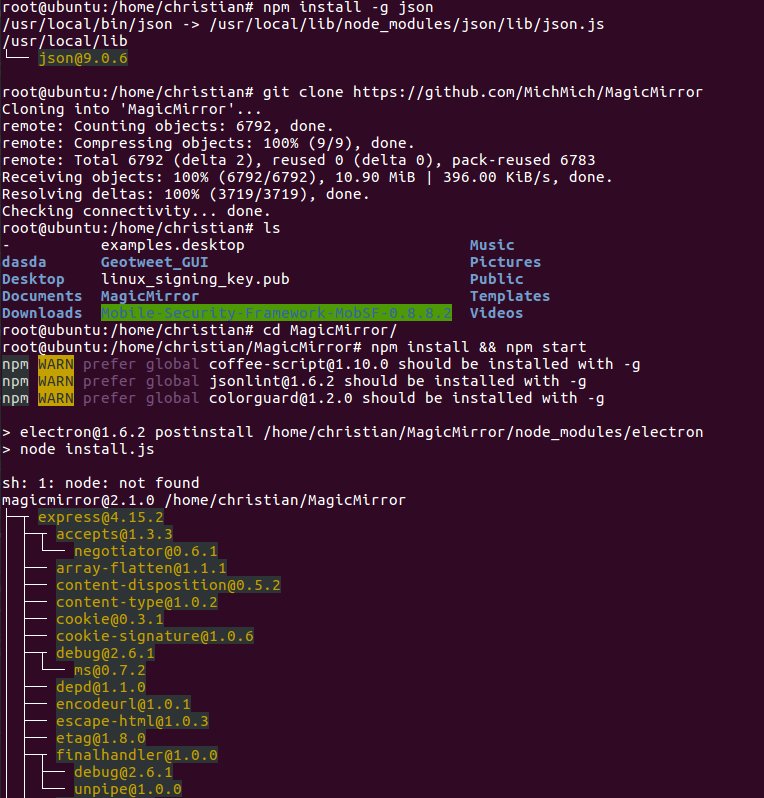
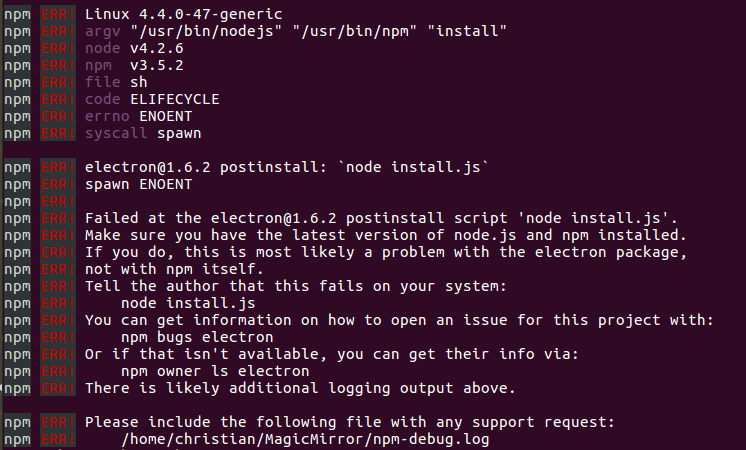
                  0_1490032831021_upload-627b7d7b-12f7-443e-b447-8750893adc5b

                  0_1490032896329_upload-f0ae1e26-6c2e-4c9d-a476-149c808e2b85

                  Any idea why?

                  I have the same kind of issue on ubuntu 18.04, did someone fix it? When someone says that it doesn’t run out of the box, what does this means?

                  A 1 Reply Last reply Reply Quote 0
                  • A Offline
                    AxLed Module Developer @Hriereb
                    last edited by

                    @Hriereb
                    Did you install “npm” and “node” as this sometimes isnt installed at ubuntu by default?

                    AxLED

                    HrierebH 1 Reply Last reply Reply Quote 0
                    • HrierebH Offline
                      Hriereb @AxLed
                      last edited by

                      @axled yes I did but nothing changed. Do you have to make it work on a virtual machine? How to enable it on Ubuntu?

                      1 Reply Last reply Reply Quote 0
                      • justjim1220J Offline
                        justjim1220 Module Developer
                        last edited by justjim1220

                        @Mykle1

                        ok, I now have both Ubuntu versions 16.04 and 18.04 up and running…

                        I have Chrome, node.js, npm, & git installed…

                        I have MagicMirror installed…

                        Getting the following error with both versions…
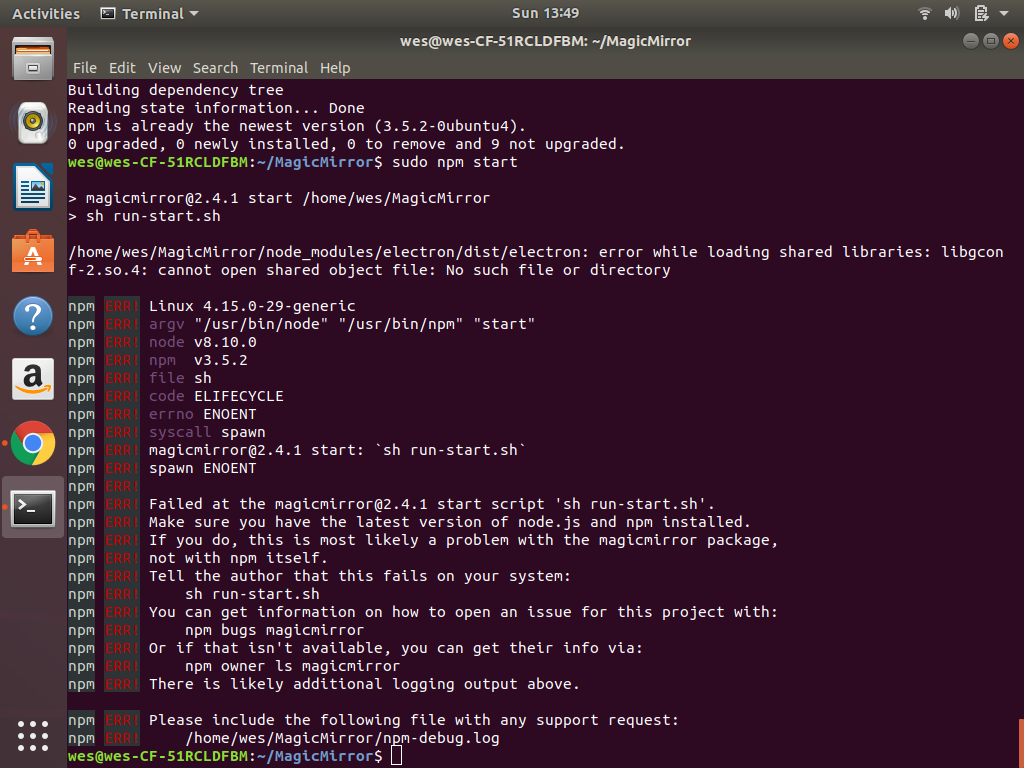
                        0_1532285621408_Screenshot from 2018-07-22 13-49-02.png

                        log file…

                        0 info it worked if it ends with ok
                        1 verbose cli [ '/usr/bin/node', '/usr/bin/npm', 'start' ]
                        2 info using npm@3.5.2
                        3 info using node@v8.10.0
                        4 verbose run-script [ 'prestart', 'start', 'poststart' ]
                        5 info lifecycle magicmirror@2.4.1~prestart: magicmirror@2.4.1
                        6 silly lifecycle magicmirror@2.4.1~prestart: no script for prestart, continuing
                        7 info lifecycle magicmirror@2.4.1~start: magicmirror@2.4.1
                        8 verbose lifecycle magicmirror@2.4.1~start: unsafe-perm in lifecycle true
                        9 verbose lifecycle magicmirror@2.4.1~start: PATH: /usr/share/npm/bin/node-gyp-bin:/home/wes/MagicMirror/node_modules/.bin:/usr/local/sbin:/usr/local/bin:/usr/sbin:/usr/bin:/sbin:/bin:/snap/bin
                        10 verbose lifecycle magicmirror@2.4.1~start: CWD: /home/wes/MagicMirror
                        11 silly lifecycle magicmirror@2.4.1~start: Args: [ '-c', 'sh run-start.sh' ]
                        12 info lifecycle magicmirror@2.4.1~start: Failed to exec start script
                        13 verbose stack Error: magicmirror@2.4.1 start: `sh run-start.sh`
                        13 verbose stack spawn ENOENT
                        13 verbose stack     at ChildProcess.<anonymous> (/usr/share/npm/lib/utils/spawn.js:17:16)
                        13 verbose stack     at emitTwo (events.js:126:13)
                        13 verbose stack     at ChildProcess.emit (events.js:214:7)
                        13 verbose stack     at maybeClose (internal/child_process.js:925:16)
                        13 verbose stack     at Process.ChildProcess._handle.onexit (internal/child_process.js:209:5)
                        14 verbose pkgid magicmirror@2.4.1
                        15 verbose cwd /home/wes/MagicMirror
                        16 error Linux 4.15.0-29-generic
                        17 error argv "/usr/bin/node" "/usr/bin/npm" "start"
                        18 error node v8.10.0
                        19 error npm  v3.5.2
                        20 error file sh
                        21 error code ELIFECYCLE
                        22 error errno ENOENT
                        23 error syscall spawn
                        24 error magicmirror@2.4.1 start: `sh run-start.sh`
                        24 error spawn ENOENT
                        25 error Failed at the magicmirror@2.4.1 start script 'sh run-start.sh'.
                        25 error Make sure you have the latest version of node.js and npm installed.
                        25 error If you do, this is most likely a problem with the magicmirror package,
                        25 error not with npm itself.
                        25 error Tell the author that this fails on your system:
                        25 error     sh run-start.sh
                        25 error You can get information on how to open an issue for this project with:
                        25 error     npm bugs magicmirror
                        25 error Or if that isn't available, you can get their info via:
                        25 error     npm owner ls magicmirror
                        25 error There is likely additional logging output above.
                        26 verbose exit [ 1, true ]
                        

                        Got any ideas?

                        "Life's Too Short To Dance With Ugly People"
                        Jim Hallock - 1995

                        N Mykle1M 2 Replies Last reply Reply Quote 0
                        • N Offline
                          NoNameRo @justjim1220
                          last edited by

                          @justjim1220 said in Run MM on Ubuntu 16 VM:

                          error Make sure you have the latest version of node.js and npm installed.

                          Upgrade npm with

                          npm install -g npm@latest
                          
                          1 Reply Last reply Reply Quote 0
                          • Mykle1M Offline
                            Mykle1 Project Sponsor Module Developer @justjim1220
                            last edited by Mykle1

                            @justjim1220 said in Run MM on Ubuntu 16 VM:

                            Got any ideas?

                            Why are you using sudo npm start? You shouldn’t use sudo to install MM or run MM. That can lead to problems. Also, it shouldn’t matter but for the sake of conformity I always install MM in the home directory

                            Create a working config
                            How to add modules

                            justjim1220J 2 Replies Last reply Reply Quote 0
                            • justjim1220J Offline
                              justjim1220 Module Developer @Mykle1
                              last edited by

                              @mykle1

                              so I have everything now installed in the root but still getting nowhere with getting the mirror to start up and run…:worried_face:

                              "Life's Too Short To Dance With Ugly People"
                              Jim Hallock - 1995

                              1 Reply Last reply Reply Quote 0
                              • justjim1220J Offline
                                justjim1220 Module Developer @Mykle1
                                last edited by

                                @mykle1

                                Still getting this…

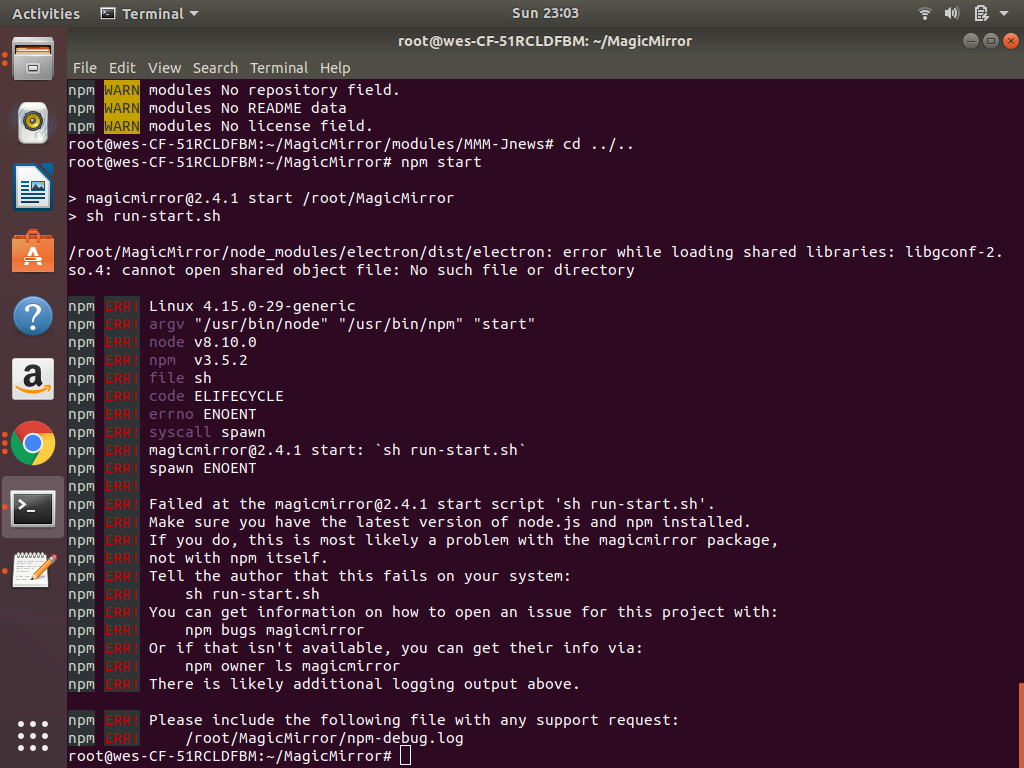
                                0_1532318741939_Screenshot from 2018-07-22 23-03-01.png

                                doesn’t matter if i’m in Ubuntu 16.04 OR 18.04
                                and it doesn’t matter if I’m in home directory OR the root directory…

                                is there a different way to run MM other than ‘npm start’?

                                "Life's Too Short To Dance With Ugly People"
                                Jim Hallock - 1995

                                ? 1 Reply Last reply Reply Quote 0
                                • A Offline
                                  AxLed Module Developer
                                  last edited by

                                  @justjim1220
                                  did you try to start the “Server only” mode an open a browser on Ubuntu with IP of your MM?
                                  To start Server only do node serveronly in your MagicMirror directory.

                                  Maybe this helps to find the problem.

                                  AxLED

                                  justjim1220J 1 Reply Last reply Reply Quote 1
                                  • ? Offline
                                    A Former User @justjim1220
                                    last edited by

                                    @justjim1220
                                    try this.

                                    sudo apt-get install libgconf-2-4
                                    
                                    1 Reply Last reply Reply Quote 0
                                    • justjim1220J Offline
                                      justjim1220 Module Developer @AxLed
                                      last edited by

                                      @axled

                                      Thanks, that worked!!!
                                      :winking_face: :winking_face: :smiling_face: :smiling_face: :grinning_face_with_smiling_eyes: :grinning_face_with_smiling_eyes: :smiling_face_with_sunglasses: :smiling_face_with_sunglasses:

                                      "Life's Too Short To Dance With Ugly People"
                                      Jim Hallock - 1995

                                      1 Reply Last reply Reply Quote 0
                                      • R Offline
                                        reitrac
                                        last edited by reitrac

                                        Hello everyone,

                                        3months later, I hope it’s not too late :)

                                        @AxLed i’m trying to use “node serveronly” but have this error :
                                        WARNING! Could not validate config file. Please correct syntax errors. Starting with default configuration.
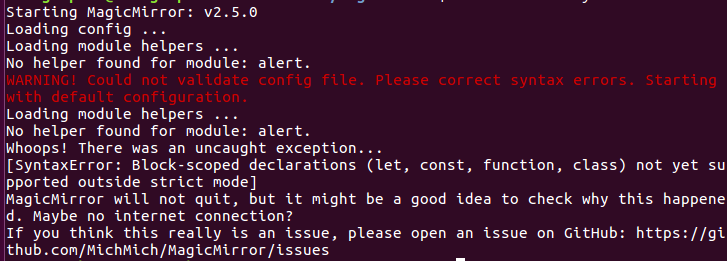
                                        0_1539678763897_Capture d’écran 2018-10-16 à 10.31.27.png

                                        I followed @Mykle1 tutorial to create default config.js but this not works.

                                        Any idea ? (My internet connection works)

                                        Thanks.

                                        ? 1 Reply Last reply Reply Quote 0
                                        • ? Offline
                                          A Former User @reitrac
                                          last edited by

                                          @reitrac
                                          Your config.js might have some misspell or wrong syntax.

                                          1 Reply Last reply Reply Quote 0
                                          • R Offline
                                            reitrac
                                            last edited by reitrac

                                            My config.js is by default :D
                                            I just changed “en” by “fr”.

                                            I’ll try to find config.js on Git and come back to you.

                                            Thanks.

                                            EDIT :

                                            I downloaded the latest config.js from : https://github.com/MichMich/MagicMirror/blob/master/config/config.js.sample
                                            And not works :'(

                                            Mykle1M ? justjim1220J 3 Replies Last reply Reply Quote 0

                                            Hello! It looks like you're interested in this conversation, but you don't have an account yet.

                                            Getting fed up of having to scroll through the same posts each visit? When you register for an account, you'll always come back to exactly where you were before, and choose to be notified of new replies (either via email, or push notification). You'll also be able to save bookmarks and upvote posts to show your appreciation to other community members.

                                            With your input, this post could be even better 💗

                                            Register Login

                                            • 1
                                            • 2
                                            • 2 / 2
                                            • First post
                                              Last post
                                            Enjoying MagicMirror? Please consider a donation!
                                            MagicMirror created by Michael Teeuw.
                                            Forum managed by Sam, technical setup by Karsten.
                                            This forum is using NodeBB as its core | Contributors
                                            Contact | Privacy Policy