MagicMirror Forum
    • Recent
    • Tags
    • Unsolved
    • Solved
    • MagicMirror² Repository
    • Documentation
    • 3rd-Party-Modules
    • Donate
    • Discord
    • Register
    • Login
    A New Chapter for MagicMirror: The Community Takes the Lead
    Read the statement by Michael Teeuw here.

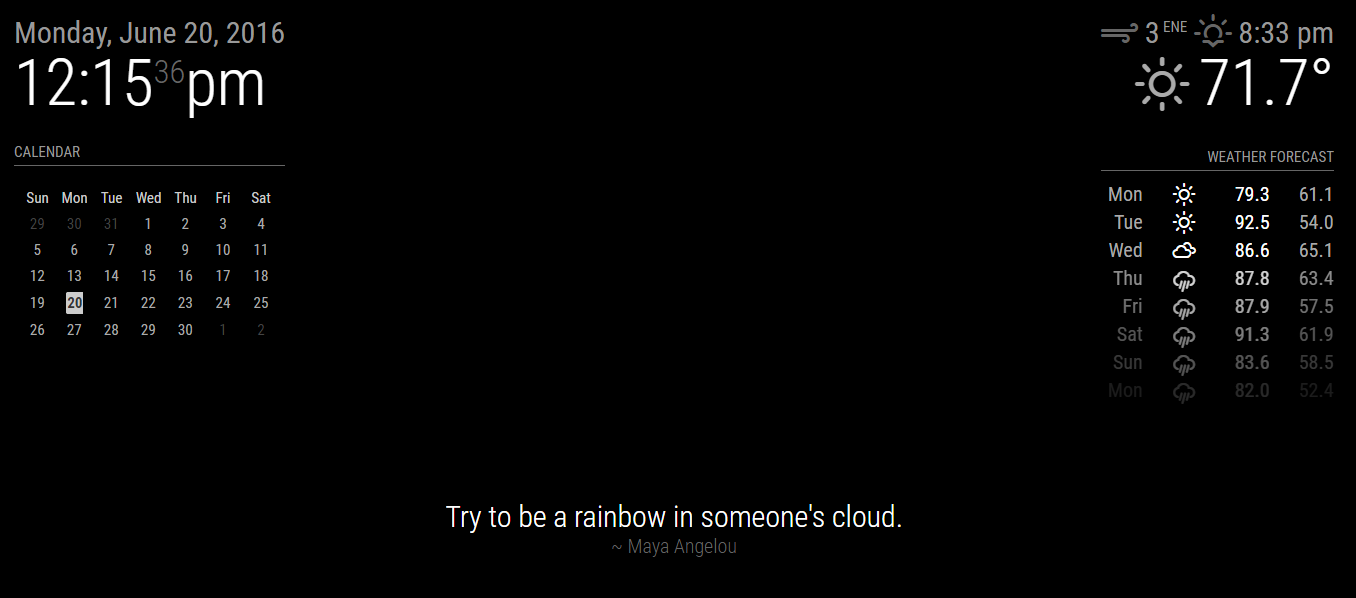
    Random Quotes

    Scheduled Pinned Locked Moved Utilities
    19 Posts 9 Posters 17.2k Views 8 Watching
    Loading More Posts
    • Oldest to Newest
    • Newest to Oldest
    • Most Votes
    Reply
    • Reply as topic
    Log in to reply
    This topic has been deleted. Only users with topic management privileges can see it.
    • KirAsh4K Offline
      KirAsh4 Moderator
      last edited by

      Not as written. It would require a bit of rewriting to allow for a local call to a file. Not impossible, just not written.

      A Life? Cool! Where can I download one of those from?

      1 Reply Last reply Reply Quote 0
      • G Offline
        geeflaxx
        last edited by

        so is that right that you put the information from your script not from brainyguote?
        so i can change it in vocal to learn an another language ?
        i mean its only a script what change the text per time ?
        if that is it that i am thanksfull
        that i need it (for example for my english…)

        1 Reply Last reply Reply Quote 0
        • KirAsh4K Offline
          KirAsh4 Moderator
          last edited by

          All the quotes are in the random_quotes.js file. You can change them to anything you want.

          A Life? Cool! Where can I download one of those from?

          1 Reply Last reply Reply Quote 0
          • G Offline
            geeflaxx
            last edited by geeflaxx

            so i have to add the paramteres (updateintervall etc) in my config ?

            because in your example wasn’t that
            very thank you!

            ‘modules: [
            {
            module: ‘random_quotes’,
            position: ‘lower_third’,
            config: {
            updateIntervall=500 // The config property is optional
            fadeSpeed=4 // Without a config, a random quote is shown,
            category=random // selected from all of the categories available.
            }
            }
            ]’

            strawberry 3.141S 1 Reply Last reply Reply Quote 0
            • KirAsh4K Offline
              KirAsh4 Moderator
              last edited by

              Correct, as the documentation shows.

              A Life? Cool! Where can I download one of those from?

              ? 1 Reply Last reply Reply Quote 0
              • strawberry 3.141S Offline
                strawberry 3.141 Project Sponsor Module Developer @geeflaxx
                last edited by strawberry 3.141

                @geeflaxx you need to write it down like this

                {
                    module: 'random_quotes',
                    position: 'lower_third',
                    config: {
                        updateIntervall: 500,
                        fadeSpeed: 4,
                        category: 'random'
                    }
                }
                

                Please create a github issue if you need help, so I can keep track

                1 Reply Last reply Reply Quote 0
                • G Offline
                  geeflaxx
                  last edited by

                  very thanksfull an both you help me a lot

                  i edited it

                  1 Reply Last reply Reply Quote 0
                  • G Offline
                    geeflaxx
                    last edited by

                    how i can do a wordwrap ? (that the word is under my words) (i hope you understand despite my english skills ^^)
                    like that :
                    hello
                    my name is

                    1 Reply Last reply Reply Quote 1
                    • KirAsh4K Offline
                      KirAsh4 Moderator
                      last edited by

                      Can’t. It’s a single line each time.

                      A Life? Cool! Where can I download one of those from?

                      J 1 Reply Last reply Reply Quote 0
                      • J Offline
                        Jopyth Moderator @KirAsh4
                        last edited by Jopyth

                        @KirAsh4 Couldn’t @geeflaxx insert a <br> inside all quotes? Would be a lot of manual work though.

                        Helpful sticky: How to troubleshoot

                        1 Reply Last reply Reply Quote 0
                        • yawnsY Offline
                          yawns Moderator
                          last edited by

                          That’s what I was thinking as well. After all it is just text in a <div> isn’t it?

                          1 Reply Last reply Reply Quote 0
                          • KirAsh4K Offline
                            KirAsh4 Moderator
                            last edited by

                            Actually, yes you could. Basically any HTML tag would (should?) work. I did a ‘split’ on a key character so I can apply two different styles, one on the quote, and one on the author. Slightly different approach.

                            A Life? Cool! Where can I download one of those from?

                            1 Reply Last reply Reply Quote 0
                            • G Offline
                              geeflaxx
                              last edited by

                              how i can config the data so, that the autor is always the same ?

                              or
                              do i need after a quote add the autor with “~” ?

                              Q 1 Reply Last reply Reply Quote 0
                              • Q Offline
                                qqqqqqqq @geeflaxx
                                last edited by

                                @geeflaxx said in Random Quotes:

                                how i can config the data so, that the autor is always the same ?

                                or
                                do i need after a quote add the autor with “~” ?

                                Too late, but here it goes.

                                You can add all the quotes from the same author in a category (like motivational or life) and change the config file to show quotes from that category only.

                                It’s upto you to add “~”, but if you do, they will follow different styles as set by the developer.

                                @KirAsh4 , I’ve noticed that the selection of quotes isn’t true random. Every time I start MM, I get the same quotes.

                                1 Reply Last reply Reply Quote 0
                                • ? Offline
                                  A Former User @KirAsh4
                                  last edited by

                                  @KirAsh4

                                  Love the module, works a treat.
                                  Can’t figure out how to change the size of the quote and/or author however.

                                  I’ve tried adding the following to custom.css

                                  .random_quotes .medium {
                                  font-size: 50px;
                                  }
                                  

                                  and

                                  .random_quotes .quote .medium {
                                  font-size: 50px;
                                  }
                                  

                                  Neither work however.
                                  I think you’ll be able to see what I tried to do here, but please could you help me figure out where I am going wrong?

                                  Thanks in advance.

                                  1 Reply Last reply Reply Quote 0

                                  Hello! It looks like you're interested in this conversation, but you don't have an account yet.

                                  Getting fed up of having to scroll through the same posts each visit? When you register for an account, you'll always come back to exactly where you were before, and choose to be notified of new replies (either via email, or push notification). You'll also be able to save bookmarks and upvote posts to show your appreciation to other community members.

                                  With your input, this post could be even better 💗

                                  Register Login

                                  • 1 / 1
                                  • First post
                                    Last post
                                  Enjoying MagicMirror? Please consider a donation!
                                  MagicMirror created by Michael Teeuw.
                                  Forum managed by Sam, technical setup by Karsten.
                                  This forum is using NodeBB as its core | Contributors
                                  Contact | Privacy Policy