MagicMirror Forum
    • Recent
    • Tags
    • Unsolved
    • Solved
    • MagicMirror² Repository
    • Documentation
    • 3rd-Party-Modules
    • Donate
    • Discord
    • Register
    • Login
    A New Chapter for MagicMirror: The Community Takes the Lead
    Read the statement by Michael Teeuw here.

    MMM-MyCommute

    Scheduled Pinned Locked Moved Transport
    286 Posts 80 Posters 655.3k Views 77 Watching
    Loading More Posts
    • Oldest to Newest
    • Newest to Oldest
    • Most Votes
    Reply
    • Reply as topic
    Log in to reply
    This topic has been deleted. Only users with topic management privileges can see it.
    • J Offline
      j.e.f.f Project Sponsor Module Developer @cruunnerr
      last edited by

      @cruunnerr sorry yes. Chat was what I meant. Send me your entire MMM-MyCommute config without hiding anything so I can test your exact config.

      A 1 Reply Last reply Reply Quote 0
      • cruunnerrC Offline
        cruunnerr
        last edited by cruunnerr

        ok. i send it to you, but the code looks scary with the chat.

        i uploaded it to my ftp-server and send you the link

        thanks for helping me

        edit:

        Got it!
        you have too write it like this:

        alternatives: true, //does work
        

        not like this:

        alternatives: 'true', //doesn't work
        

        Thank you anyway :)

        1 Reply Last reply Reply Quote 0
        • R Offline
          raggedyandy
          last edited by

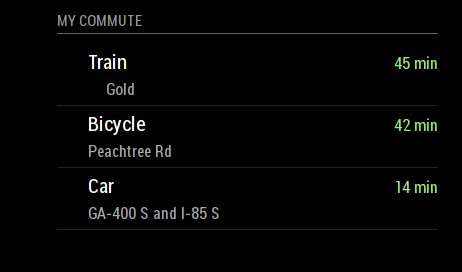
          Has anyone else had trouble getting the icons to display? I’m not sure if the SVG file I’m using has been corrupted, but I also seem to get an error message whenever I try opening that file separately, even after pulling the latest from the git. Below is how it renders for me.

          Great module btw!
          0_1517179636865_magicmirrorerror.png

          1 Reply Last reply Reply Quote 0
          • A Offline
            ATibbs
            last edited by

            I Just recently installed and configured MMM-MyCalendar and MMM-MyCommute with few issues and love the modules. I noticed in the config for the calendar (and also in the console logs) that the calendar is broadcasting an array with data such as location, geo, etc.

            I was hoping someone with a little more JS experience (I have PS and VB scripting experience but this is my first dive into development) might help me out a little. I have been trying to use the receiveNotification: Function to pull the location and title values from the calendar and use them to update the destination and label fields from MyCommute respectively. Essentially I want the driving duration displayed in MyCommute to give me driving times to my next calendar appointment. I have been searching and throwing code at this module for 3 days now and am ready to start smashing things.

            Help me MagicMirror forums…you’re my only hope.

            pyrosmileyP 1 Reply Last reply Reply Quote 1
            • pyrosmileyP Offline
              pyrosmiley @ATibbs
              last edited by

              @ATibbs This is not my work (I’m not that smart) but I did find a fork of this module that adds what I think you’re looking for – it’s behind the master still, but it works pretty well by and large. Check out the calendar-integration branch of this repository (courtesy of olexs on github).

              You may need some additional configuration settings to make it work. I don’t currently have access to mine, but iirc I guessed at the changes based on this changelog from the pull request on the master repo.

              In a few days I’ll be back home, feel free to shoot me a message if you can’t get it up and running an I’ll send you my config once I can get to it.

              A 2 Replies Last reply Reply Quote 1
              • A Offline
                ATibbs @pyrosmiley
                last edited by

                @pyrosmiley Oh man, thank you so much for this. I was on the right track too but this would have taken me a month to figure out. Now I just need to sit here at work for the next 8 hours waiting to try this out. Thanks again for this, Ill update here if I get it working.

                1 Reply Last reply Reply Quote 0
                • A Offline
                  ATibbs @pyrosmiley
                  last edited by

                  @pyrosmiley So I copy/Pasta’d the .js file from the calendar-integration branch and it worked like a charm without any configuration other than changing the showcalendarevents value from false. Thanks again, this is huge for me.

                  O 1 Reply Last reply Reply Quote 0
                  • O Offline
                    olexs @ATibbs
                    last edited by

                    @ATibbs I’m the author of the calendar-integration fork. It’s quite old but works stable enough for myself. OP has a very valid issue with it, in that it uses up a lot of API calls if you have many events refreshing often - so be careful to limit the showcalendarevents to a low value. I have it running with 3 events shown and haven’t had an API limit issue in many months of use.

                    I’ll take a look at upstream changes and update/rebase the fork to the current master, to keep it up to date and compatible.

                    A pyrosmileyP 2 Replies Last reply Reply Quote 4
                    • A Offline
                      ATibbs @olexs
                      last edited by

                      @olexs Thanks for putting the work in, you did a great job. I too have showcalendarevents set to 3 and everything seems to be running fine. Thanks again.

                      1 Reply Last reply Reply Quote 0
                      • pyrosmileyP Offline
                        pyrosmiley @olexs
                        last edited by

                        @olexs Thanks a lot for that fork – it’s exactly what I needed for the mirror!

                        1 Reply Last reply Reply Quote 1
                        • A Offline
                          aishaamila @j.e.f.f
                          last edited by

                          @j.e.f.f does this modules in Malaysia? Because i keep on getting syntax error so the config cannot be validated

                          J 1 Reply Last reply Reply Quote 0
                          • J Offline
                            j.e.f.f Project Sponsor Module Developer @aishaamila
                            last edited by

                            @aishaamila I don’t see why it wouldn’t. Does google maps work for you just in your browser?

                            If you can’t figure it out PM me and I’ll help you troubleshoot.

                            1 Reply Last reply Reply Quote 0
                            • A Offline
                              AlexNY007
                              last edited by

                              Not sure everybody is aware of this but today when i was trying to deploy the module and then getting the APi i found out that Google now is requesting a billing account. Even has a $200 limit for use per month. Do you guys know if this is per project or per account? If so anybody recently created an account for this module? any hints will be appreciated.

                              AlbinolanA 1 Reply Last reply Reply Quote 0
                              • O Offline
                                olexs
                                last edited by olexs

                                Annoyingly enough, this is correct. Google is changing their Maps API access, and billing now needs to be set up for all uses of the API - including free tier. The 200$ limit is their free allowance, as long as you stay under that you don’t pay anything at all. Using only MMM-MyCommute should not even come close to that. But you still have to provide billing information, even if it’s never going to be used.

                                I have updated my account and project that I use for MMM-MyCommute, and it works just fine.

                                A 1 Reply Last reply Reply Quote 0
                                • A Offline
                                  AlexNY007 @olexs
                                  last edited by AlexNY007

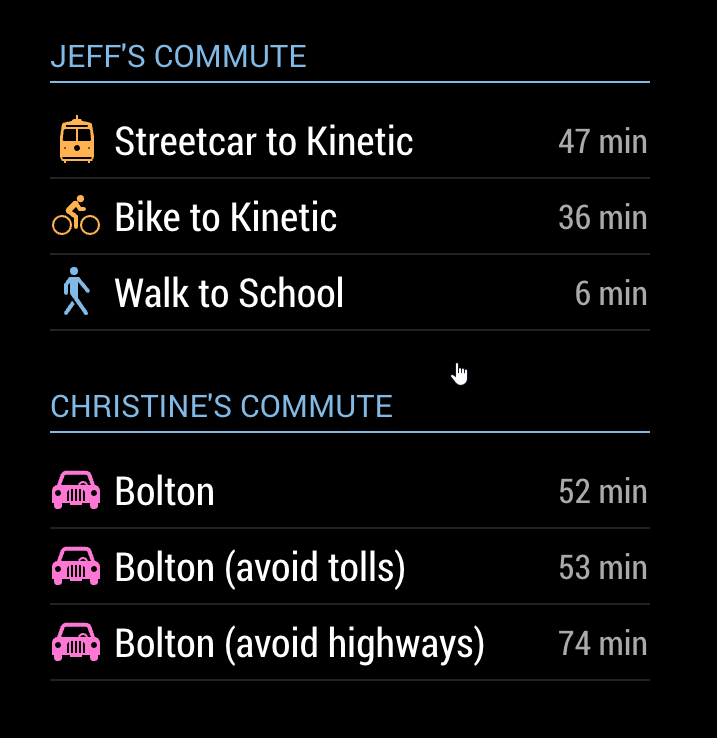
                                  @olexs yes. I read their last FAQ and basically its is what you said. Sorry if this sound stupid but, when you said MM-Commute should not come close to the allowance limit, do you mean that even if i have one project for em and my wife should not cost me a billing headache? I mean if i do something like this.
                                  0_1527175369701_f2dd475e-ea5e-4489-8a8d-2064eac0a385-image.png

                                  O 1 Reply Last reply Reply Quote 0
                                  • O Offline
                                    olexs @AlexNY007
                                    last edited by

                                    @alexny007 Unless you have many (dozens) instances of the module running on the same account, it will stay far below the 200$ free tier limit, and it won’t cost you anything.

                                    A 1 Reply Last reply Reply Quote 1
                                    • A Offline
                                      AlexNY007 @olexs
                                      last edited by

                                      @olexs Thank you!!! looking forward to experiment with this module.

                                      1 Reply Last reply Reply Quote 0
                                      • AlbinolanA Offline
                                        Albinolan @AlexNY007
                                        last edited by

                                        @alexny007 I created my account last week, and was presented with the billing screen, however I somehow managed to set it up without actually giving any information, seems to be a bug when you have multiple tabs open, which allows you to bypass it. It says that I have one set up, but when I go to view its details, it asks me to enter them.

                                        1 Reply Last reply Reply Quote 0
                                        • J Offline
                                          Jeffers1984
                                          last edited by Jeffers1984

                                          Hi everyone,

                                          Hoping you can help me with a query I have! I am certainly no coder and I will probably use the wrong terminology, so I apologise in advance.

                                          I have updated my Node.js to V10.4.0 since then and despite rebooting my Pi, MMM-MyCommute is no longer working. Does anyone have any suggestions as to why? here is my full config (I have removed all sensitive info).

                                          
                                          var config = {
                                          	address: "localhost", // Address to listen on, can be:
                                          	                      // - "localhost", "127.0.0.1", "::1" to listen on loopback interface
                                          	                      // - another specific IPv4/6 to listen on a specific interface
                                          	                      // - "", "0.0.0.0", "::" to listen on any interface
                                          	                      // Default, when address config is left out, is "localhost"
                                          	port: 8080,
                                          	ipWhitelist: ["127.0.0.1", "::ffff:127.0.0.1", "::1"], // Set [] to allow all IP addresses
                                          	                                                       // or add a specific IPv4 of 192.168.1.5 :
                                          	                                                       // ["127.0.0.1", "::ffff:127.0.0.1", "::1", "::ffff:192.168.1.5"],
                                          	                                                       // or IPv4 range of 192.168.3.0 --> 192.168.3.15 use CIDR format :
                                          	                                                       // ["127.0.0.1", "::ffff:127.0.0.1", "::1", "::ffff:192.168.3.0/28"],
                                          
                                          	language: "en",
                                          	timeFormat: 24,
                                          	units: "metric",
                                          
                                          	modules: [
                                          // ALERTS
                                          		{
                                          			module: "alert",
                                          		},
                                          // UPDATE NOTIFICATIONS	
                                          		{
                                          			module: "updatenotification",
                                          			position: "top_bar"
                                          		},
                                          // UPDATE CLOCK		
                                          		{
                                          			module: "clock",
                                          			position: "top_left",
                                          			showWeek: true,
                                          			timezone: "Etc/GMT",
                                          			width: "200px"
                                          		},
                                          // CALENDAR	
                                          		{
                                          			module: "calendar",
                                          			header: "Work Calendar",
                                          			position: "top_right",
                                          			config: {
                                          				calendars: [
                                          						{
                                          						symbol: "calendar-check-o ",
                                          						url: "...",
                                          					//	maximumEntries: 3,
                                          						maximumNumberOfDays: 3,
                                          						timezone: "Etc/GMT-1",
                                          						
                                          						}
                                          					   ]
                                          				}		
                                          		},
                                          
                                          // WEATHER
                                          		{
                                          			module: "currentweather",
                                          			position: "top_right",
                                          			config: {
                                          				location: "Warrington",
                                          				locationID: "2634739", //Location ID from http://openweathermap.org/help/city_list.txt
                                          				appid: "..."
                                          			}
                                          		},
                                          		
                                          // FORECAST	
                                          		{
                                          			module: "weatherforecast",
                                          			position: "top_right",
                                          			header: "Weather Forecast",
                                          			config: {
                                          				location: "Warrington",
                                          				locationID: "2634739",  
                                          				appid: "..."
                                          			}
                                          		},
                                          // NEWS
                                          		{
                                          			module: "newsfeed",
                                          			position: "bottom_bar",
                                          			config: {
                                          				feeds: [
                                          					{
                                          					title: "Everton FC",
                                          					url: "feeds.evertonfc.com/everton-news?format=xml",
                                          					
                                          					
                                          					title: "BBC Headline",
                                          					url: "http://feeds.bbci.co.uk/news/rss.xml",
                                          					
                                          										
                                          					title: "BBC Technology",
                                          					url: "http://feeds.bbci.co.uk/news/technology/rss.xml",
                                          					
                                          					
                                          					title: "BBC Science",
                                          					url: "http://feeds.bbci.co.uk/news/science_and_environment/rss.xml",
                                          					}
                                          				],
                                          				showSourceTitle: true,
                                          				showPublishDate: true
                                          			}
                                          		},
                                          		
                                          // TRAFFIC		
                                           
                                          {
                                                module: "MMM-MyCommute",
                                                position: "top_left",
                                                header: "Traffic",
                                                classes: "default everyone",
                                                disabled: false,
                                                config: {
                                                  apikey: ".",
                                                  origin: "... ...",
                                                  startTime: "00:00",
                                                  endTime: "23:59",
                                                  hideDays: [],
                                                  showSummary: true,
                                                  colorCodeTravelTime: true,
                                                  moderateTimeThreshold: 1.1,
                                                  poorTimeThreshold: 1.3,
                                                  nextTransitVehicleDepartureFormat: "[next at] h:mm a",
                                                  travelTimeFormat: "h [h] m [min]",
                                                  travelTimeFormatTrim: "left",
                                                  pollFrequency: 10 * 60 * 1000, //every ten minutes, in milliseconds
                                                  destinations: [
                                                    {
                                                      destination: "...",
                                                      label: "Matt Work",
                                                      mode: "driving",
                                                    },
                                                    {
                                                      destination: "...",
                                                      label: "Sarah Work",
                                                      mode: "driving",
                                                    },
                                                    }
                                                      destination: "...",
                                                      label: "Nursery",
                                                      mode: "driving",
                                                    },
                                                    {
                                                      destination: "...",
                                                      label: "... Community",
                                                      mode: "driving",
                                                    },
                                                    {
                                                      destination: "...",
                                                      label: "Grandad Jeffs",
                                                      mode: "driving",
                                                    }
                                                  ]
                                                }
                                              },  
                                          
                                          ]	
                                          
                                          };
                                          
                                          /*************** DO NOT EDIT THE LINE BELOW ***************/
                                          if (typeof module !== "undefined") {module.exports = config;}


                                          Thanks,

                                          EDIT:

                                          I have done some more troubleshooting and notice that when I remove the MMM-MyCommute code from the Config above MagicMirror then starts fine?! Not sure if that does help at all! The terminal error is:

                                          “WARNING! Could not validate config file. Please correct syntax errors. Starting with default configuration.” but clearly the config file is there (as above), so must be a syntax error right?

                                          strawberry 3.141S 1 Reply Last reply Reply Quote 0
                                          • strawberry 3.141S Offline
                                            strawberry 3.141 Project Sponsor Module Developer @Jeffers1984
                                            last edited by strawberry 3.141

                                            @jeffers1984 you have two issues:

                                            label: "Sarah Work",
                                                        mode: "driving",
                                                      },
                                                      }
                                                        destination: "...",
                                                        label: "Nursery",
                                                        mode: "driving",
                                                      },
                                                      {
                                                        destination: "...",
                                                        label: "... Community",
                                            

                                            you start the block with label nursery with a closing instead of an opening bracket.

                                            second issue is in the newsfeed you have duplicated feeds, because you created one object for all instead of one for each feed. Therefore you will only get the last newsfeed, if you want all you have to do:

                                            feeds: [
                                              {
                                                title: "Everton FC",
                                                url: "feeds.evertonfc.com/everton-news?format=xml",
                                              },{
                                                title: "BBC Headline",
                                                url: "http://feeds.bbci.co.uk/news/rss.xml",
                                              },{		
                                                title: "BBC Technology",
                                                url: "http://feeds.bbci.co.uk/news/technology/rss.xml",
                                              },{
                                                title: "BBC Science",
                                                url: "http://feeds.bbci.co.uk/news/science_and_environment/rss.xml",
                                              }
                                            ]
                                            

                                            I doubt that those issues are coming from the node 10 upgrade and it worked before :face_with_stuck-out_tongue_winking_eye:


                                            Please create a github issue if you need help, so I can keep track

                                            J 2 Replies Last reply Reply Quote 0

                                            Hello! It looks like you're interested in this conversation, but you don't have an account yet.

                                            Getting fed up of having to scroll through the same posts each visit? When you register for an account, you'll always come back to exactly where you were before, and choose to be notified of new replies (either via email, or push notification). You'll also be able to save bookmarks and upvote posts to show your appreciation to other community members.

                                            With your input, this post could be even better 💗

                                            Register Login

                                            • 1
                                            • 2
                                            • 3
                                            • 4
                                            • 5
                                            • 14
                                            • 15
                                            • 3 / 15
                                            • First post
                                              Last post
                                            Enjoying MagicMirror? Please consider a donation!
                                            MagicMirror created by Michael Teeuw.
                                            Forum managed by Sam, technical setup by Karsten.
                                            This forum is using NodeBB as its core | Contributors
                                            Contact | Privacy Policy