Read the statement by Michael Teeuw here.
stronger Raspberry Pi 3 Alternatives
-
@Snille Yes, very interesting. I liked the idea of comparing the boards with Geekbench. Maybe this is a measurable unit to compare.
@cowboysdude Are you willing to run such a Geekbench on your system?Somebody backed this and is going to get a one?
Looking for some building inspiration?
Check out my large, thin and metal framed mirror on robstechlog.com.Modules released:
MMM-GoogleAnalytics
MMM-GrafanaChart
MMM-GrafanaGauges -
I think that’s awesome. IF it has more power, and it seems these boards are getting more powerful all the time, that’s a good thing!
-
@SvenSommer Yes, I’m backing it. :) I’m going (if it works) to replace my Pi3 with it. :)
If you cant find it, make it and share it
MMM-homeassistant-sensors,MMM-Modulebar,MMM-Profilepicture,MMM-Videoplayer,MMM-TautulliLatest -
@Snille I would but right now I have so much going on that backing anything else would be counter productive.
I’m backing a Thermostat right now… and that’s keeping my butt busy :)
-
hello. I cannot remember if you did a post here about your steps installing ubuntu? can you direct me to it please, if you did indeed do one?
I’m about to dual boot a win7 mini itx with ubuntu over the weekend, and then install MM, for the extra power it will give, and also wondered if JRE is installed with the ubuntu installer, or whether I need to do that separately? if this is needed of course?Also any hints/tips/pitfalls you can offer, about the install, will be greatly appreciated. thank you.
-
@Damian said in stronger Raspberry Pi 3 Alternatives:
JRE
I didn’t do dual boot only because well Windows is blah LOL
I straight just installed Unbuntu then followed the instructions for manual Magic Mirror install and I’ve had no problems at all! :)
Here’s a guide for Unbuntu:
https://tutorials.ubuntu.com/tutorial/tutorial-install-ubuntu-desktop#0
I installed from a USB Stick :)
-
@cowboysdude said in stronger Raspberry Pi 3 Alternatives:
JRE
Yes, was unsure if I needed to install the Java Runtime Environment as a seperate, or whether ubuntu installs that itself? Or indeed if it is needed at all?
I didn’t do dual boot only because well Windows is blah LOL
Agree, but i want to keep it on the other half of the 500gb drive for a future project.
I straight just installed Unbuntu then followed the instructions for manual Magic Mirror install and I’ve had no problems at all! :)
Good to know there is no issues/problems to look out for. This will be first time installing and using ubuntu, so was unsure if it is as straight forward as raspbian to set up and run, and get MM on top.
I will now look forward to use MM without the usual RP3 constraints.
Here’s a guide for Unbuntu:
https://tutorials.ubuntu.com/tutorial/tutorial-install-ubuntu-desktop#0
I installed from a USB Stick :)
Than you very much for this, I will have an enjoyable weekend setting this all up.
-
@Damian does it make sense then to just setup ubuntu for magicmirror? You got windows already and magicmirror works also on windows
-
@strawberry-3.141 said in stronger Raspberry Pi 3 Alternatives:
@Damian You got windows already and magicmirror works also on windows
I never thought about that. :-(
I just went back over posts here and seen one from @Mykle1 about setting up on his windows PC
I just thought that MM would run better on a linux distro system partition, more than on a full Win system? If there is a difference that is?
Thanks for that, as this will save some time, and thanks to @Mykle1 for his guide.
-
@Damian I don’t think it really matters. I just prefer Linux … Just easier for me.
-
@cowboysdude said in stronger Raspberry Pi 3 Alternatives:
@Damian I don’t think it really matters. I just prefer Linux … Just easier for me.
Thank you. Really looking forward to seeing the difference in power with MM.
fyi… I was going to build an itx like you mentioned in here, but seen a mint condition Lenovo Q180 going for a song on ebay, so bought it, and it is perfect for my next MM. 2.13 GHz 4GB ram 500GB HDD.
-
Makes a HUGE difference :) You’ll love it.
-
Here is another option:
ASRock N3150DC-ITX Mini-ITX Motherboard - if you can find one.
SoC – Intel Celeron N3150 quad core processor @ up to 2.08 GHz with Intel HD Graphics Gen8 @ up to 640 MHz – 6W TDP
There are some other Celeron SoC boards that take 19v DC power. The Asus Q1900DC-ITX uses the J1900.
Look for “Thin Mini-ITX” normally that means the DC in.
-Earle
-
@cowboysdude How is the miniATX for heat generation and dissipation when your mirror is hanging up against the wall? Do you need to use a fan on the cpu or gpu? My Pi3 already runs in the high 60’s Celcius without a fan (I’m not using face recognition, or this would likely be much worse)… I’d be concerned that the extra power and limited airflow would generate a significant amount of heat, and adding a fan would result in an annoying whirring sound – ideally I’d want the mirror to operate silently.
-
@j.e.f.f right now I don’t have it all together so I can’t really answer that question. BUT it has crossed my mind… so I’m going to run a fan off of the motherboard and run it to the top of the ‘frame’ to get rid of the heat. If you buy a high quality fan the noise shouldn’t be a problem…
-
@cowboysdude When you have it all put together, let us know what the noise from the fan is like.
-
@j.e.f.f Will do!
-
@j.e.f.f said in stronger Raspberry Pi 3 Alternatives:
let us know what the noise from the fan is like.
My experience with the fan.
My thoughts about using a fan:
In my case, if there is any form of ambient sound in the room, I don’t hear the fan at all. If the window is open, if the tv or radio is on, anything at all then I can’t hear the fan. I listened for it when I first installed it.
When do I hear it? At night, when the windows are closed, tv is off, and the house is absolutely silent. The mirror is not in my bedroom, although that wouldn’t matter. My wife’s snoring can mask the sound of a 747 on liftoff.
-
Well here’s step 1 for my big mirror… I wanted something stronger then a PI so here is my mini-itx in its new home… Cooling is NOT an issue… it’s about 13" square and about 3 inches tall :) Easy to put out of the way … NOW to build a frame for the ‘display’… Coming soon!
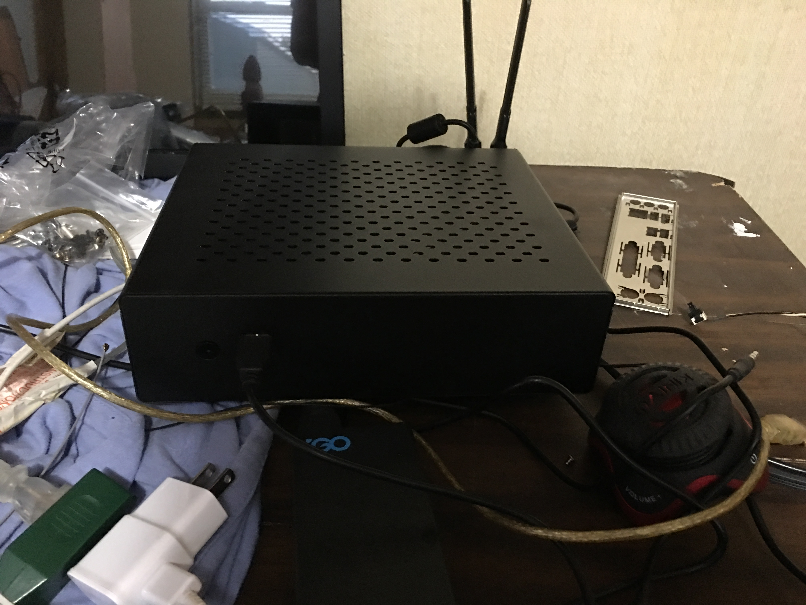
HERE is how it all stays cool…this fan is totally SILENT… LOVE IT!
https://www.newegg.com/Product/Product.aspx?Item=N82E16835220067 -
@cowboysdude said in stronger Raspberry Pi 3 Alternatives:
Easy to put out of the way … NOW to build a frame for the ‘display’
Great idea! Now hurry the hell up with the frame! :^)






Hello! It looks like you're interested in this conversation, but you don't have an account yet.
Getting fed up of having to scroll through the same posts each visit? When you register for an account, you'll always come back to exactly where you were before, and choose to be notified of new replies (either via email, or push notification). You'll also be able to save bookmarks and upvote posts to show your appreciation to other community members.
With your input, this post could be even better 💗
Register Login