MagicMirror Forum
    • Recent
    • Tags
    • Unsolved
    • Solved
    • MagicMirror² Repository
    • Documentation
    • 3rd-Party-Modules
    • Donate
    • Discord
    • Register
    • Login
    A New Chapter for MagicMirror: The Community Takes the Lead
    Read the statement by Michael Teeuw here.

    MMM-NOAA - Another Weather Module

    Scheduled Pinned Locked Moved System
    690 Posts 77 Posters 2.9m Views 70 Watching
    Loading More Posts
    • Oldest to Newest
    • Newest to Oldest
    • Most Votes
    Reply
    • Reply as topic
    Log in to reply
    This topic has been deleted. Only users with topic management privileges can see it.
    • Mykle1M Offline
      Mykle1 Project Sponsor Module Developer @cowboysdude
      last edited by

      @cowboysdude said in MMM-NOAA - Another Weather Module:

      did you go a pull request to fix it?

      Uhhh, no. Haha. I went to do it but it appears you already corrected it.

      Create a working config
      How to add modules

      cowboysdudeC 1 Reply Last reply Reply Quote 1
      • cowboysdudeC Offline
        cowboysdude Module Developer @Mykle1
        last edited by

        @mykle1 That’s right LOL

        1 Reply Last reply Reply Quote 1
        • D Offline
          doogy_rev
          last edited by

          This is an awesome weather module! Just set mine up and using Darksky as my weather source. I have set my update interval to 30 min, which (unless I am being a div) would mean 24 a updates day and 700 or so a month. Monitoring my DarkSky console I am currently updating 45-50 times a day.

          {
                                  module: "MMM-NOAA3",
                                  position: "top_right",
                                  config: {
                                          provider: "darksky",   
                                          apiKey: "xxxxxxxxxxxxxxxxxxxxxxxxxxx",        // From one of the providers listed above
                                          airKey: "xxxxxxxxxxxxxxxxxxx", 
                                          css: "NOAA3",                 // THIS MUST CONTAIN A CSS STYLE NAME
                                          updateInterval: 30 * 60 * 1000,
                                          userlat: "49.238941", //MUST HAVE BOTH
                                          userlon: "-121.765883"  //MUST HAVE BOTH
                                  }
                          },


          Is the above correct from a configuration perspective? Have I missed something?

          Thanks in advance!

          Mykle1M 1 Reply Last reply Reply Quote 0
          • Mykle1M Offline
            Mykle1 Project Sponsor Module Developer @doogy_rev
            last edited by

            @doogy_rev said in MMM-NOAA - Another Weather Module:

            Have I missed something?

            Math class, apparently. ;-)

            Every 30 minutes would be 48 calls a day, and in a 30 day month, 1440 calls

            Create a working config
            How to add modules

            1 Reply Last reply Reply Quote 2
            • D Offline
              doogy_rev
              last edited by

              Haha, yes you are right. What an utter putz I am 🙈

              Mykle1M 1 Reply Last reply Reply Quote 0
              • Mykle1M Offline
                Mykle1 Project Sponsor Module Developer @doogy_rev
                last edited by

                @doogy_rev

                Don’t be too hard on yourself. We all make mistakes. :thumbsup:

                Create a working config
                How to add modules

                1 Reply Last reply Reply Quote 2
                • E Offline
                  epi
                  last edited by epi

                  Did someone managed to change css to make this module look more like this?
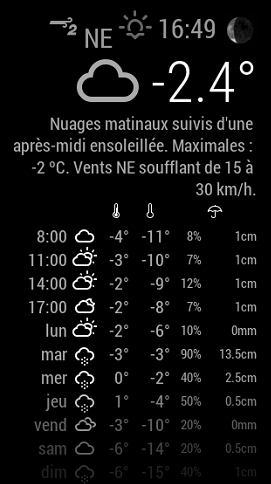
                  0_1538143780588_78a4657f-8b20-4130-959a-fd4ec7666090-image.png
                  Or like this
                  0_1538165065297_1506892109941-github.png

                  Mykle1M 1 Reply Last reply Reply Quote 0
                  • Mykle1M Offline
                    Mykle1 Project Sponsor Module Developer @epi
                    last edited by

                    @epi said in MMM-NOAA - Another Weather Module:

                    Did someone managed to change css to make this module look more like this?

                    What you’re describing looks alot like the default weather module. Go figure.

                    Create a working config
                    How to add modules

                    1 Reply Last reply Reply Quote 1
                    • cowboysdudeC Offline
                      cowboysdude Module Developer
                      last edited by

                      Maybe someone did but it certainly wasn’t me… but feel free to play with the css if you’d like.

                      1 Reply Last reply Reply Quote 0
                      • cowboysdudeC Offline
                        cowboysdude Module Developer
                        last edited by

                        Stay tuned I’ve modified Sean’s MMM-WeatherBackground to work with NOAA3 :) Working out some bugs but should be released soon!

                        1 Reply Last reply Reply Quote 0
                        • cowboysdudeC Offline
                          cowboysdude Module Developer
                          last edited by

                          A little sample…

                          0_1538528547918_scr.jpg

                          Mykle1M 1 Reply Last reply Reply Quote 2
                          • Mykle1M Offline
                            Mykle1 Project Sponsor Module Developer @cowboysdude
                            last edited by

                            @cowboysdude

                            I hate you! :-)

                            Create a working config
                            How to add modules

                            cowboysdudeC 1 Reply Last reply Reply Quote 2
                            • cowboysdudeC Offline
                              cowboysdude Module Developer @Mykle1
                              last edited by

                              @mykle1 Don’t hate me… @Sean made it… I just adapted it to NOAA3 LOL

                              1 Reply Last reply Reply Quote 0
                              • cowboysdudeC Offline
                                cowboysdude Module Developer
                                last edited by

                                Description:

                                Added Moon Phases and some style updates

                                Please follow Readme on Github!

                                To update just do a ‘git pull’ in the MagicMirror/modules/MMM-NOAA3 directory

                                Version 3.2.2

                                Download:

                                [card:cowboysdude/MMM-NOAA3]

                                M 1 Reply Last reply Reply Quote 1
                                • H Offline
                                  Hubschra01
                                  last edited by

                                  Hi together,
                                  I´m new on this nice modul.
                                  I install and setup the module and use Openweather. The measurements are shown on the Mirror but without any Unit. (% or °C…) And the Images of Sun and Moon and the 4 day Forecast will not appear. Anybody know the Mistakes I do in the Setup. I don´t use the AQI Key because is not nessesary for me.

                                  In the Termial I got some Whoops… I show below…

                                  Whoops! There was an uncaught exception...
                                  TypeError: Cannot read property 'length' of undefined
                                      at Object.parseForecast (/home/pi/MagicMirror/modules/MMM-NOAA3/providers/ow.js:184:42)
                                      at Request.request [as _callback] (/home/pi/MagicMirror/modules/MMM-NOAA3/providers/ow.js:55:17)
                                      at Request.self.callback (/home/pi/MagicMirror/modules/MMM-NOAA3/node_modules/request/request.js:185:22)
                                      at emitTwo (events.js:126:13)
                                      at Request.emit (events.js:214:7)
                                      at Request.<anonymous> (/home/pi/MagicMirror/modules/MMM-NOAA3/node_modules/request/request.js:1161:10)
                                      at emitOne (events.js:116:13)
                                      at Request.emit (events.js:211:7)
                                      at IncomingMessage.<anonymous> (/home/pi/MagicMirror/modules/MMM-NOAA3/node_modules/request/request.js:1083:12)
                                      at Object.onceWrapper (events.js:313:30)
                                  MagicMirror will not quit, but it might be a good idea to check why this happened. Maybe no internet connection?
                                  If you think this really is an issue, please open an issue on GitHub: https://gi                                   thub.com/MichMich/MagicMirror/issues
                                  Whoops! There was an uncaught exception...
                                  SyntaxError: Unexpected token c in JSON at position 0
                                      at JSON.parse (<anonymous>)
                                      at Object.parseUV (/home/pi/MagicMirror/modules/MMM-NOAA3/providers/ow.js:74:23)
                                      at Request.request [as _callback] (/home/pi/MagicMirror/modules/MMM-NOAA3/providers/ow.js:69:17)
                                      at Request.self.callback (/home/pi/MagicMirror/modules/MMM-NOAA3/node_modules/request/request.js:185:22)
                                      at emitTwo (events.js:126:13)
                                      at Request.emit (events.js:214:7)
                                      at Request.<anonymous> (/home/pi/MagicMirror/modules/MMM-NOAA3/node_modules/request/request.js:1161:10)
                                      at emitOne (events.js:116:13)
                                      at Request.emit (events.js:211:7)
                                      at IncomingMessage.<anonymous> (/home/pi/MagicMirror/modules/MMM-NOAA3/node_modules/request/request.js:1083:12)
                                  
                                  
                                  1 Reply Last reply Reply Quote 0
                                  • G Offline
                                    Galm
                                    last edited by Galm

                                    Hello,

                                    I am trying to use your new module. I was using the previous one with openweathermap. I can’t get any info display on the screen as you can seen below :
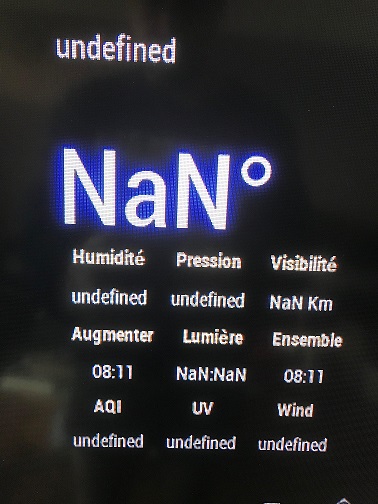
                                    0_1538807973103_weathermodule.jpg

                                    FYI : my API key is working well with the default weather module and i use you API airkey on your 1st module without any problems

                                    If i do understand well in your ow.js, you use this 1st url : http://api.openweathermap.org/data/2.5/forecast/daily?lat=“+this.config.userlat+”&lon=“+this.config.userlon+”&units=imperial&appid="+this.config.apiKey;

                                    At 1st sight : you missed the use of one variable. Should it be written like this : http://api.openweathermap.org/data/2.5/forecast/daily?lat=“+this.config.userlat+”&lon=“+this.config.userlon+”&units=“+this.config.units+”&appid="+this.config.apiKey; ?

                                    Another thing : daily forcast are not allowed in free plan so this url won"t work with free plan. I tested it on my browser, to get the forcast I have to use : http://api.openweathermap.org/data/2.5/forecast?lat=“+this.config.userlat+”&lon=“+this.config.userlon+”&units=imperial&appid="+this.config.apiKey; -> i don’t have any idea if you retrieve the info needed in your parser.

                                    Hope it helps to debug my problems :)

                                    Thanks a lot for your work

                                    cowboysdudeC 1 Reply Last reply Reply Quote 0
                                    • cowboysdudeC Offline
                                      cowboysdude Module Developer
                                      last edited by cowboysdude

                                      Thank you to @revere521 for finding a problem I didn’t even know existed!! Missing a file that the module is looking for!! I’ll fix that~ :)

                                      ALL fixed…do a git pull and all will be well :)

                                      1 Reply Last reply Reply Quote 0
                                      • cowboysdudeC Offline
                                        cowboysdude Module Developer @Galm
                                        last edited by

                                        @galm Do a git pull in the MagicMirror/modules/MMM-NOAA3 dir and it will work for you ;)

                                        G 2 Replies Last reply Reply Quote 0
                                        • G Offline
                                          Galm @cowboysdude
                                          last edited by

                                          @cowboysdude said in MMM-NOAA - Another Weather Module:

                                          MMM-NOAA3

                                          Hello,

                                          It did not change anything :( still not showing any values

                                          1 Reply Last reply Reply Quote 0
                                          • H Offline
                                            Hubschra01
                                            last edited by

                                            Hello,
                                            I do the git pull too, but I still get the Errors in the Terminalwindow shown on top.
                                            No Forecast and now measurement units

                                            The Api request work in the Browser for my coordinates an id.

                                            Any Ideas.

                                            1 Reply Last reply Reply Quote 0

                                            Hello! It looks like you're interested in this conversation, but you don't have an account yet.

                                            Getting fed up of having to scroll through the same posts each visit? When you register for an account, you'll always come back to exactly where you were before, and choose to be notified of new replies (either via email, or push notification). You'll also be able to save bookmarks and upvote posts to show your appreciation to other community members.

                                            With your input, this post could be even better 💗

                                            Register Login

                                            • 1
                                            • 2
                                            • 31
                                            • 32
                                            • 33
                                            • 34
                                            • 35
                                            • 35 / 35
                                            • First post
                                              Last post
                                            Enjoying MagicMirror? Please consider a donation!
                                            MagicMirror created by Michael Teeuw.
                                            Forum managed by Sam, technical setup by Karsten.
                                            This forum is using NodeBB as its core | Contributors
                                            Contact | Privacy Policy