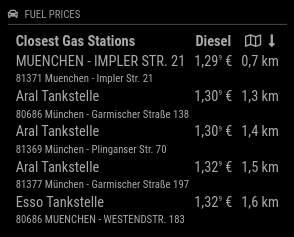
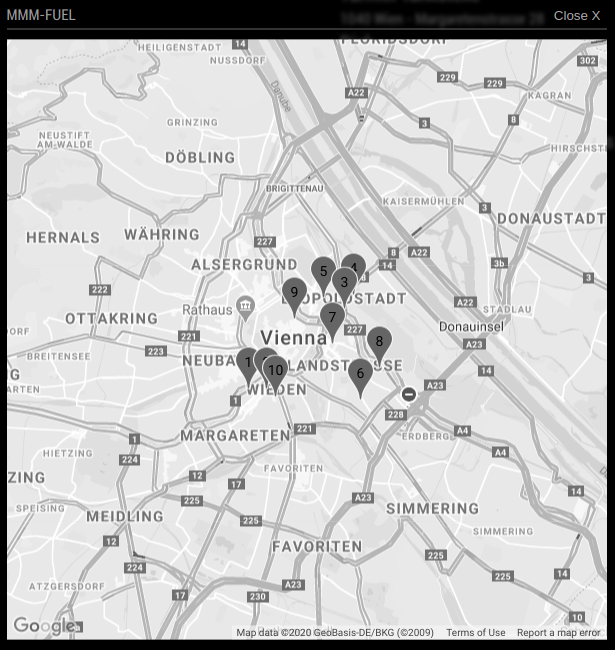
Read the statement by Michael Teeuw here.
-
@ostfilinchen i tested some stuff and the only thing which forced the module to refresh data more often then it was defined in the config was by restarting the mirror what you said was not your case and accessing the mirror with a browser via another computer. everytime you refresh that page it will load the data.
@lolobyte your issue in github is resolved now
if there is one fuel type present in config and thie price is 0€ the gas station gets completely removed from the display
if there is more than one fuel type in config and one of them has a price greater than 0€ the gas station will be displayed at the end of the list, otherwise the gas stations is also removed from the list
[card:fewieden/MMM-Fuel]
-
@strawberry-3.141
Great, it works well now.Thank’s a lot.
One more question.
Can you tell me why your Fuel-Module is shown on my mirror but not in my browser on the laptop?
The other Modules are working well. MMM-Fuel is only showing the ModuleName and ModuleNumber.!
-
@lolobyte any errors? it was working for me in the browser, but be aware of the problem @ostfilinchen had with a blocked key due probably to many requests based on browser refreshing
-
ok, that was a good reason for me to check it with another browser.
For usual i use a the maxthon browser. I checked now with chrome and wuala, your module is shown like it have to be.Thanks for your info with the browser requests.
-
Helllo, and befor a big sry for my very bad english.
i try too run the module but every time in change the config id will say the no config is there.
if copy the mmm modul in moduls, run the npm installer, change the config and nothing…
were is my mistake? -
@DeSlow can you post your config snippet? dont forget to replace your api key first
-
do you meen this
}
},
{
module: “MMM-Fuel”,
position: “top_right”,
config: {
api_key: “api key”,
lat: 53.931775,
lng: 9.505148,
types: [“e5”],
}
} -
@DeSlow you should remove the api key here in the forum this is kind of a password and should not be shared with someone else. i will test this on my machine
-
This post is deleted! -
and 1 question to this:
DependenciesAn installation of MagicMirror2
OPTIONAL: Voice Control
npm
request -------what is this and what got i go white isim so bad in englisch, got dam
-
@DeSlow The config works for me when I replace the quotes. check your pm for support in german
EDIT: the problem was a missing comma in the config file
-
The Addon works great
But: is a filter based on opened station in a defined radius possible?
I want to hide the distance and detailed address, to reduce the size of the mmm-fuel box.
Only Shell (Zip/City), Aral (Zip/City) should be displayed.my requirements in detail:
no rotate (check)
2 types of gas (check)
maximum of 3 displayed station (check)
not possible yet:
display only open stations
reduce length of the station name, remove address, or at least shorten.Thanks (and merry christmas btw)
-
Furthermore i want to hide the car icon, because it does not fit into the mm style (just my opinion)
-
Changelog:
4 new config options
- shortenText: shorten name and address after certain characters
- showAddress: show address of gas station or not
- showOpenOnly: show only gas stations that are open or all
- iconHeader: display icon in header
[card:fewieden/MMM-Fuel]
-
I did a replacement on the Station names, because “Shell” is typically naming there stations after the Street name.
I fixed the City name to have only the first Letter in uppercase.
How can i remove the " null" part, which is occuring at JET stations,
or how can i tidy up the street names? (every seperate word starting with an uppercase)of course i can start with a list of the complete string that should be replaced, but there might be another option.
Thanks :)
-
- null @jets is propably that they inserted the house number in the street name and the house number value returns null
- for the street names i would split at the space character and then for each array item charAt(0).toUpperCase() and the rest of the string lowercase and finally join them together
-
I added checks for house numbers==null and splitted the street names.
Also the Brand names starting with (star,ESSO,Aral were replaced automatically)
(Shell and no-name stations are a special case, so i need to handle them individually)But, there is still another special case:
Streetnames with " " or “-” should be splitted, but no housenumbers (from JET :D ).
How can i avoid splitting numbers:
This is the section that does the splitting
words = str.toLowerCase().split(/-| /);
can be found here in total:
https://github.com/Dom1n1c/MMM-Fuel/blob/master/MMM-Fuel.js -
@Dom1n1c I commented on your changes
-
Is it possible to choose other typs of fuel like non-leaded supergrade plus petrol or premium?
-
@reaper81 the api only provides diesel e5 and e10 sorry
Hello! It looks like you're interested in this conversation, but you don't have an account yet.
Getting fed up of having to scroll through the same posts each visit? When you register for an account, you'll always come back to exactly where you were before, and choose to be notified of new replies (either via email, or push notification). You'll also be able to save bookmarks and upvote posts to show your appreciation to other community members.
With your input, this post could be even better 💗
Register Login