MagicMirror Forum
    • Recent
    • Tags
    • Unsolved
    • Solved
    • MagicMirror² Repository
    • Documentation
    • 3rd-Party-Modules
    • Donate
    • Discord
    • Register
    • Login
    A New Chapter for MagicMirror: The Community Takes the Lead
    Read the statement by Michael Teeuw here.

    Changing icons of the modules Current Weather and Weather Forecast

    Scheduled Pinned Locked Moved Development
    301 Posts 30 Posters 1.6m Views 33 Watching
    Loading More Posts
    • Oldest to Newest
    • Newest to Oldest
    • Most Votes
    Reply
    • Reply as topic
    Log in to reply
    This topic has been deleted. Only users with topic management privileges can see it.
    • P Offline
      PhilReis @Tagriel
      last edited by

      @tagriel i have used svg Icons because it was easier for me.
      I can try to make a solution with the CSS Icons which you have linked here.

      T 1 Reply Last reply Reply Quote 0
      • T Offline
        Tagriel @PhilReis
        last edited by

        @philreis I’m wondering because my raspberry heat goes way up after displaying the new weather icons. I thought it might be bc of the svg files, does it happen to you? (are you using a raspberry?). I also wanted to share something with you, if I don’t have any modules, lets say, on my top_left screen, the current weather module only displays the degree without any icons, and if I add any other module to the top-left screen, then I can see the icons, its pretty strange :( do you happen to know what might be happening? I’ve been reading the code almost line by line trying to find if there is a table or div anywhere missing but I can’t seem to find anything.

        P 1 Reply Last reply Reply Quote 0
        • P Offline
          PhilReis @Tagriel
          last edited by

          @tagriel i will test it.

          1 Reply Last reply Reply Quote 0
          • T Offline
            Tagriel
            last edited by

            Thanks man! I’ve also got a question for you, it’s breaking my head, I’ve given a lot of days of debugging and searching what might be happening but I don’t find an answer.

            If I have my currentweather module on top_left alone, there’s no weather icon
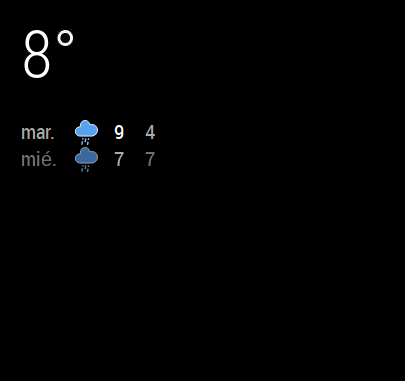
            0_1541452997075_Captura de pantalla 2018-11-05 a las 22.20.25.png

            BUT if I put any other module on top_left below my current weather module, I can see the icon :'(
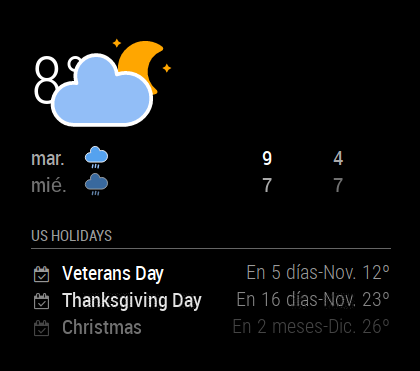
            0_1541453036867_Captura de pantalla 2018-11-05 a las 22.19.38.png

            I just don’t understand what I’m doing wrong, do you have any ideas?

            Thanks in advance!

            1 Reply Last reply Reply Quote 0
            • T Offline
              Tagriel
              last edited by

              Hi all,

              I just found the issue. Just check there’s height and width on your custom.css

              .currentweather .weathericon {
              position: absolute;
              z-index: 0;
              height: 200px;
              width: 400px
              right: 180px;
              margin-top: -65px;
              margin-left: 30px;
              }

              1 Reply Last reply Reply Quote 0
              • H Offline
                homerj99
                last edited by homerj99

                looks great, thanks so much

                1 Reply Last reply Reply Quote 0
                • schwoediauerS Offline
                  schwoediauer @Vulcain
                  last edited by

                  @vulcain

                  best solution for my Icons - good job!

                  1 Reply Last reply Reply Quote 0
                  • F Offline
                    Fa @Vulcain
                    last edited by

                    @vulcain can you copy/paste your custom.css in full please , it would help me
                    thanks

                    1 Reply Last reply Reply Quote 0
                    • V Offline
                      vinp Module Developer
                      last edited by

                      My CPU goes through the roof when I tried these animated icons last night. Anyone else seeing high CPU usage with them ?

                      J 1 Reply Last reply Reply Quote 0
                      • S Offline
                        santiago5 @PhilReis
                        last edited by santiago5

                        @PhilReis said in Changing icons of the modules Current Weather and Weather Forecast:

                        I have add the other icons. But not all are properly positioned yet.
                        And a there is no icon for fog.
                        In the next few weeks I will position the icon correctly.
                        This solution is maybe not the best but it works!

                        Picture:

                        0_1531077724549_Mirror.JPG

                        For this icons you need this icon package:
                        https://www.amcharts.com/free-animated-svg-weather-icons/

                        Copy the icon from the folder “animated” to the folder “MagicMirror/css/icons”

                        Then you have to add this code to your “custom.css” file.

                        /* Aenderungen Wetter Icon */
                        /* Aenderungen aktuelles Wetter */
                        
                        .currentweather .weathericon {
                          position: absolute;
                          z-index: 0;
                          height: 200px;
                          right: 180px;
                          margin-top: -65px;
                        }
                        
                        .currentweather .wi-day-sunny {
                        content: url("/css/icons/day.svg");
                        }
                        
                        .currentweather .wi-day-cloudy {
                        content: url("/css/icons/cloudy-day-1.svg");
                        }
                        
                        .currentweather .wi-rain {
                        content: url("/css/icons/rainy-6.svg");
                        }
                        
                        .currentweather .wi-night-clear {
                        content: url("/css/icons/night.svg");
                        }
                        
                        .currentweather .wi-night-cloudy {
                        content: url("/css/icons/cloudy-night-2.svg");
                        padding-right: 15px;
                        padding-top: 10px;
                        }
                        
                        .currentweather .wi-cloudy {
                        content: url("/css/icons/cloudy.svg");
                        }
                        
                        .currentweather .wi-showers {
                        content: url("/css/icons/rainy-7.svg");
                        }
                        
                        .currentweather .wi-thunderstorm {
                        content: url("/css/icons/thunder.svg");
                        }
                        
                        .currentweather .wi-snow {
                        content: url("/css/icons/snowy-6.svg");
                        }
                        
                        .currentweather .wi-cloudy-windy {
                        content: url("/css/icons/cloudy-day-3.svg");
                        }
                        
                        .currentweather .wi-night-rain {
                        content: url("/css/icons/rainy-6.svg");
                        }
                        
                        .currentweather .wi-night-snow {
                        content: url("/css/icons/snowy-6.svg");
                        }
                        
                        .currentweather .wi-night-thunderstorm {
                        content: url("/css/icons/thunder.svg");
                        }
                        
                        .currentweather .wi-night-showers {
                        content: url("/css/icons/rainy-7.svg");
                        }
                        
                        .currentweather .wi-fog {
                        content: url("/css/icons/cloudy.svg");
                        }
                        
                        .currentweather .wi-night-alt-cloudy-windy {
                        content: url("/css/icons/cloudy-night-1.svg");
                        }
                        
                        /* Aenderungen Wettervorhersage */
                        
                        .weatherforecast .weathericon {
                          position: absolute;
                          left: 35px;
                          z-index: 1;
                          margin-top: -30px;
                          height: 60px;
                        }
                        
                        .weatherforecast .wi-day-sunny {
                        content: url("/css/icons/day.svg");
                        padding-left: 6px;
                        padding-top: 5px;
                        height: 50px;
                        }
                        
                        .weatherforecast .wi-day-cloudy {
                        content: url("/css/icons/cloudy-day-1.svg");
                        }
                        
                        .weatherforecast .wi-rain {
                        content: url("/css/icons/rainy-6.svg");
                        padding-left: 8px;
                        padding-top: 5px;
                        height: 45px;
                        }
                        
                        .weatherforecast .wi-night-clear {
                        content: url("/css/icons/night.svg");
                        }
                        
                        .weatherforecast .wi-night-cloudy {
                        content: url("/css/icons/cloudy-night-2.svg");
                        height: 50px;
                        padding-left: 5px;
                        padding-top: 7px;
                        }
                        
                        .weatherforecast .wi-cloudy {
                        content: url("/css/icons/cloudy.svg");
                        }
                        
                        .weatherforecast .wi-showers {
                        content: url("/css/icons/rainy-7.svg");
                        }
                        
                        .weatherforecast .wi-thunderstorm {
                        content: url("/css/icons/thunder.svg");
                        }
                        
                        .weatherforecast .wi-snow {
                        content: url("/css/icons/snowy-6.svg");
                        }
                        
                        .weatherforecast .wi-cloudy-windy {
                        content: url("/css/icons/cloudy-day-3.svg");
                        height: 45px;
                        padding-left: 8px;
                        padding-top: 7px;
                        }
                        
                        .weatherforecast .wi-night-rain {
                        content: url("/css/icons/rainy-6.svg");
                        padding-left: 8px;
                        padding-top: 5px;
                        height: 45px;
                        }
                        
                        .weatherforecast .wi-night-snow {
                        content: url("/css/icons/snowy-6.svg");
                        }
                        
                        .weatherforecast .wi-night-thunderstorm {
                        content: url("/css/icons/thunder.svg");
                        }
                        
                        .weatherforecast .wi-night-showers {
                        content: url("/css/icons/rainy-7.svg");
                        }
                        
                        .weatherforecast .wi-fog {
                        content: url("/css/icons/cloudy.svg");
                        }
                        
                        .weatherforecast .wi-night-alt-cloudy-windy {
                        content: url("/css/icons/cloudy-night-1.svg");
                        height: 50px;
                        padding-left: 5px;
                        padding-top: 7px;
                        }
                        

                        As I said not completely finished.

                        Hello anyone, if i have a icon packs named sun.mov, rain.mov, etc, can i put the pack in /css/icons and use the same code but changing the url (and maybe padding)?
                        from content: url("/css/icons/day.svg"), to content: url("/css/icons/sun.mov"); or i need something else?
                        i don’t know how coding :smiling_face_with_open_mouth_cold_sweat:

                        T P 2 Replies Last reply Reply Quote 0
                        • J Offline
                          j.e.f.f Project Sponsor Module Developer @vinp
                          last edited by

                          @vinp said in Changing icons of the modules Current Weather and Weather Forecast:

                          My CPU goes through the roof when I tried these animated icons last night. Anyone else seeing high CPU usage with them ?

                          I added the ability to use animated icons in my weather module, and I, too, notice very high CPU usage, even though the animation code is purported to not be demanding of resources. I’m going to guess that SVG / Canvas animation on Electron running or on a Raspberry Pi (or both!) is not optimised to be as efficient as it could be.

                          If I have many icons animated at the same time and if I leave it running for days, eventually MM will freeze. CPU temp and usage goes up significantly until that happens.

                          V 1 Reply Last reply Reply Quote 1
                          • bheplerB Offline
                            bhepler Module Developer
                            last edited by

                            @aecandroid - Please check out this guide on how to use the markdown features of the forum. Then go back and properly block out your config.js file. That will make debugging your code much easier.

                            A 1 Reply Last reply Reply Quote 1
                            • Mykle1M Offline
                              Mykle1 Project Sponsor Module Developer
                              last edited by

                              @aecandroid

                              Or

                              https://forum.magicmirror.builders/topic/4247/how-to-post-code-on-the-forum-for-absolute-beginners

                              Create a working config
                              How to add modules

                              1 Reply Last reply Reply Quote 0
                              • A Offline
                                aecandroid @bhepler
                                last edited by aecandroid

                                @bhepler @Mykle1 My apologies. It was late last night and when I posted the code I saw it had created a block and I didn’t look at it closely. I have properly blocked out my config.js file below. Your help is greatly appreciated.

                                /* Magic Mirror Config Sample
                                 *
                                 * By Michael Teeuw http://michaelteeuw.nl
                                 * MIT Licensed.
                                 *
                                 * For more information how you can configurate this file
                                 * See https://github.com/MichMich/MagicMirror#configuration
                                 *
                                 */
                                
                                var config = {
                                	address: "localhost", // Address to listen on, can be:
                                	                      // - "localhost", "127.0.0.1", "::1" to listen on loopback interface
                                	                      // - another specific IPv4/6 to listen on a specific interface
                                	                      // - "", "0.0.0.0", "::" to listen on any interface
                                	                      // Default, when address config is left out, is "localhost"
                                	port: 8080,
                                	ipWhitelist: ["127.0.0.1", "::ffff:127.0.0.1", "::1"], // Set [] to allow all IP addresses
                                	                                                       // or add a specific IPv4 of 192.168.1.5 :
                                	                                                       // ["127.0.0.1", "::ffff:127.0.0.1", "::1", "::ffff:192.168.1.5"],
                                	                                                       // or IPv4 range of 192.168.3.0 --> 192.168.3.15 use CIDR format :
                                	                                                       // ["127.0.0.1", "::ffff:127.0.0.1", "::1", "::ffff:192.168.3.0/28"],
                                
                                	language: "en",
                                	timeFormat: 24,
                                	units: "metric",
                                
                                	modules: [
                                		{
                                			module: "alert",
                                		},
                                		{
                                			module: "updatenotification",
                                			position: "top_bar"
                                		},
                                		{
                                			module: "clock",
                                			position: "top_left"
                                		},
                                		{
                                			module: "calendar",
                                			header: "UK Holidays",
                                			position: "top_left",
                                			config: {
                                				calendars: [
                                					{
                                						symbol: "calendar-check-o ",
                                						url: "webcal://calendarlabs.com/ical-calendar/ics/75/UK_Holidays.ics"
                                					}
                                				]
                                			}
                                		},
                                		 {
                                			       module: 'MMM-TFL',
                                			       position: 'bottom_right',    // This can be any of the regions but works best on either side of the display
                                			       config: {
                                				               updateTime: 600000,
                                				               modes: ['tube', 'overground', 'national-rail'],
                                				               lines: ['c2c', 'bakerloo', 'central', 'district', 'hammersmith-city', 'jubilee', 'metropolitan', 'northern', 'piccadilly', 'victoria', 'waterloo-city'],
                                				             }
                                			     },
                                		{	
                                			units: "imperial",
                                			module: "currentweather",
                                			position: "top_right",
                                			config: {
                                				location: "London",
                                				locationID: "xxx",  //ID from http://www.openweathermap.org/help/city_list.txt
                                				appid: "xxx"
                                				iconTable: {
                                    					'01d': 'wi-day-sunny',
                                    					'02d': 'wi-day-cloudy',
                                    					'03d': 'wi-cloudy',
                                    					'04d': 'wi-cloudy-windy',
                                    					'09d': 'wi-showers',
                                    					'10d': 'wi-rain',
                                    					'11d': 'wi-thunderstorm',
                                    					'13d': 'wi-snow',
                                    					'50d': 'wi-fog',
                                    					'01n': 'wi-night',
                                    					'02n': 'wi-night-cloudy',
                                    					'03n': 'wi-night-cloudy',
                                    					'04n': 'wi-night-cloudy',
                                    					'09n': 'wi-night-showers',
                                    					'10n': 'wi-night-rain',
                                    					'11n': 'wi-night-thunderstorm',
                                    					'13n': 'wi-night-snow',
                                    					'50n': 'wi-night-alt-cloudy-windy'
                                				}
                                				
                                		}
                                		},
                                		{
                                			units: "imperial",
                                			module: "weatherforecast",
                                			position: "top_right",
                                			header: "Weather Forecast",
                                			config: {
                                				location: "London",
                                				locationID: "xxx",  //ID from http://www.openweathermap.org/help/city_list.txt
                                				appid: "xxx"
                                			}
                                		},
                                		{
                                					module: 		'MMM-UKNationalRail',
                                					position: 		'bottom_left',
                                					header:			'Departures',		//Optional - delete this line to turn OFF the header completely
                                					config: {
                                									stationCode: 		'xxx', 		// CRS code for station
                                									app_id: 			'xxx', 		// TransportAPI App ID
                                									app_key: 			'xxx', 		// TransportAPI App Key
                                									maxResults: 		5,  		//Optional - Maximum results to display.
                                									showOrigin: 		false   	//Optional - Show the origin of the train in the table
                                								}
                                				},
                                	]
                                
                                };
                                
                                /*************** DO NOT EDIT THE LINE BELOW ***************/
                                if (typeof module !== "undefined") {module.exports = config;}
                                
                                
                                A 1 Reply Last reply Reply Quote 0
                                • V Offline
                                  vinp Module Developer @j.e.f.f
                                  last edited by

                                  @j-e-f-f I also tried out your module for the weather. Looks neat! I also noticed that any animated image in any MM module spikes the CPU. I tried my best at looking at the Electron github project to see if there were any open or closed issues on it. I did not find much. I even tried upgrading my Electron to the latest stable version and that did not help much either.

                                  1 Reply Last reply Reply Quote 0
                                  • A Offline
                                    aecandroid @aecandroid
                                    last edited by

                                    @aecandroid said in Changing icons of the modules Current Weather and Weather Forecast:

                                    @bhepler @Mykle1 My apologies. It was late last night and when I posted the code I saw it had created a block and I didn’t look at it closely. I have properly blocked out my config.js file below. Your help is greatly appreciated.

                                    /* Magic Mirror Config Sample
                                     *
                                     * By Michael Teeuw http://michaelteeuw.nl
                                     * MIT Licensed.
                                     *
                                     * For more information how you can configurate this file
                                     * See https://github.com/MichMich/MagicMirror#configuration
                                     *
                                     */
                                    
                                    var config = {
                                    	address: "localhost", // Address to listen on, can be:
                                    	                      // - "localhost", "127.0.0.1", "::1" to listen on loopback interface
                                    	                      // - another specific IPv4/6 to listen on a specific interface
                                    	                      // - "", "0.0.0.0", "::" to listen on any interface
                                    	                      // Default, when address config is left out, is "localhost"
                                    	port: 8080,
                                    	ipWhitelist: ["127.0.0.1", "::ffff:127.0.0.1", "::1"], // Set [] to allow all IP addresses
                                    	                                                       // or add a specific IPv4 of 192.168.1.5 :
                                    	                                                       // ["127.0.0.1", "::ffff:127.0.0.1", "::1", "::ffff:192.168.1.5"],
                                    	                                                       // or IPv4 range of 192.168.3.0 --> 192.168.3.15 use CIDR format :
                                    	                                                       // ["127.0.0.1", "::ffff:127.0.0.1", "::1", "::ffff:192.168.3.0/28"],
                                    
                                    	language: "en",
                                    	timeFormat: 24,
                                    	units: "metric",
                                    
                                    	modules: [
                                    		{
                                    			module: "alert",
                                    		},
                                    		{
                                    			module: "updatenotification",
                                    			position: "top_bar"
                                    		},
                                    		{
                                    			module: "clock",
                                    			position: "top_left"
                                    		},
                                    		{
                                    			module: "calendar",
                                    			header: "UK Holidays",
                                    			position: "top_left",
                                    			config: {
                                    				calendars: [
                                    					{
                                    						symbol: "calendar-check-o ",
                                    						url: "webcal://calendarlabs.com/ical-calendar/ics/75/UK_Holidays.ics"
                                    					}
                                    				]
                                    			}
                                    		},
                                    		 {
                                    			       module: 'MMM-TFL',
                                    			       position: 'bottom_right',    // This can be any of the regions but works best on either side of the display
                                    			       config: {
                                    				               updateTime: 600000,
                                    				               modes: ['tube', 'overground', 'national-rail'],
                                    				               lines: ['c2c', 'bakerloo', 'central', 'district', 'hammersmith-city', 'jubilee', 'metropolitan', 'northern', 'piccadilly', 'victoria', 'waterloo-city'],
                                    				             }
                                    			     },
                                    		{	
                                    			units: "imperial",
                                    			module: "currentweather",
                                    			position: "top_right",
                                    			config: {
                                    				location: "London",
                                    				locationID: "xxx",  //ID from http://www.openweathermap.org/help/city_list.txt
                                    				appid: "xxx"
                                    				iconTable: {
                                        					'01d': 'wi-day-sunny',
                                        					'02d': 'wi-day-cloudy',
                                        					'03d': 'wi-cloudy',
                                        					'04d': 'wi-cloudy-windy',
                                        					'09d': 'wi-showers',
                                        					'10d': 'wi-rain',
                                        					'11d': 'wi-thunderstorm',
                                        					'13d': 'wi-snow',
                                        					'50d': 'wi-fog',
                                        					'01n': 'wi-night',
                                        					'02n': 'wi-night-cloudy',
                                        					'03n': 'wi-night-cloudy',
                                        					'04n': 'wi-night-cloudy',
                                        					'09n': 'wi-night-showers',
                                        					'10n': 'wi-night-rain',
                                        					'11n': 'wi-night-thunderstorm',
                                        					'13n': 'wi-night-snow',
                                        					'50n': 'wi-night-alt-cloudy-windy'
                                    				}
                                    				
                                    		}
                                    		},
                                    		{
                                    			units: "imperial",
                                    			module: "weatherforecast",
                                    			position: "top_right",
                                    			header: "Weather Forecast",
                                    			config: {
                                    				location: "London",
                                    				locationID: "xxx",  //ID from http://www.openweathermap.org/help/city_list.txt
                                    				appid: "xxx"
                                    			}
                                    		},
                                    		{
                                    					module: 		'MMM-UKNationalRail',
                                    					position: 		'bottom_left',
                                    					header:			'Departures',		//Optional - delete this line to turn OFF the header completely
                                    					config: {
                                    									stationCode: 		'xxx', 		// CRS code for station
                                    									app_id: 			'xxx', 		// TransportAPI App ID
                                    									app_key: 			'xxx', 		// TransportAPI App Key
                                    									maxResults: 		5,  		//Optional - Maximum results to display.
                                    									showOrigin: 		false   	//Optional - Show the origin of the train in the table
                                    								}
                                    				},
                                    	]
                                    
                                    };
                                    
                                    /*************** DO NOT EDIT THE LINE BELOW ***************/
                                    if (typeof module !== "undefined") {module.exports = config;}


                                    I certainly would appreciate anyone’s help on this one.

                                    bheplerB 1 Reply Last reply Reply Quote 0
                                    • bheplerB Offline
                                      bhepler Module Developer @aecandroid
                                      last edited by

                                      @aecandroid - I’m not seeing anything obviously incorrect with your config. What behavior are you seeing that you wish to fix? Are you getting the module to display at all? Are you getting any modules to display at all? Are you just not getting the icons that you wish?

                                      A 1 Reply Last reply Reply Quote 0
                                      • yawnsY Offline
                                        yawns Moderator
                                        last edited by

                                        You are missing a comma in line appid for currentweather module

                                        				locationID: "xxx",  //ID from http://www.openweathermap.org/help/city_list.txt
                                        				appid: "xxx",
                                        				iconTable: {
                                        
                                        A 1 Reply Last reply Reply Quote 1
                                        • A Offline
                                          aecandroid @bhepler
                                          last edited by

                                          @bhepler when I add the iconTable it gives me the screen saying I need to add a config.js file or if one is already added, then to use the javascript line checker. If I delete the icon table, everything works fine.

                                          1 Reply Last reply Reply Quote 0
                                          • A Offline
                                            aecandroid @yawns
                                            last edited by

                                            @yawns too right you are my friend!! The smallest oversight messes up the whole game. Thank you!!

                                            1 Reply Last reply Reply Quote 0

                                            Hello! It looks like you're interested in this conversation, but you don't have an account yet.

                                            Getting fed up of having to scroll through the same posts each visit? When you register for an account, you'll always come back to exactly where you were before, and choose to be notified of new replies (either via email, or push notification). You'll also be able to save bookmarks and upvote posts to show your appreciation to other community members.

                                            With your input, this post could be even better 💗

                                            Register Login

                                            • 1
                                            • 2
                                            • 12
                                            • 13
                                            • 14
                                            • 15
                                            • 16
                                            • 14 / 16
                                            • First post
                                              Last post
                                            Enjoying MagicMirror? Please consider a donation!
                                            MagicMirror created by Michael Teeuw.
                                            Forum managed by Sam, technical setup by Karsten.
                                            This forum is using NodeBB as its core | Contributors
                                            Contact | Privacy Policy