Read the statement by Michael Teeuw here.
My Custom Smart Mirror.
-
Same as everyone here, I have took on the awesome project of building my own Smart/Magic Mirror. I’ll spare the details unless someone inquires but I did build my own frame. I utilized an old 20" monitor I had and put it at the top of my 20"x48" mirror. Using a Pi3 to run the server I have attached a PIR Sensor to trigger it on and off. I am really only using the default modules along with the Remote Module. Truly the best part was me putting in the Background Module and scaring family and friends with it!
OK, UPDATE: I have continued to program on the Magic Mirror and although it doesn’t look like it, the last few weeks of programming have paid off. I have added Module Schedules and Timers. At night (from 6pm till 4am) it will display Moon Phases. I also added a network scanner that tells me when my kids Xbox or Tablets are online. I caught them once playing in the middle of the night LoL.
I have also built an Android app that lets me control the mirror using the MMM-Remote-Control. I can turn Modules on and off, turn the mirror on and off, update the modules and reboot the whole system. Pretty handy when I am showing it off.
Lastly, to get in the Halloween Spirit I added some scary backgrounds that fade in and out at random. True story, I got good and drunk the night I decided to add these wallpapers. During the middle of the night I get up to go to the bathroom and Scared The Hell out of Myself when I walked past my mirror and saw the Nun!
YET ANOTHER UPDATE: I have gone through and added a few more modules to include MMM_AssistantMK2, MMM_AlexaOnOff and MMM-Screencast. Having the embedded Google assistant in the mirror helps get additional information when I see something about weather or my calendar. Having AlexaOnOff helps when I want to vocally turn the mirror on/off or even reboot or update. I use the screen cast occasionally to play fitness videos while correcting my form. I even added a much larger list of compliments including ones specific to weather that everyone tends to enjoy.
Lastly, I added the WatchDog module which has really helped stabilize the mirror. I recommend anyone running this on a Pi to have this module.


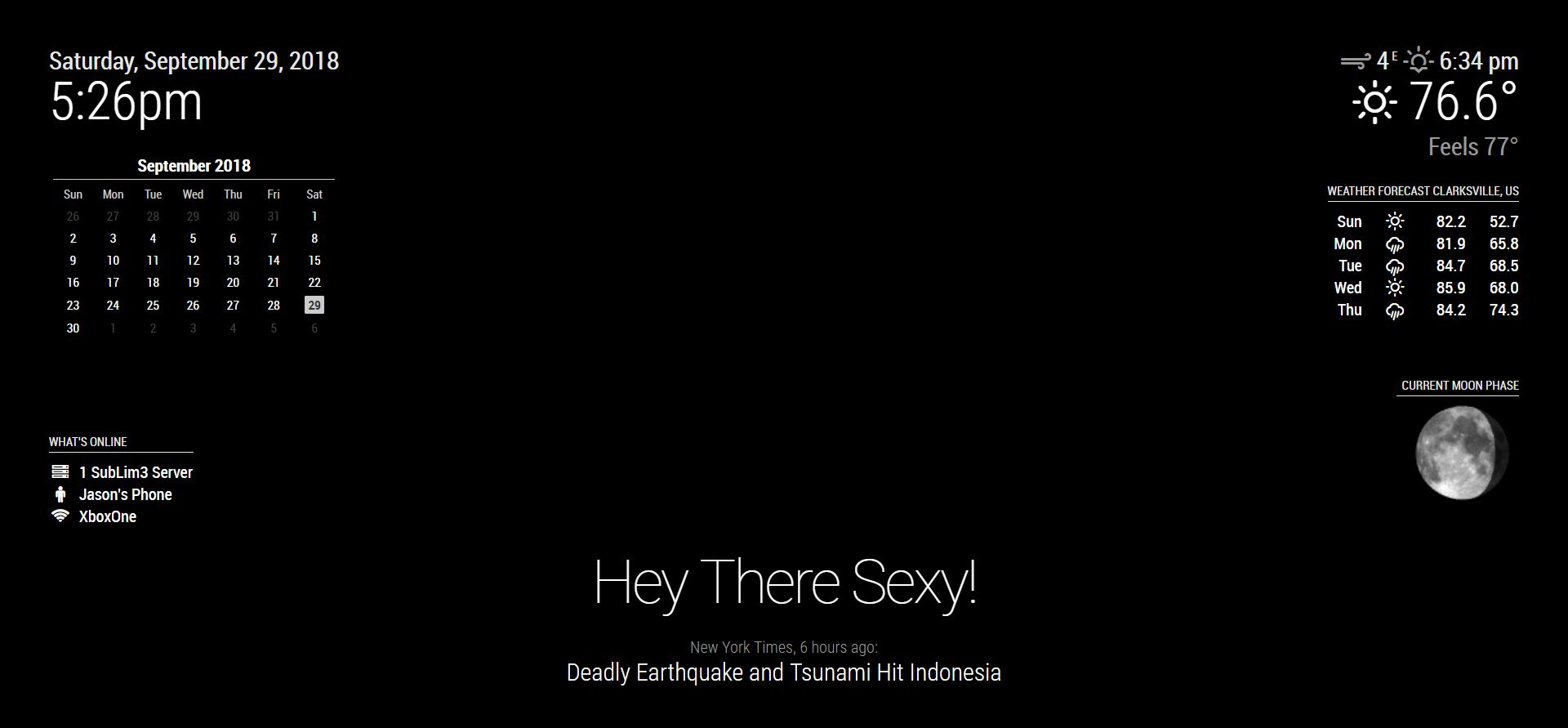
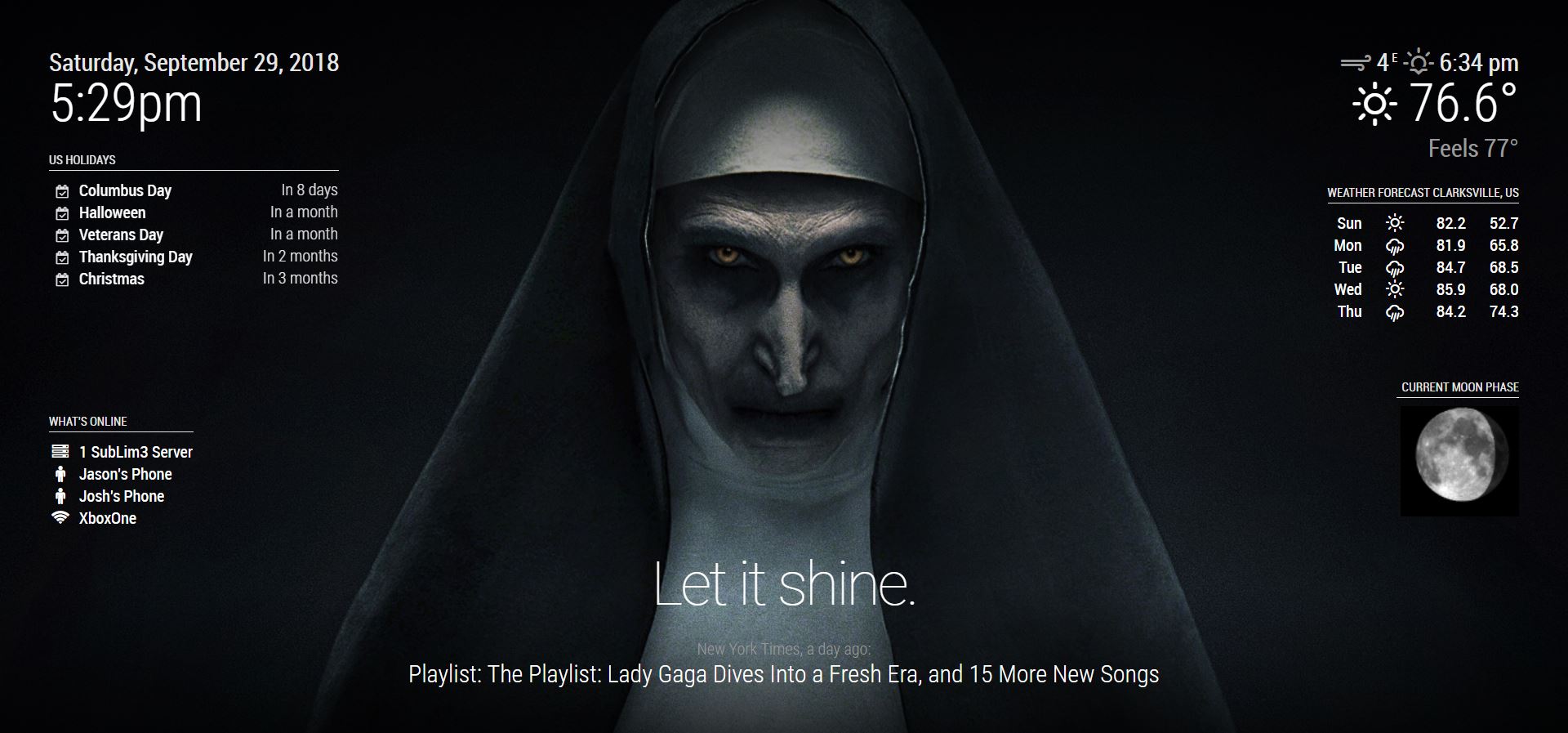
-
-
Well done, young man. :thumbsup:
-
Looks really awesome, great job!
-
One if the cleanest setups I have seen so far. Well done!
-
OK, UPDATE: I have continued to program on the Magic Mirror and although it doesn’t look like it, the last few weeks of programming have paid off. I have added Module Schedules and Timers. At night (from 6pm till 4am) it will display Moon Phases. I also added a network scanner that tells me when my kids Xbox or Tablets are online. I caught them once playing in the middle of the night LoL.
I have also built an Android app that lets me control the mirror using the MMM-Remote-Control. I can turn Modules on and off, turn the mirror on and off, update the modules and reboot the whole system. Pretty handy when I am showing it off.
Lastly, to get in the Halloween Spirit I added some scary backgrounds that fade in and out at random. True story, I got good and drunk the night I decided to add these wallpapers. During the middle of the night I get up to go to the bathroom and Scared The Hell out of Myself when I walked past my mirror and saw the Nun!


-
Hi, can you tell me please if your android app work from internet or just in local network ? And maybe you can share that app with us please ? Thanks.
-
@electros
The app is only a wrapper pointing to my mirror at http://192.168.1.222:8080/remote.html. This is only able to be done as I have statically assigned my mirror as the .222 address. I could run a port forward on my firewall and allow it to work from outside the house but I haven’t got a need to since I wouldn’t be standing in view of the mirror and it’s a security vulnerability. Let me know if you have further questions. -
Nicely done.
Is that the PIR Sensor at the top of the mirror?
-
@azscram
No, that was my Echo Dot. The PIR is somewhat visible in the second picture. There is a small ribbon cable going from the Pi to the PIR. It’s on the right side so anytime I want it on I just wave my hand on right of the mirror. It’s incredibly sensitive so I never have a problem waking it up.I am in process of adding a PS3 Eye cam and using MMM-Hotword and MMM-AssistantMk2. Might even go as far as training facial recognition.
-
nice setup. one question what module did u use for background ? I have MMM-EasyPix but do not know how to put pic to fullscreen. Can you share your config ?
-
You could use MMM-EasyPix as a background module but that is really not its purpose. Just try this module.
-
thanks works better :)
-
-
I use MMM-BackgroundSlideshow. Here is list of my modules:
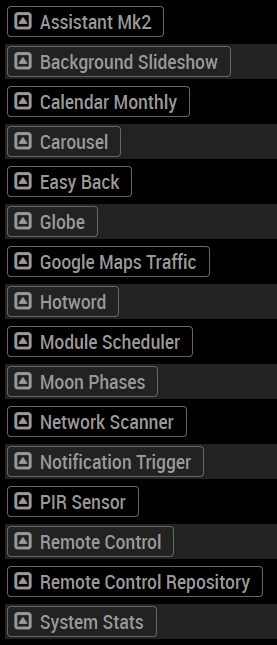
Update: MMM-BackgroundSlideshow stopped working for me so I switched to MMM-EasyBack. -
Looks realy great, good work!
What monitor did you use? Mine is bleeding it’s backlight through the mirror, which isn’t the case with your screen, according to the pictures.
-
@hannes23 So long as the light in front of the mirror is brighter than the monitor behind the mirror it won’t bleed through. I am using an old LCD screen I had lying around but an OLED would produce the best results as the black on those is truly black. I only get bleed through when I turn the light off in my room. If the light is on, all looks good.
-
A mirror with a higher transmission should also reduce the backlight bleeding since you won’t have to increase the brightness as much, creating a better black and therefore having better contrast.
-
Dear @SubLim3 the none looks cool. Well done :) Cool mirror. Where did hang it? Hope you guys enjoys it :)
Many Greetings from Germany,
Paul -
Hello! I have one question! The only type of mirror that you used in that project was the two-way mirror, right? I’m asking this because I’m looking to put 2 types of mirror: a two way one only for the monitor (because it’s a 17 inch 4:3 one and it’s small) and the rest will be just a simple mirror. Thanks in advance and also great project. Good luck.




Hello! It looks like you're interested in this conversation, but you don't have an account yet.
Getting fed up of having to scroll through the same posts each visit? When you register for an account, you'll always come back to exactly where you were before, and choose to be notified of new replies (either via email, or push notification). You'll also be able to save bookmarks and upvote posts to show your appreciation to other community members.
With your input, this post could be even better 💗
Register Login