MagicMirror Forum
    • Recent
    • Tags
    • Unsolved
    • Solved
    • MagicMirror² Repository
    • Documentation
    • 3rd-Party-Modules
    • Donate
    • Discord
    • Register
    • Login
    A New Chapter for MagicMirror: The Community Takes the Lead
    Read the statement by Michael Teeuw here.

    Stop the screensaver!

    Scheduled Pinned Locked Moved General Discussion
    42 Posts 17 Posters 44.2k Views 16 Watching
    Loading More Posts
    • Oldest to Newest
    • Newest to Oldest
    • Most Votes
    Reply
    • Reply as topic
    Log in to reply
    This topic has been deleted. Only users with topic management privileges can see it.
    • F Offline
      frog
      last edited by

      There’s no need for that attitude. Please desist as this is a forum for helping people. I also had this problem so it isn’t isolated. It may not be possible to add a keyboard and mouse to the screen and use the screensaver utility.

      cowboysdudeC 1 Reply Last reply Reply Quote 0
      • O Offline
        onetwankyfive
        last edited by

        or buy a mouse jiggler
        https://www.amazon.com/WiebeTech-Programmable-Mouse-Jiggler-MJ-3/dp/B00MTZY7Y4/ref=sr_1_1?ie=UTF8&qid=1482934294&sr=8-1&keywords=mouse+jiggler

        F 1 Reply Last reply Reply Quote 0
        • F Offline
          frog @onetwankyfive
          last edited by

          @onetwankyfive said in Stop the screensaver!:

          or buy a mouse jiggler
          https://www.amazon.com/WiebeTech-Programmable-Mouse-Jiggler-MJ-3/dp/B00MTZY7Y4/ref=sr_1_1?ie=UTF8&qid=1482934294&sr=8-1&keywords=mouse+jiggler

          😀

          1 Reply Last reply Reply Quote 0
          • M Offline
            markiper
            last edited by

            Thanks everyone for the erplies. I am still having the same issue, but doing some more testing and reading. I found this post:

            http://www.geeks3d.com/hacklab/20160108/how-to-disable-the-blank-screen-on-raspberry-pi-raspbian/

            In theory, just modifying the lightdm.conf should do the trick with newer versions of Raspbian Jessie Lite. I will poke around some more, hopefully i find a fix, so I can provide something back to this community.

            1 Reply Last reply Reply Quote 1
            • lolobyteL Offline
              lolobyte
              last edited by

              Hi all,

              after doing this

              Disable the screensaver:
              Go to LXDE-autostart config:

              sudo nano /etc/xdg/lxsession/LXDE/autostart

              add the following lines:

              @xset s noblank
              @xset s off
              @xset -dpms

              Save and close, using the commands CTRL-O and CTRL-X.

              Go to lightdm.conf:

              sudo nano /etc/lightdm/lightdm.conf

              add the following lines in section [SeatDefaults]:

              xserver-command=X -s 0 -dpms

              The fucking screensaver is starting again.

              Then i do following:

              sudo apt-get install xscreensaver
              sudo apt-get remove xscreensaver

              An i never see a starting screensaver gain.

              Good luck!

              1 Reply Last reply Reply Quote 0
              • M Offline
                markiper
                last edited by

                So here is how I was able to fix my issue with the screen saver. I started this project following the tutorial from here:

                https://github.com/MichMich/MagicMirror/wiki/Jessie-Lite-Installation-Guide

                When you get to the Disable the ScreenSaver portion of the article, instead of changing the autostart file under

                /etc/xdg/lxsession/LXDE/autostart

                You should modify the autostart file under ~/.config/lxsession/LXDE/autostart

                sudo nano ~/.config/lxsession/LXDE/autostart

                Comment the first 3 lines (using a #), then add the same three lines listed in the tutorial. The final autostart file after all modifications should look similar to:

                #@lxpanel --profile LXDE
                #@pcmanfm --desktop --profile LXDE
                #@xscreensaver -no-splash

                @xset s noblack
                @xset s off
                @xset -dpms

                Once that is done, follow the instructions to modify the lightdm.conf file:

                sudo nano /etc/lightdm/lightdm.conf

                [SeatDefaults]
                xserver-command=X -s 0 -dpms

                Save the changes, reboot your raspberry pi (I am using an RPi3), and the screen saver is gone for good. Hopefully this helps someone else having the same issue.

                1 Reply Last reply Reply Quote 0
                • cowboysdudeC Offline
                  cowboysdude Module Developer @frog
                  last edited by

                  @frog said in Stop the screensaver!:

                  There’s no need for that attitude. Please desist as this is a forum for helping people. I also had this problem so it isn’t isolated. It may not be possible to add a keyboard and mouse to the screen and use the screensaver utility.

                  Attitude? Oh you haven’t seen my attitude… just making a simple suggestion where there doesn’t need a case made out of it. It’s THE simplest way for NON programmers to do it…

                  1 Reply Last reply Reply Quote 1
                  • rcollieR Offline
                    rcollie
                    last edited by

                    I realize how (super) old this topic is, but for anyone who stumbles across it and still dealing with this, xscreensaver really is the easiest solution.

                    sudo apt-get install xscreensaver

                    Just change the screen saver in there to no screen saver, and you’re sorted.

                    1 Reply Last reply Reply Quote 0
                    • P Offline
                      PaulB
                      last edited by

                      Hey guys,

                      there is another option on disabling the screensaver, which worked perfectly for me.
                      Just disable the screensaver in the option menu of debian.

                      Hope this helps someone :)

                      1 Reply Last reply Reply Quote 0
                      • B Offline
                        BlackTalon
                        last edited by

                        Revived again. I have xscreensaver installed and the screensaver disabled. It still blanks the screen after a day.

                        1 Reply Last reply Reply Quote 0
                        • ChrisC Offline
                          Chris
                          last edited by

                          Hello,

                          After a total reinstall of the recent raspberry to integrate Google Assist Pi, I also have the same problem.

                          After watching, I end up with an empty screen after about 6 hours. I am forced to restart MagicMirror via the MMM-Remote-Control module.
                          On the other hand I do not have xsceensaver of installed but the modification of the lines of command indicated in the wiki of installation of MM

                          I did not experience this problem before. The only difference between my two installations is the 2.3.1 update of MagicMirror.
                          Would it affect?

                          Regards,

                          1 Reply Last reply Reply Quote 0
                          • G Offline
                            Gabev
                            last edited by

                            I had the same problem where. I stumbled across this thread, check out the answer given by JimmyN… it helped me at least.

                            1 Reply Last reply Reply Quote 0
                            • M Offline
                              m0111k @cowboysdude
                              last edited by

                              @cowboysdude tried that, screen still went standby… any clue for fix?
                              ps im newb here, how can i remove xscreensaver when it doesnt work? Thanks

                              Mykle1M 1 Reply Last reply Reply Quote 0
                              • Mykle1M Offline
                                Mykle1 Project Sponsor Module Developer @m0111k
                                last edited by

                                @m0111k said in Stop the screensaver!:

                                ps im newb here, how can i remove xscreensaver when it doesnt work? Thanks

                                sudo apt-get remove xscreensaver

                                However, I don’t think xscreensaver is capable of putting your display into standby. That is likely your system or settings.

                                Create a working config
                                How to add modules

                                A 1 Reply Last reply Reply Quote 0
                                • A Offline
                                  Anthony Project Sponsor @Mykle1
                                  last edited by

                                  @Mykle1
                                  Is there any possibillity that Lucy interacts somehow with the screen saver? I am asking this because I have installed xscreensaver and working good but if I have lucy enabled I get the black screen and I must move the mouse to sho the MM again. Just a thought!

                                  Mykle1M 1 Reply Last reply Reply Quote 0
                                  • Mykle1M Offline
                                    Mykle1 Project Sponsor Module Developer @Anthony
                                    last edited by

                                    @Anthony

                                    Perhaps, but I’ve never seen this behavior or heard about it before this. I will see if I can reproduce that here.

                                    Create a working config
                                    How to add modules

                                    1 Reply Last reply Reply Quote 0
                                    • Mykle1M Offline
                                      Mykle1 Project Sponsor Module Developer
                                      last edited by Mykle1

                                      @Anthony

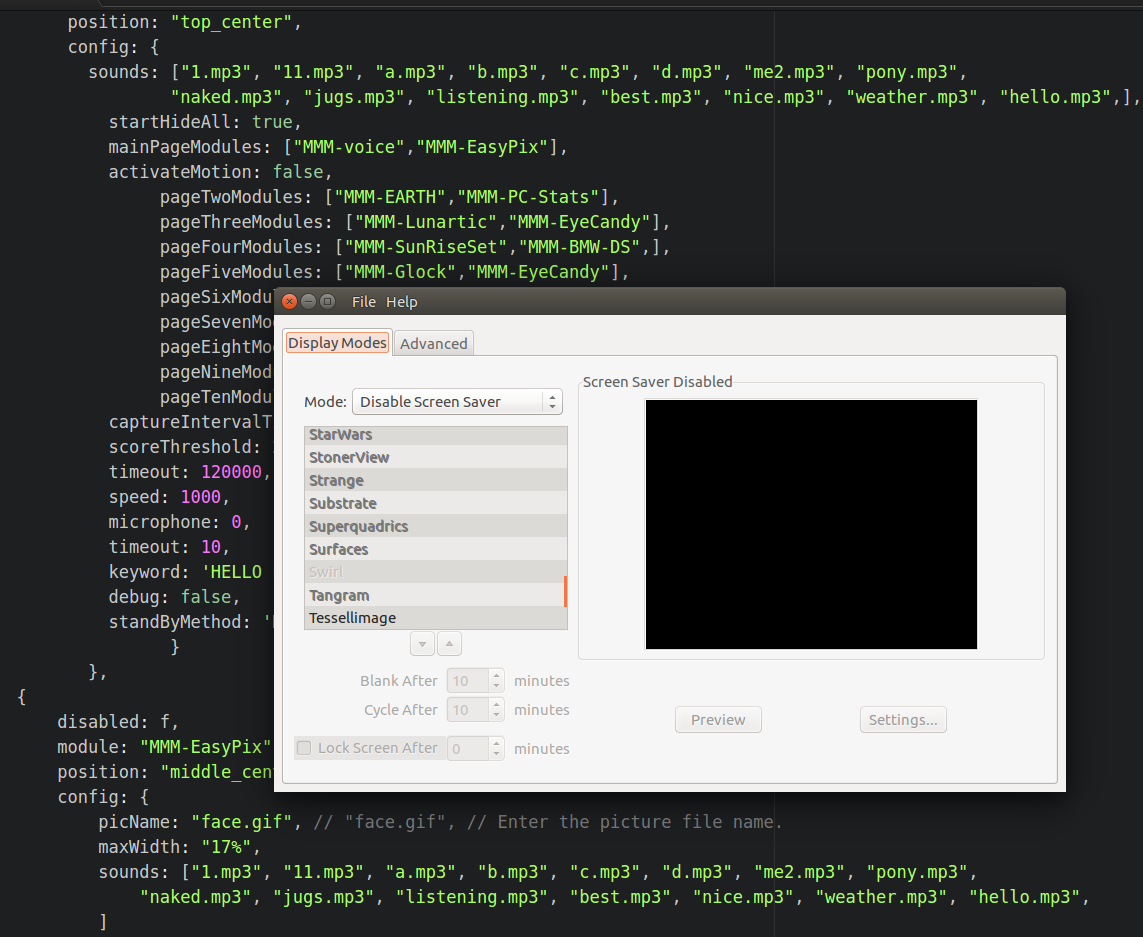
                                      I’m not seeing this behavior at all. You can clearly see that I have xscreensaver running with the “Screen Saver DIsabled” but I can’t reproduce what it happening to you. Lucy responds normally and no black screen issue. If you say “SHOW MODULES” does Lucy show them?

                                      ![0_1551838003790_Screenshot.png](Uploading 100%)

                                      Edit: Something seems to be amiss. The forum isn’t allowing me to post an image at the moment.

                                      Picture below.

                                      Create a working config
                                      How to add modules

                                      1 Reply Last reply Reply Quote 0
                                      • Mykle1M Offline
                                        Mykle1 Project Sponsor Module Developer
                                        last edited by

                                        0_1551840753892_Screenshot.png

                                        Create a working config
                                        How to add modules

                                        A 1 Reply Last reply Reply Quote 0
                                        • A Offline
                                          Anthony Project Sponsor @Mykle1
                                          last edited by

                                          @Mykle1
                                          Thank you for your reply. I haven’t try to see if Lucy works when I see the black screen because I can’t see the “Say, ‘Hello Lucy’” message and because of the latency problems I have I don’t know when it recognizes the keyword and wait for commands. My guess is that it will work but when I am finished with my mirrorsetup I will hung it on the wall so I won’t have mouse and keyboard connected to move or press a button for the mirror to show. Also the black screen appears not only in the standby mode. Last night I left the mirror showing my page 1 modules and in the morning I saw the black screen again. Moved the mouse and evertything showed up.

                                          S 1 Reply Last reply Reply Quote 0
                                          • S Do not disturb
                                            sdetweil @Anthony
                                            last edited by

                                            @Anthony said in Stop the screensaver!:

                                            Moved the mouse and evertything showed up.

                                            that means screensaver kicked in… MM doesn’t do module visibility by mouse movement…

                                            Sam

                                            How to add modules

                                            learning how to use browser developers window for css changes

                                            A 1 Reply Last reply Reply Quote 0

                                            Hello! It looks like you're interested in this conversation, but you don't have an account yet.

                                            Getting fed up of having to scroll through the same posts each visit? When you register for an account, you'll always come back to exactly where you were before, and choose to be notified of new replies (either via email, or push notification). You'll also be able to save bookmarks and upvote posts to show your appreciation to other community members.

                                            With your input, this post could be even better 💗

                                            Register Login

                                            • 1
                                            • 2
                                            • 3
                                            • 2 / 3
                                            • First post
                                              Last post
                                            Enjoying MagicMirror? Please consider a donation!
                                            MagicMirror created by Michael Teeuw.
                                            Forum managed by Sam, technical setup by Karsten.
                                            This forum is using NodeBB as its core | Contributors
                                            Contact | Privacy Policy