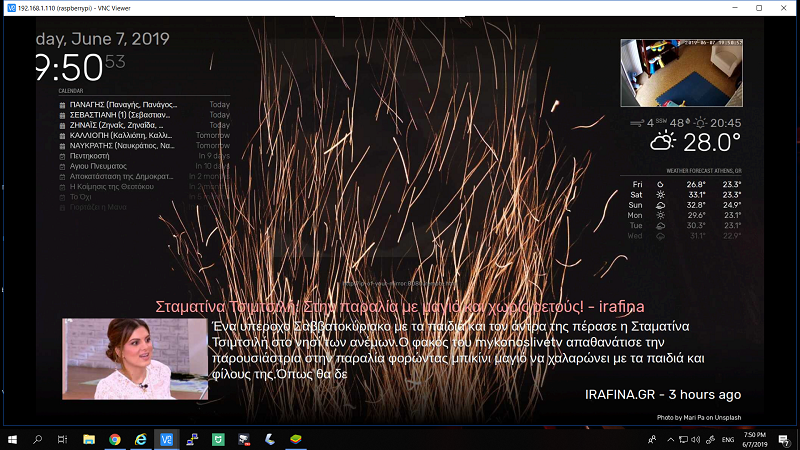
hello,lil help,what do i have to add in custom.css to align MMM-RTSPStream window with the module below?
https://imgur.com/XQZNEvg
C
Offline
A New Chapter for MagicMirror: The Community Takes the Lead
Read the statement by Michael Teeuw here.
Read the statement by Michael Teeuw here.
Posts
-
RE: [MMM-RTSPStream] - Video Streaming from Live Feeds & Security Cameras
-
RE: mmm-nest-status unresponsive after 12hours
@sdetweil this is the error appearing at my MM screen after 6-8 hours.What else can i do to help?
-
RE: mmm-nest-status unresponsive after 12hours
@sdetweil so the error is
Nest API Error:{"code":"ECONNRESET","path"null,"host":"firebase-apiserver38-tah01-iad01.dapi.production.nest.com","port":"9553"} -
RE: mmm-nest-status unresponsive after 12hours
@sdetweil thanx mate.I use your repo ,it works fine but after a day or so i get a "Nest API Error:[object Object]
-
RE: mmm-nest-status unresponsive after 12hours
had the same problem with this module…had to restart my mm to keep it running so i gave up.Its a pity cause its so nice good looking module but after some hours it gets unresponsive …
-
weird black screen/startup problem
so i am running MM on a Rpi3 and it works just fine for several days.After 7-8 days more or less suddenly the screen blacks showing only my MMM-RTSPStream feed using vlc.Tried to restart it with pm2 and it seems it runs fine but i only get the same black screen.If i open mm remotely to chrome browser for example,it shows up and working fine.I only get black at Rpi.If i restart Rpi pm2 seems to start mm but nothing shows up.If i “npm start” from MagicMirror directory log shows that MM and all modules are running fine but i still get nothing on screen.Now the weird part,if i “sudo apt-get update—> sudo apt-get upgrade” and reboot then everything is magically working like before.Any ideas?
-
RE: default clock size?
@broberg thnx mate,but if i use transform: scale all the module goes left and off screen like this:
-
RE: default clock size?
@thedoorsfanatic i use the digital one,i just want it little bigger in size so my old eyes can see it from some distance :)
-
RE: MM as a screensaver
thanx,i got it .I test it opening mm ip at chrome and works great only MMM-RTSPSTREAM doent work.It doent show my cam ,maybe has something to do with vlc i am using…Anyway now i have to find a screensaver program for windows that can show a webpage…
-
MM as a screensaver
Just an idea…i run my MM at a Rpi3b and i also want to show my MM as a screensaver at my home’s pcs.Can i do that somehow?Now i can show my MM fullscreen through VNC at my pc.Any ideas?
-
i wish for an easier google assistant module
i have used the MMM-AssistantMK2 with MMM-Hotword at my previous MM instalation .It was so messy instaling that modules,with a lot of errors,deletes,start over but i have managed to get them work spending a lot of time .So i wish someone with the right knowledge to make a module or an instalation script that can install google assistant with the nice visual interface that MMM-AssistantMK2 is using,and a “ok google” trigger word. Just install,add the credentials file and the config.js part.I dont have the time and the Knowledge to do that .I dont even Know if it is possible,but it will be awesome!
-
RE: My hallway Magic Mirror! (Greece)
nice,i need more info (price,where to buy) for the glass so pm me whatever u ve got.I use a PS3 camera that haw an aray of 4 mics for google assistant project called GassistPi.Do u use anything simillar or plain voice sdk?Plus i use camera with Motion so i can turn off monitor whenever none is around…
-
RE: My hallway Magic Mirror! (Greece)
Πολυ ομορφο,μπραβο!Did you use film or glass ?What do u use for voice commands?
-
RE: [MMM-RTSPStream] - Video Streaming from Live Feeds & Security Cameras
how can i test with omxplayer that my camera link is playing ok?With vlc my link is ok but using omxplayer with the module i get nothing,empty box.
-
RE: [Remote-Control] Shutdown, Configure and Update your MagicMirror
solved it ,replace node_helper.js with this one ,fix is by ronanversendaal
-
RE: [Remote-Control] Shutdown, Configure and Update your MagicMirror
-
lock a module size
How can we lock a module’s size?My issue is that i use MMM-AssistantMk2 at top_left,above my calendar that is at top_left position too.When i use assistant it changes size depending to my question and it makes calendar change width too.How can i lock calendar’s size?
-
MMM-PIR-Sensor, Edit command for TVoff?
Re: PIR-Sensor - put your mirror to sleep if not used
can i use a custom command to turn my tv power save mode?My lg tv does not turn off with usual commands but i discovered that giving a/opt/vc/bin/tvservice -pthe tv is shutting down the screen entering a power save mode or something…
How can i use that command with the PIR module?