Hi, question,
do you live somewhere sunny ?
Could you try the run this and share the output ?
hoymiles-wifi --host 192.168.178.114 get-real-data-new
You’ll need to change the IP to the IP of your DTU.
E.J.
 E
Online
E
Online
Hi, question,
do you live somewhere sunny ?
Could you try the run this and share the output ?
hoymiles-wifi --host 192.168.178.114 get-real-data-new
You’ll need to change the IP to the IP of your DTU.
E.J.
@sdetweil said in MMM-Hoymiles-Wifi:
sounds like a new config parm so you don’t have to edit the file
(pass as a parameter on /hoymiles_data.py start)
Exactly!
I did change hoymiles_data.py to be able to refrain from hard-coding it:
python hoymiles_data.py --dtu_ip_address 192.168.178.114--debug
The next thing would be to pass the parameter(s) from the configuration (to be coded in the MMM-Hoymiles-Wifi.js file).
As I never made a module myself, I would need to find out how.
Any suggestions are much appreciated!
E.J.
Just FYI.
I am currently busy making some changes to the module.
As there is no sunshine due to the current weather conditions, it is a bit difficult to have real measurements.
Trying to add a test using a JSON dataset.
Hope to be able to present it a.s.a.p.
E.J.
@SuVo said in MMM-Hoymiles-Wifi:
What can I try?
Have you any idea what could be wrong?
You have to edit
~/MagicMirror/modules/MMM-Hoymiles-Wifi/hoymiles_data.py
Change this line to the address of your DTU:
dtu = DTU("192.168.178.114")
And I had to change
 width: "288px",
 height: "360px",
in the ~/MagicMirror/config/config.js file.
This is my config:
{
  module: "MMM-Hoymiles-Wifi",
  header: "MMM-Hoymiles-Wifi",
  disabled: false,
  position: "top_left",
  config: {
    width: "288px",
    height: "360px",
    updateInterval: 60000, // in milli seconds
    frames : [
      { src: 'http://127.0.0.1:5000' },
    ]
  },
},
Hi,
I saw some CSS topics recently and would like to add my issue to the list.
I read a few tutorials / explanations, but I cannot get that mapped to my issue.
Trying to add an entry in custom.css to change padding-top: 10px; to padding-top: 0px;
Using the browsers elements inspector I was able to find what should be changed:


Now the question is how to translate this to the wanted CSS entry.
This is an attempt, but of course wrong:
.calendar .div.module-content .table.xsmall .tr.dateheader.normal .td .element.style {
    padding-top: 0px;
}
Any help is much appreciated.
E.J.
It is working now.
I see it displayed on the MagicMirror.
Due to no sunshine I cannot check actual values, but that is for later.
Hi there,
I am using hoymiles-wifi myself and am curious on how it looks on the MagicMirror.
Very nice initiative !!
Trying to get your module working, but no luck till now.
I will open some Issues for you to have a look at.
Best regards,
E.J.
My Google Calendar remark was more aimed at the basic.ics we get from it.
I see now it added an unnecessary discussion.
However it did take me some time to find out that the screen you showed is only seen after clicking the More Options button; my bad.
Your evaluation of showEnd and showEndsOnlyWithDuration is quite useful.
Btw, one time in the Dutch parliament there was a big confusion about voting for something.
If you do not want XXX, then vote yes, if you want XXX then vote no.
Of course this went wrong.
Concluding: all my tests passed, meaning it works as designed.
I will raise an issue for a feature request, but you can either reject it or put it on the bottom of your list of todo’s.
@sdetweil said in Cant use showEnd icloud cal:
@evroom I just posted an update to fix showEndsOnlyWithDuration
Okay, so to recap (me talking to myself :-)):
It basically applies to a fullday event that spans multiple days.
Because a single fullday event has an equal start and end date.
And a fullday reoccurring event is just X times a single fullday event.
Google Calendar makes it a bit more difficult to understand the begin and end dates (hence the need to calculate and adjust) :
TestCal: SINGLE_FULLDAY_EVENT
Thursday, October 31
BEGIN:VEVENT
DTSTART;VALUE=DATE:20241031
DTEND;VALUE=DATE:20241101
TestCal: FULLDAY_EVENT_SPANS_3_DAYS
November 1 – 3, 2024
DTSTART;VALUE=DATE:20241101
DTEND;VALUE=DATE:20241104
Here a fullday event that spans multiple days:
BEGIN:VEVENT
DTSTART;VALUE=DATE:20241101
DTEND;VALUE=DATE:20241104
DTSTAMP:20241026T152207Z
UID:2srults5ctu7t3n4piick00gv8@google.com
CREATED:20241026T152154Z
LAST-MODIFIED:20241026T152154Z
SEQUENCE:0
STATUS:CONFIRMED
SUMMARY:TestCal: FULLDAY_EVENT_SPANS_3_DAYS
TRANSP:TRANSPARENT
END:VEVENT
‘prevent’ means: when set to false (default), you will see the end date.
When set to true, you will not see the end date.
Test with latest updates (git pull on Sat 26 Oct 16:51:00 CEST 2024):
showEnd: true.
showEndsOnlyWithDuration: false,
 !
!
showEnd: true.
showEndsOnlyWithDuration: true,
 !
!
@evroom said in Cant use showEnd icloud cal:
@sdetweil said in Cant use showEnd icloud cal:
@evroom there is a documentation repo
Found it:
https://github.com/MagicMirrorOrg/MagicMirror-Documentation/issues
Opened:
https://github.com/MagicMirrorOrg/MagicMirror-Documentation/issues/266
@sdetweil said in Cant use showEnd icloud cal:
@evroom there is a documentation repo
Found it:
https://github.com/MagicMirrorOrg/MagicMirror-Documentation/issues
Sam,
Whilst testing your last changes, I sort of see a need for a new date format parameter.
For an event with duration, spanning multiple days.
E.g. spanningDayEventDateFormat.
[TestCal: TIMESPAN_HOLIDAY]
BEGIN:VEVENT
DTSTART:20241125T110000Z
DTEND:20241127T160000Z
DTSTAMP:20241026T091719Z
UID:1lk06o70p9bp21ln3pdfda4ng0@google.com
CREATED:20241026T090035Z
LAST-MODIFIED:20241026T090035Z
SEQUENCE:0
STATUS:CONFIRMED
SUMMARY:TestCal: TIMESPAN_HOLIDAY
TRANSP:OPAQUE
END:VEVENT
For events with duration. spanning one night, like an overnight flight, it is not really necessary, but not really bad either.
[TestCal: OVERNIGHT_FLIGH]
BEGIN:VEVENT
DTSTART:20241202T190000Z
DTEND:20241203T030000Z
DTSTAMP:20241026T091719Z
UID:0s4flhmaf7p6q5atemshns4upp@google.com
CREATED:20241026T090148Z
LAST-MODIFIED:20241026T090215Z
SEQUENCE:0
STATUS:CONFIRMED
SUMMARY:TestCal: OVERNIGHT_FLIGHT
TRANSP:OPAQUE
END:VEVENT
The reasoning behind it is following:
For a ‘normal’, single, event I am not really interested in the full end date format (dateEndFormat).
That is why I normally use dateEndFormat: "HH:mm".
But for an event with duration, spanning multiple days, the setting dateEndFormat: "ddd MMM D - HH:mm" makes more sense.
dateFormat: “ddd MMM D - HH:mm”
dateEndFormat: “HH:mm”
fullDayEventDateFormat: “ddd MMM D”
[good for normal events, ‘bad’ for spanning events]:
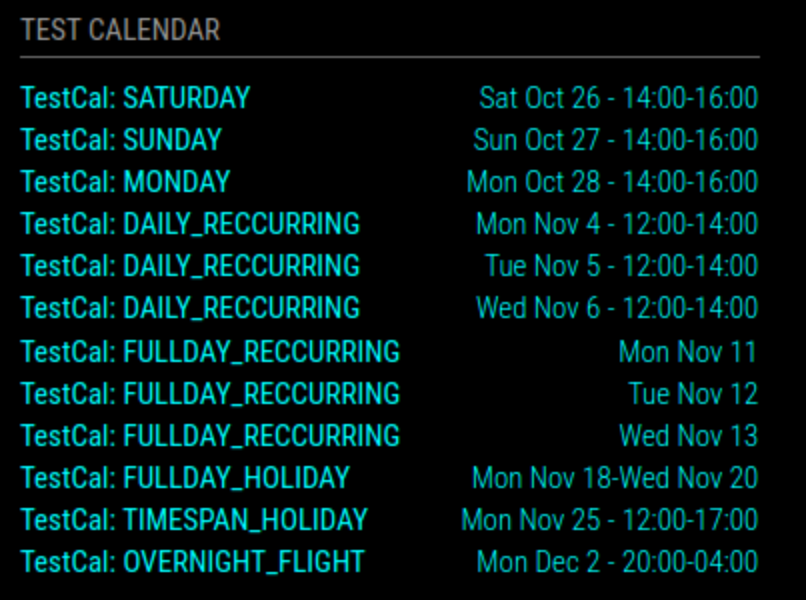
dateFormat: “ddd MMM D - HH:mm”
dateEndFormat: “ddd MMM D - HH:mm”
fullDayEventDateFormat: “ddd MMM D”
[‘bad’ for normal events, good for spanning events]:
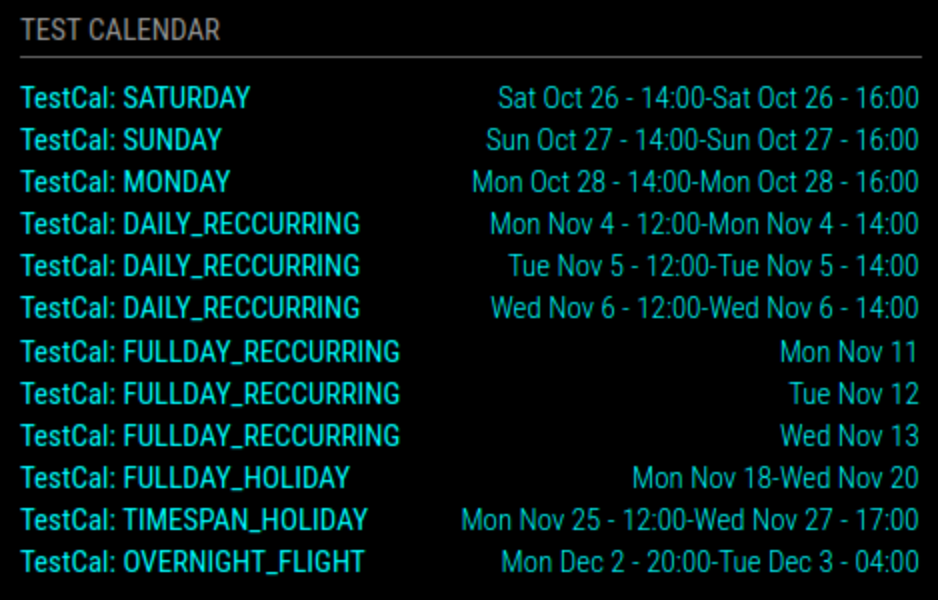
I hope I could explain it well enough.
And that it makes sense. :-)
Best regards,
E.J.
Sam,
The option showEndsOnlyWithDuration is not described yet on https://docs.magicmirror.builders/modules/calendar.html.
The interaction / dependancy with showEnd also needs to be documented.
I do not know if documentation issues also can / should be done on https://github.com/MagicMirrorOrg/MagicMirror.
Will follow up in the “Cant use showEnd icloud cal” topic then.
Sorry, do not want to cause confusion.
One should probably not do a quick test right after a full working day:-)
The number of test cases seems endless.
Do I remove the earlier changes ((lines 437 and 439) before changing line 415 ?
Just to follow up on the test I did where I got the end date displayed according to ‘dateEndFormat’ for a repeating allday event.
Most of it is also covered in the other thread.
It is working with your suggested change in calendar.js.
No need to set ‘showEnd: false’.

urgency: 0,
timeFormat: "absolute",
dateFormat: "dddd MMM D - HH:mm",
dateEndFormat: "dddd MMM D - HH:mm",
fullDayEventDateFormat: "dddd MMM D",
showEnd: true,
showEndsOnlyWithDuration: true,
getRelative: 0,
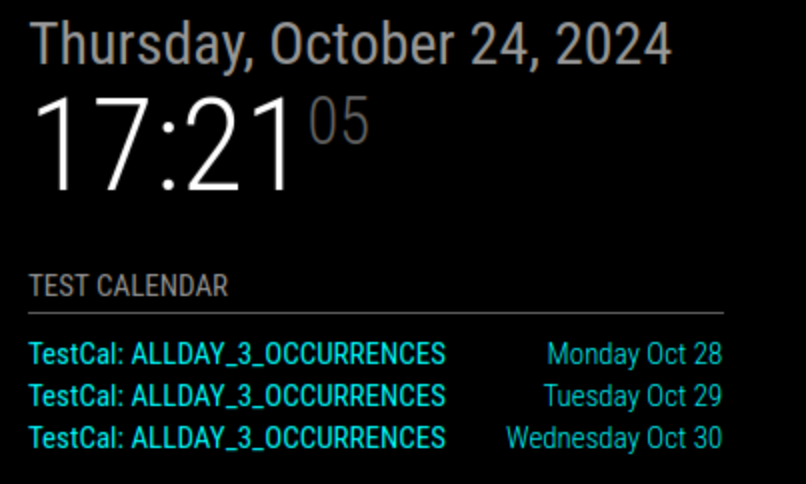
In short, I think it is looking better now.
To make full profit from ‘showEnd: true’ one should use a ‘dateEndFormat’ that makes sense, not like mine.
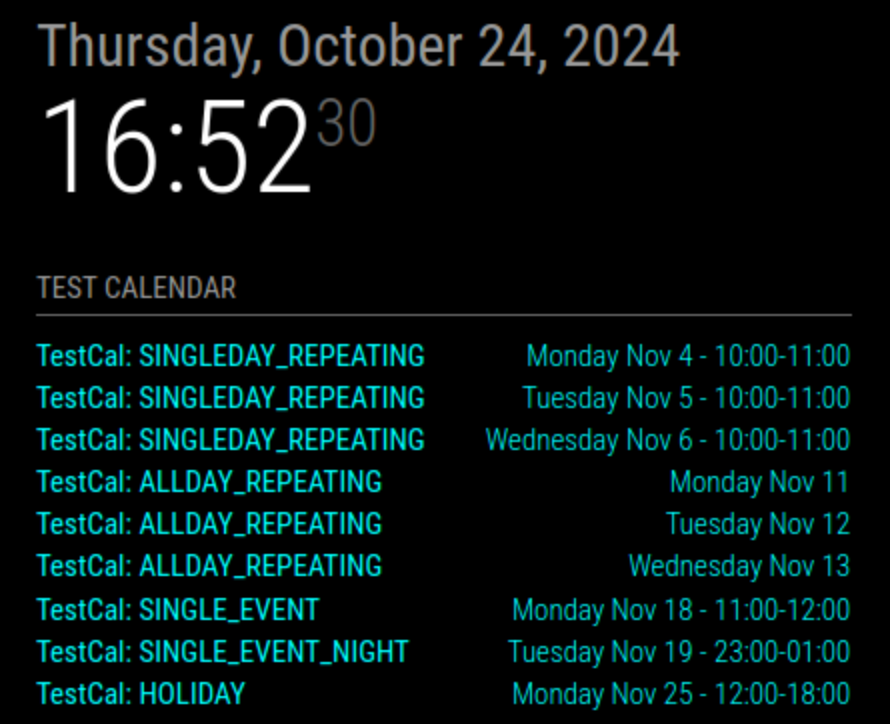
The only thing that I notice, is that ‘showEndsOnlyWithDuration’ is not doing anything.
In my examples I only see a change when I toggle ‘showEnd’.

urgency: 0,
timeFormat: "absolute",
dateFormat: "dddd MMM D - HH:mm",
dateEndFormat: "HH:mm",
fullDayEventDateFormat: "dddd MMM D",
showEnd: true,
showEndsOnlyWithDuration: true,
getRelative: 0,
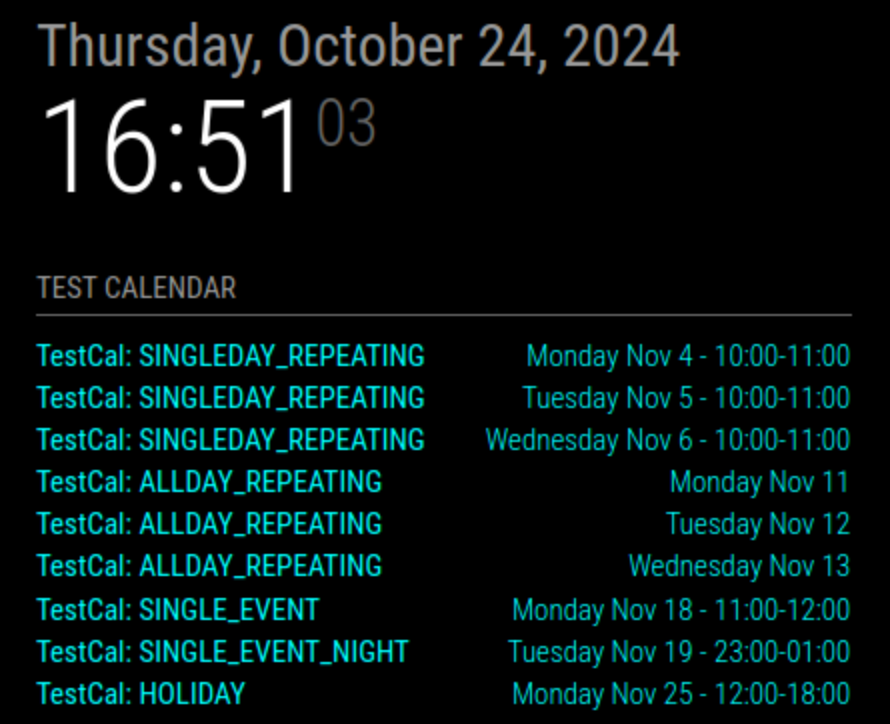
showEnd: true,
showEndsOnlyWithDuration: false,
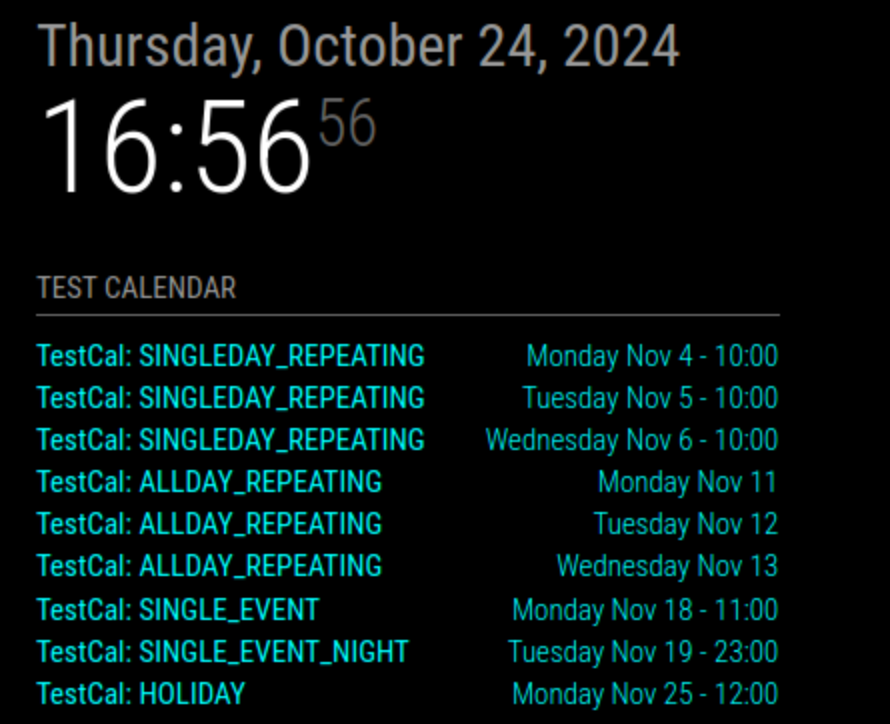
showEnd: false,
showEndsOnlyWithDuration: true,
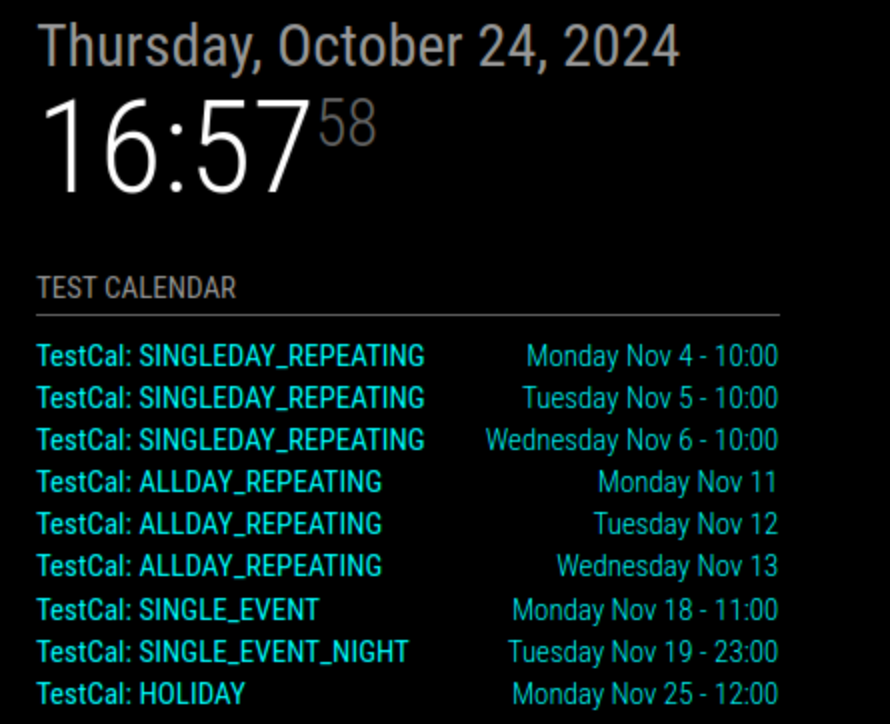
showEnd: false,
showEndsOnlyWithDuration: false,
@sdetweil said in Cant use showEnd icloud cal:
calendar.js
~/MagicMirror/modules/default/calendar/calendar.js
this.config.fullDayEventDateFormat
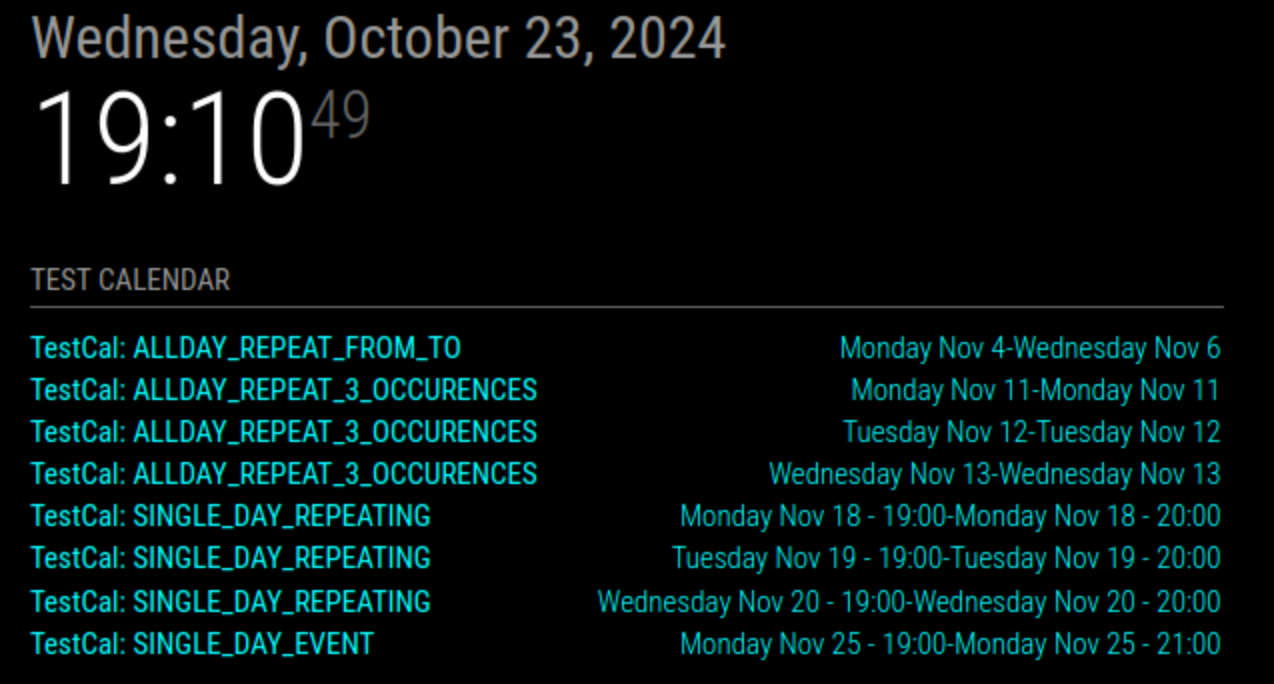
showEnd: true,
showEndsOnlyWithDuration: true,
showEnd: false,
showEndsOnlyWithDuration: true,
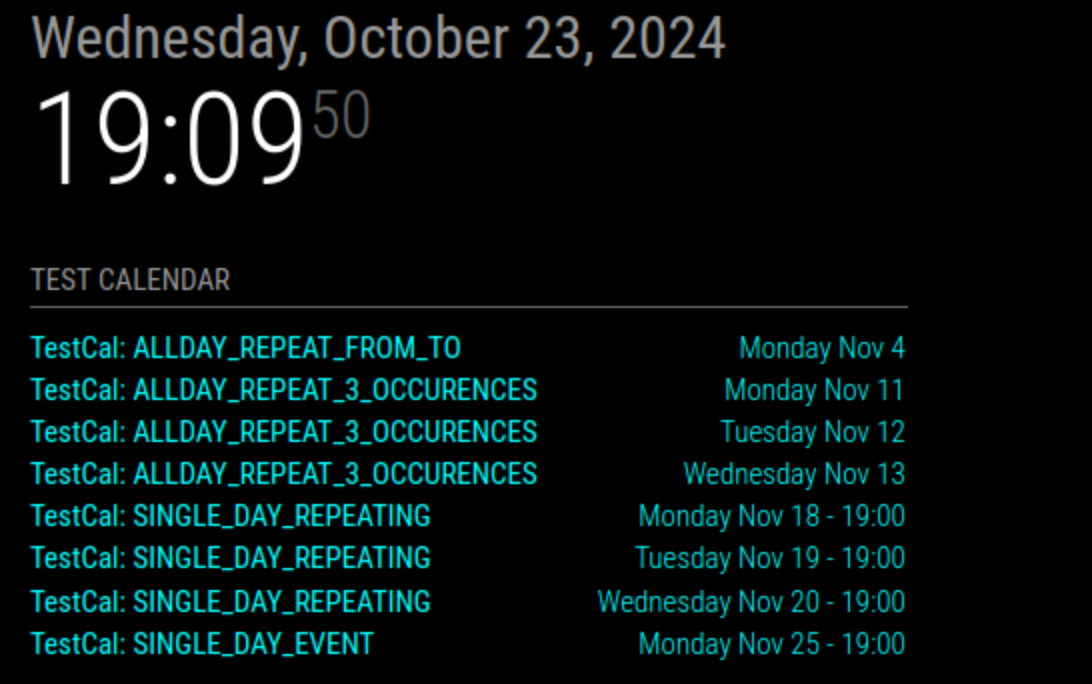
Repeating all day event with X occurrences shows end time of 23:59.
urgency: 0,
timeFormat: "absolute",
dateFormat: "dddd MMM D - HH:mm",
dateEndFormat: "HH:mm",
fullDayEventDateFormat: "dddd MMM D",
showEnd: true,
showEndsOnlyWithDuration: true,
getRelative: 0,
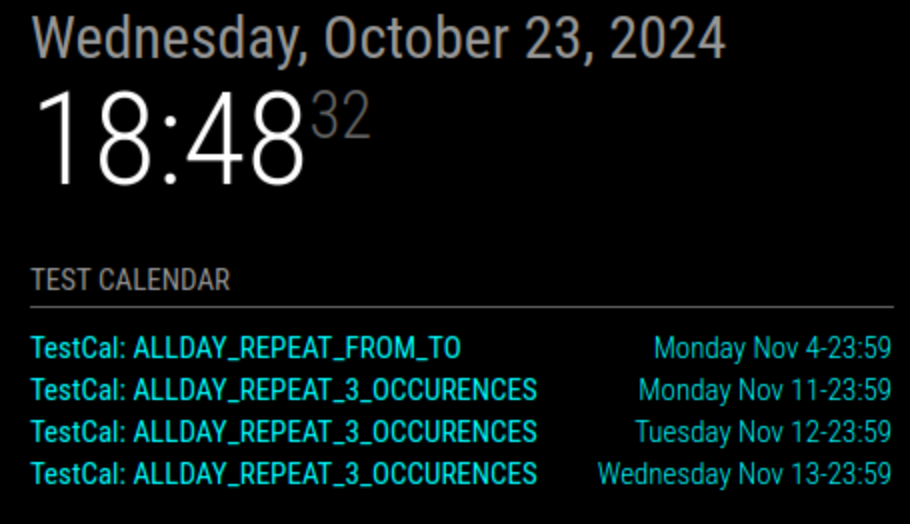
BEGIN:VEVENT
DTSTART;VALUE=DATE:20241104
DTEND;VALUE=DATE:20241107
DTSTAMP:20241023T164753Z
UID:086ujg156a8n9t0dpg8h3g4ptu@google.com
CREATED:20241023T164710Z
LAST-MODIFIED:20241023T164710Z
SEQUENCE:0
STATUS:CONFIRMED
SUMMARY:TestCal: ALLDAY_REPEAT_FROM_TO
TRANSP:TRANSPARENT
END:VEVENT
BEGIN:VEVENT
DTSTART;VALUE=DATE:20241111
DTEND;VALUE=DATE:20241112
RRULE:FREQ=DAILY;COUNT=3
DTSTAMP:20241023T164753Z
UID:0c9ah6plfonal1s1250k2mmgbt@google.com
CREATED:20241023T164743Z
LAST-MODIFIED:20241023T164743Z
SEQUENCE:0
STATUS:CONFIRMED
SUMMARY:TestCal: ALLDAY_REPEAT_3_OCCURENCES
TRANSP:TRANSPARENT
END:VEVENT
(cannot upload a text file anymore, only images)
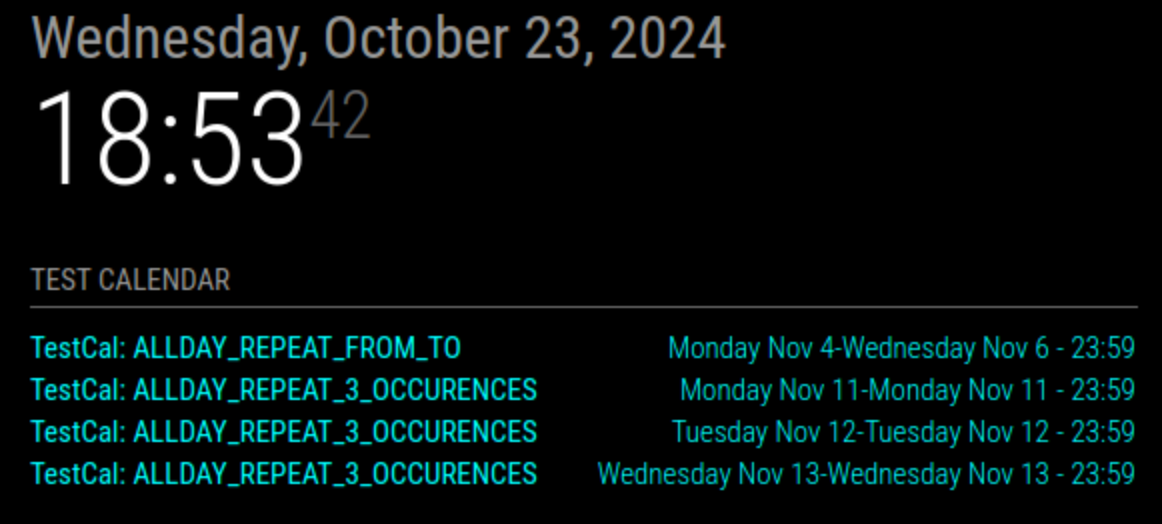
Changed:
dateEndFormat: "dddd MMM D - HH:mm",
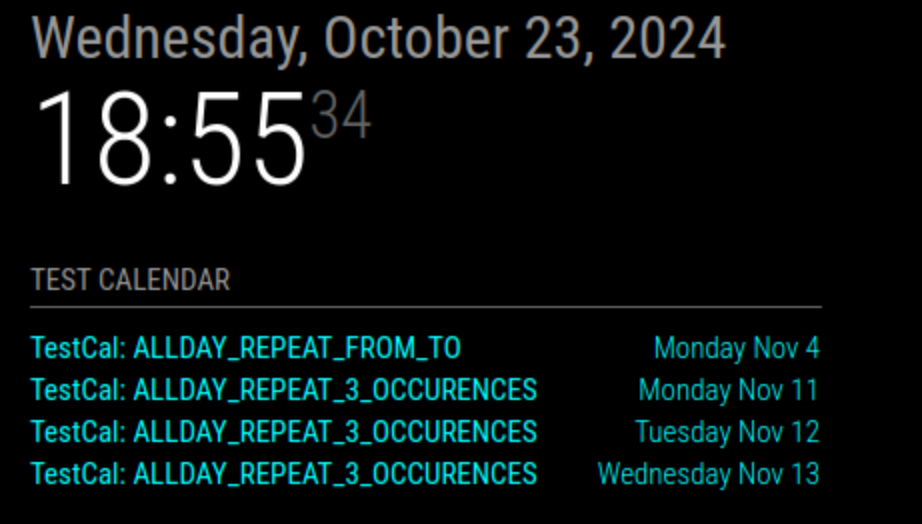
Changed:
showEnd: false,
At first sight I do not like it too much.
Daily repeating events have an end time now that does not make really sense (23:59) and the Holliday end time only makes sense when the dateEndFormat is extended to see the date.
And that makes it pretty crowded in the date/time column.
IMHO :-)
timeFormat: "absolute",
showEnd: true,
showEndsOnlyWithDuration: true,
//dateEndFormat: "HH:mm",
dateEndFormat: "dddd MMM D - HH:mm",
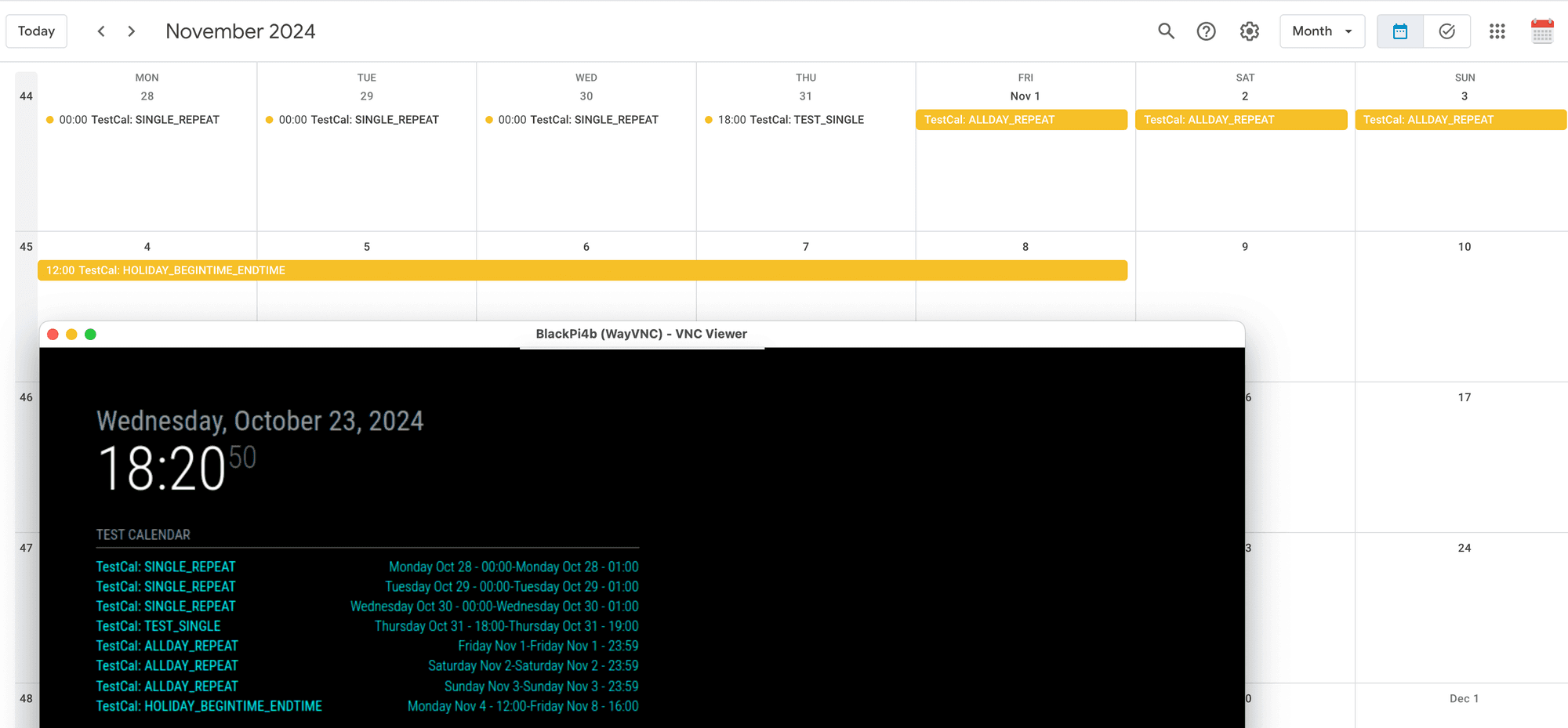
I currently have
showEndsOnlyWithDuration: true,
but
showEndsOnlyWithDuration: false,
does not seem to do anything.
timeFormat: "absolute",
showEnd: false,
showEndsOnlyWithDuration: true,
dateEndFormat: "HH:mm",
//dateEndFormat: "dddd MMM D - HH:mm",
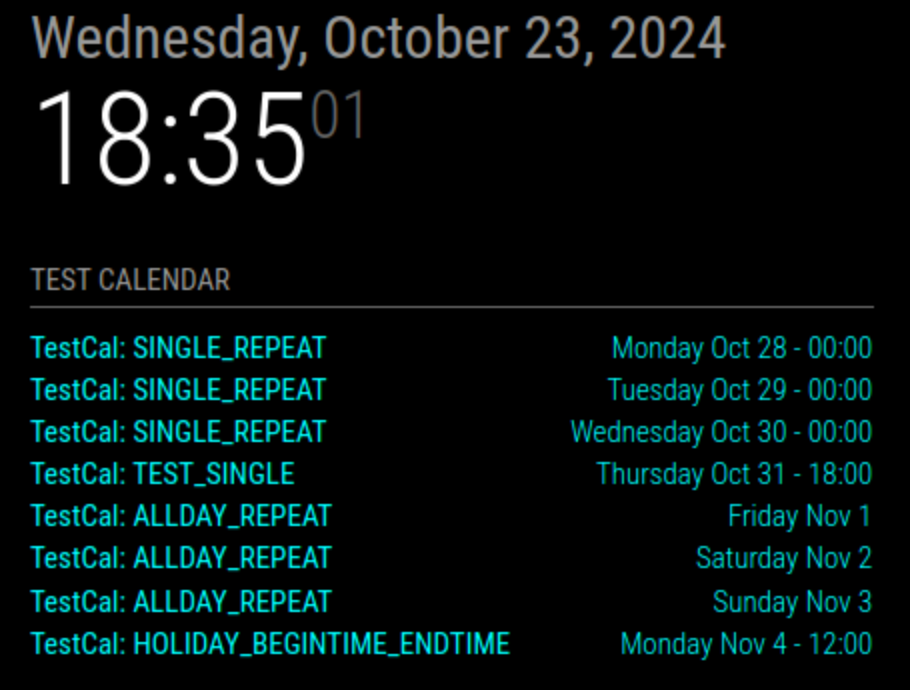
Regards,
E.J.