@JohnGalt I’m having that same issue. Larger area alerts I get smaller area alerts I do not. There is currently 3 alerts in my area. Flooding, Severe Thunderstorm Watch and Severe Thunderstorm Warning, but when I get a larger area alert is shows up. It would be interesting to know more about this.
J
Offline
A New Chapter for MagicMirror: The Community Takes the Lead
Read the statement by Michael Teeuw here.
Read the statement by Michael Teeuw here.
Posts
-
RE: MMM-WeatherAlerts - granularity
-
RE: MM current version on Raspberry Pi 5 cannot turn off monitor
@devonian69 Do you mean just a normal update for the module?
-
RE: MM digital display hung like a picture
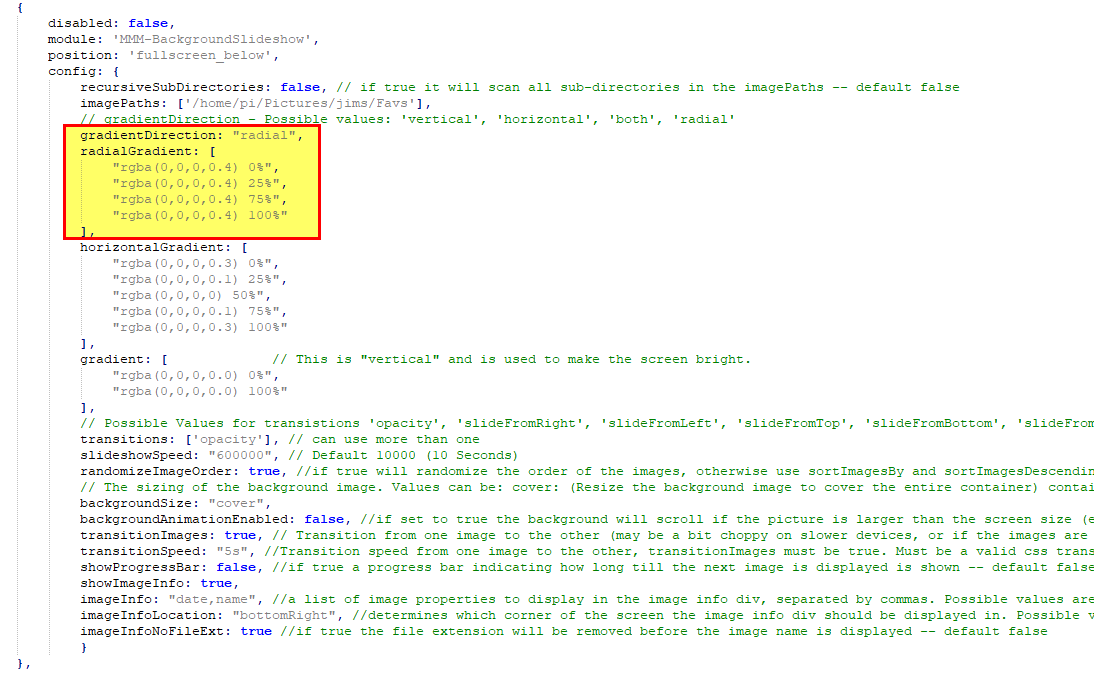
@rmonkey If you use MMM-BackgroundSlideShow, it has a radial option that is basically a vignette.
-
RE: MM current version on Raspberry Pi 5 cannot turn off monitor
@1a2a3a Thank you Thank you Thank you… That worked for me as well… Message me, and I will get you a pizza like I promised to anyone who could get my pi4 running latest rasbian to turn off the monitor. Adding vc4.force_hotplug=1 to the end of the line in /boot/cmdline.txt did the trick along with using wlr-randr!!
I’m serious about the pizza.
-
RE: MM current version on Raspberry Pi 5 cannot turn off monitor
@JohnGalt said in MM current version on Raspberry Pi 5 cannot turn off monitor:
@jbat66 - thanks for the offer. If you do wind up sharing your work, I will take a look and see if it works for me.
I don’t run any remote control module, and don’t find the “MMM-remote” you reference when I search. I do, however, find at least two (2) different modules called “MMM-Remote-Control” by two different authors. Do you mean one of those?
This one: https://github.com/Jopyth/MMM-Remote-Control
Sorry I should have been more clear.
-
RE: MM current version on Raspberry Pi 5 cannot turn off monitor
@sdetweil So I ened up using a Yo-Link Plug, and it’s API. I have my monitor plugged into the Yo-Link Plug. I wrote a script that sets a delay time off to 1 minute for the monitor, and then 10 seconds later does a sudo power off command. So the pi shuts down gracefuly and then the monitor. The pi is powered from the usb connector on the monitor.
-
RE: Weatherstation using MagicMirror+Rasp3b+7inch touchscreen
@Saabman I know coding, but not some flavors, like java script and json, as an example or even API usage, but with Chat GPT over the last couple of months I have done a lot and learned a lot. It is great for making a function, or a small script, and then you use them as building blocks for larger projects. Shoot I have found out about services I never knew about. For example a website (openstreetmap.org) that has an API, that if you feed it GPS coordinates, it returns the street address, county, Country, etc. Another website (timezonedb.com) that if you feed it GPS coordinates it gives you the timezone, and GMT Offset.
My ChatGPT request was something like “Write a bash script that uses GPS coordinates set in variables to get the timezone” and tada I learned something.
Or using crazy sed commands (I never was good at them) to push the GPS data into the config.js for MM
#sed -i ‘/^\s*header: “TimeZone-- /c'”${THREE_TABS}“'header: “TimeZone-- '”$TIMEZONEABB”’ --------- Altitude: ‘“$ALTITUDE_FEET”’",’ “$CONFIG_FILE”etc.
-
RE: Weatherstation using MagicMirror+Rasp3b+7inch touchscreen
Great build! I like it!
-
RE: MM current version on Raspberry Pi 5 cannot turn off monitor
@sdetweil
I looked it up and you can get power readings via the API.
http://doc.yosmart.com/docs/yolinkapi/Outlet -
RE: MM current version on Raspberry Pi 5 cannot turn off monitor
@sdetweil said in MM current version on Raspberry Pi 5 cannot turn off monitor:
@jbat66 trying to find devices without host connections… get more/all local
While the Yo-Link is great it is cloud and you can’t do local yet. They have been talking about it in their forums, however.
-
RE: MM current version on Raspberry Pi 5 cannot turn off monitor
@BKeyport the physical Mirror’s Power supply is the only thing I plug in, and the PI gets its power from USB from the display, so no extra power source to monitor.
I will probably just do a bash script to shut down the pi at some time say 10:00pm, then I will have Alexa shut down the mirror’s power (thus the pi as well) via a Yo-Link smart plug at 10:05pm. Then at sunrise via Amazon Alexa, I will just turn on mirror.
I already do this for my RV Starlink, since I have cell modem as a backup, I can use the internet to turn on and off my internet. lol
-
RE: MM current version on Raspberry Pi 5 cannot turn off monitor
@sdetweil Get a Yo-Link Plug. They have an API, you get your API key from an advanced menu in their app. Their plugs do grab usage, I have not used the API to grab usage, just to turn on and off, and to get temperatures from their sensors. I then use the API in MM to display the temperatures.
https://www.amazon.com/s?k=yolink+smart+plug
The whole Yo-Link echo system is great for DIY folks in home automation. -
RE: MM current version on Raspberry Pi 5 cannot turn off monitor
@BKeyport Thanks, I’m already turning off my background pictures, and just dimming (could also just hide all) modules. The problem is that I want to turn off the screen but leave the pi running, because one of my MM will be in an RV and when boondocking (running on batteries) you want to use as little power as you can, so it is silly to run the screen at night.
I am using wayland, didn’t know I could goto X11, and not have a problem with MM. I may look into that, thanks!!
As a side note I couldn’t get unclutter to remove the mouse in wayland as it does in X, but I found ydotool using this command works well in wayland to move the mouse to the bottom right corner, so it only shows one pixel. :-)
ydotool mousemove -x 5000 -y 5000right now, I have installed physical buttons, so I can shut the screen and pi down manually. I may crontab a shutdown of the pi, and then use yo-link (home automation switch) to kill the power after the crontab shutdown is done.
-
RE: MM current version on Raspberry Pi 5 cannot turn off monitor
@BKeyport Thanks. I tried these on my Vilros Magic Mirror, and nothing happened, just errors. I tried them on my Raspberry PI 4 running older rasbian, and it work on there. except my monitor just went to flashing blue white pink. I guess that is the default no input screen. lol
I think turning off the monitors have more to do with the version of rasbian, than with the hardware. IMHO
-
RE: MM current version on Raspberry Pi 5 cannot turn off monitor
@sdetweil I’m just dimming all my modules and doing with the ‘nightlight’ effect. lol
The Vilros Magic Mirror is using hdmi, but looks like CEC doesn’t work.
https://www.amazon.com/gp/product/B0BJXD68JV -
RE: MM current version on Raspberry Pi 5 cannot turn off monitor
@JohnGalt Side note, I will buy someone a pizza, if I can get working commands to actually turn off and turn on my HDMI display. I think I have tried everything on the internet with no luck. I’m serious about the pizza!
:-) -
RE: MM current version on Raspberry Pi 5 cannot turn off monitor
@JohnGalt I have a Pi 4, but have the latest OS, and I never have found a way to turn off the monitor. I have the same problem of the screen being too bright, so what I did was write a bash script, to turn off the background slide show, and to dim all the modules via the api into MMM-remote. I also have in my script just a hide all, and the screen goes blank, even tho the monitor is still on.
Here is how you can hide all modules
curl -X GET “$API_URL/api/module/all/hide” -H “accept: application/json”
the $API_URL, is your IP address. I use “http://localhost:8080”I also wrote a script that will get the sunrise sunset times for the day and shut off my screen by hiding or diming all the modules at sunset, and then reverse that at sunrise.
let me know if you are interested. I need to put some of my stuff up on github. I’m just getting familiar with github, and have fixed a couple of modules for folks in the last week.
-
RE: MMM-birthdays
I updated MMM-birthdays to add the ability to turn off the module when there are no bdays to show.
Also added the ability to update the name of the title/headerPull request here: https://github.com/amitchone/MMM-birthdays/pull/10
My fork, if you want to install and test it.
https://github.com/jbat66/MMM-birthdaysThank you Adam for writing this module.
-
RE: A New Chapter for MagicMirror: The Community Takes the Lead
@MichMich I only found out about MagicMirror two months ago, and in that time I have setup four MagicMirrors in frames (I got prefab’ed), two MagicMirrors in Dockers, and one running on our main TV. One of them is going in our RV, with GPS, that will automatically update weather, weather warnings, tell you where you are at, and turn on and off the frame at sunset/sunrise, at your current location. I have one with my elderly father, where we, can send pictures to the frame, and it can show him the weather. Playing with MM forced me to do my first pull request on Github to fix someones module. lol
I just want to thank you on your work on MagicMirror and how much pleasure it has brought to our family.
-
RE: MM current version on Raspberry Pi 5 cannot turn off monitor
@vvrangler
You have to have MMM-Remote-Control installed, and in the config.js file you can put several custom commands that point to scripts on your machine.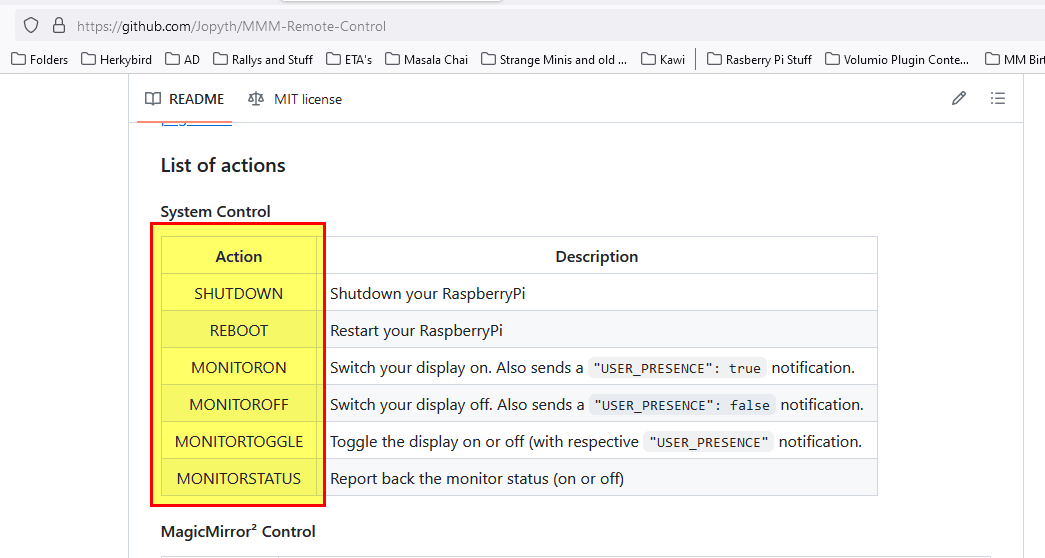
Here is an example for two of them in my config.js.
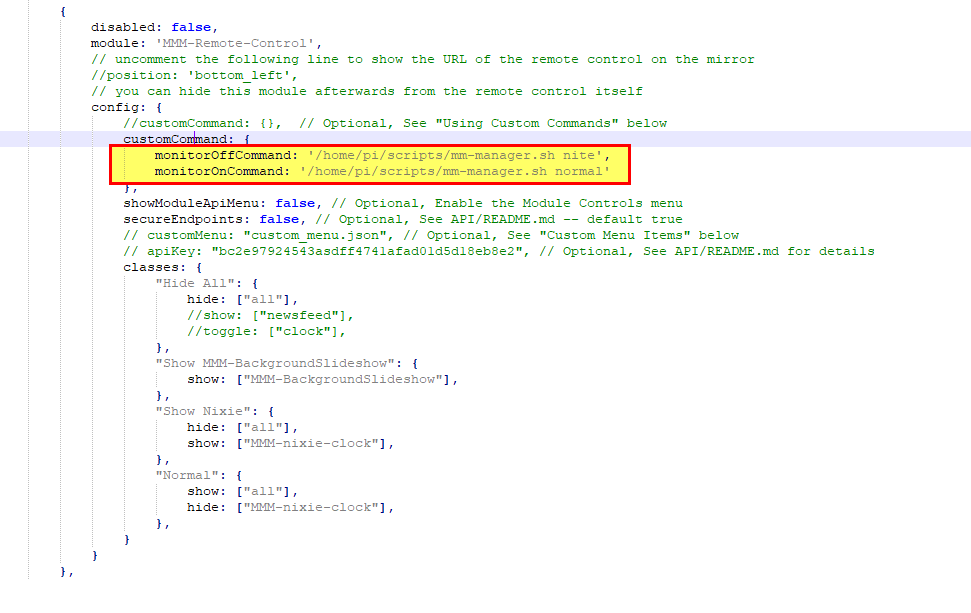
mm-manager.sh, is just a script I wrote to do things to my magic mirror, you scripts can be named what you want and just have the commands you want.