found the old discussion here
 K
Offline
K
Offline
A New Chapter for MagicMirror: The Community Takes the Lead
Read the statement by Michael Teeuw here.
Read the statement by Michael Teeuw here.
Posts
-
RE: calendar fetch goes wrong and gpu process error
-
RE: calendar fetch goes wrong and gpu process error
@bugsounet said in calendar fetch goes wrong and gpu process error:
@karsten13 maybe it’s related with node v21.x
I think not because he is running with electron and so using node
v20.9.0at runtime@rotorax I’m still interested if it works with the correct electron version
v31.1.0 -
RE: calendar fetch goes wrong and gpu process error
@rotorax said in calendar fetch goes wrong and gpu process error:
after upgrading to the second community release
this should be MagicMirror
v2.28.0which ships with electron versionv31.1.0[2024-07-22 07:54:19.741] [INFO] System information: ### SYSTEM: manufacturer: Raspberry Pi Foundation; model: Raspberry Pi 3 Model A Plus Rev 1.0; raspberry: [object Object]; virtual: false ### OS: platform: linux; distro: Raspbian GNU/Linux; release: 11; arch: arm; kernel: 6.1.21-v7+ ### VERSIONS: electron: 29.1.6; used node: 20.9.0; installed node: 21.7.3; npm: 10.5.0; pm2: 5.3.1 ### OTHER: timeZone: Europe/Berlin; ELECTRON_ENABLE_GPU: undefinedbut your logs tell us that you are using electron
v29.1.6So how did you update? It seems you didn’t run the
npm ...command (see documentation how to upgrade).The calendar error should be fixed with the newer electron version.
-
RE: calendar fetch goes wrong and gpu process error
can we get the provided system informations from the logs?
should look like
[2024-07-19 19:18:05.141] [INFO] System information: ### SYSTEM: manufacturer: Microsoft; model: Docker Container; raspberry: undefined; virtual: true ### OS: platform: linux; distro: Debian GNU/Linux; release: 12; arch: x64; kernel: 5.15.153.1-microsoft-standard-WSL2 ### VERSIONS: electron: undefined; used node: 22.4.1; installed node: 22.4.1; npm: 10.8.1; pm2: ### OTHER: timeZone: Europe/Berlin; ELECTRON_ENABLE_GPU: undefined -
RE: MMM-OpenWeatherMapForecast 3.0 API calls and freeze issue
without knowing if it is related to this we have another odd behaviour here which sounds similiar
-
RE: odd module load behaviour after upgrading to 2.28
tested this with the content of the
config.js.sample, there are 2 weather instances in the config and I see 2 messages in the dev console -
RE: Setting up auto display off during the night.
looks like
XDG_RUNTIME_DIRis unset, so you can check what value contains this variable in your user environment by executingecho $XDG_RUNTIME_DIRin the terminal and then changeWAYLAND_DISPLAY="wayland-1" wlr-randr --output HDMI-A-1 --offto
XDG_RUNTIME_DIR="value-from-above" WAYLAND_DISPLAY="wayland-1" wlr-randr --output HDMI-A-1 --off -
RE: MagicMirror regions
there were more changes in the corresponding PR, see https://github.com/MagicMirrorOrg/MagicMirror/pull/3445/files
-
v2.28.0
https://github.com/MagicMirrorOrg/MagicMirror/releases/tag/v2.28.0
[2.28.0] - 2024-07-01
Thanks to: @btoconnor, @bugsounet, @JasonStieber, @khassel, @kleinmantara and @WallysWellies.
⚠️ This release needs nodejs version >= v20.9.0
Added
- [calendar] Added config option “showEndsOnlyWithDuration” for default calendar
- [compliments] Added
specialDayUniqueconfig option, defaults tofalse(#3465) - [weather] Provider weathergov: Use
precipitationLast3HoursifprecipitationLastHourisnull(#3124)
Removed
- [tests] delete node v18 support (#3462)
Updated
- [core] Update dependencies including electron to v31
- [core] use node >= v20 (#3462)
- [core] Update
config.js.sampleto use openmeteo as weather provider which needs no api key - [tests] Use latest@version of node for
automated-tests.yaml(#3483) - [updatenotification] Avoid using pm2 when running in docker container
Fixed
- [core] Fixed crash possibility if
module: <name>is not defined and onpostion: <positon>mistake (#3445) - [weather] Fixed precipitationProbability in forecast for provider openmeteo (#3446)
- [weather] Fixed type=daily for provider openmeteo having no data when running after 23:00 (#3449)
- [weather] Fixed type=daily for provider openmeteo showing nightly icons in forecast when current time is “nightly” (#3458)
- [weather] Fixed forecast and hourly weather for provider openmeteo to use real temperatures, not apparent temperatures (#3466)
- [tests] Fixed e2e tests running in docker container which needs
address: "0.0.0.0"(#3479)
-
RE: MMM-2Day-NOAA-Forecast stopped working, stuck on "loading"
@leonids said in MMM-2Day-NOAA-Forecast stopped working, stuck on "loading":
Could not resolve host: github.com
looks like you have network problems
-
RE: Font for non-latin characters
you can take a look at
<mm-folder>/fonts/roboto.csswhere the mm fonts are defined -
RE: one call api open weather
I’m trying to convert from MMM-OpenWeatherForecast to something else, but Openweather is confusing me with the API subscription.
same situation here. I like the above module but I don’t want to subscribe to the new openweather api.
First alternative was the mm weather module because it has several providers so you can switch easily. But the design is so far away from MMM-OpenWeatherForecast …
So next approach was to use the data from mm weather for an own module with better UI.
Thats the current output:
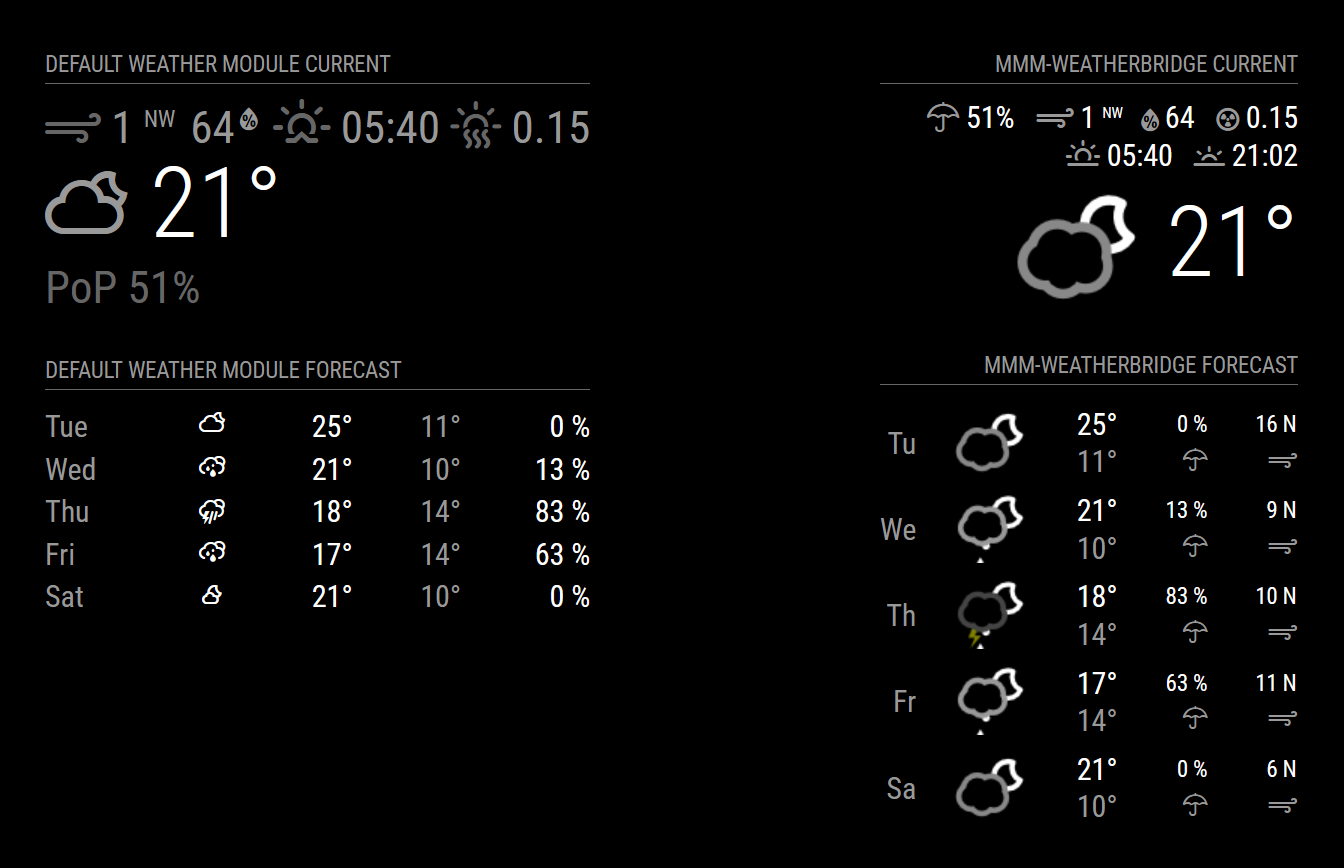
It is still a beta version and not published yet.
Another approach could be to extend the mm weather module with configurable njk templates and the cool skycons (which can be animated) …
-
RE: Git Hub requiring username and password
old one works too (but should not be used anymore)
-
RE: Git Hub requiring username and password
tested it, no auth needed:
❯ git clone https://github.com/MagicMirrorOrg/MagicMirror.git Cloning into 'MagicMirror'... remote: Enumerating objects: 26723, done. remote: Counting objects: 100% (112/112), done. remote: Compressing objects: 100% (71/71), done. remote: Total 26723 (delta 53), reused 82 (delta 35), pack-reused 26611 Receiving objects: 100% (26723/26723), 22.56 MiB | 12.26 MiB/s, done. Resolving deltas: 100% (16643/16643), done. -
RE: Module for MagicMirror forum
the use of a csrf token is restricted to admins (as already mentioned by @bugsounet), there is a hack described here to open this for all users but I don’t think we should do this.
For accessing the read(-only) api you can use a cookie from your browser, e.g.
curl --cookie "express.sid=xxxxxxx" https://forum.magicmirror.builders/api/unreadbut this would be challenging to use in a module for mm …
-
RE: Module for MagicMirror forum
some api urls seem to work without authentication, e.g.
❯ curl -s https://forum.magicmirror.builders/api/recent/posts/day | jq -r '.[].topic.title' Default Weather Module Icon Position Module for MagicMirror forum MMM-Formula1 updates MMM-Formula1 updates MMM-Formula1 updates Live phone location Refresh Magic Mirror after custom css changes Module for MagicMirror forum Refresh Magic Mirror after custom css changes MMM-QuotesFromReddit Refresh Magic Mirror after custom css changes -
RE: MMM-CalendarExt3
@flemmingss said in MMM-CalendarExt3:
The “CX3_Shared” folder is empty
this is the problem which is caused by the strange installation procedure in the used docker image.
The module installation is done via
npm init -y
npm install request --save
You have to ask the author of this script why he is doing this.
With this construction the postinstall/postupgrade scripts defined in the
package,jsonofMMM-CalendarExt3are never called so theCX3_Sharedfolder is empty. -
RE: module.js mismatch error and good by os
I think the fetch errors are related to https://github.com/MagicMirrorOrg/MagicMirror/issues/3329
you can try the newest electron version or disable ipv6