@peterpan894
Could you post this to issue board or discussion of GitHub repository? I should look inside with focus. And maybe needs to talk more closely.
M
Offline
A New Chapter for MagicMirror: The Community Takes the Lead
Read the statement by Michael Teeuw here.
Read the statement by Michael Teeuw here.
Posts
-
RE: MMM-Caldav not listening on port 8080
-
RE: MMM-CalendarExt3
[UPDATE] 1.7.0
skipof event Object property (Example)skipPassedEventTodayof config- eventTime color in multiday event
more,morePopoverfeature.- Global object check. (For compatible with not browser environment)
- Support
iconify - auto-detect
firstDayOfWeekandminimalDaysOfNewYear weekendsof config
Usually I just describe outlines of update here, but in this update, I need to explain somethings with images, so I did it.
I opened WIKI for some details.
Using Iconify
Even though
fontawesomeis the default icon framework of MM, there are many needs oficonify. And I prefer it to font-awesome. Now you can use iconify icons by config valueuseIconify: true// In your calendar module config defaultSymbolClassName: '', // <-- Important to identify iconify properly. calendars: [ { color: "red", symbol: "flag:us-4x3", url: "https://ics.calendarlabs.com/76/mm3137/US_Holidays.ics?foo" }, { color: "red", symbol: "fa fa-fw fa-flag", // <-- Important when you want to use font-awesome also together. url: "https://ics.calendarlabs.com/76/mm3137/US_Holidays.ics?bar" }, ],WARNING
To useiconify, you should setdefaultSymbolClassName: '',in your default calendar module. Usually, it is enough when you hide the original default calendar module to use with CX3. But if you want to use font-awesome icons together, you should add font-awesome classnames (e.gfa,fas, …) by yourself.displaying startTime and endTime in multi-day event.
a Fullday event doesn’t need startTime and endTime. And there is not enough place to show endTime for a single-day event. But for multi-day events, There would be enough space to display the endTime of the last day of the period. And it would be convenient. The position where the endTime would be displayed will be near the event’s last day.
If you don’t want to show it, add this to your
css/custom.css.CX3 .event.multiday:not(.continueToNextWeek) .headline .endTime { display: none; }morefor overflowed events.By the limitation of
maxEventLines(and due to the resolution of the MM screen), overflowed events on the day had to be ignored. It was inconvenient.Now, CX3 can show how many events are ignored in the day. You can pop over the whole events list of that day by clicking/touching the header of the cell or more marks(White rounded number). The popover contents could be scrollable by touch/drag (if possible)
NOTICE Firefox, Opera Mobile, Samsung Browser cannot handle a new de facto starndard
popoverfeature yet.skipPassedEventToday
Even though it would be helpful to use the new
morefeature, Still overflowed events would be inconvenient. Generally, upcoming events would be more important than past events especially fortoday. So you can skip the past events of today by this option. The skipped events will be shown again when today passes.skipPassedEventToday: false(default)skipPassedEventToday: trueAuto-detect calendar info by locale
Before 1.7.0, the user must manually set
firstDayOfWeekandminimalDaysOfNewYearin the config to calculate the start day of the week, week number, weekend info, etc.Now, this module will calculate that info automatically with
localewithout your manual config forfirstDayOfWeekandminimalDaysOfNewYear(Leave them as blank ornull)For example;
- When you set the locale as
en-US(in the module config or global config), the week starts from Sunday. - When you set the locale as
en-GB, the week starts from Monday. - When you set the locale as
fa-IR, the week starts from Saturday, and the weekend day will be only Friday.
Of course, you can set them up manually by force for the exceptions.
- Not supported natively in legacy browsers.
- To show custom weekend days for your job shift instead of public weekends. (e.g.
weekends: [1, 3, 5]for Mon, Wed, Fri resting) - to adopt a locale but with a different language. (e.g. The Americans living in Germany, so the calendar system itself should be followed by German rule but displayed in English.)
locale: 'en-US', // Displaying things as US English, e.g. MM. DD. YYYY instead of European DD. MM. YYYY firstDayOfWeek: 1, // German ISO rule. The week starts on Monday, not Sunday, as `en-US` minimalDaysOfNewYear: 4,weekendsA new config value,
weekends: [], is introduced. By default, you don’t have to set this by yourself because it is derived from the auto-detection of calendar info from the locale. This field will be fulfilled automatically unless you set it manually in config.
Every day cell hasweekendandweekend_1orweekend_2as its classname.For example,
weekends: [6, 0]means Saturday and Sunday will be considered weekends. Saturday will haveweekend weekend_1and Sunday will haveweekend weekend_2.Style cells with these class names instead of the fixed
weekday_N. You don’t have to know which weekday is a weekend in a specific locale.And more…
-
RE: MMM-Caldav not listening on port 8080
@sdetweil
He seems to sethttpscheme properly in the config he posted.symbol: "calendar-check", url: "http://localhost:8080/DAVCAL/calname.ics",Maybe a
ipWhitelistsetup could be the issue. -
RE: MMM-Caldav not listening on port 8080
@peterpan894
You can test whether iCAL is serving or not by yourself.- Execute MM
- In the same client ,
open the browser then navigate to this.
http://localhost:8080/CALDAV/calname.ics -
RE: Wrap event title MMM-CalendarExt3
@muhsintt said in Wrap event title MMM-CalendarExt3:
Re: MMM-CalendarExt3
Hello,
Can you share a CSS or Node.js script that that wraps event titles into 2 or more lines when it does not fit in the cell?
Thanks very much.
I don’t agree that kind of wrapped multi-lines are useful.
Because it’s ugly and wastes space(unless using a 4K screen), it is not easy to glance at, and it is hard to recognise events. Just two-line wrapping may not be sufficient to display long titles. (How about 3 lines? Or 4 lines? no ends…)
So, I intentionally designed this module like the current one looks. It is an old legacy concept from MMM-CalendarExt, (and MMM-CalendarExt2, …) All other major calendar applications on desktop or mobile keep the one-liner in month-type view. (Google Calendar, Apple calendar, MS Outlook, Fantastical, …)Anyway, usually, MM is regarded as just a dashboard to glance at, not a Franklin organizer.
Even though 2liners could be possible with some tricks(I tried once), technically, It needs a ton of heavy CSS and JS tweaks. If you are not an expert, you probably ruin the whole look.
I totally understand this ellipsed title may not be enough to read. What I suggest alternately are;
- Use colour and symbols to distinguish some events.
- Use abbreviations to shorten long titles.
(For above two approaches, you can handle events with prepared handlers of this module) - Shorten time format. (
22is better than10:00 PM) - Use
popoverfeature to see details of the event. (When your MM device supports touch/click) - Use other sidekick modules to look for details, like MMM-CalendarExt3Agenda, Or the default calendar module.
-
RE: Automatic checking of all MagicMirror² modules
I suggest you and the community expand
package.jsonto regularise the details of the module. (recommended but optional)
For example;{ "name": "mmm-something", "version": "1.0.0", ... "mm" : { "communityId" : "johndoe", "community" : "MagicMirror forum", "screenshot" : "https://somewhere.com/screenshot.png", "install" : "https://github.com/johndoe/mmm-something/README.md#installation", "update" : "...", "email" : "johndoe@somewhere", "required: { "mm" : "2.25", "node" : "18.0" }, "notice" : [ "This will not work in Windows.", "Pre-dependency required. Please readme." ] } }The fields are my imagination. Maybe the community can reach an agreement on rules.
-
RE: MMM-OpenmapWeather sunrise and sunset times are GMT
@rsiggins
In my test, the module itself returns the right time of the target place converted to my local timezone. Anyway, there may be some special reason for your case.Of course, the developer should look inside to know what really happened. But as a emergency cure, you can use some monkey-patching before real fixation from the developer.
{ module: "MMM-ModuleMonkeyPatch", config: { patches: [ { module: "MMM-OpenmapWeather", method: "processWeather", patch: function (original, args) { const [ data ] = args const yourDesiredOffset = 5 * 60 * 60 // 5 hours data.sys.sunrise = new Date((data.sys.sunrise + yourDesiredOffset) * 1000).valueOf() data.sys.sunset = new Date((data.sys.sunset + yourDesiredOffset) * 1000).valueOf() original(data) } }, ] } } -
RE: Calendar Not Displaying Recurring Events
@oldrocker said in Calendar Not Displaying Recurring Events:
@sdetweil here is some information:
config: {
                                broadcastPastEvents: true,
                                calendars: [
                                        {
                                                fetchInterval: 7 * 24 * 60 * 60 * 1000,
                                                symbol: 'calendar-check',
                                                broadcastPastEvents: true,
                                                maximumEntries: 100,
                                                maximumNumberOfDays: 365,
                                                url: 'http://XXXXXXXXXXXXXXXXXX/Routine.ics',
                                                name: 'Routine',
                                                color: 'yellow',
                                                auth: {
                                                  user: 'XXXXXXXXXXX',
                                                  pass: 'XXXXXXXXXXX',
                                                  method: 'basic'
                                                },
                                        },
event
BEGIN:VEVENT
CREATED:20231111T124003Z
DTSTAMP:20231111T124242Z
LAST-MODIFIED:20231111T124242Z
SEQUENCE:3
UID:02d62d6f-74ff-48c2-aa7d-2682cb7e688c
DTSTART;VALUE=DATE:20231111
DTEND;VALUE=DATE:20231112
STATUS:CONFIRMED
SUMMARY:Test Event 1
RECURRENCE-ID;VALUE=DATE:20231111
END:VEVENT

BEGIN:VEVENT
CREATED:20231111T124003Z
DTSTAMP:20231111T124242Z
LAST-MODIFIED:20231111T124242Z
SEQUENCE:3
UID:02d62d6f-74ff-48c2-aa7d-2682cb7e688c
DTSTART;VALUE=DATE:20231118
DTEND;VALUE=DATE:20231119
STATUS:CONFIRMED
SUMMARY:Test Event 1
RECURRENCE-ID;VALUE=DATE:20231118
END:VEVENT
There should be RRULES in the file. Could you find?
-
RE: node problem : I can't update my MM and MM disappears from my screen after reboot
@RIKKO14
If your MM worked fine and you don’t have any MUST-UPDATE needs, Just don’t update . Leave it as it was. -
RE: Overlap of weather modules
@Michelle-H2020
Your screen resolution looks so small. How large is it? -
RE: Image in module not showing on mirror browser
@lavolp3
Maybe CORS rule exception? -
RE: MM2 can get POST API?
@hikano765
usethis.expressAppin node_helper.js
Of course, you can use your ownexpressorfastifywhatever by importing that node module. -
RE: Mmm calendar ext3
@Michelle-H2020
I think you probably editedcustom.css,Without any modification/overriding of custom.css, This module should look like these;
-
1080x1920 vertical screen
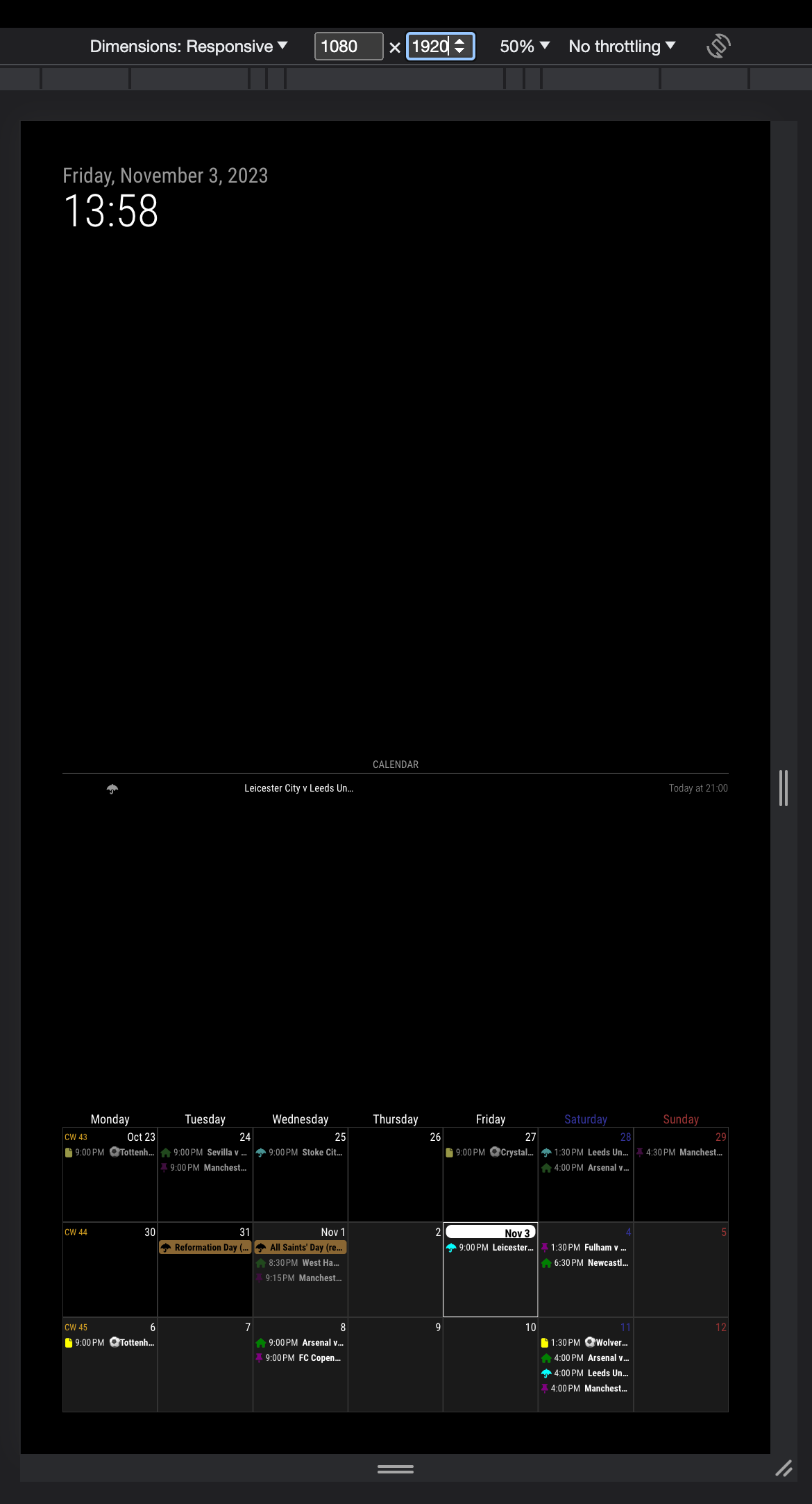
-
600x800 vertical screen
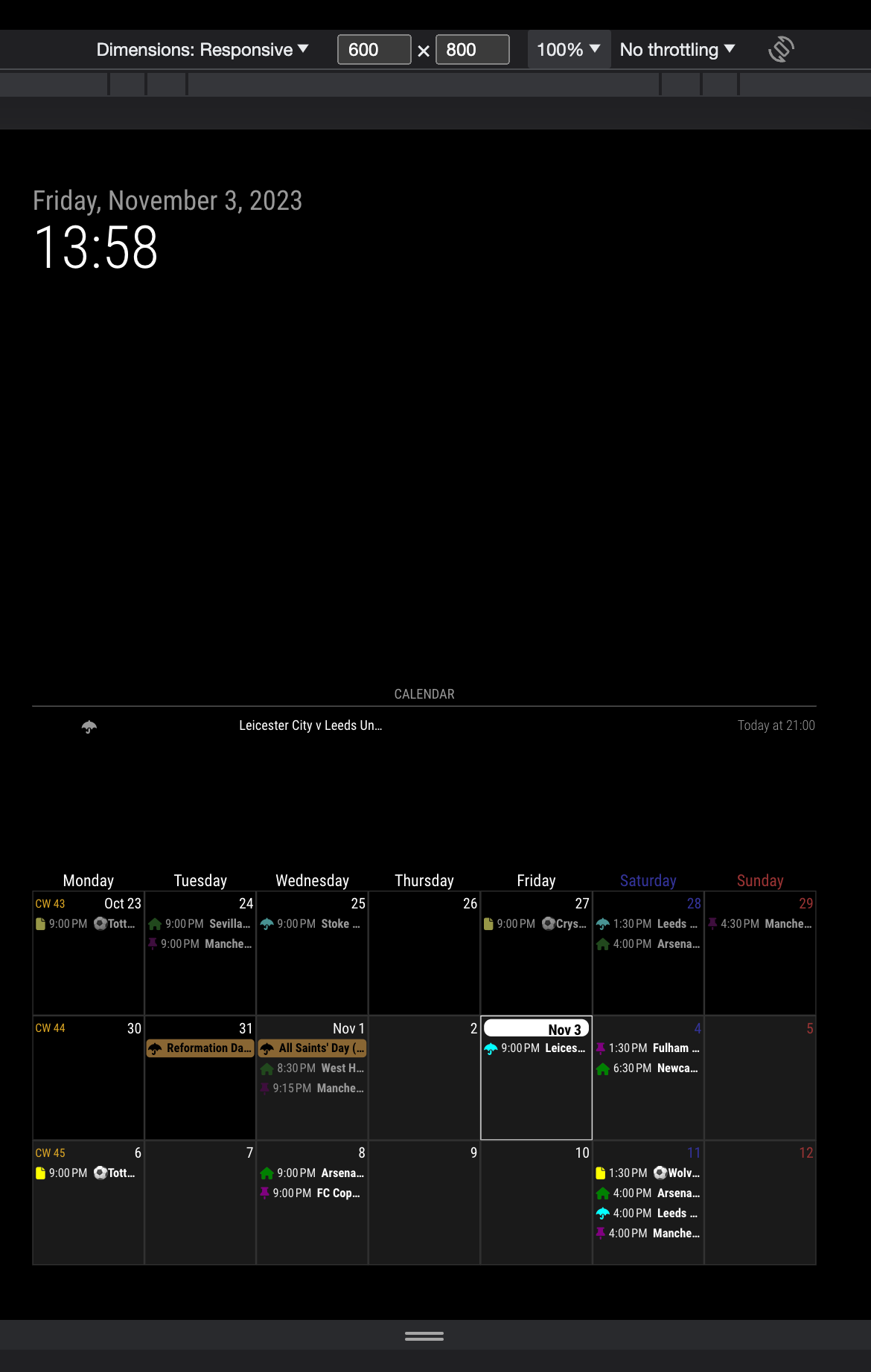
-
-
RE: Mmm calendar ext3
@Michelle-H2020
What is your screen resolution? It seems not FHD. -
RE: Mmm calendar ext3
@Michelle-H2020
Only first letter? Show me a picture of your mirror. And your config also be needed to guess what happened.
Of course the small resolution cannot handle enough width of module. -
RE: MM stoped working after update MMM-CalDAV
@bdream
Give me more details.(Log, what did you do, environment, config, …) And, MMM-CalDAV is rebuilt recently from scratch, so you have to reinstall and many config things are changed. -
RE: MMM-CalendarExt2 vertical orientation positioning
@Michelle-H2020
CX2 doesn’t respect usual MM’s positioning. It manage number of “views” in multi-positions, so you need to assign position to each “view”, not module itself.
Read manuals.-
https://github.com/MMM-CalendarExt2/MMM-CalendarExt2/blob/main/docs/Configuration.md
-
https://github.com/MMM-CalendarExt2/MMM-CalendarExt2/blob/main/docs/Configuration/View.md
And other documents also.
-
-
RE: [MMM-MailMessage] Send messages to your MagicMirror via e-mail
@UncleRoger said in [MMM-MailMessage] Send messages to your MagicMirror via e-mail:
I did the card thing per the template
It doesn’t work for some time.
-
RE: Automatic checking of all MagicMirror² modules
@Jalibu Didn’t do that yet? :D
-
RE: MMM-CalendarExt3
@roth_nj
By default, without any modification; This module has 2 style metaphor for event. One is for fullday/multidays event and one is for normal event.
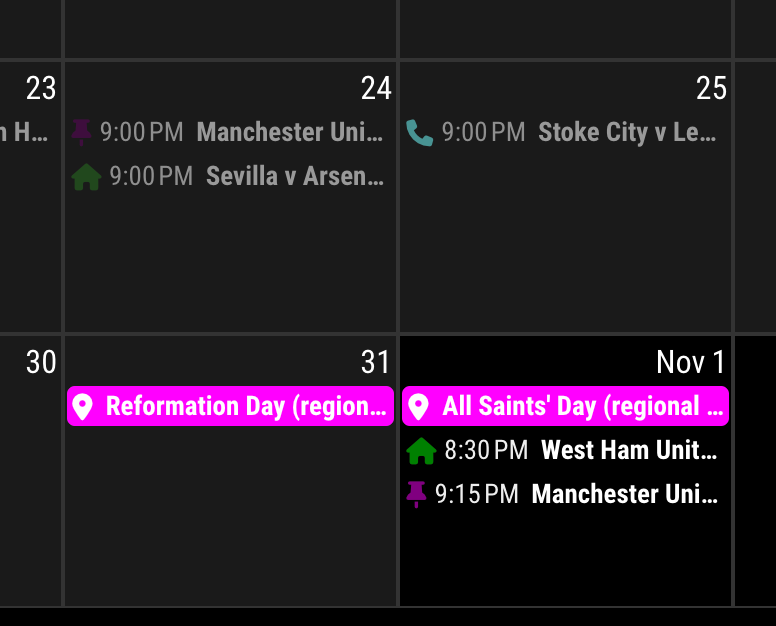
Fullday/multidays event looks a boxed, background-filled to be distinguished with a normal event.Anyway, if you want that a normal event has same looks with fullday events - boxed and filled.
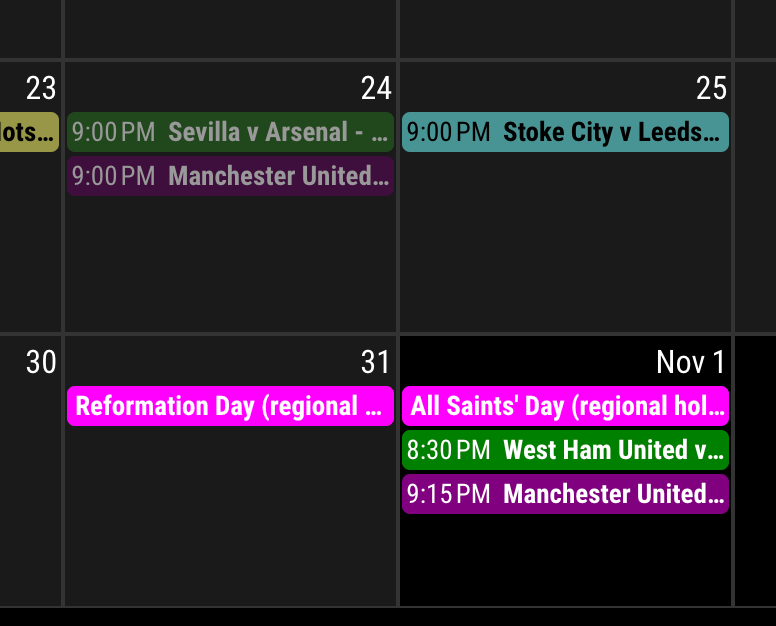
Add these lines to your custom.css
.CX3 .event.singleday .headline:not(.useSymbol)::before,
.CX3 .event.singleday .headline.useSymbol .symbol.noSymbol::before {
  display: none;
}

.CX3 .event.singleday {
  background-color: var(--calendarColor);
  mix-blend-mode: difference;
  border-radius: 4px;
  color: var(--oppositeColor);
}

.CX3 .event:not(.fullday) .headline .time {
  color: var(--oppositeColor);
}