MagicMirror Forum
    • Recent
    • Tags
    • Unsolved
    • Solved
    • MagicMirror² Repository
    • Documentation
    • 3rd-Party-Modules
    • Donate
    • Discord
    • Register
    • Login
    1. Home
    2. Mykle1
    3. Posts
    A New Chapter for MagicMirror: The Community Takes the Lead
    Read the statement by Michael Teeuw here.
    Mykle1M Offline
    • Profile
    • Following 5
    • Followers 73
    • Topics 101
    • Posts 4,397
    • Groups 2

    Posts

    Recent Best Controversial
    • RE: For the life of me

      @strawberry-3.141 said in For the life of me:

      .MMM-NetworkScanner .fa-ul {
      margin-left: 0px;
      }

      First, thanks again

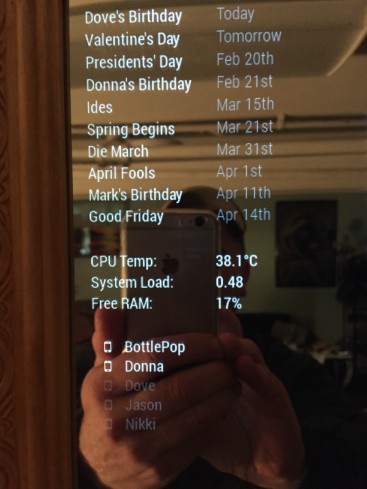
      This worked but it pushed the “mobile” icon to the very edge of the mirror, so I tried 10px, 20px and 30px, until I got this. Nice, but not exactly how I pictured it.
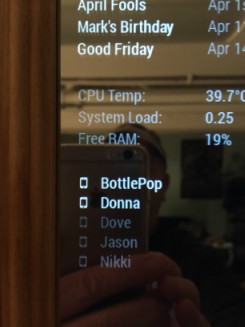
      0_1487026318051_IMG_1741edit.jpg

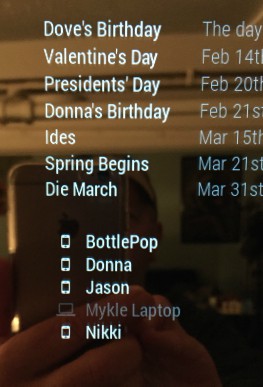
      So, I went to the config.js and removed “mobile” from the icon designation, so it looked like this, icon: “”}, That removed the icons but the names were still exactly where they were, as if the space for the icons was still occupied. So, I went back to the “margin-left: 0px;”. That was damn close! I wound up at margin-left: 2px;. Just right!
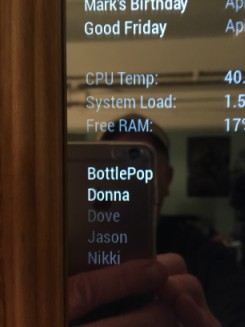
      0_1487029387090_IMG_1743edit.jpg

      Now I’m going to try to see if I can figure out how to put the mobile icon on the right of the name. I’m not asking for help on that, yet.
      posted in Troubleshooting
      Mykle1M
      Mykle1
    • For the life of me

      Hi all.

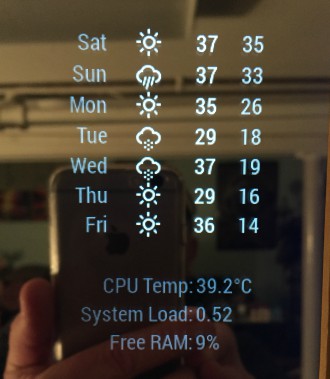
      As you can see from the picture below, I was successful in getting the appearance of SystemStats to my liking. The alignment was more “centered”, but not exactly, so I moved the text to align to the left. Just the way I wanted it. Also, the default text was “dimmed” and I didn’t like that much either, so I changed that to “normal”. This I did on my own, without asking for help. No small feat for me and very satisfying. (Hold the applause)

      Also in the picture, below SystemStats, is NetworkScanner. (Here’s where the topic will make sense). You can see that NetworkScanner is slightly indented. Now, I have been trying but, (enter topic name here) I can’t find where to edit this as I did with SystemStats, so that I can align it to the left margin, as I did with SystemStats.

      0_1487021883675_IMG_1738edit.jpg

      If someone would point me in the right direction, I would be greatly obliged.

      posted in Troubleshooting
      Mykle1M
      Mykle1
    • RE: 1 old noob + 1 rPi = I can't believe I did it! (revisited)

      @carlhoffman said in 1 old noob + 1 rPi = I can’t believe I did it! (revisited):

      You did an absolutely fantastic job on your mirror, and your “boring” story is rather inspiring if you ask me. Thanks for posting!

      Thank you very much for your kind words. I thought I was done with this, but it has been so much fun that I continue to tweak things and I’m trying to repay those that helped me along the way by helping other new builders that have questions. There are some fantastic people here that helped me and everyone else. PeppaPigKilla (the very first person to get me past a hurdle), yawns, Strawberry 3.141, to name a few. They are brilliant, patient, and generous with their assistance. In my case, they deserve to be mentioned.

      Peace :peace:

      posted in Show your Mirror
      Mykle1M
      Mykle1
    • RE: I can't seem to configure the default clock for my life

      @cowboysdude said in I can’t seem to configure the default clock for my life:

      You’re missing two One at the start and one at the end.

      You beat me to it, bro. There was no answer when I started and then when I posted, it showed you already made it to the finish line. :thumbsup:

      posted in Troubleshooting
      Mykle1M
      Mykle1
    • RE: I can't seem to configure the default clock for my life

      @Treestanx said in I can’t seem to configure the default clock for my life:

      Can someone help me out?

      I will try to help you.

                  {
      		module: 'MMM-Globe',
      		position: 'bottom_center',
      		config: {
      		style: 'natColor',
      		imageSize: 200,
      		ownImagePath:'',
      		updateInterval: 10*60*1000
      	}
      	},
      	{
      		module: 'clock',
      		timezone: 'America/New_York',
      		position: 'top_center'
      	},
      	{
      		module: 'calendar',
      

      Here is the clock portion of my config.js file between 2 other modules. Notice how the module before clock ends with },
      The clock module should also end with }, as you can see from mine.

      From what I’ve learned here, every { needs to have a corresponding } somewhere afterwards in the modules config.
      AND, the last } in that modules config needs to have a comma after it. See the module above clock? It has 2 { and
      2 corresponding } the last } having a comma afterwards.

      I hope this helps. I’ve given some faulty advice before but I’d like to think I’ve helped a few people.

      posted in Troubleshooting
      Mykle1M
      Mykle1
    • RE: compliments module with currentweather doesn't work

      @strawberry-3.141 said in compliments module with currentweather doesn’t work:

      @Mykle1 you should not add commas at the end

      I should give up trying to help. Thanks for setting me straight, again.

      posted in Troubleshooting
      Mykle1M
      Mykle1
    • RE: compliments module with currentweather doesn't work

      @joelpfeiffer said in compliments module with currentweather doesn’t work:

      i hope someone can tell me what i did wrong.

      Try a comma after the last ] so it looks like this --> ],

      posted in Troubleshooting
      Mykle1M
      Mykle1
    • RE: My First Build, 24 Inch In A Custom Frame

      @AdamMoses-GitHub

      Nice work young man! :thumbsup:

      posted in Show your Mirror
      Mykle1M
      Mykle1
    • RE: Is there a way . . .

      @strawberry-3.141 said in Is there a way . . .:

      put that in custom.css

      You, Sir, are an absolute GENIUS! Absolutely PERFECT!

      Many thanks!

      posted in Troubleshooting
      Mykle1M
      Mykle1
    • RE: MMM-NetworkScanner help needed

      @slametps said in MMM-NetworkScanner help needed:

      @Mykle1 : For now, I downloaded the previous version (tags v0.0.1 before the official bugs free the new version v0.0.2 fixed/released), and work like a charm.

      Very good. :thumbsup:

      posted in Troubleshooting
      Mykle1M
      Mykle1
    • RE: Bad question

      @Fonfon - You’re welcome. Peace. :peace:

      posted in General Discussion
      Mykle1M
      Mykle1
    • Is there a way . . .

      . . . to change the margins for the entire screen? If, for instance, I wanted to make the margins around the entire screen 20 pixels so that the modules would all move to the margins, how would I do that? I think it’s in one of the css files, but which one? And what code would I be looking for to edit?

      And, if you are feeling very generous, how would align these two modules? Notice how the Calendar module is a bit further left than the NetworkScanner module below it?
      0_1486913832939_IMG_1731edit.jpg

      Many thanks to all those that have already given me assistance. I’ve been trying to repay your kindness by helping others that are newer than me and are asking the questions that I asked just a few weeks ago

      posted in Troubleshooting
      Mykle1M
      Mykle1
    • RE: Bad question

      @Fonfon said in Bad question:

      how you manage your pie when it is in the mirror ??

      This is how I do/did it:

      Go to your Pi Application Menu, scroll down to Preferences, scroll down to Raspberry Pi Configuration. In the window that opens click the Interfaces button. Enable VNC. Click OK. Your done with the Pi.

      On the computer that you want to manage your Pi from, go to https://www.realvnc.com/download/viewer/windows/ (In this case it’s for Windows. Choose your platform). Download VNC Viewer. This will allow you to remotely administer your Pi, and your MM, without having to take your mirror down or bring a mouse and keyboard to your mirror. I was doing that for a while until I learned this.

      There might be other ways but this is the way I do it.

      Peace

      posted in General Discussion
      Mykle1M
      Mykle1
    • RE: How HOT Does it Get?

      @AAPS said in How HOT Does it Get?:

      How long does the new static IP address last if it isn’t permanent?

      I tried to find out how long the lease lasts for but I was unable to discover that information. The word “temporary” appeared somewhere when I was doing the initial search for assigning static IP’s. That is why I noted that the change wasn’t permanent.

      Worst case scenario if the leases expire: Go back to that one page in your router. A few clicks. Leases renewed.

      Best case scenario: They don’t expire (or last a very long time)

      posted in General Discussion
      Mykle1M
      Mykle1
    • RE: MMM-NetworkScanner

      @ianperrin said in MMM-NetworkScanner:

      I am looking at it but please bear with me

      Shhhhh! Quiet! Genius at work!

      I am completely serious. I think you are a brilliant young man.

      Much success to you. :thumbsup_tone1:

      posted in Utilities
      Mykle1M
      Mykle1
    • RE: MMM-NetworkScanner

      @slametps Yes, at first the same thing happened to me.

      This might seem obvious but did you change your config.js to ipAddress instead of macAddress?

      posted in Utilities
      Mykle1M
      Mykle1
    • RE: MMM-NetworkScanner

      @slametps

      This worked for me. If you have FIOS you might want to try it. If not, if you have the ability to set static ip addresses in your own system, you could try that

      I went into my FIOS router and assigned a “static lease” on the IP addresses of the devices that would not show in NetworkScanner with their MAC addresses. Went back into my config.js and changed the macAddress to ipAddress for each device and put in the static IP addresses I just assigned in the router.
      It’s working now, all except for the machine I am working on now (my desktop). It doesn’t show as active, even with a static lease on the IP address. That’s sort of alright, as I really just wanted the cell phones to appear, which they do, but odd,

      For those with FIOS that want to try:

      Sign in to Verizon router. Click Advanced tab (almost top right). Click yes to proceed. Click IP Address Distribution bottom right. Click Connection List almost in the middle. On the left, find the device that you want to assign a static lease IP address to. On the right, in the Action column, click the Edit icon. Tick the Static Lease Type box. Click Apply. That is now a static IP address. GO back one page and look in the Lease Type column. It will show you the Static designation.
      Peace

      posted in Utilities
      Mykle1M
      Mykle1
    • RE: MMM-NetworkScanner help needed

      @slametps I think so too. I could not get it to work with MAC addresses. Assigning static IP addresses is the only way I could get it to work, and even that was not perfect, as it would not show my desktop as active , even with a static ip address

      posted in Troubleshooting
      Mykle1M
      Mykle1
    • RE: MMM-NetworkScanner help needed

      @cowboysdude

      After I assigned static IP addresses via my FIOS router the scanner started working, somewhat. Then I rearranged my mirror, somewhat.

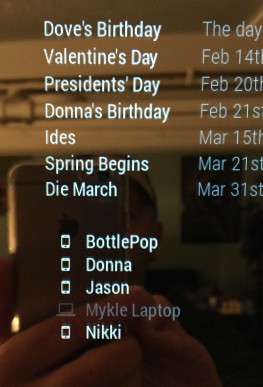
      0_1486855552533_IMG_1731edit.jpg 0_1486855587628_IMG_1732edit.jpg

      posted in Troubleshooting
      Mykle1M
      Mykle1
    • RE: How HOT Does it Get?

      @AAPS said in How HOT Does it Get?:

      Can you just do that on the router’s webpage?

      You sure can. Here, I’ll save you some searching around:

      Sign in to Verizon router. Click Advanced tab (almost top right). Click yes to proceed. Click IP Address Distribution bottom right. Click Connection List almost in the middle. On the left, find the device that you want to assign a static lease IP address to. On the right, in the Action column, click the Edit icon. Tick the Static Lease Type box. Click Apply. That is now a static IP address. GO back one page and look in the Lease Type column. It will show you the Static designation.

      Peace

      posted in General Discussion
      Mykle1M
      Mykle1
    • 1 / 1