
MagicMirror Forum
    • Recent
    • Tags
    • Unsolved
    • Solved
    • MagicMirror² Repository
    • Documentation
    • 3rd-Party-Modules
    • Donate
    • Discord
    • Register
    • Login
    1. Home
    2. Mykle1
    3. Posts
    A New Chapter for MagicMirror: The Community Takes the Lead
    Read the statement by Michael Teeuw here.
    Mykle1M Offline
    • Profile
    • Following 5
    • Followers 73
    • Topics 101
    • Posts 4,397
    • Groups 2

    Posts

    Recent Best Controversial
    • RE: MMM-NetworkScanner help needed

      @cowboysdude said in MMM-NetworkScanner help needed:

      I can verify mac addresses not working for me either… I installed it to play with and the only way I can show anything online is using ip addresses…

      A quick fix, so far:

      I went into my FIOS router and assigned a “static lease” on the IP addresses of the devices that would not show in NetworkScanner with their MAC addresses. Went back into my config.js and changed the macAddress to ipAddress for each device and put in the static IP addresses I just assigned in the router.

      It’s working now, all except for the machine I am working on now (my desktop). It doesn’t show as active, even with a static lease on the IP address. That’s sort of alright, as I really just wanted the cell phones to appear, which they do, but odd, nonetheless. :-/

      Now two things that remain:

      1. I want to move the entire cell that contains NetworkScanner on the screen to the left. Could someone tell me where to find that?

      2. The phrase “was last seen 5 minutes ago” in NetworkScanner. Where do I go to edit that?
      posted in Troubleshooting
      Mykle1M
      Mykle1
    • RE: How HOT Does it Get?

      @AAPS said in How HOT Does it Get?:

      You just telling me this is helpful. I could maybe set a static IP address if I suddenly start feeling less lazy. :thinking:

      I did some poking around and discovered an easier way to set a static IP for the Pi, although it’s not permanent. I have FIOS, and within the router interface you can set a “static lease” for any of the devices on your network. Easy as Pi. Took less than a minute

      posted in General Discussion
      Mykle1M
      Mykle1
    • RE: MMM-NetworkScanner help needed

      @slametps said in MMM-NetworkScanner help needed:

      sudo arp-scan -l -q

      I just checked all reported mac addresses against my device entries. They are all correct. Not one of them shows as online

      posted in Troubleshooting
      Mykle1M
      Mykle1
    • RE: MMM-NetworkScanner help needed

      @slametps said in MMM-NetworkScanner help needed:

      arp-scan -l -q

      pi@Pi3:~ $ arp-scan -l -q
      You need to be root, or arp-scan must be SUID root, to open a link-layer socket.
      link_open: Operation not permitted
      pi@Pi3:~ $

      please advise

      posted in Troubleshooting
      Mykle1M
      Mykle1
    • MMM-NetworkScanner help needed

      Hi, and please help. Thank you.

      I’ve got this module running but the only devices that will show as active are the Github from the sample config and the showUnknown devices which I have turned off. All others that I have added appear as offline. I’m using the MAC addresses that I got from my router (and confirmed them with what MMM-NetworkScanner shows when I have showUnknown enabled) They are correct and all in lower case. I read where that might be an issue. I did git pull and npm install in the MMM-NetworkScanner folder. Also, if I change the 2nd device entry (below) to macAddress and enter the MykleDesktop macAddress, then the macAddress that was showing in showUnknown no longer appears, and still the device shows as offline. In other words, all my devices show their mac addresses as online if I don’t list them in devices. If I list them in devices, they show as offline and the showUnknown mac addresses disappear

      {
      module: ‘MMM-NetworkScanner’,
      position: ‘top_left’,
      config: {
      devices: [
      { ipAddress: “github.com”, name: “Github”, icon: “globe”},
      { ipAddress: “192.168.1.4”, name: “MykleDesktop”, icon: “desktop”},
      { macAddress: “mac.address.all.lower.case”, name: “DoveMBP”, icon: “laptop”},
      { macAddress: “mac.address.all.lower.case”, name: “MyklesiPhone”, icon: “mobile”},
      { macAddress: “mac.address.all.lower.case”, name: “JayAndroid”, icon: “mobile”},
      { macAddress: “mac.address.all.lower.case”, name: “DonnaMBP”, icon: “laptop”},
      { macAddress: “mac.address.all.lower.case”, name: “DonnaiPhone”, icon: “mobile”},
      { macAddress: “mac.address.all.lower.case”, name: “NikkiiPhone”, icon: “mobile”},
      ],
      showUnknown: false,
      showOffline: true,
      showLastSeen: true,
      keepAlive: 180,
      updateInterval: 10,
      residents: “Mobile”, // I tried this with each name of the devices above and each icon name and the default of []
      occupiedCMD: {notification: ‘TEST’, payload: {action: ‘occupiedCMD’}},
      vacantCMD: {notification: ‘TEST’, payload: {action: ‘vacantCMD’}},
      }

      posted in Troubleshooting
      Mykle1M
      Mykle1
    • RE: How HOT Does it Get?

      @AAPS

      My ip address changes too but I can find it easily by signing in to my router. You can set a static ip address for your Pi. I tried but got frustrated and gave it up. I’ll try again when my patience isn’t so low.

      I’ve also been toying with the idea of a PIR sensor or webcam but I’m still just trying to perfect my setup before diving into that. Good luck in your venture. I wish I could have been more help

      posted in General Discussion
      Mykle1M
      Mykle1
    • RE: MMM-NetworkScanner

      @ianperrin said in MMM-NetworkScanner:

      there no such thing as a stupid question so keep asking away…

      Hi, and please help. Thank you.

      I’ve got this module running but the only devices that will show as active are the Github from the sample config and the showUnknown devices which I have turned off. All others that I have added appear as offline. I’m using the MAC addresses that I got from my router and they are correct and all in lower case. I read above where that might be an issue. I did git pull and npm install in the MMM-NetworkScanner folder.

      {
              		module: 'MMM-NetworkScanner',
              		position: 'top_left', 
              		config: {
      			devices: [
      				{ ipAddress: "github.com", name: "Github", icon: "globe"},
      				{ ipAddress: "192.168.1.4", name: "MykleDesktop", icon: "desktop"},
                          		{ macAddress: "mac.address.all.lower.case", name: "DoveMBP", icon: "laptop"},
                          		{ macAddress: "mac.address.all.lower.case", name: "MyklesiPhone", icon: "mobile"},
                          		{ macAddress: "mac.address.all.lower.case", name: "JayAndroid", icon: "mobile"},
                          		{ macAddress: "mac.address.all.lower.case", name: "DonnaMBP", icon: "laptop"},
                          		{ macAddress: "mac.address.all.lower.case", name: "DonnaiPhone", icon: "mobile"},
      				{ macAddress: "mac.address.all.lower.case", name: "NikkiiPhone", icon: "mobile"},
                      		],
                  			showUnknown: false,  
              			showOffline: true, 
              			showLastSeen: true,
              			keepAlive: 180,
              			updateInterval: 10,
              			residents: "Mobile", // I tried this with each name of the devices above and each icon name
              			occupiedCMD: {notification: 'TEST', payload: {action: 'occupiedCMD'}},
              			vacantCMD:   {notification: 'TEST', payload: {action: 'vacantCMD'}},
              		}
      
      posted in Utilities
      Mykle1M
      Mykle1
    • RE: Internet Monitor

      @cowboysdude said in Internet Monitor:

      I tell you what I’d do before I tried it again… backup my sd card

      Done. I made two backups of my SD card. One locally and one on my backup server. While that was going on I installed a fan on my Pi. I have spare parts lying around. Good little mini project while I waited for the backups. Now my Pi runs at 35 C, down from 60 C. Sweet.

      posted in Utilities
      Mykle1M
      Mykle1
    • RE: How HOT Does it Get?

      @AAPS said in How HOT Does it Get?:

      That’s great. My new problem now is figuring out how to make it wake up. How did you do it?

      It’s no good connecting a mouse and/or keyboard to the mirror to wake it up. It takes the “magic” away, you know?

      I had this problem as well. I decided to disable the screensaver. IMHO this is easiest done by installing xscreensaver (you don’t have to do any coding). Once installed, you go to the desktop of your GUI on the Pi, click on the raspberry icon, upper left, select preferences, select screensaver and disable the screensaver. Its one of the button choices. Now you can use the MMM-Remote-Control module to turn your monitor on and off, modules on and off, etc. It’s fabulous. Works from any computer on the same network and even works from your cell phone.

      You can thank me later. ;-)

      posted in General Discussion
      Mykle1M
      Mykle1
    • RE: How HOT Does it Get?

      @1m2 said in How HOT Does it Get?:

      I will def. encorporate a fan once I get to that point in my build.

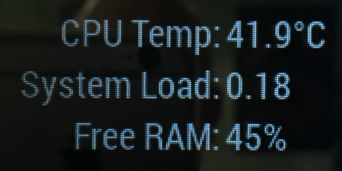
      I was waiting to see what sort of response you would get about the fan. I’ve been wanting to add a fan although all searches say that the Pi can run without problems up to 80°C or more. That “seemed” hot to me. My Pi was running at 60°C, which is well under the maximum that I discovered. So, I took it upon myself to add a fan (I have spare parts lying around) and connected it to a 5V pin and a GRD pin on the GPIO header. I’ve been running the mirror all day without a hitch and my CPU temp is nearly 20°C cooler. Have a look.

      0_1486693124992_temploadram3.png

      posted in General Discussion
      Mykle1M
      Mykle1
    • RE: MMM-phone-notifications & text messages

      @crowbar

      I do not have an answer for you, sorry. However, I’d be interested to know if you get it working, and in that case, if it would work with an iPhone 6

      posted in Troubleshooting
      Mykle1M
      Mykle1
    • RE: Internet Monitor

      Well, I waited over and hour, staring at the console, and nothing happened since I ran:
      pm2 flush
      pm2 logs

      Here is what I’ve been staring at:

      pi@Pi3:~ $ pm2 flush
      [PM2] Flushing /home/pi/.pm2/pm2.log
      [PM2] Flushing
      [PM2] /home/pi/.pm2/logs/mm-out-0.log
      [PM2] /home/pi/.pm2/logs/mm-error-0.log
      [PM2] Logs flushed
      pi@Pi3:~ $ pm2 logs
      [TAILING] Tailing last 10 lines for [all] processes (change the value with --lines option)
      /home/pi/.pm2/pm2.log last 10 lines:
      /home/pi/.pm2/logs/mm-out-0.log last 10 lines:
      /home/pi/.pm2/logs/mm-error-0.log last 10 lines:
      [STREAMING] Now streaming realtime logs for [all] processes
      
      posted in Utilities
      Mykle1M
      Mykle1
    • RE: Internet Monitor

      I’ve been waiting for 34 minutes and nothing has happened. My console still reads:

      [STREAMING] Now streaming realtime logs for [all] processes.

      Am I supposed to do something? run MM with your module perhaps? You didn’t say

      posted in Utilities
      Mykle1M
      Mykle1
    • RE: Internet Monitor

      @ronny3050 ok, I’m waiting for it to complete

      posted in Utilities
      Mykle1M
      Mykle1
    • RE: Internet Monitor

      @ronny3050 wait for it to complete doing something? Will it stop by itself or I have to do something?

      If so, what do I have to do?

      It’s running now

      posted in Utilities
      Mykle1M
      Mykle1
    • RE: Internet Monitor

      @ronny3050 - this is what I got when I ran pm2 logs

      [TAILING] Tailing last 10 lines for [all] processes (change the value with --lines option)
      /home/pi/.pm2/logs/mm-error-0.log last 10 lines:
      0|mm       | npm ERR!     npm bugs magicmirror
      0|mm       | npm ERR! Or if that isn't available, you can get their info via:
      0|mm       | npm ERR!     npm owner ls magicmirror
      0|mm       | npm ERR! There is likely additional logging output above.
      0|mm       | 
      0|mm       | npm ERR! Please include the following file with any support request:
      0|mm       | npm ERR!     /home/pi/MagicMirror/npm-debug.log
      0|mm       | ERROR! Could not find main module js file.
      0|mm       | ERROR! Could not find main module js file.
      0|mm       | ERROR! Could not find main module js file.
      
      /home/pi/.pm2/logs/mm-out-0.log last 10 lines:
      0|mm       | Starting module: newsfeed
      0|mm       | Sockets connected & modules started ...
      0|mm       | Launching application.
      0|mm       | Create new calendar fetcher for url: http://www.calendarlabs.com/templates/ical/US-Holidays.ics - Interval: 300000
      0|mm       | Create new calendar fetcher for url: https://calendar.google.com/calendar/ical/themykle%40themykle.com/private-XXXXXXXXXXXXXXXXXXXXXXXXXXXXXXXXXX/basic.ics - Interval: 300000
      0|mm       | Create new news fetcher for url: http://www.nytimes.com/services/xml/rss/nyt/HomePage.xml - Interval: 300000
      0|mm       | 
      0|mm       | > magicmirror@2.1.0 start /home/pi/MagicMirror
      0|mm       | > electron js/electron.js
      0|mm       | 
      
      [STREAMING] Now streaming realtime logs for [all] processes
      
      posted in Utilities
      Mykle1M
      Mykle1
    • RE: Internet Monitor

      @Mar said in Internet Monitor:

      @Mykle1 As I posted up above, seems like others are having the same issue. I noticed that in the logs the internet monitor is posting the speed every few seconds so I was thinking this was a probably cause?

      Though the amount of slowdown just to show the wifi indicator was a little too much

      My problem isn’t slowdown, it’s crashing my MM2 (see previous post) so I’m trying to get the the logs so I can post them and perhaps get a fix. Also, I’m on a Pi3

      posted in Utilities
      Mykle1M
      Mykle1
    • RE: Internet Monitor

      @cowboysdude said in Internet Monitor:

      /root/.pm2/logs/

      when I try cd root it says permission denied. I tried sudo cd root and it said bad command.

      So, how do I get to the logs so I can post them?

      posted in Utilities
      Mykle1M
      Mykle1
    • RE: Internet Monitor

      @cowboysdude said in Internet Monitor:

      /root/.pm2/logs/

      Thanks bro, I’ll look into that in a little while

      posted in Utilities
      Mykle1M
      Mykle1
    • 1
    • 2
    • 215
    • 216
    • 217
    • 218
    • 219
    • 220
    • 217 / 220