@sdetweil
It only runs a patched version of stretch right now. I am able to do the project I was wanting to do with it… at $55 it is a little pricey and a LOT more work to get running debian, but it is doing the job. Finally found a wireless adapter for the Libre and it is rock steady… Only thing I do not like is I can not seem to get it to boot from a usb drive has to be from sd card…
Fun little learning experience…
 P
Offline
P
Offline
A New Chapter for MagicMirror: The Community Takes the Lead
Read the statement by Michael Teeuw here.
Read the statement by Michael Teeuw here.
Posts
-
RE: Can MagicMirror run on other similarily priced hardware?
-
RE: MMM-OpenWeatherForecast - Replacement for MMM-DarkSkyForecast
@lxne
So, is that going to be the API for Dark Sky to run on in 2023? -
RE: Can MagicMirror run on other similarily priced hardware?
@sdetweil
Will MM run on Libre Computer Board AML-S905X-CC (Le Potato) 2GB 64-bit Mini Computer they are only $55 on amazon. I think they will run Debian pretty easily.
I am going to try a few other projects with it that I have been wanting to do on a RPi, but they are pretty pricey right now. I thought this was worth a try. If it doesn’t work out, I will try a few of the projects on the support forum they have. -
RE: Can MagicMirror run on other similarily priced hardware?
@sdetweil said in Can MagicMirror run on other similarily priced hardware?:
gallium
That looks like a very good option while the Raspberry Pi are so expensive.
I just bought a refurbed chrome book that is in the list supported by gallium.
Going to give gallium a try when it arrives.
Do you know if I could just load debian on the chrome book?
I want to try a few different programs and they all require Debian or Ubuntu… -
RE: Building mirror without programing
@sdetweil Does your script work on windows 10 or chrome book???
-
RE: MMM-OpenWeatherForecast - Replacement for MMM-DarkSkyForecast
Thank you all for information. I was upset. I really like the way my Darksky weather module looks on my screen. I guess in march next year I will think about having to change over to something else. Maybe by then someone will make it so the Darksky module works with another weather api…
-
RE: MMM-OpenWeatherForecast - Replacement for MMM-DarkSkyForecast
When will Darksky fail to work anymore.
I have it running now and it works fine.
What am I missing? -
RE: MMM-GmailFeed Trouble
@Ray
It was caused by google / gmail forcing 2 step verification down our throats .
The one time use app passwords 16 digit code is a great work around at least.
There are lots of instructions out there on how to use it. -
RE: MMM-NetworkScanner
Thank you for the information, I am still having issues with the list going off the screen. I am trying different areas on the screen to see if that makes a differance.
-
RE: MMM-NetworkScanner
@xadamxk
You gonna fix this problem for me.? I have done a little research on it and it is way above my pay grade… -
RE: Default Calendar
@sdetweil
Thanks I will look into it when i get time. I have carousel working pretty well now. 33 out of the 40 I had working on MM before update to 2.18, so I am plenty happy… -
RE: MMM-IPCam format
@thephantom_nl
I changed over to omxplayer and solved my problems with it resizing on restart.
I can not find the bookmark for how to install omxplayer. Must have not saved it.
Google it that is what I did… -
RE: [MMM-GmailFeed] - Simple Gmail unread messages list/notification
@sdetweil said in [MMM-GmailFeed] - Simple Gmail unread messages list/notification:
@plainbroke module install instructions
git clone https://github.com/shaneapowell/MMM-GmailFeed.git
cd MMM-GmailFeed
npm install
the GitHub page is the README.MD file
also, if the module has a package.json you need to npm install ( in the new module folder), even if they don’t say so
I did all the npm install and it still did not work until I did the “npm install request” in the MagicMirror/modules folder, that alone fixed almost all my install issues… Could hardly believe something so simple fixed so much… And yes I have been running npm install in all my modules folders just to be safe. That pm2 restart mm && pm2 log lines=50 ( i think that is correct) really made life easier… Thanks to all whom helped with my issue…
-
RE: MMM-Carousel - how to configure a module multiple times on the SAME page?
@fantasmic78
This is what 2 instances of calendar look like in my carousel setup.
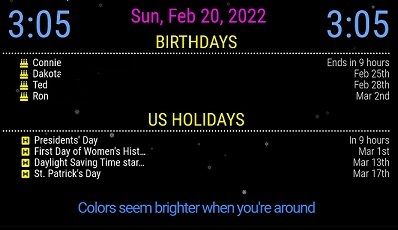
is that what you are trying to do?
-
RE: MMM-NetworkScanner
@sdetweil
Thanks for looking I was afraid of that. I will put a request in for a hopeful change by the maker… -
RE: Default Calendar
@sdetweil
Sorry I do not understand what you mean. “define another calendar module”.
I have the events combined right now I really would like them as two seperate calendars. I use carousel remember. My Calendars cover most of the screen. -
Default Calendar
Re: Default Modules
Is there a way to have 2 calendars I used to have 1 for Birthdays and one for holidays. I simply renamed the default calendar to calendarh and moved it to the moduels folder and in the config.js the config was under calendarh
I also renamed the css and js files for calendarh directory. I had to go in and change a few things in the js and the css. It all worked so nice. now I can not do that for some reason. Any suggestions what I may be doing wrong this time… ?{ module: "calendar", position: "middle_center", header: "Birthdays", config: { fade: false, maximumEntries: 4, timeFormat: "absolute", urgency: 3, getRelative: 24, calendars: [ { symbol: "birthday-cake", url: "https://calendar.google.com } ] } }, { module: "calendarh", position: "middle_center", header: "US Holidays", config: { fade: false, maximumEntries: 4, timeFormat: "absolute", urgency: 3, getRelative: 24, calendars: [ { symbol: "h-square", url:"https://calendar.google.com/calendar/ical/en.usa%23holiday%40group.v.calendar.google.com/public/basic.ics" } ] } }, -
MMM-NetworkScanner
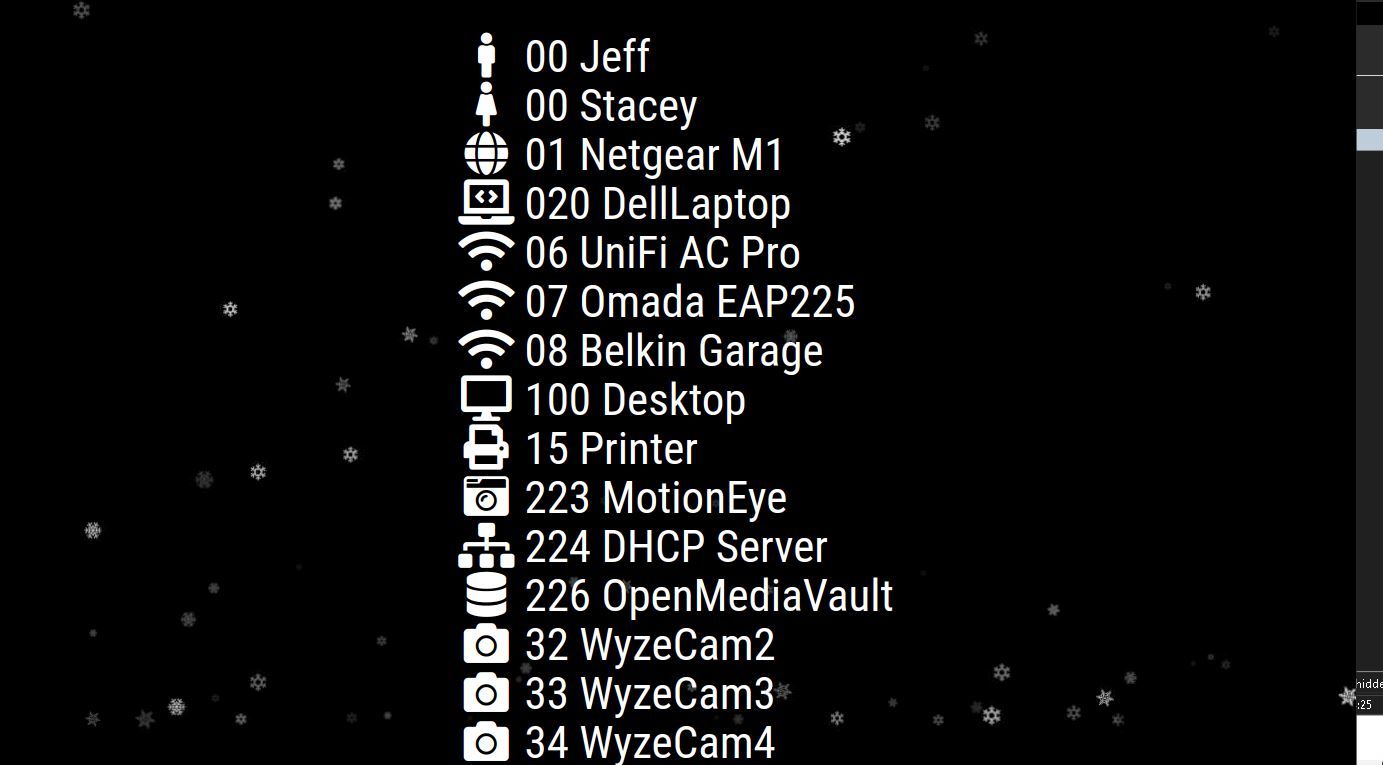
Is there a way to have two columns side by side of output to the screen?
I have more in the module being checked than will fit on the screen in one column.
I have even made the font smaller so I could get the important ones to show.