A New Chapter for MagicMirror: The Community Takes the Lead
Read the statement by Michael Teeuw here.
  • Magic Mirror not starting after upgrade on Raspberry Pi2

    1
    0 Votes
    1 Posts
    812 Views
    H
    I upgraded MM today to version 2.4.1 on my raspberry Pi 2. I did the npm install but now getting the following error: 0 info it worked if it ends with ok 1 verbose cli [ ‘/usr/bin/nodejs’, ‘/usr/bin/npm’, ‘start’ ] 2 info using npm@1.4.21 3 info using node@v4.8.2 4 verbose run-script [ ‘prestart’, ‘start’, ‘poststart’ ] 5 info prestart magicmirror@2.4.1 6 info start magicmirror@2.4.1 7 verbose unsafe-perm in lifecycle true 8 info magicmirror@2.4.1 Failed to exec start script 9 error magicmirror@2.4.1 start: sh run-start.sh 9 error Exit status 127 10 error Failed at the magicmirror@2.4.1 start script. 10 error This is most likely a problem with the magicmirror package, 10 error not with npm itself. 10 error Tell the author that this fails on your system: 10 error sh run-start.sh 10 error You can get their info via: 10 error npm owner ls magicmirror 10 error There is likely additional logging output above. 11 error System Linux 4.14.52-v7+ 12 error command “/usr/bin/nodejs” “/usr/bin/npm” “start” 13 error cwd /home/pi/MagicMirror 14 error node -v v4.8.2 15 error npm -v 1.4.21 16 error code ELIFECYCLE 17 verbose exit [ 1, true ]
  • This topic is deleted!

    Unsolved
    2
    0 Votes
    2 Posts
    14 Views
  • config file issue

    Unsolved
    2
    0 Votes
    2 Posts
    783 Views
    S
    @oj96 said in config file issue: accessToken: ‘xxxxxxxxxxxxxxxxxxxxxxxxxxxxxxxx’ lists: [ “inbox”], interval: 60 fade: true } }, ] modules: [ well, a bunch of problems… 1 you have the wrong single and double quotes here… do NOT use a word processing editor… only a text editor… (nano or gedit or vi)… 2. missing comma after accesstoken line and interval line and u have two modules: [ blocks… quick way to test your config for syntax… copy/paste it all to jslint.com check long lines, single quotes, and whitespace mess at the bottom, then press jslint then copy/paste it back to the config.js file.
  • Screen cannot rotate after upgrade to 2.4.0

    Unsolved
    4
    0 Votes
    4 Posts
    2k Views
    S
    Read and Read and found the solution regarding cannot upgrade to 2.4.0 git reset --hard; git clean -df;
  • Newbie to everything - Error in module and cant work out why!

    Unsolved
    12
    1
    0 Votes
    12 Posts
    6k Views
    S
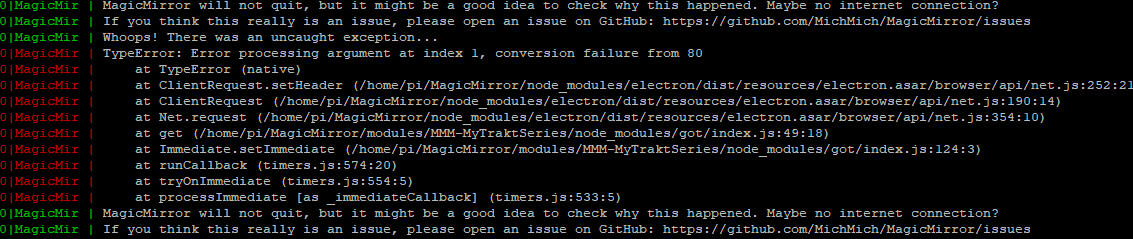
    @erycken said in Newbie to everything - Error in module and cant work out why!: loader.js:182 Load script: modules/MMM-MyTraktSeries//MMM-MyTraktSeries.js module.js:477 Module registered: MMM-MyTraktSeries loader.js:152 Bootstrapping module: MMM-MyTraktSeries loader.js:237 File already loaded: moment.js loader.js:157 Scripts loaded for: MMM-MyTraktSeries loader.js:197 Load stylesheet: modules/MMM-MyTraktSeries/MMM-MyTraktSeries.css loader.js:159 Styles loaded for: MMM-MyTraktSeries translator.js:170 MMM-MyTraktSeries - Load translation fallback: translations/en.json loader.js:161 Translations loaded for: MMM-MyTraktSeries … MMM-MyTraktSeries.js:22 Starting module: MMM-MyTraktSeries main.js:422 All modules started! … module.js:156 MMM-MyTraktSeries received a system notification: ALL_MODULES_STARTED … module.js:154 calendar received a module notification: CURRENTWEATHER_DATA from sender: currentweather so, from the log, your module is loaded and running… so, what do you do to present info? how does your module respond to the getDom() method call? that is how it provides data to be displayed…
  • Weather forecast only displays 'invalid date'

    Solved
    21
    0 Votes
    21 Posts
    91k Views
    B
    Awesome, v2.4.1 fixed it Thanks @MichMich :)
  • Help! Problem updating to v2.3.1

    2
    0 Votes
    2 Posts
    881 Views
    MichMichM
    @kullboys https://forum.magicmirror.builders/topic/7581/can-t-update/4
  • Can't Update

    4
    0 Votes
    4 Posts
    3k Views
    D
    @michmich Thasnks MitchMitch. That did it.
  • Downgrade Magic Mirror?

    14
    0 Votes
    14 Posts
    9k Views
    Mykle1M
    @kastore https://github.com/MichMich/MagicMirror/releases
  • Which version of raspbian? Jessie? Stretch?

    Unsolved
    2
    0 Votes
    2 Posts
    2k Views
    MichMichM
    You can use the latest version, but make sure you use the full version. Not the lite version.
  • MMM-Assistant Jarvis.umdl set up

    Unsolved
    3
    0 Votes
    3 Posts
    2k Views
    M
    @plachu I’m using 2.4.1 It recognizes the jarvis hotword with file: ‘resources/u-models/jarvis.umdl’, sensitivity: ‘0.8,0.80’, hotwords: [‘jarvis’,‘jarvis’] but the microphone turns red right after recognizing the hotword and doesn’t do anything afterwards.
  • This topic is deleted!

    Unsolved
    1
    0 Votes
    1 Posts
    40 Views
  • MMM-MyWeather doesn't show up

    3
    0 Votes
    3 Posts
    2k Views
    S
    @axled I think it’s because I don’t have the WU API i was trying to use one from OpenWeather
  • This topic is deleted!

    Unsolved
    1
    0 Votes
    1 Posts
    4 Views
  • static text to MM2

    Solved
    5
    0 Votes
    5 Posts
    2k Views
    K
    Hi @yawns , thanks a lot. This works fine after I copied your code into my file. Just typing the rest of the missing code does´nt worked. I had to copy the code. I assume a missing ; or ,. Anyway I fixed with your help. Thanks a lot!
  • Trying to change header colors

    1
    0 Votes
    1 Posts
    679 Views
    S
    I’m not sure what I’m doing wrong here, the others seem to be working… .weatherforecast .header { color: #09F; } .calendarweekly .header { color: #09F; }
  • localhost:8080 shows MagicMirror, but Electron just shows a blank screen

    Unsolved
    4
    0 Votes
    4 Posts
    2k Views
    R
    DOH! I deleted the local MagicMirror directory and ran the install script.
  • Npm stopped working, npm install dont work

    Unsolved
    1
    0 Votes
    1 Posts
    693 Views
    M
    Hi, my npm has stopped working. I reinstalled node and deleted node_modules folder and tried to run “npm install” command and it says ERROR “sha512-YZotALyZD1xJixB8pNOKqBpmxV/NrOpMHQ3l7/CMB1hn5U7KRSviaeyv8/1MT7/rTgEFPOW85mdaFKFr2EfeAw== integrity checksum failed when using sha512: wanted sha512-YZotALyZD1xJixB8pNOKqBpmxV/NrOpMHQ3l7/CMB1hn5U7KRSviaeyv8/1MT7/rTgEFPOW85mdaFKFr2EfeAw== but got sha512-qOBOtp4vM2cf7NdCiUjnvLp7thkR43HUzrIO1HwknT6fj8D8Nc6IjtTqUS1WAYq8n6axCVB8GFGMptaY6ic/kw==. (178754 bytes)”. Complete log: https://www.scribd.com/document/383017992/2018-07-02T07-22-59-541Z-debug
  • Google Routes modules just showing white square! Send Help!

    1
    1 Votes
    1 Posts
    708 Views
    S
    Hi MM Peeps, I’m trying to load the google routes module, I’ve entered the api key and the city ids but all that shows up is a white square? Any help will be greatly appreciated
  • This topic is deleted!

    Unsolved
    1
    0 Votes
    1 Posts
    9 Views