A New Chapter for MagicMirror: The Community Takes the Lead
Read the statement by Michael Teeuw here.
  • MMM-Mail - check more than one mail account?

    1
    0 Votes
    1 Posts
    1k Views
    ManmachineM
    @Pieps Hi, Is it possible to check more than one mail account? If yes Could you give a sample configuration?
  • 0 Votes
    2 Posts
    4k Views
    brobergB
    @xy86 you have to get in to the magic mirror folder first before you can run npm start Ie type cd MagicMirror And then npm start Or display=:0 npm start If you are running it via ssh
  • MMM-ModuleScheduler -----> MMM-Globe ?

    Solved
    2
    0 Votes
    2 Posts
    2k Views
    I
    @ironman_DK Solved : I forgot to write the module MMM-Globe in to MMM-ModuleScheduler in Config.JS, now everything is working.
  • messed up my config.. MM tells me to create a config file

    31
    0 Votes
    31 Posts
    24k Views
    yawnsY
    What are you installing PHP5 and apache2 for?
  • stumped newbe

    40
    0 Votes
    40 Posts
    24k Views
    Mykle1M
    @trader-dude Ha! I thought you forgot. Peace :beers:
  • AM/PM times shown even with timeFormat: 24,

    6
    0 Votes
    6 Posts
    4k Views
    R
    @Richard238 Is a knowed issue https://github.com/MichMich/MagicMirror/issues/776 If you can help with that go ahead with a Pull Request.
  • cant receive any email :(

    1
    0 Votes
    1 Posts
    1k Views
    P
    im using https://github.com/ronny3050/email-mirror but i cant recieve any email, here’s the actual error Email notifier error: { Error: Timed out while connecting to server at Timeout._onTimeout (/home/pi/MagicMirror/modules/email/node_modules/imap/lib/Connection.js:280:15) at ontimeout (timers.js:365:14) at tryOnTimeout (timers.js:237:5) at Timer.listOnTimeout (timers.js:207:5) source: ‘timeout’ }
  • MMM-Doomsday - remove space ?

    4
    1
    0 Votes
    4 Posts
    2k Views
    pjkoelemanP
    @ironman_DK When you want to learn something about CSS I use w3schools.com. When you want to have a look at the used styles start your MagicMirror with ‘npm start dev’ than you can see the used style off the modules.
  • MMM-Voice

    3
    0 Votes
    3 Posts
    2k Views
    P
    @strawberry-3.141 not really, it is at home/MagicMirror But when I run the bash I am at home/MagicMirror/modules/MMM-voice/installers
  • MMM-Traffic - make text lighter ?

    10
    1
    0 Votes
    10 Posts
    5k Views
    I
    @pjkoeleman ahh off course,I have done it, Thnak you for your help :-)
  • Magic mirror raspberry pi zero wireless??

    2
    0 Votes
    2 Posts
    2k Views
    Mykle1M
    @freya Your answer may be here https://forum.magicmirror.builders/topic/1183/how-i-got-my-magic-mirror-working-on-a-raspberry-pi-0-zero Copied from there: Setting up a WIFI connection. Although this might be common knowledge, I had to do some research to get my Pi accessible via SSH (we will talk about that later) to get the work done. Your first step will be to connect the Pi to the monitor and plug in your keyboard. When you power on your Pi a list of fancy words will appear and at some point you will be greeted with green letters and the ability to type, and so we will type like our lives depend on it! The first thing you want to type is: sudo nano /etc/wpa_supplicant/wpa_supplicant.conf This opens a document called ‘wpa_supplicant.conf’, basically the place where we can tell our Pi to connect to our WIFI. In this document we want to insert the following text: network={ ssid=“Your_wifi_name” psk=“Your_wifi_password” } Replace ‘Your_wifi_name’ with the name of your Wifi Network and replace ‘Your_wifi_password’ with your Wifi networks password. Make sure to match both the name and password exactly, including capital letters etc. Also keep the name/password surrounded with the "s, without these it won’t work. If you have multiple networks you want your Pi to be able to connect to, you can add the inserted text multiple times. I only tested it with 2 at the moment, and that seems to work just fine. When you’re done editting the file, press crtl+x to close the file, it will ask you if you want to save the changes you made, accept this by pressing ‘y’ and finally press enter to go back to your command line. At this point you can shut down your Pi by typing ‘sudo shutdown’ and waiting a minute.

  • MagicMirror in bathroom

    5
    0 Votes
    5 Posts
    3k Views
    D
    @cowboysdude Even with exposed boards?
  • Not able to SSH into MM

    3
    0 Votes
    3 Posts
    2k Views
    A
    @deadherring make sure you’re on the same network as the pi, unless you open a SSH tunnel - then you can connect to your router and further into your pi as if you were on your network. You can use SSH on your phone too, that will eliminate the need of a computer with keyboard and mouse. :)
  • merging Google calendar with MM calendar?

    10
    0 Votes
    10 Posts
    6k Views
    P
    @Mykle1 Thanks!
  • This topic is deleted!

    1
    0 Votes
    1 Posts
    78 Views
  • need help with config file

    17
    1 Votes
    17 Posts
    27k Views
    D
    @strawberry-3.141 That’s exactly what was wrong with it. I went back into the config folder, and at the top I saw the word metric laughing at me.
  • "camera by alexyak"module problem !

    1
    1
    0 Votes
    1 Posts
    936 Views
    A
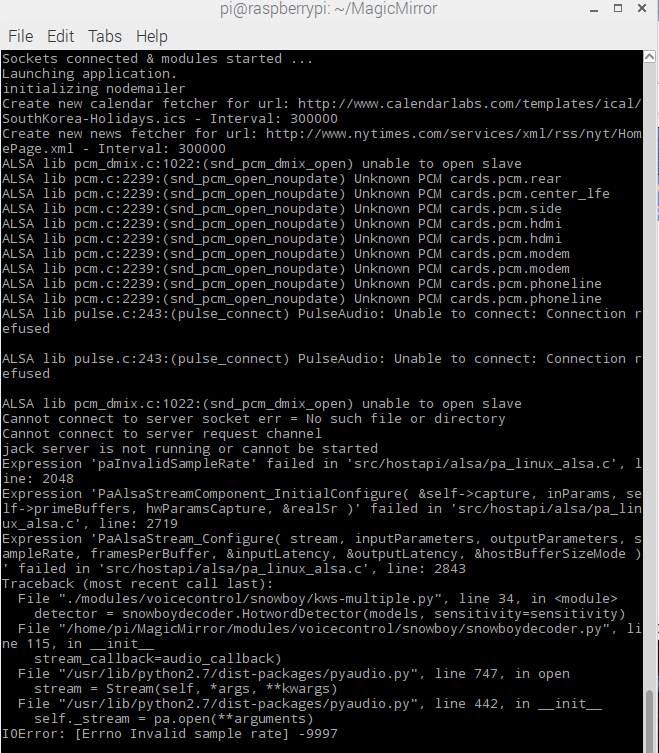
    Hello everyone! anyone using the module 'Camera by alexyak"? I connected my web cam and mic which is connected by USB to raspberrypi3, but everytime I do npm start it shows these errors … How should I do if I want to fix these ALSA problems? [image: 1490191638120-1.png]
  • Help Me Please

    2
    0 Votes
    2 Posts
    1k Views
    strawberry 3.141S
    @jonny4500 you have to run npm start in a terminal in the magicmirror directory, you cant just open the index.html file in a browser
  • Word dependant text color change.

    2
    0 Votes
    2 Posts
    1k Views
    strawberry 3.141S
    @Richard238 from my knowledge there is no possibility to set a css rule based on an element content
  • PM2 Error

    7
    0 Votes
    7 Posts
    4k Views
    A
    @KnottyCord You are correct - you are running systemd (not plain old linux). PM2 does not seem to “realize” that. Note that there is ANOTHER problem with PM2 that is now reported as a bug - read all about it here: https://forum.magicmirror.builders/topic/2065/solved-pm2-does-not-start-on-reboot/10 Best of luck - and don’t hesitate to ask for help!