Read the statement by Michael Teeuw here.
MMM-Worldclock
-
@solelo Actually, no. For completeness here are my settings from config.js:
		{
			module: 'MMM-Worldclock',
			position: 'top_left', // This can be any of the regions, best in top_left or top_right regions
			config: {
			// See 'Configuration options' for more information.
				timeFormat: 'HH:mm', //Global time format, as defined in moment.js format()
				style: 'top', // Which way do you want the flag and description from the clock? choices are 'top', 'left','right','bottom'
				offsetTimezone: null, // Timezone you want to show the difference from. null, "", or omitted from config will be UTC.
				clocks: [
					{
						title: "Weltzeit",
						timezone: "UTC",
						// timeFormat: "HH:mm MM/DD", // Time format override.
						// altflag: "world.png" // if you'd like a flag from a file on your mirror device.
					},
					{
						title: "Vancouver", // Too long of a title could cause bad text align.
						timezone: "America/Vancouver",
						flag: "ca", // If you'd like a flag from the standard library
					},
					{
						title: "Boca Chica", // Too long of a title could cause bad text align.
						timezone: "America/Chicago", //When omitted, Local time will be displayed.
						flag: "us", // If you'd like a flag from the standard library
					},
					{
						title: "Sydney", // Too long of a title could cause bad text align.
						timezone: "Australia/Sydney",
						flag: "au", // If you'd like a flag from the standard library
					},
				]
			},
		},
Did you restart MM or do a reload (Ctrl-R)?
-
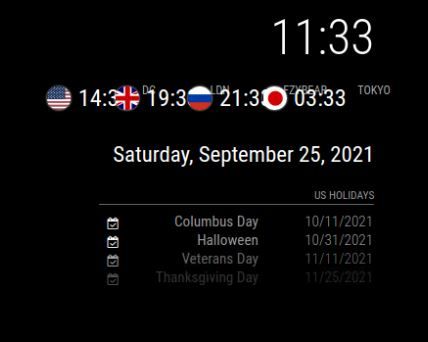
I added your custom css but the title is showing overlapped and I have it as style left, should I change it to top like yours?
-
@solelo Adjust the width to 200px
 .MMM-Worldclock .world {
       width: 200px;
 }
The module may also have an alignment problem on the right side. Further customization of custom.css may be required.
-
@macg Ok thanks I’ll mess around with it some more and see if I can get it customized. I figured it was simple as adding your custom css snippet in but I guess not
-
@solelo Just try to set the width higher and higher, eventually nothing will overlap anymore. But it will probably be quite wide, with the cities next to the time. Maybe that’s why style: ‘top’ is the better choice.
-
@solelo see this
https://forum.magicmirror.builders/topic/14862/help-with-a-couple-css-issues?_=1632064035932
u can change the styles livee and then save it to custom.css…
note that you can doc the dev window at the bottom too, using the 3 dot menu next to the X to close the dev window
-
A supplement to the development tools. When you open it, you can select “Sources” and pause script execution with the “pause button” or F8 in the lower third. This makes it easier to get through all the style classes, which otherwise update every second.
-
I used to install the original
woldclockmodule, just switched to this one and it worked out of the box.Thanks for the work. :clapping_hands:
-
How do I center horizontally at the top of the screen instead of left?
-
@SymmetriC put it in the top_center position
-
@sdetweil or top_bar
-
@sdetweil Thank you! That worked and the solution was easier than I thought! lol
-
@BKeyport, @ulrichwisser and all: Please let me know if the following questions would be better served under a new topic, but since my issues originated with this older module, and the new module shares the same name I thought it appropriate to post under this topic…
Issue: the old module is no longer supported by the developer, who suggests using a newer module which uses the same module name. After cloning the new module, the instructions call for doing an ‘npm ci’ command, which fails due to a lack of an existing package-lock,json file.
Question: Is there something different I should be doing, o si this something the developer needs to fix?
Old module: https://github.com/BKeyport/MMM-Worldclock
New module: https://github.com/ulrichwisser/MMM-Worldclock
Error Message:pi@mirror1:~/MagicMirror/modules $ cd MMM-Worldclock pi@mirror1:~/MagicMirror/modules/MMM-Worldclock $ npm ci npm ERR! code EUSAGE npm ERR! npm ERR! The `npm ci` command can only install with an existing package-lock.json or npm ERR! npm-shrinkwrap.json with lockfileVersion >= 1. Run an install with npm@5 or npm ERR! later to generate a package-lock.json file, then try again. npm ERR! npm ERR! Clean install a project npm ERR! npm ERR! Usage: npm ERR! npm ci npm ERR! npm ERR! Options: npm ERR! [--install-strategy <hoisted|nested|shallow|linked>] [--legacy-bundling] npm ERR! [--global-style] [--omit <dev|optional|peer> [--omit <dev|optional|peer> ...]] npm ERR! [--strict-peer-deps] [--foreground-scripts] [--ignore-scripts] [--no-audit] npm ERR! [--no-bin-links] [--no-fund] [--dry-run] npm ERR! [-w|--workspace <workspace-name> [-w|--workspace <workspace-name> ...]] npm ERR! [-ws|--workspaces] [--include-workspace-root] [--install-links] npm ERR! npm ERR! aliases: clean-install, ic, install-clean, isntall-clean npm ERR! npm ERR! Run "npm help ci" for more info npm ERR! A complete log of this run can be found in: /home/pi/.npm/_logs/2025-08-05T17_16_59_150Z-debug-0.log pi@mirror1:~/MagicMirror/modules/MMM-Worldclock $ -
@JohnGalt npm install then
-
@sdetweil – That’s what I thought. Just did that and it’s working now…
Thanks, as always!
-
My version of the module developed a fatal bug that I couldn’t get rid of… The best move was to shut it down.
-
@BKeyport – Sorry to hear that, but thanks for the module while you maintained it.
And a big thanks for directing us to another module, and not just leaving it hanging out there!
-
@BKeyport
Was the altflag option something that was related to the fatal bug in your version? If not, do you think it’s something that could be added to the latest one? -
@UncleRoger No, it wasn’t that. I forgot about that code. I might go back in and grab it and offer it to the other version once updated.



Hello! It looks like you're interested in this conversation, but you don't have an account yet.
Getting fed up of having to scroll through the same posts each visit? When you register for an account, you'll always come back to exactly where you were before, and choose to be notified of new replies (either via email, or push notification). You'll also be able to save bookmarks and upvote posts to show your appreciation to other community members.
With your input, this post could be even better 💗
Register Login