Read the statement by Michael Teeuw here.
Motion Detector
-
Never monitors turn off by themselve as soon as there is no signal or after a few minutes without signal. Mine was a old that did not turn on/off automatically.
I used wiringpi to activate a relais that turns the current of the monitor on and off. -
@danielis
Sorry I can’t get your point as English is not my first language.
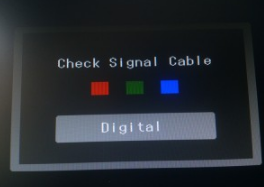
What I’m saying is that when the camera does not detect any movement, and the timeout setted is out, the monitor does not show the mirror, but after a few seconds appears something like this:
-
OK
But if there is a movement detected - is then the mirror shown?Why do you expect to see the mirror after the timeout?
The mirror must be on if there is a movement. And if there is no movement and the timeout is over, then is the mirror off.
That is what you want and what this module is doing.I think your problem is that as soon as the mirror is off, your monitor should turn off - right?
-
@danielis said in Motion Detector:
ur problem is that as soon as the mirror is off, your monito
Yes sir, that is my problem, the module seems to be working fine, but it is a bit annoying to see the alert when the mirror is off
-
Yes, that was what I tried to say in my first post yesterday.
I had the same problem.
Old monitors do not turn off by themselve if there is no signal. Newer monitor do turn off, and all is fine.My solution was tu use a relais to turn on/off the current of the monitor. Therefore I used a pin of the GPIOs to control the relais.
For controlling this GPIO pin I used the wiringpi library
I had to add some lines in the node_helper.js - please look at the lines with: exec("gpio -g …
pi@magicmirror:~/MagicMirror/modules/motiondetector $ more node_helper.js'use strict'; /* Magic Mirror * Module: MMM-PIR-Sensor * * By Paul-Vincent Roll http://paulvincentroll.com * MIT Licensed. */ const NodeHelper = require('node_helper'); const exec = require('child_process').exec; var moment = require('moment'); module.exports = NodeHelper.create( { start: function () { //this.started = false; exec("gpio -g write 4 1", null); console.log('motiondetector started ...'); console.log('monitor relais on'); }, activateMonitor: function () { exec("gpio -g write 4 1", null); console.log(moment().format() + ' monitor relais on'); //this.started = false; }, deactivateMonitor: function () { exec("gpio -g write 4 0", null); console.log(moment().format() + ' monitor relais off'); //this.started = false; }, socketNotificationReceived: function (notification) { //const self = this; if (notification === 'MOTION_DETECTED') { //const self = this; //this.started = true; this.activateMonitor(); } if (notification === 'DEACTIVATE_MONITOR') { //const self = this; //this.started = true; this.deactivateMonitor(); } } } ); -
@danielis Hi! I’ve tried, but still can’t get it. So I was thinking, instead of putting of the monitor, is it possible to show a black image for example?
So when it detects movement, the MM appears, and when not, a black photo is shown.
Is it possible? -
@pepemujica
There is a module called HideAll (or something similar) which simply hides all modules and leaves a black background. Maybe you want to try it -
Could someone please write up a working instruction for the motion detector with the rasperry pi camera? Not the pir sensor, need to make use of the camera somehow. :)
-
@alexyak Does this module switch off the pi, i’m only asking since i have Alexa running in the background which requires 3 terminals to be open all the time? If the pi goes into ‘standby’ or goes off i have to re-enter the information into the 3 terminals consecutively to get it up and running again. Thanks
Mick -
@Kimzer I wrote up a method using a version of Motion for the RasPi. It’s under the tutorials section of the forum. It’s a non-module solution, so there’s some weirdness involved. But I did get it to work with a Raspicam.
@mickyas - This module doesn’t switch off the pi, it just switches off the output to the monitor.
-
@bhepler Yup that’s what I did too.
-
I’m trying to use this model on my Raspberry Pi Zero W with the Raspberry Cam. I run
MM in serveronly mode, using the Midori-browser. This setup itself works fine and also the camera is able to make picturesraspistill -o testpicture.jpgHowever, if I try to add the ‘motiondetector’ module to the config I just get an empty (black, but not switched of) screen after reboot. This is even the case for a very small config.js :
var config = {
        port: 8080,
        ipWhitelist: ["127.0.0.1", "::ffff:127.0.0.1", "::1"],
        language: "en",
        timeFormat: 24,
        units: "metric",

        modules: [
                {
                        module: "clock",
                        position: "top_left"
                },
            {
                    module: 'motiondetector',
                    config: {
                            timeout: 5*60*1000
                    }
            },
        ]

};

/*************** DO NOT EDIT THE LINE BELOW ***************/
if (typeof module !== "undefined") {module.exports = config;}
Things I did:
cd ~/MagicMirror/modules
git clone https://github.com/alexyak/motiondetector
Added line
bcm2835-v4l2to/etc/modulesandhdmi_blanking=1to/boot/config.txtIf I omit the motiondetecotor entry in the config.js it loads fine and I can see the loaded modules. If I execute
/opt/vc/bin/tvservice -othe screen goes off (completely black). I I afterwards run
/opt/vc/bin/tvservice --preferred && sudo chvt 6 && sudo chvt 7the background light of the screen goes on, however the modules that were there previously don’t show up again ( I waited for several minutes).
If I run/opt/vc/bin/tvservice --preferred && sudo chvt 6 && sudo chvt 2the modules become visible again. Therefore I changed the line in
~/MagicMirror/modules/motiondetector/node_helper.jsaccordingly. However then I got still an empty screen and in the log:
Jul 16 18:59:23 me startMagicMirror.sh[480]: ** Message: console message: [native code] @0: Starting module: motiondetector
Jul 16 18:59:23 me startMagicMirror.sh[480]: ** Message: console message: http://localhost:8080/modules/motiondetector//motiondetector.js @39: TypeError: Attempted to assign to readonly property.
Jul 16 18:59:24 me startMagicMirror.sh[480]: monitor :state 0x12000a [HDMI DMT (82) RGB full 16:9], 1920x1080 @ 60.00Hz, progressive
Jul 16 18:59:24 me startMagicMirror.sh[480]: ** Message: console message: http://localhost:8080/js/main.js @134: TypeError: null is not an object (evaluating 'moduleWrapper.getElementsByClassName')
To me as a beginner it looks like a permission problem. However even making the motiondetector folder and all files therein rw for everybody it didn’t work.
I hope that somebody who has knowledge about JS can comment on this issue. Many thanks in advance.
-
@Hawking try to change line 39 to:
cameraPreview.style.visibility = "hidden"; -
Thanks for the quick help. I also found the line in motiondetector.js a bit strange (why the semicolon within the parenthesis…) but as I don’t know JS or details about the code, I couldn’t judge.
I still have the same effect (blank screen) but the new error message is
Jul 17 23:16:55 me startMagicMirror.sh[445]: ** Message: console message: [native code] @0: Starting module: motiondetector
Jul 17 23:16:55 me startMagicMirror.sh[445]: ** Message: console message: http://localhost:8080/modules/motiondetector//diff-cam-engine.js @81: TypeError: undefined is not an object (evaluating '(navigator.getUserMedia || navigator.webkitGetUserMedia || navigator.mozGetUserMedia || navigator.msGetUserMedia).call')
Maybe all these things give empty? As a workaround I surrounded the function by
function requestWebcam() {
         var self = this;
         method = (navigator.getUserMedia || navigator.webkitGetUserMedia || navigator.mozGetUserMedia || navigator.msGetUserMedia);
                   if ( !! method ) {
                     ....
                  }
}
Now at least the other modules load successfully.
However, the modules don’t get deactivated after some minutes :-/ I assume that one of these navigator methods is needed for the motiondetector to work? If I look at https://developer.mozilla.org/en/docs/Web/API/Navigator/getUserMedia they seem anyway outdated? How would the user grand permission in a headless setup? Does somebody know if they are supported by the Midori browser? -
@Hawking As far as I know electron exposes the audio and video access, but in midori you probably need to allow the access manually
-
Hi, I’m a total noob to all this, but have recently started a project to build a magic mirror. I’ve got MagicMirror setup, and have the modules I want working. Now I’d like to use the motiondetector module, but although it appears to run without any error, the monitor itself is not turning off.
I’ve tested the camera module and that is working, and I can see an image / record video etc. I’ve also tested running the tvservice commands directly and both of these work as expected:
/opt/vc/bin/tvservice -o
/opt/vc/bin/tvservice --preferred && sudo chvt 6 && sudo chvt 7Only change I have made is to the timeout (30000 so I’m not waiting for too long before the screen should turn off).
My config.js has the following entry for motiondetector:
/* Magic Mirror Config Sample
 *
 * By Michael Teeuw http://michaelteeuw.nl
 * MIT Licensed.
 *
 * For more information how you can configurate this file
 * See https://github.com/MichMich/MagicMirror#configuration
 *
 */

var config = {
	port: 8080,
	ipWhitelist: ["127.0.0.1", "::ffff:127.0.0.1", "::1","192.168.7.4"], // Set [] to allow all IP addresses
	                                                       // or add a specific IPv4 of 192.168.1.5 :
	                                                       // ["127.0.0.1", "::ffff:127.0.0.1", "::1", "::ffff:192.168.1.5"],
	                                                       // or IPv4 range of 192.168.3.0 --> 192.168.3.15 use CIDR format :
	                                                       // ["127.0.0.1", "::ffff:127.0.0.1", "::1", "::ffff:192.168.3.0/28"],

	language: "en",
	timeFormat: 24,
	units: "metric",

	modules: [
		{
			module: "alert",
		},
		{
			module: "updatenotification",
			position: "top_bar"
		},
		{
			module: "clock",
			position: "top_left"
		},
		{
			module: "calendar",
			header: "UK Holidays",
			position: "top_left",
			config: {
				calendars: [
					{
						symbol: "calendar-check-o ",
						url: "webcal://www.gov.uk/bank-holidays/england-and-wales.ics"
					}
				]
			}
		},
		{
			module: "currentweather",
			position: "top_right",
			config: {
				location: "London",
				locationID: "xxxxxxx",  //ID from http://www.openweathermap.org/help/city_list.txt
				appid: "xxxxxxxxxxxxxxxxxxxxxxxxxxxxxxxx"
			}
		},
		{
			module: "weatherforecast",
			position: "top_right",
			header: "Weather Forecast",
			config: {
				location: "London",
				locationID: "xxxxxxx",  //ID from http://www.openweathermap.org/help/city_list.txt
				appid: "xxxxxxxxxxxxxxxxxxxxxxxxxxxxxxxx"
			}
		},
		{
			module: "newsfeed",
			position: "bottom_bar",
			config: {
				feeds: [
					{
						title: "BBC News",
						url: "http://feeds.bbci.co.uk/news/rss.xml?edition=uk"
					},
					{
						title: "BBC London",
						url: "http://feeds.bbci.co.uk/news/england/london/rss.xml"
					},
				],
				showSourceTitle: true,
				showPublishDate: true
			}
		},
    {
		module: 		'MMM-UKNationalRail',
		position: 		'top_left',
		header:			'Departures',		//Optional - delete this line to turn OFF the header completely
		config: {
			stationCode: 		'xxx', 		// CRS code for station
			app_id: 			'xxxxxxx', 		// TransportAPI App ID
			app_key: 			'xxxxxxxxxxxxxxxxxxxxxxxxxxxxxxxx', 		// TransportAPI App Key
			maxResults: 		5,  		//Optional - Maximum results to display.
			showOrigin: 		false   	//Optional - Show the origin of the train in the table
		}
	},
	{
    module:		'MMM-Tube-Status',
    position:	'top_left',
    header:		'Tube Status',
    config:		{
                show_all:	 true
                }
},
	    {
		module: 	'MMM-UKLiveBusStopInfo',
		position: 	'top_left',
		header:		'Departures',			//Optional - delete this line to turn OFF the header completely
		config: {
			atcocode: 		'xxxxxxxxxx', 		// ATCO code for specific bus stop
			app_id: 		'xxxxxxx', 				// TransportAPI App ID
			app_key: 		'xxxxxxxxxxxxxxxxxxxxxxxxxxxxxxxx', 	            // TransportAPI App Key
			limit: 			5, 					// Optional - Maximum results to display.
      		nextBuses: 		'yes',              	// Optional - Use expensive RealTime info from NextBuses
      		showRealTime: 	true,          	// Optional - show realtime departure info
      		showDelay: 		true              	// Optional - show delay in minutes based on Real Time info vs Time table
		}
	},
	{
		module: 'MMM-SystemStats',
		position: 'bottom_right', // This can be any of the regions.
		classes: 'small dimmed', // Add your own styling. Optional.
		config: {
			updateInterval: 10000,
			animationSpeed: 0,
			align: 'left', // align labels
			//header: 'System Stats', // This is optional
		},
	},
		{
			module: "MMM-ip",
			position: "bottom_right"
		},
{
    module: 'MMM-Remote-Control'
    // uncomment the following line to show the URL of the remote control on the mirror
    // , position: 'bottom_left'
    // you can hide this module afterwards from the remote control itself
},
{
    module: 'motiondetector'
},

	]
};

/*************** DO NOT EDIT THE LINE BELOW ***************/
if (typeof module !== "undefined") {module.exports = config;}
Weird thing is, if I try to have a config section in the config.js with the timeout, and restart MagicMirror, I get an error that the config.js is corrupt. But if I remove the config part, MagicMirror loads without error. MM log below:
0|mm       | Connecting socket for: MMM-ip
0|mm       | Starting module helper: MMM-ip
0|mm       | Connecting socket for: MMM-Remote-Control
0|mm       | Starting node helper for: MMM-Remote-Control
0|mm       | Connecting socket for: motiondetector
0|mm       | Sockets connected & modules started ...
0|mm       | monitor on: true
0|mm       | monitor :state 0x120006 [DVI DMT (82) RGB full 16:9], 1920x1080 @ 60.00Hz, progressive
0|mm       |
0|mm       | Launching application.
0|mm       | Create new calendar fetcher for url: http://www.gov.uk/bank-holidays/england-and-wales.ics - Interval: 300000
0|mm       | Create new news fetcher for url: http://feeds.bbci.co.uk/news/rss.xml?edition=uk - Interval: 300000
0|mm       | Create new news fetcher for url: http://feeds.bbci.co.uk/news/england/london/rss.xml - Interval: 300000
0|mm       | monitor :state 0x120006 [DVI DMT (82) RGB full 16:9], 1920x1080 @ 60.00Hz, progressive
0|mm       |
Any ideas on what could be the problem?
Thanks…
-
@strawberry-3.141
Thanks for your help. Unfortunately I don’t find any information about media access or how to activate it in the Midori browser…@mongo116
I cant’ help you why the motiondetector does not turn off your screen (it also does not work in my case). However, how does the config.js with the additional time-out section that results in an error look like? At least in my case a section like{ module: 'motiondetector', config: { timeout: 5*60*1000 } },gave no complaints about errors in the config file (for a complete config-file see my post above).
-
@Hawking Thank you, that works. Monitor is still not turning off, but that’s one issue off the list :)
-
Just to add to this, I have checked that the camera is working and motion is detected by testing with https://github.com/pageauc/motion-track. All appears to be working as expected. No motion is detected unless I move in front of the camera.
-
@mongo116 maybe the value that gets returned is different than the value set in the module, so he always tries to activate the monitor?






Hello! It looks like you're interested in this conversation, but you don't have an account yet.
Getting fed up of having to scroll through the same posts each visit? When you register for an account, you'll always come back to exactly where you were before, and choose to be notified of new replies (either via email, or push notification). You'll also be able to save bookmarks and upvote posts to show your appreciation to other community members.
With your input, this post could be even better 💗
Register Login