MagicMirror Forum
    • Recent
    • Tags
    • Unsolved
    • Solved
    • MagicMirror² Repository
    • Documentation
    • 3rd-Party-Modules
    • Donate
    • Discord
    • Register
    • Login
    A New Chapter for MagicMirror: The Community Takes the Lead
    Read the statement by Michael Teeuw here.

    Hello-Lucy

    Scheduled Pinned Locked Moved Fun & Games
    285 Posts 27 Posters 682.9k Views 27 Watching
    Loading More Posts
    • Oldest to Newest
    • Newest to Oldest
    • Most Votes
    Reply
    • Reply as topic
    Log in to reply
    This topic has been deleted. Only users with topic management privileges can see it.
    • NathanWilcoxN Offline
      NathanWilcox
      last edited by

      @Mykle1

      Great module have been using for some time while developing the mirror.

      I apologise if you have covered this else where but I simply cannot find it, Is there a way to automatically show modules on MagicMirror start as appose to them being hidden and only shown when prompted.

      Thanks

      Mykle1M 1 Reply Last reply Reply Quote 0
      • Mykle1M Offline
        Mykle1 Project Sponsor Module Developer @NathanWilcox
        last edited by

        @NathanWilcox said in Hello-Lucy:

        Is there a way to automatically show modules on MagicMirror start as appose to them being hidden and only shown when prompted.

        If you’re not gun shy about modifying the files yourself, you can find this in the MMM-voice.js file and comment it out. You’ll find it at about line 277. I assume you know that every module you have loading will be displayed. :-)

             if (notification === 'DOM_OBJECTS_CREATED') {
                 MM.getModules().enumerate((module) => {
                        module.hide(1000);
                    });   
             } 
        

        Create a working config
        How to add modules

        1 Reply Last reply Reply Quote 2
        • NathanWilcoxN Offline
          NathanWilcox
          last edited by

          @Mykle1

          That’s exactly what I was looking for. Yes I did realise it would show all.

          I’m trying to demonstrate to the other half the different ways we can have the mirror and she wasn’t too enthusiastic with booting a “blank screen”

          Mykle1M 1 Reply Last reply Reply Quote 1
          • Mykle1M Offline
            Mykle1 Project Sponsor Module Developer @NathanWilcox
            last edited by

            @NathanWilcox

            Sound of whip snapping

            ;-)

            Create a working config
            How to add modules

            1 Reply Last reply Reply Quote 1
            • M Offline
              maxbachmann
              last edited by maxbachmann

              Will give Snips a try when I get my microphone array. Seems like the just released ther German automated speech recognition a few days ago

              Seems pretty easy in general (I guess the hardest thing will be talking to the modules since snips uses python and here it’s java script while I am usually only using c++ lmao)

              Edit: Just realised there is already a mqtt module for MagicMirror2 that should make it quite a bit easier

              1 Reply Last reply Reply Quote 0
              • D Offline
                djsunrise19
                last edited by

                @mykle1: Very nice module! Works really good, and it’s easy to add more and more modules. unfortunately, with one of them, I have a problem: https://github.com/eouia/MMM-CalendarExt.

                I found the wrapper part, but it doesn’t work. The other modules are still working. Do you have an idea?

                  getDom: function() {
                    if (this.isInit) {
                      R = new Render ()
                      R.drawViews(
                        this.CurrentConfigs,
                        this.getEventsToDraw()
                      )
                    }
                    var wrapper = null
                    wrapper = document.createElement("div")
                    wrapper.id = 'CALEXT_proxy'
                    wrapper.className = 'proxy'
                    return wrapper
                  },
                
                    notificationReceived: function(notification, payload) {
                        if (notification === 'HIDE_WORK') {
                            this.hide(1000);
                        }  else if (notification === 'SHOW_WORK') {
                            this.show(1000);
                        }
                            
                    },	  
                

                Thank you!

                Mykle1M 1 Reply Last reply Reply Quote 0
                • Mykle1M Offline
                  Mykle1 Project Sponsor Module Developer @djsunrise19
                  last edited by

                  @djsunrise19

                  That looks right.

                  Have you made the other changes that you need to make, according to the readme? That is not the only modification you need to perform.
                  If you issue the “SHOW MODULES” command, does it show then?
                  Is there another " notificationReceived: function" within the MMM-CalendarExt.js file?

                  Create a working config
                  How to add modules

                  D 1 Reply Last reply Reply Quote 0
                  • D Offline
                    djsunrise19 @Mykle1
                    last edited by

                    @Mykle1 said in Hello-Lucy:

                    @djsunrise19

                    That looks right.

                    Have you made the other changes that you need to make, according to the readme? That is not the only modification you need to perform.
                    If you issue the “SHOW MODULES” command, does it show then?
                    Is there another " notificationReceived: function" within the MMM-CalendarExt.js file?

                    Yes, all other Lucy / Voice modules are still working. I made all changes (accordingly your read me). Within the MMM-CalendarExt.js file are more than one “notificationReceived: function” functions:

                      notificationReceived: function(notification, payload, sender) {
                        var sessionId = moment().valueOf()
                        if (typeof payload !== 'undefined' && payload !== null) {
                          if (typeof payload.sessionId !== 'undefined') {
                            sessionId = payload.sessionId
                          }
                        }
                        switch (notification) {
                          case 'DOM_OBJECTS_CREATED':
                            if(typeof sender == 'undefined') {
                              this.loadCSS()
                              this.initAfterLoading()
                            }
                            break
                          case 'CHANGED_PROFILE':
                            this.showing = 0
                            this.isInit = 0
                            this.initAfterLoading(payload.to)
                            this.sendNotification('CALEXT_SAYS_PROFILE_CHANGED', payload)
                            break
                          case 'CALEXT_ADD_EVENT':
                            if(typeof payload.event !== 'undefined') {
                              this.addInstantEvent(payload.event, sender.name, sessionId)
                            }
                            break
                          case 'CALEXT_REMOVE_EVENT':
                            if(typeof payload.uid !== 'undefined') {
                              this.removeInstantEvent(payload.uid, sender.name, sessionId)
                            }
                            break
                          case 'CALEXT_TELL_SCHEDULE':
                            if(typeof payload.filter !== 'undefined') {
                              this.saySchedule(payload.filter, sender.name, sessionId)
                            }
                            break
                          case 'CALEXT_MODIFY_CONFIG':
                            this.modifyConfiguration(payload.config, sender.name, sessionId)
                        }
                      },
                    
                      socketNotificationReceived: function(notification, payload) {
                        switch (notification) {
                          case 'CALENDAR_MODIFIED':
                            this.sendNotification("CALEXT_SAYS_CALENDAR_MODIFIED")
                            this.events = payload
                            this.makeIndex()
                            this.draw()
                    
                            break
                          case 'READY_TO_ADD_CALENDAR':
                            this.addCalendars()
                            break;
                          }
                      },
                    

                    Should I put your function after one of these?

                    Mykle1M 1 Reply Last reply Reply Quote 0
                    • Mykle1M Offline
                      Mykle1 Project Sponsor Module Developer @djsunrise19
                      last edited by

                      @djsunrise19

                      I haven’t tested this because I don’t use CalendarExt. Couldn’t get it to work for me :-/

                      However, please remove the entry you made after the return wrapper and make the entry as I have shown below

                      notificationReceived: function(notification, payload, sender) {
                       
                       		if (notification === 'HIDE_WORK') {
                                  this.hide(1000);
                              }  else if (notification === 'SHOW_WORK') {
                                  this.show(1000);
                              }
                       
                       
                          var sessionId = moment().valueOf()
                          if (typeof payload !== 'undefined' && payload !== null) {
                            if (typeof payload.sessionId !== 'undefined') {
                              sessionId = payload.sessionId
                            }
                          }
                      

                      Create a working config
                      How to add modules

                      D 1 Reply Last reply Reply Quote 1
                      • D Offline
                        djsunrise19 @Mykle1
                        last edited by

                        @Mykle1 That’s it! Thank you! Again :)!

                        Mykle1M 1 Reply Last reply Reply Quote 1
                        • Mykle1M Offline
                          Mykle1 Project Sponsor Module Developer @djsunrise19
                          last edited by

                          @djsunrise19 said in Hello-Lucy:

                          That’s it! Thank you! Again :)!

                          You’re welcome, my friend. I’m glad that you find Lucy useful. I don’t think I could live without it now. :-)

                          Create a working config
                          How to add modules

                          1 Reply Last reply Reply Quote 0
                          • cowboysdudeC Offline
                            cowboysdude Module Developer
                            last edited by

                            https://www.youtube.com/watch?v=Ez8axz9bwUg&feature=youtu.be

                            Thanks Lucy for the to-do list :)

                            Mykle1M 1 Reply Last reply Reply Quote 2
                            • Mykle1M Offline
                              Mykle1 Project Sponsor Module Developer @cowboysdude
                              last edited by

                              @cowboysdude

                              No, thank you my friend. I am honored that you use something of mine when you are capable of such greatness.

                              Create a working config
                              How to add modules

                              1 Reply Last reply Reply Quote 2
                              • Mykle1M Offline
                                Mykle1 Project Sponsor Module Developer
                                last edited by Mykle1

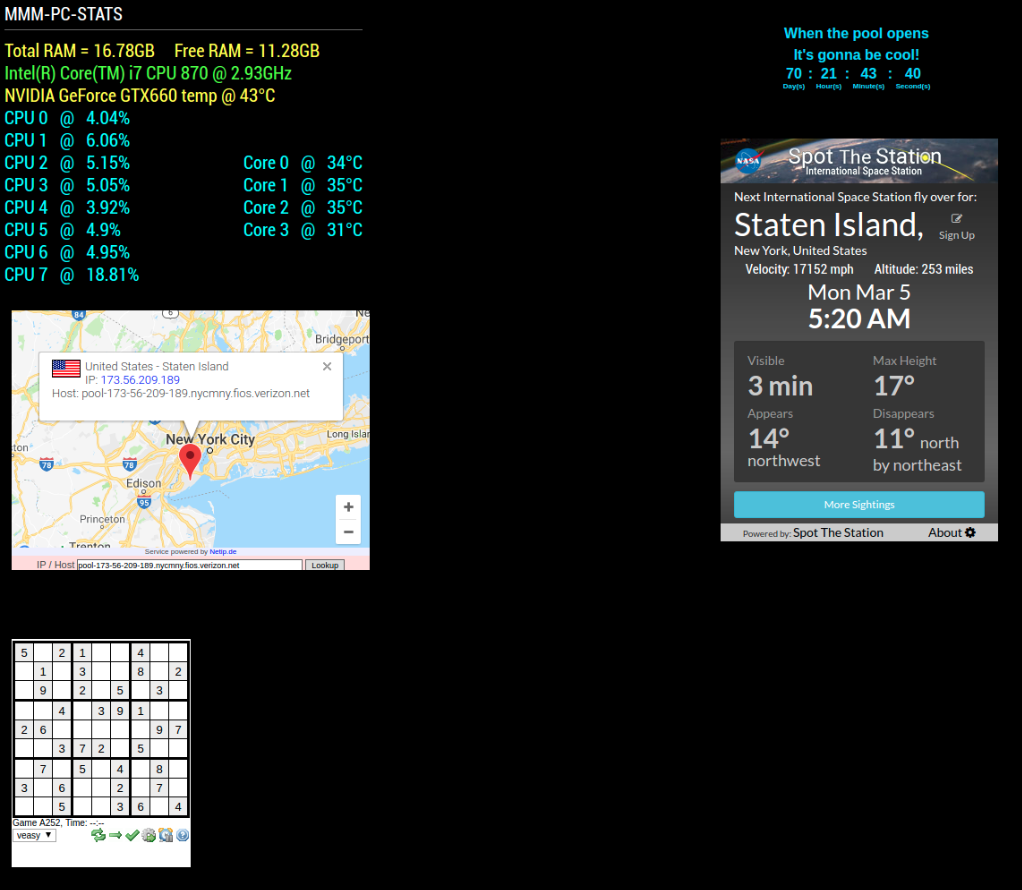
                                Added 4 new modules to the Hello-Lucy defaults.

                                • https://github.com/mykle1/MMM-URHere
                                • https://github.com/mykle1/MMM-Sudoku
                                • https://github.com/mykle1/MMM-EventHorizon
                                • https://github.com/mykle1/MMM-ISS

                                0_1520217065306_1.png

                                Create a working config
                                How to add modules

                                1 Reply Last reply Reply Quote 2
                                • Mykle1M Offline
                                  Mykle1 Project Sponsor Module Developer
                                  last edited by

                                  So, all the credit for this goes to @cowboysdude. I immediately added it to my “must have” list. Yesterday, I had the movie “Predator” playing fullscreen as my live desktop on my MM. The possibilities are endless. Just amazing. Modules look amazing on top of it. This is like “Shock and awe” for MM. Kudos bro!

                                  https://youtu.be/M3QvF-ctZEA

                                  Create a working config
                                  How to add modules

                                  E D 2 Replies Last reply Reply Quote 2
                                  • E Offline
                                    E3V3A @Mykle1
                                    last edited by

                                    @Mykle1 Whats that rotating planet? (Is it earth? – No, the module?)

                                    "Everything I do (here) is for free – altruism is the way!"
                                    MMM-FlightsAbove, MMM-Tabulator, MMM-Assistant (co-maintainer)

                                    1 Reply Last reply Reply Quote 1
                                    • E Offline
                                      E3V3A
                                      last edited by

                                      It’s this one: https://github.com/mykle1/MMM-EARTH
                                      Very nice!
                                      But the one on the video seemspinning much faster. @Mykle1 what are your config setting for that?

                                      "Everything I do (here) is for free – altruism is the way!"
                                      MMM-FlightsAbove, MMM-Tabulator, MMM-Assistant (co-maintainer)

                                      Mykle1M 1 Reply Last reply Reply Quote 1
                                      • D Offline
                                        Damian @Mykle1
                                        last edited by

                                        @Mykle1 said in Hello-Lucy:

                                        playing fullscreen as my live desktop
                                        @cowboysdude

                                        Please tell me this live desktop will be published? Appreciate it will only suit those of us who use a PC MM, but I would agree this is “Shock and awe” and above all, full praise to both of you who have emerged yourselves fully into the MM to produce so much, in such a short space of time. You two, are truly Brothers in Arms :-) Well done to both.

                                        Mykle1M 1 Reply Last reply Reply Quote 0
                                        • Mykle1M Offline
                                          Mykle1 Project Sponsor Module Developer @E3V3A
                                          last edited by

                                          @E3V3A said in Hello-Lucy:

                                          It’s this one: https://github.com/mykle1/MMM-EARTH
                                          Very nice!
                                          But the one on the video seemspinning much faster. @Mykle1 what are your config setting for that?

                                          No, that’s not MMM-EARTH. See my next answer

                                          Create a working config
                                          How to add modules

                                          1 Reply Last reply Reply Quote 1
                                          • Mykle1M Offline
                                            Mykle1 Project Sponsor Module Developer @Damian
                                            last edited by Mykle1

                                            @Damian said in Hello-Lucy:

                                            Please tell me this live desktop will be published? Appreciate it will only suit those of us who use a PC MM

                                            You would have to ask @cowboysdude about that. It’s not mine to give. He made the magic happen. If there is an underrated module developer here, it’s him.

                                            Create a working config
                                            How to add modules

                                            D 1 Reply Last reply Reply Quote 2

                                            Hello! It looks like you're interested in this conversation, but you don't have an account yet.

                                            Getting fed up of having to scroll through the same posts each visit? When you register for an account, you'll always come back to exactly where you were before, and choose to be notified of new replies (either via email, or push notification). You'll also be able to save bookmarks and upvote posts to show your appreciation to other community members.

                                            With your input, this post could be even better 💗

                                            Register Login

                                            • 1
                                            • 2
                                            • 3
                                            • 4
                                            • 5
                                            • 6
                                            • 14
                                            • 15
                                            • 4 / 15
                                            • First post
                                              Last post
                                            Enjoying MagicMirror? Please consider a donation!
                                            MagicMirror created by Michael Teeuw.
                                            Forum managed by Sam, technical setup by Karsten.
                                            This forum is using NodeBB as its core | Contributors
                                            Contact | Privacy Policy