MagicMirror Forum
    • Recent
    • Tags
    • Unsolved
    • Solved
    • MagicMirror² Repository
    • Documentation
    • 3rd-Party-Modules
    • Donate
    • Discord
    • Register
    • Login
    A New Chapter for MagicMirror: The Community Takes the Lead
    Read the statement by Michael Teeuw here.

    MMM-EventHorizon

    Scheduled Pinned Locked Moved Fun & Games
    41 Posts 8 Posters 25.9k Views 8 Watching
    Loading More Posts
    • Oldest to Newest
    • Newest to Oldest
    • Most Votes
    Reply
    • Reply as topic
    Log in to reply
    This topic has been deleted. Only users with topic management privileges can see it.
    • Mykle1M Offline
      Mykle1 Project Sponsor Module Developer @MrNonoss
      last edited by

      @mrnonoss

      Well, I got to it sooner than I thought. You can now choose if you want to “count up” or not.

      Do a git pull in the MMM-EventHorizon directory or install as per the readme.

      https://github.com/mykle1/MMM-EventHorizon

      Create a working config
      How to add modules

      M 1 Reply Last reply Reply Quote 1
      • M Offline
        MrNonoss @Mykle1
        last edited by MrNonoss

        @mykle1 oh man, you’re awsome.
        I’ll give it à try when I go home.

        Really, tank you à lot ! 👍

        Will you update the readme for the synthax to be used ?

        Mykle1M 1 Reply Last reply Reply Quote 0
        • Mykle1M Offline
          Mykle1 Project Sponsor Module Developer @MrNonoss
          last edited by

          @mrnonoss said in MMM-EventHorizon:

          Will you update the readme for the synthax to be used ?

          The update includes an amended readme. There is an addition to the config entry sample. countUp: "yes", (or no)

          Create a working config
          How to add modules

          1 Reply Last reply Reply Quote 0
          • Hein-JanH Offline
            Hein-Jan
            last edited by

            @Mykle1

            It feels like the timer is not indicating the correct time. It is set for 09:00:00. Current time is 21:40. Count down says we still have 17 hrs and 19 minutes to go. I think it should be 11 hrs and 21 minutes.
            I am on Central European time. Could that be a contributing factor? Does the module vector in time-zone influences?

            Hein-Jan

            Mykle1M 2 Replies Last reply Reply Quote 0
            • Mykle1M Offline
              Mykle1 Project Sponsor Module Developer @Hein-Jan
              last edited by

              @hein-jan

              It never dawned on me that the timezsone was specific to the url being used in the module. The url itself is rather cryptic so I can’t determine what part is responsible for the timezone. Thus, I can’t make an option for timezones, unless someone wants to help determine that for me.

              I have a work around if you are interested. You can go to https://www.timeanddate.com/clocks/freecountdown.html and create your own timer. You will be given a url when you are done. That url can be inserted into your copy of the module, with some minor modification and it will work.

              This problem arises because the module is simply in an iFrame and not data from an API

              Create a working config
              How to add modules

              1 Reply Last reply Reply Quote 0
              • Mykle1M Offline
                Mykle1 Project Sponsor Module Developer @Hein-Jan
                last edited by Mykle1

                @hein-jan said in MMM-EventHorizon:

                I am on Central European time.

                I went and got a url for Central European time. Replace line 41 in the MMM-EventHorizon.js file with the following line.

                iframe.src = "http://free.timeanddate.com/countdown/i6f8ps4b/n48/cf12/cm0/cu4/ct0/cs0/ca0/cr0/ss0/cac0ff/cpc0ff/pc000/tcfff/fs100/szw320/szh135/tat" + this.config.text1 + "/tac0ff/tpt" + this.config.endText1 + "/tpc0ff/mat" + this.config.text2 + "/mpt" + this.config.endText2 + "/mpc0ff/iso" + this.config.date + "T" + this.config.time;

                This will only work when these two config.js options are as follows:

                module: 'MMM-EventHorizon',
                            position: 'bottom_left',
                            config: {
                                size: "medium", // small, medium or large
                                countUp: "yes", // yes or no (count up after timer is done)
                

                The other config options will work as intended

                Create a working config
                How to add modules

                1 Reply Last reply Reply Quote 0
                • Hein-JanH Offline
                  Hein-Jan
                  last edited by

                  Mykle1

                  Thanks for your reply and confirming that it is a time-zone issues.
                  Instead of messing around with the code, I think I will simply off-set my event deadline time.
                  That way I am at least robust against updates.
                  Thanks for the work with the CET link.

                  Hein-Jan

                  Mykle1M 1 Reply Last reply Reply Quote 0
                  • Mykle1M Offline
                    Mykle1 Project Sponsor Module Developer @Hein-Jan
                    last edited by

                    @hein-jan

                    You could do that or you could make it your own. Feel free to make any edits that please you. Ah, the beauty of open source. :-) Have fun.

                    Create a working config
                    How to add modules

                    1 Reply Last reply Reply Quote 0
                    • Mykle1M Offline
                      Mykle1 Project Sponsor Module Developer
                      last edited by

                      Update:

                      [card:mykle1/MMM-EventHorizon]

                      Version 1.0.1

                      Thanks to @spitzlbergerj for taking the initiative here. He posted an issue at the repo which included the modificatons so I wanted him to get the credit and my thanks.

                      Now you can color text line by line AND use any city you like as the timezone.

                      git pull or install as per the readme

                      Create a working config
                      How to add modules

                      1 Reply Last reply Reply Quote 0
                      • Mykle1M Offline
                        Mykle1 Project Sponsor Module Developer
                        last edited by Mykle1

                        Update:

                        [card:mykle1/MMM-EventHorizon]

                        Version update 1.0.2

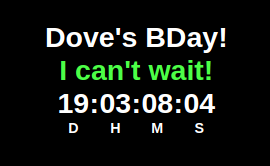
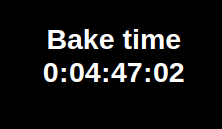
                        Added an option for unit designation

                        1. No units
                        2. D H M S
                        3. Day Hr Min Sec
                        4. Days Hrs Mins Secs
                        5. Days Hours Minutes Seconds (Full names)

                        Example of option 1 and 2
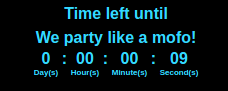
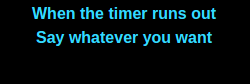
                        0_1548380952908_Screenshot from 2019-01-24 19-13-00.png - 0_1548381184316_wert.png

                        Create a working config
                        How to add modules

                        swvalentiS 1 Reply Last reply Reply Quote 2
                        • swvalentiS Offline
                          swvalenti Project Sponsor @Mykle1
                          last edited by

                          @Mykle1 Any way to add years to this? I retire in 2515 days, but would like to know years then days. HA! I keep having to fn pull out the calculator to convert.

                          Thanks ahead if this can be done!

                          Regards, Scott

                          Mykle1M 3 Replies Last reply Reply Quote 0
                          • Mykle1M Offline
                            Mykle1 Project Sponsor Module Developer @swvalenti
                            last edited by

                            @swvalenti

                            Scott,

                            I’m terribly sorry but this module doesn’t use a conventional api data source which would have allowed me to do the computations on the data. Thus, converting all those days to years. It’s simply using an iFrame and tapping in to this web site. You can see on the site that “days” is not an option. My apologies.

                            Peace!

                            Create a working config
                            How to add modules

                            1 Reply Last reply Reply Quote 0
                            • Mykle1M Offline
                              Mykle1 Project Sponsor Module Developer @swvalenti
                              last edited by

                              @swvalenti

                              Hey Scott,

                              You could try this module. It shows just the days remaining.

                              https://forum.magicmirror.builders/topic/1846/mmm-doomsday-the-countdown-module

                              Create a working config
                              How to add modules

                              swvalentiS 1 Reply Last reply Reply Quote 0
                              • swvalentiS Offline
                                swvalenti Project Sponsor @Mykle1
                                last edited by

                                @Mykle1 said in MMM-EventHorizon:

                                @swvalenti

                                Hey Scott,

                                You could try this module. It shows just the days remaining.

                                https://forum.magicmirror.builders/topic/1846/mmm-doomsday-the-countdown-module

                                I will give that a go thank you sir.

                                Mykle1M 1 Reply Last reply Reply Quote 0
                                • Mykle1M Offline
                                  Mykle1 Project Sponsor Module Developer @swvalenti
                                  last edited by Mykle1

                                  @swvalenti

                                  Upon further inspection of the site I found that “Show Days Only” is an option. Sorry I missed it the first time. If you would not mind trying it out and reporting back to me I would be grateful. I updated the repo. Note: New config option.


                                  Create a working config
                                  How to add modules

                                  1 Reply Last reply Reply Quote 1
                                  • Mykle1M Offline
                                    Mykle1 Project Sponsor Module Developer
                                    last edited by Mykle1

                                    Update:

                                    [card:mykle1/MMM-EventHorizon]

                                    Version update 1.0.3

                                    Added an option to display only days remaining, as per request by @swvalenti.

                                    Do a git pull in the MMM-EventHorizon directory or install as per the readme.

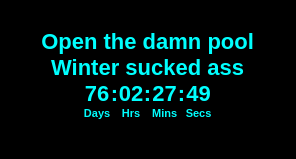
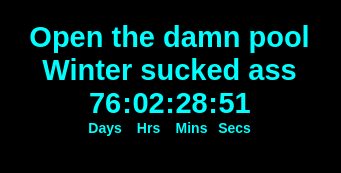
                                    0_1571276833516_Screenshot from 2019-10-16 21-40-39.png

                                    Create a working config
                                    How to add modules

                                    swvalentiS 1 Reply Last reply Reply Quote 1
                                    • swvalentiS Offline
                                      swvalenti Project Sponsor @Mykle1
                                      last edited by

                                      @Mykle1 doing something wrong when added justDays, now a config error shows…ideas?

                                      {
                                      	disabled: false,
                                      	module: 'MMM-EventHorizon',
                                      	position: 'top_left',
                                      	config: {
                                          	timezone: "n2268",                     // See Timezone chart at bottom
                                      	justDays: “yes”,
                                          	size: "large",                        // small, medium or large
                                          	countUp: "yes",                       // Count up after timer ends
                                          	date: "2026-09-04",                   // YYYY-MM-DD format ONLY
                                          	time: "23:59:59",                     // (HH:MM:SS)    Exact time you want timer to end
                                          	text1: "Until Retirement",         // 2 lines of text during timer
                                          	text2: "Bitches!",               // 2 lines of text during timer
                                          	text1Color: "4169E1",                 // Hex color codes
                                          	text2Color: "C0C0C0",                 // Hex color codes
                                          	timerColor: "FFFFFF",                 // Hex color codes
                                          	endText1: "When timer ends",          // 2 lines of text when timer ends
                                          	endText2: "Say something here",       // 2 lines of text when timer ends
                                          	endText1Color: "FFFFFF",              // Hex color codes
                                          	endText2Color: "62FF00",              // Hex color codes
                                          	timerUpColor: "FFFFFF",               // Hex color codes
                                          	colorpc: "000",                       // color of the background 000 = black, t = transparent
                                        	}
                                      
                                      S 1 Reply Last reply Reply Quote 0
                                      • S Offline
                                        sdetweil @swvalenti
                                        last edited by

                                        @swvalenti Wrong double quote characters. Type it from the keyboard, not cut/paste

                                        Sam

                                        How to add modules

                                        learning how to use browser developers window for css changes

                                        swvalentiS 1 Reply Last reply Reply Quote 2
                                        • swvalentiS Offline
                                          swvalenti Project Sponsor @sdetweil
                                          last edited by

                                          @sdetweil said in MMM-EventHorizon:

                                          @swvalenti Wrong double quote characters. Type it from the keyboard, not cut/paste

                                          I’m an idiot thank you sir that fixed it. Thanks @Mykle1 for the quick update! You guys rock.

                                          Mykle1M 1 Reply Last reply Reply Quote 1
                                          • Mykle1M Offline
                                            Mykle1 Project Sponsor Module Developer @swvalenti
                                            last edited by

                                            @swvalenti said in MMM-EventHorizon:

                                            Thanks @Mykle1 for the quick update! You guys rock.

                                            You’re welcome, mate. Turned out to be a rather easy update. I’m glad you suggested it because now the module has more, better options and should appeal to more users.

                                            Create a working config
                                            How to add modules

                                            1 Reply Last reply Reply Quote 1

                                            Hello! It looks like you're interested in this conversation, but you don't have an account yet.

                                            Getting fed up of having to scroll through the same posts each visit? When you register for an account, you'll always come back to exactly where you were before, and choose to be notified of new replies (either via email, or push notification). You'll also be able to save bookmarks and upvote posts to show your appreciation to other community members.

                                            With your input, this post could be even better 💗

                                            Register Login

                                            • 1
                                            • 2
                                            • 3
                                            • 1 / 3
                                            • First post
                                              Last post
                                            Enjoying MagicMirror? Please consider a donation!
                                            MagicMirror created by Michael Teeuw.
                                            Forum managed by Sam, technical setup by Karsten.
                                            This forum is using NodeBB as its core | Contributors
                                            Contact | Privacy Policy