Read the statement by Michael Teeuw here.
MM and UBUNTU. Made for each other.
-
I did learn the hard way that a miniPC running an Intel Atom processor and integrated graphics is not suitable for Ubuntu and therefore the MagicMirror. The IGP does not have drivers in Ubuntu 14, 16, nor 18 and uses most of its power to render the desktop.
I might put the server version on it and turn it into a gateway or something.
-
@bhepler said in MM and UBUNTU. Made for each other.:
Intel Atom processor and integrated graphics is not suitable for Ubuntu and therefore the MagicMirror.
The only two laptops that I’ve had trouble with are both ThinkPads. I struggled with them and eventually gave up.
However, I did have success with a little piece of $h1t with specs similar to what you mentioned.
https://www.youtube.com/watch?v=QZ8t3UoKYu0
Total cost = $11
Specs:
ASUS Eee PC
Intel Atom CPU N570 @ 1.66GHz x 4
2GB of RAM
Intel Pineview M Graphics
Display 8.5" width by 5.25" height
250GB HD
Integrated microphone
Built-in WiFi
VGA port (for external monitor)$11 on craigslist
64-bit Ubuntu 14.04 LTS
MagicMirror v2.1.3Modules:
MMM-Advice
AlarmClock
calendar
clock
compliments
Cocktails
EARTH
EasyBack
Events
FMI (Find My iPhone)
ImageSlideshow
Lunartic
newsfeed
NOAA3
PC-Stats
voice w/ Hello-Lucy
WunderGround -
@mykle1 - Sigh. I suppose I can try again. Did you have to do any fiddling to get the OS to use a graphics driver?
-
@bhepler said in MM and UBUNTU. Made for each other.:
Sigh. I suppose I can try again. Did you have to do any fiddling to get the OS to use a graphics driver?
No sir. I did a standard install of ubuntu 16.04LTS (I only use this version. I tried 18.xx and had trouble) During the setup of the installation there is a click box for “use third party drivers” or something to that effect. I always click (enable) that option. I don’t know if it’s worth mentioning but I always use a wired internet connection during installation. It’s just faster that way as it updates everything.
Let me know how you make out. :thumbsup:
-
Recommendation Update
Actually, this is more of a recommendation confirmation. While you can use ubuntu 18.xx and MM together, I don’t recommend it. I just did a clean install of ubuntu 18.04. Newest stable node and npm. MM v2.6.0. Yes, it runs MM but I don’t see any benefit to using ubuntu 18.xx over 16.04 LTS. I don’t like the changes to the UI in 18.xx and I really don’t like dealing with all the vulnerabilities.
Ubuntu 16.04 LTS has a more intuitive UI (IMHO) and there are NO vulnreablilities to deal with. NONE!
So, for the time being, I’m staying with Ubuntu 16.04 LTS. It’s trouble free and MM loves it, too.
I did a test install of Ubuntu 18.04 on a machine I found in someone’s trash. That’s when the vulnerabilities reminded me of why I don’t like 18.xx. Look at the specs. One man’s trash is another man’s treasure.
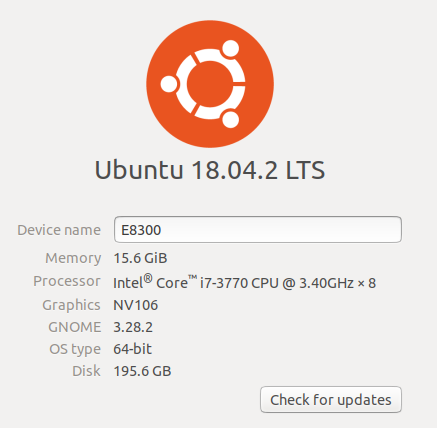
-
not gonna lie, i actually have a i5 mini pc laying around and have been fiddling with the pis for weeks now trying to get everything dialed in and your post got me a little pumped to be able to use this pc i got.
i got ubuntu installed no problem…
i know NOTHING about it so i couldnt even get past how to install the wireless adapter lol…
so im scrapping this and going back to install raspbian on the pc and will try it at that point.
-
@Mykle1 Nice Find! :)
-
I had version 18.xx installed, up and going just fine on my dev machine
I am used to dealing with vulnerabilities, since I mainly work with Windows
But, I just have my mindset to run
npm audit fix --force&npm i lodash@4.17.5 -g&npm i acorn@^6.0.0 -gafter every install of MM2. only takes a few minutes extra and it fixes all the vulnerabilities. Except for a few that come with some of the modules. With Ubuntu 18.xx, if I remember, I think just thenpm audit fix --forcewas all I needed to do. -
Yes, as I said, I too had ubuntu 18.xx and MM up and running. I just prefer NOT to deal with any vulnerabilities which 16.04 doesn’t have. I don’t know of any benefit to running 18.xx over 16.04 and, as I stated, I’m not a fan of the new UI in 18.xx. I ran MM over Windows when I first started. The disadvantages quickly became apparent. Hello-Lucy never would have happened if I didn’t leave Windows behind. I never looked back. :-)
-
By popular demand
Install ubuntu 16.04LTS (internet connection HIGHLY recommended)
You MUST (check box) “Install 3rd Party Drivers” during installation
Fully update the installation via the software manager after installation (It often needs to)
Install node (includes npm) (I use node 8 )
curl -sL https://deb.nodesource.com/setup_8.x | sudo -E bash -
It will ask you if you want to install curl (gives you the command). Do so. Then run #1 again
- This will complete the installation of node and npm
sudo apt-get install -y nodejs- Check for success of node and npm installation in your terminal.
run
node -v(this will show your version)
runnpm -v(this will show your version)Now install MM
Run
git clone https://github.com/MichMich/MagicMirror.gitin your terminalYou may be asked to install git here. Do so. Use the command presented to you in the terminal
Then run
git clone https://github.com/MichMich/MagicMirror.gitagainThen
cd MagicMirrorand runnpm installThen run your mirror
npm start -
I know this thread is quite old, hoping @Mykle1 or someone still looks at it.
I followed the instructions and have a MM running on my Acer Revo. However, when I start MagicMirror, all I see is a blank screen. I have pm2 and electron installed, where do I find the logfile to try to track down the issue?
-
@cliff365 is it before adding any modules? or after?
if after see here
https://forum.magicmirror.builders/topic/15778/fix-for-black-screen-in-2-16-and-laterif before do
pm2 stop all pm2 flush pm2 start 0 pm2 logs --lines=50 -
Thanks @sdetweil , I entered the lines, but I had a bit of a problem getting MM to not restart while I tried to capture the logs. Hope this provides some insight:
0|MagicMirror | Starting server on port 8080 ... 0|MagicMirror | [17.12.2021 16:25.52.307] [LOG] 0|MagicMirror | Server started ... 0|MagicMirror | [17.12.2021 16:25.52.312] [LOG] 0|MagicMirror | Connecting socket for: updatenotification 0|MagicMirror | [17.12.2021 16:25.52.316] [LOG] Sockets connected & modules started ... 0|MagicMirror | (electron:4583): GLib-GIO-CRITICAL **: g_dbus_connection_register_object: assertion 'G_IS_DBUS_CONNECTION (connection)' failed 0|MagicMirror | (electron:4583): GLib-GIO-CRITICAL **: g_dbus_connection_register_object: assertion 'G_IS_DBUS_CONNECTION (connection)' failed 0|MagicMirror | (electron:4583): GLib-GIO-CRITICAL **: g_dbus_connection_get_unique_name: assertion 'G_IS_DBUS_CONNECTION (connection)' failed 0|MagicMirror | [4583:1217/162552.823896:ERROR:bus.cc(393)] Failed to connect to the bus: Failed to connect to socket /tmp/dbus-rSguYNpjNi: Connection refused 0|MagicMirror | [4583:1217/162552.824839:ERROR:bus.cc(393)] Failed to connect to the bus: Failed to connect to socket /tmp/dbus-rSguYNpjNi: Connection refused 0|MagicMirror | [17.12.2021 16:25.52.921] [LOG] 0|MagicMirror | Launching application. 0|MagicMirror | [4583:1217/162553.058857:ERROR:bus.cc(393)] Failed to connect to the bus: Failed to connect to socket /tmp/dbus-rSguYNpjNi: Connection refused 0|MagicMirror | [4613:1217/162553.640227:ERROR:sandbox_linux.cc(376)] InitializeSandbox() called with multiple threads in process gpu-process. 0|MagicMirror | [17.12.2021 16:26.01.616] [LOG] 0|MagicMirror | Shutting down server... 0|MagicMirror | [17.12.2021 16:26.01.618] [LOG] Stopping module helper: updatenotification PM2 | App [MagicMirror:0] exited with code [0] via signal [SIGINT] PM2 | App [MagicMirror:0] starting in -fork mode- PM2 | App [MagicMirror:0] online 0|MagicMirror | > magicmirror@2.17.1 start /home/cliff/MagicMirror 0|MagicMirror | > DISPLAY="${DISPLAY:=:0}" ./node_modules/.bin/electron js/electron.js 0|MagicMirror | [17.12.2021 16:26.06.425] [LOG] 0|MagicMirror | Starting MagicMirror: v2.17.1 0|MagicMirror | [17.12.2021 16:26.06.446] [LOG] 0|MagicMirror | Loading config ... 0|MagicMirror | [17.12.2021 16:26.06.466] [LOG] 0|MagicMirror | Loading module helpers ... 0|MagicMirror | [17.12.2021 16:26.06.487] [LOG] 0|MagicMirror | No helper found for module: alert. 0|MagicMirror | [17.12.2021 16:26.06.550] [LOG] 0|MagicMirror | Initializing new module helper ... 0|MagicMirror | [17.12.2021 16:26.06.555] [LOG] 0|MagicMirror | Module helper loaded: updatenotification 0|MagicMirror | [17.12.2021 16:26.06.559] [LOG] No helper found for module: clock. 0|MagicMirror | [17.12.2021 16:26.06.563] [LOG] All module helpers loaded. 0|MagicMirror | [17.12.2021 16:26.06.846] [LOG] 0|MagicMirror | Starting server on port 8080 ... 0|MagicMirror | [17.12.2021 16:26.06.895] [LOG] 0|MagicMirror | Server started ... 0|MagicMirror | [17.12.2021 16:26.06.900] [LOG] Connecting socket for: updatenotification 0|MagicMirror | [17.12.2021 16:26.06.905] [LOG] Sockets connected & modules started ... 0|MagicMirror | (electron:4673): GLib-GIO-CRITICAL **: g_dbus_connection_register_object: assertion 'G_IS_DBUS_CONNECTION (connection)' failed 0|MagicMirror | (electron:4673): GLib-GIO-CRITICAL **: g_dbus_connection_register_object: assertion 'G_IS_DBUS_CONNECTION (connection)' failed 0|MagicMirror | (electron:4673): GLib-GIO-CRITICAL **: g_dbus_connection_get_unique_name: assertion 'G_IS_DBUS_CONNECTION (connection)' failed 0|MagicMirror | [4673:1217/162607.415011:ERROR:bus.cc(393)] Failed to connect to the bus: Failed to connect to socket /tmp/dbus-rSguYNpjNi: Connection refused 0|MagicMirror | [4673:1217/162607.415886:ERROR:bus.cc(393)] Failed to connect to the bus: Failed to connect to socket /tmp/dbus-rSguYNpjNi: Connection refused 0|MagicMirror | [17.12.2021 16:26.07.530] [LOG] 0|MagicMirror | Launching application. 0|MagicMirror | [4673:1217/162607.651240:ERROR:bus.cc(393)] Failed to connect to the bus: Failed to connect to socket /tmp/dbus-rSguYNpjNi: Connection refused 0|MagicMirror | [4705:1217/162608.260106:ERROR:sandbox_linux.cc(376)] InitializeSandbox() called with multiple threads in process gpu-process. 0|MagicMirror | [17.12.2021 16:26.09.807] [LOG] 0|MagicMirror | Shutting down server... 0|MagicMirror | [17.12.2021 16:26.09.811] [LOG] Stopping module helper: updatenotification PM2 | App [MagicMirror:0] exited with code [0] via signal [SIGINT] PM2 | App [MagicMirror:0] starting in -fork mode- PM2 | App [MagicMirror:0] online 0|MagicMirror | > magicmirror@2.17.1 start /home/cliff/MagicMirror 0|MagicMirror | > DISPLAY="${DISPLAY:=:0}" ./node_modules/.bin/electron js/electron.js ^A0|MagicMirror | [17.12.2021 16:26.14.742] [LOG] 0|MagicMirror | Starting MagicMirror: v2.17.1 0|MagicMirror | [17.12.2021 16:26.14.762] [LOG] 0|MagicMirror | Loading config ... 0|MagicMirror | [17.12.2021 16:26.14.779] [LOG] 0|MagicMirror | Loading module helpers ... 0|MagicMirror | [17.12.2021 16:26.14.787] [LOG] No helper found for module: alert. 0|MagicMirror | [17.12.2021 16:26.14.838] [LOG] 0|MagicMirror | Initializing new module helper ... 0|MagicMirror | [17.12.2021 16:26.14.843] [LOG] 0|MagicMirror | Module helper loaded: updatenotification 0|MagicMirror | [17.12.2021 16:26.14.848] [LOG] No helper found for module: clock. 0|MagicMirror | [17.12.2021 16:26.14.851] [LOG] All module helpers loaded. -
@cliff365 this post seems to imply installing as root and running as user or vice versa.
https://forum.magicmirror.builders/topic/8464/back-screan-when-start-up-an-errors
delete the mm folder and use my script
https://github.com/sdetweil/MagicMirror_scripts
do NOT use sudo , and use a normal user, not logon as root
-
@sdetweil You are amazing! I wish I knew Linux as well I know Windows, but so it goes. Your suggestion worked! Thanks again!




Hello! It looks like you're interested in this conversation, but you don't have an account yet.
Getting fed up of having to scroll through the same posts each visit? When you register for an account, you'll always come back to exactly where you were before, and choose to be notified of new replies (either via email, or push notification). You'll also be able to save bookmarks and upvote posts to show your appreciation to other community members.
With your input, this post could be even better 💗
Register Login