MagicMirror Forum
    • Recent
    • Tags
    • Unsolved
    • Solved
    • MagicMirror² Repository
    • Documentation
    • 3rd-Party-Modules
    • Donate
    • Discord
    • Register
    • Login
    A New Chapter for MagicMirror: The Community Takes the Lead
    Read the statement by Michael Teeuw here.

    2 MagicMirror windows

    Scheduled Pinned Locked Moved Troubleshooting
    17 Posts 4 Posters 6.9k Views 3 Watching
    Loading More Posts
    • Oldest to Newest
    • Newest to Oldest
    • Most Votes
    Reply
    • Reply as topic
    Log in to reply
    This topic has been deleted. Only users with topic management privileges can see it.
    • U Offline
      umeeq
      last edited by

      Hi Everyone,

      I’m very new to MM and need some assistance. I just tried entering the code to enable auto boot and now everytime the mirror boots I have 2 MM windows running. I have gone into the config.js file and edited to determine the correct window but now need to get rid of the second window I created by “enabling” auto boot.

      Will backtracking to remove the code work?

      Thanks in advance.

      Mykle1M 1 Reply Last reply Reply Quote 0
      • Mykle1M Offline
        Mykle1 Project Sponsor Module Developer @umeeq
        last edited by

        @umeeq

        I assume PM2 is reporting something like this
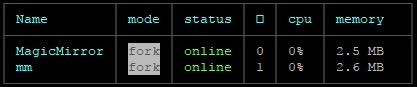
        0_1524858939976_1.jpg

        In which case you would:

        pm2 stop mm
        pm2 delete mm
        pm2 save
        rm ~/mm.sh
        

        Then check your instances again. :-)

        Create a working config
        How to add modules

        U 1 Reply Last reply Reply Quote 1
        • U Offline
          umeeq @Mykle1
          last edited by

          @Mykle1
          You are right. However, it seems like MagicMirror might be the one I should delete? When I run pm2 start mm.sh, the “mm” window launches.

          0_1524863547894_918645d4-7a0d-4319-9c5b-edefe6f811f1-image.png

          Thanks for your help.

          Mykle1M 1 Reply Last reply Reply Quote 0
          • Mykle1M Offline
            Mykle1 Project Sponsor Module Developer @umeeq
            last edited by

            @umeeq said in 2 MagicMirror windows:

            However, it seems like MagicMirror might be the one I should delete?

            Yes sir :-)

            Create a working config
            How to add modules

            U 1 Reply Last reply Reply Quote 1
            • U Offline
              umeeq @Mykle1
              last edited by

              @Mykle1

              This worked! Thank you so much.

              Mykle1M 1 Reply Last reply Reply Quote 0
              • Mykle1M Offline
                Mykle1 Project Sponsor Module Developer @umeeq
                last edited by

                @umeeq

                You’re welcome. Peace!

                Create a working config
                How to add modules

                U 1 Reply Last reply Reply Quote 1
                • U Offline
                  umeeq @Mykle1
                  last edited by

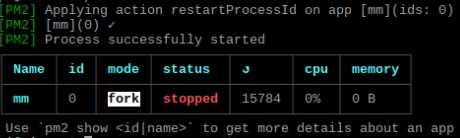
                  @Mykle1 You helped me with this a year ago and I ran into the same issue. I deleted MagicMirror, and now when I run pm2 start mm.sh the mirror doesn’t launch. I also noticed the mm.sh file was missing from /home/pi.

                  0_1558116872446_c73b7988-3f27-40a8-bd24-4621bdf8fbbb-image.png

                  S 1 Reply Last reply Reply Quote 0
                  • S Offline
                    sdetweil @umeeq
                    last edited by

                    @umeeq mm.sh is located in /home/pi/MagicMirror/installers

                    Sam

                    How to add modules

                    learning how to use browser developers window for css changes

                    U 1 Reply Last reply Reply Quote 0
                    • U Offline
                      umeeq @sdetweil
                      last edited by

                      @sdetweil Thanks for your response Sam.

                      I initially also saw a version in /home/pi, possibly the duplicate.

                      I’m still not sure how to boot the correct version of the mm though. Also not sure how I keep setting up two MMs.

                      Thanks in advance.

                      S 1 Reply Last reply Reply Quote 0
                      • S Offline
                        sdetweil @umeeq
                        last edited by sdetweil

                        @umeeq pm2 delete one of the apps or copy mm.sh into the MM folder

                        Sam

                        How to add modules

                        learning how to use browser developers window for css changes

                        U 1 Reply Last reply Reply Quote 0
                        • U Offline
                          umeeq @sdetweil
                          last edited by

                          @sdetweil As in here?

                          /home/pi/MagicMirror

                          S 1 Reply Last reply Reply Quote 0
                          • S Offline
                            sdetweil @umeeq
                            last edited by

                            @umeeq yes… MM (or mm) = MagicMirror (tired of typing it out all the time)

                            Sam

                            How to add modules

                            learning how to use browser developers window for css changes

                            U 1 Reply Last reply Reply Quote 0
                            • U Offline
                              umeeq @sdetweil
                              last edited by

                              @sdetweil No worries, I just wasn’t sure where you meant to copy it into.

                              I copied it into /home/pi/MagicMirror… ran pm2 start mm.sh and still nothing.

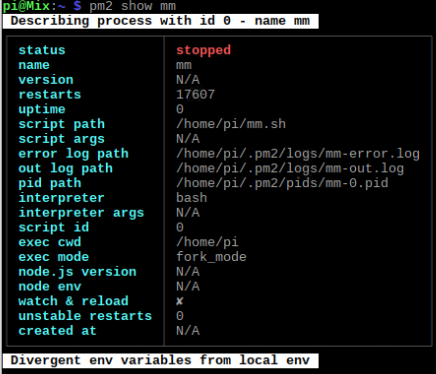
                              I can execute the file from the folder location, but cant run pm2 stop mm to stop the app. I ran pm2 show mm and got the result below.

                              0_1558318816381_ee85dba4-a53e-435c-805f-82f73472c2ef-image.png

                              S 1 Reply Last reply Reply Quote 0
                              • S Offline
                                sdetweil @umeeq
                                last edited by

                                @umeeq said in 2 MagicMirror windows:

                                pm2 start mm.sh

                                from what folder?

                                Sam

                                How to add modules

                                learning how to use browser developers window for css changes

                                U 1 Reply Last reply Reply Quote 0
                                • U Offline
                                  umeeq @sdetweil
                                  last edited by umeeq

                                  @sdetweil Copied from /home/pi/MagicMirror/installers into /home/pi/MagicMirror. Mind you I didn’t delete the original in the installers folder.

                                  Bare with me with the hand-holding.

                                  bheplerB 1 Reply Last reply Reply Quote 0
                                  • bheplerB Offline
                                    bhepler Module Developer @umeeq
                                    last edited by

                                    @umeeq - Looking at your info, the pm2 process is expecting to find the mm.sh file in the folder /home/pi

                                    It’s this line: script path /home/pi/mm.sh

                                    So move the script to that location.

                                    mv /home/pi/MagicMirror/mm.sh /home/pi
                                    chmod +x /home/pi/mm.sh
                                    
                                    U 1 Reply Last reply Reply Quote 3
                                    • U Offline
                                      umeeq @bhepler
                                      last edited by

                                      @bhepler This worked, thank you!

                                      1 Reply Last reply Reply Quote 1

                                      Hello! It looks like you're interested in this conversation, but you don't have an account yet.

                                      Getting fed up of having to scroll through the same posts each visit? When you register for an account, you'll always come back to exactly where you were before, and choose to be notified of new replies (either via email, or push notification). You'll also be able to save bookmarks and upvote posts to show your appreciation to other community members.

                                      With your input, this post could be even better 💗

                                      Register Login

                                      • 1 / 1
                                      • First post
                                        Last post
                                      Enjoying MagicMirror? Please consider a donation!
                                      MagicMirror created by Michael Teeuw.
                                      Forum managed by Sam, technical setup by Karsten.
                                      This forum is using NodeBB as its core | Contributors
                                      Contact | Privacy Policy