MagicMirror Forum
    • Recent
    • Tags
    • Unsolved
    • Solved
    • MagicMirror² Repository
    • Documentation
    • 3rd-Party-Modules
    • Donate
    • Discord
    • Register
    • Login
    A New Chapter for MagicMirror: The Community Takes the Lead
    Read the statement by Michael Teeuw here.

    Regions

    Scheduled Pinned Locked Moved Core System
    34 Posts 19 Posters 115.8k Views 23 Watching
    Loading More Posts
    • Oldest to Newest
    • Newest to Oldest
    • Most Votes
    Reply
    • Reply as topic
    Log in to reply
    This topic has been deleted. Only users with topic management privileges can see it.
    • D Offline
      doubleT Module Developer
      last edited by

      @Peter said in Regions:

      .regio bottom_bar.

      Can you copy and paste your exact code? It’s important that you address it with “.region.bottom” (no space, and note the dots)

      I posted about addressing elements in CSS before, see here.

      P 1 Reply Last reply Reply Quote 0
      • P Offline
        Peter @doubleT
        last edited by

        @doubleT sorry for the misunderstanding.
        First I copied and pasted your code; it gave an overlap (bottom bar and bottom left and bottom right).
        Then I tried more things like changing it in . bottom_bar (did not help to solve the problem.).
        And I tried some other values in your code.
        Restarted the RPI every time in between the changes.
        But still the same problem.
        Peter

        1 Reply Last reply Reply Quote 0
        • D Offline
          doubleT Module Developer
          last edited by doubleT

          @Peter said in Regions:

          . bottom_bar

          That’s what I ment with exact code. Because this will do nothing, it should be

          .bottom.bar
          

          Because the element you want to address has both classes, there’s no space in between.
          But I see where it went wrong: “bottom_bar” is how you assign a module to a region in the config.js. But that’s not how you address it in css.

          Can you show us your problem with either a screenshot or a photo? If I understand right, you have

          • Newsfeed in bottom_bar (css: .region.bottom.bar .container .module)
          • a module in bottom_left (css: .region.bottom.bar .region.bottom.left)
          • something in bottom_right (css: .region.bottom.bar .region.bottom.right)
            Important: “.region.bottom.bar .container” will address ALL of them because of the structure.

          Usually, the bottom_bar should claim its place as needed and push the other two up as necessary. So that would be normal (and is what you described).

          I’d try

          .region.bottom.bar .container .module.newsfeed {
              height: ???px; /* height of the module with maximum lines possible */
          }
          
          P 1 Reply Last reply Reply Quote 0
          • P Offline
            Peter @doubleT
            last edited by

            @doubleT , you made my day!
            It works perfectly.
            Indeed I have a newsfeed (several from different sources) in the bottom_bar, Moviemodule in bottom_left and random (travel) pictures in bottom_right region.
            With your help the modules stay on the same line!
            Thanks!
            Peter

            1 Reply Last reply Reply Quote 0
            • D Offline
              doubleT Module Developer
              last edited by

              You’re welcome.
              Btw. depending on how you control your Pi and Mirror, you don’t need to restart your whole Pi. In this case, just refreshing the browser should work, or restarting the Mirror process, if it doesn’t.

              1 Reply Last reply Reply Quote 0
              • WayneRigleyW Offline
                WayneRigley
                last edited by WayneRigley

                Hi all, well after countless trying ive given up and now asking for help. my MM is working perfect and the only troubling issue in my top_right section, i have a few things in there under the config but i would like to extend the left border of my top_right a little more left if thats possible. i have too much open space from the center to the right side. i will not be resizing fonts using the shift+ +/- any longer so that wont be an issue is manually adjusted. thanks all in advance and have a look here what im refering to
                https://photos.app.goo.gl/EUWdJRQwAjKJksx46

                Wayne R

                1 Reply Last reply Reply Quote 0
                • F Offline
                  Fifin404
                  last edited by Fifin404

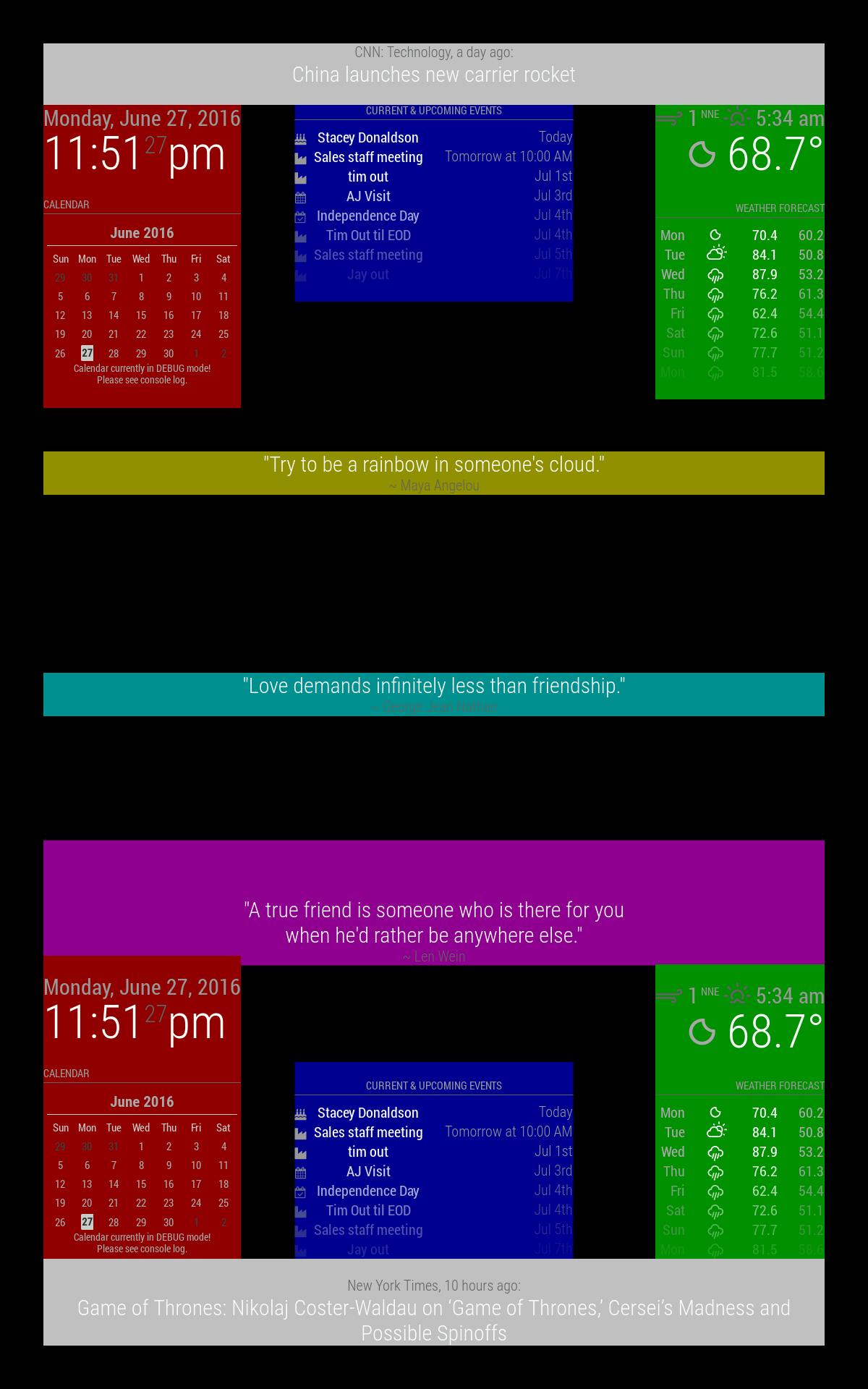
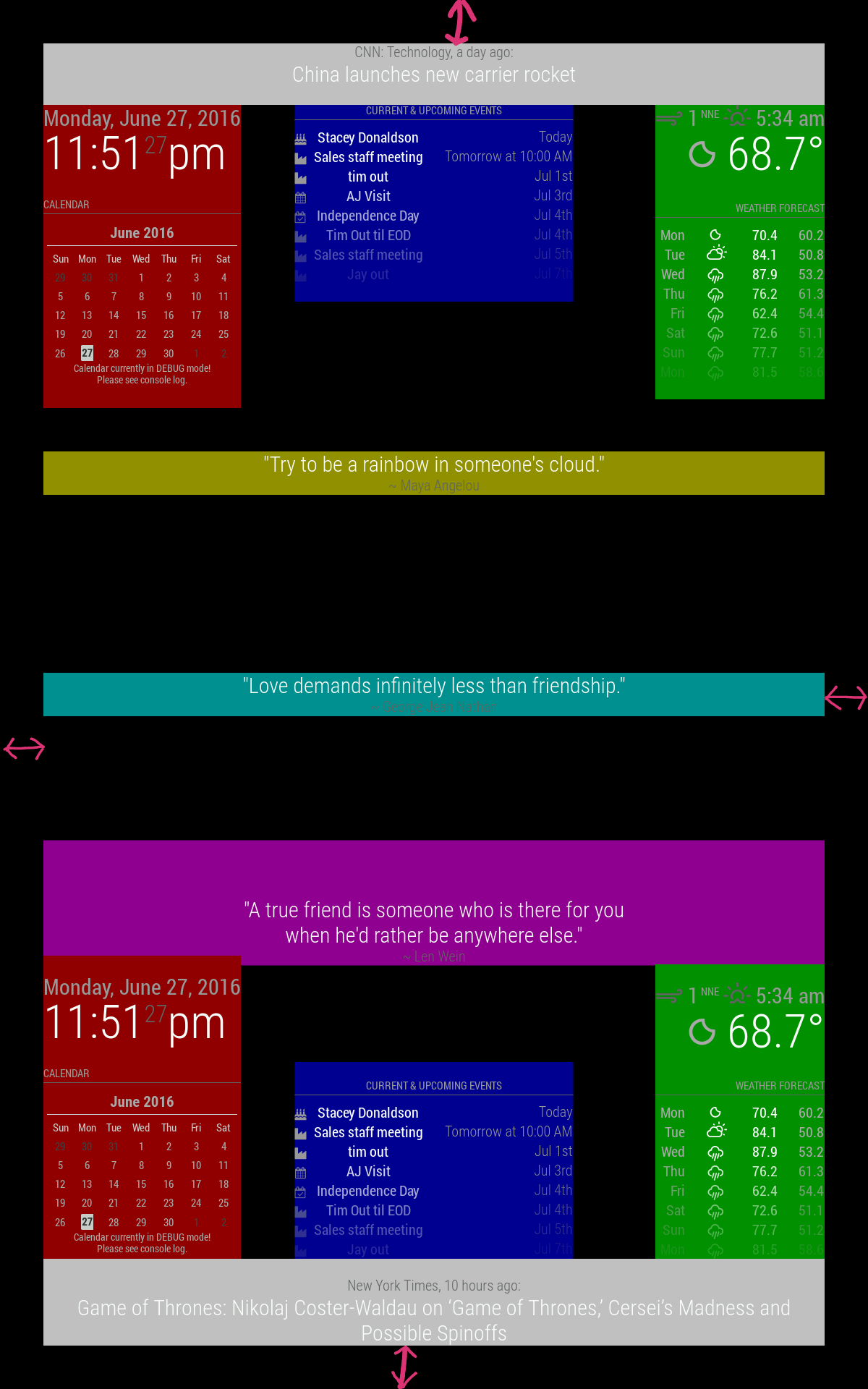
                  Hi all, is there any way to change outer border around modules? Make it smaller?
                  0_1575129077002_IMG_20191130_153745.png

                  1 Reply Last reply Reply Quote 0
                  • FoziF Offline
                    Fozi Project Sponsor
                    last edited by

                    Im main.css you can change the margin, heightand width under ‚body’ as you need. Here are my values I adjusted. The default values are commented.

                    body {
                      /* margin: 60px; */
                      margin: 5px; 
                      position: absolute;
                      /*height: calc(100% - 120px);
                      width: calc(100% - 120px);*/
                      height: calc(100% - 10px);
                      width: calc(100% - 10px);
                    

                    HowTo: Replace PIR Sensor with a RCWL-0516 Microwave Sensor

                    Mykle1M 1 Reply Last reply Reply Quote 0
                    • F Offline
                      Fifin404
                      last edited by

                      Thank you, that is what I looking for.

                      1 Reply Last reply Reply Quote 0
                      • Mykle1M Offline
                        Mykle1 Project Sponsor Module Developer @Fozi
                        last edited by

                        @Fozi said in Regions:

                        Im main.css you can change

                        Encouraging people to modify their main.css is really not a good idea, especially for those that are new to MM and/or linux.

                        Please direct your help towards the custom.css file which is intended for just such modifications.

                        Peace

                        -A concerned citizen-

                        Create a working config
                        How to add modules

                        D FoziF 2 Replies Last reply Reply Quote 1
                        • D Offline
                          drwatson @Mykle1
                          last edited by

                          Good point, @Mykle1

                          Can you then suggest the equivalent change to make the proper way without modifying the main.css?

                          C Mykle1M 2 Replies Last reply Reply Quote 0
                          • C Offline
                            cskenney @drwatson
                            last edited by

                            @drwatson Copy the exact same code that @Fozi noted above and put it in the custom.css file.

                            Below is what I put in my custom.css file.

                            body {
                              margin: 5px;
                              position: absolute;
                              height: calc(100% - 10px);
                              width: calc(100% - 10px);
                            }
                            
                            1 Reply Last reply Reply Quote 3
                            • BKeyportB Offline
                              BKeyport Module Developer
                              last edited by BKeyport

                              This post is deleted!
                              1 Reply Last reply Reply Quote 0
                              • FoziF Offline
                                Fozi Project Sponsor @Mykle1
                                last edited by

                                @Mykle1 ouh damned…your concerns are absolutely justified. Haven’t hought of that. Thanks for pointing me to that.:thumbs_up_light_skin_tone:

                                HowTo: Replace PIR Sensor with a RCWL-0516 Microwave Sensor

                                1 Reply Last reply Reply Quote 2
                                • F Offline
                                  Fifin404
                                  last edited by

                                  Yes I added code to custom.css not main.css. Thanks for all

                                  1 Reply Last reply Reply Quote 1
                                  • Mykle1M Offline
                                    Mykle1 Project Sponsor Module Developer @drwatson
                                    last edited by Mykle1

                                    @drwatson @Fozi

                                    Can you then suggest the equivalent change to make the proper way without modifying the main.css?

                                    Well, any changes that you consider making in the main.css can be made in the custom.css file without changing the main.css file. The custom.css file will override what is in the main.css file. This way you’re not altering any core files and your modifications will be accepted. When it’s time to upgrade to a newer version of MM the upgrade won’t abort because of changes you’ve made to the core files and your custom.css changes will survive the upgrade. :-)

                                    I’m still learning things every day and I enjoy the process. That’s the whole point for me.

                                    Peace!

                                    Create a working config
                                    How to add modules

                                    1 Reply Last reply Reply Quote 0
                                    • cowboysdudeC Offline
                                      cowboysdude Module Developer
                                      last edited by

                                      Yes I would HIGHLY suggest you do not change the main.css file… that could send other modules or positions in to chaos. Use the custom css as Mykle1 suggested :)

                                      1 Reply Last reply Reply Quote 1
                                      • T Offline
                                        toots
                                        last edited by

                                        Sorry if this has been asked. Is there a way to do left_side and right_side? I’m displaying my mirror on a chromecast so it’s locked into landscape mode at 720p and there isn’t a whole lot of room for each of the regions. I’d rather replace top_left and bottom_left with left_side, and just use the entire edge.

                                        S 1 Reply Last reply Reply Quote 0
                                        • S Offline
                                          sdetweil @toots
                                          last edited by

                                          @toots u could edit the index.html to add your left/right locations, and add entries to custom.css for them

                                          Sam

                                          How to add modules

                                          learning how to use browser developers window for css changes

                                          1 Reply Last reply Reply Quote 0
                                          • M Offline
                                            megagprime
                                            last edited by

                                            hi all, how could i center this kodi-websocket module between these two?

                                            0c7f3eab-0372-47e1-bc6a-e11ae8bd7409-image.png

                                            using bottom left for map, bottom center for kodi websocket and bottom right for wind

                                            i tried custom.css module placement but did not work

                                            .module.MMM-Kodi-WebSocket{
                                            left : 600 px,
                                            }

                                            1 Reply Last reply Reply Quote 0

                                            Hello! It looks like you're interested in this conversation, but you don't have an account yet.

                                            Getting fed up of having to scroll through the same posts each visit? When you register for an account, you'll always come back to exactly where you were before, and choose to be notified of new replies (either via email, or push notification). You'll also be able to save bookmarks and upvote posts to show your appreciation to other community members.

                                            With your input, this post could be even better 💗

                                            Register Login

                                            • 1
                                            • 2
                                            • 1 / 2
                                            • First post
                                              Last post
                                            Enjoying MagicMirror? Please consider a donation!
                                            MagicMirror created by Michael Teeuw.
                                            Forum managed by Sam, technical setup by Karsten.
                                            This forum is using NodeBB as its core | Contributors
                                            Contact | Privacy Policy