MagicMirror Forum
    • Recent
    • Tags
    • Unsolved
    • Solved
    • MagicMirror² Repository
    • Documentation
    • 3rd-Party-Modules
    • Donate
    • Discord
    • Register
    • Login
    A New Chapter for MagicMirror: The Community Takes the Lead
    Read the statement by Michael Teeuw here.

    MMM-HomeKit | Control your MagicMirror with Apple HomeKit

    Scheduled Pinned Locked Moved System
    27 Posts 17 Posters 23.5k Views 20 Watching
    Loading More Posts
    • Oldest to Newest
    • Newest to Oldest
    • Most Votes
    Reply
    • Reply as topic
    Log in to reply
    This topic has been deleted. Only users with topic management privileges can see it.
    • N Offline
      Niggich @Caimin
      last edited by

      @Caimin Thank you a lot. It is working like this. I install sshpass to send the Commands via ssh.

      1 Reply Last reply Reply Quote 0
      • K Offline
        kevinlingley
        last edited by

        This post is deleted!
        1 Reply Last reply Reply Quote 0
        • B Offline
          Baassievalk
          last edited by

          This post is deleted!
          1 Reply Last reply Reply Quote 0
          • B Offline
            Baassievalk
            last edited by

            Hi!

            I need a little help setting it up…
            When turning on the mirror in the HomeKit App I get the following log:

            [2020-3-29 22:26:16] [Raspberry Pi] Mirror is off.
            [2020-3-29 22:26:17] [Raspberry Pi] Failed to turn on Mirror
            [2020-3-29 22:26:17] [Raspberry Pi] 
            Als het goed is hebt u de gebruikelijke informatie ontvangen van uw
            systeembeheerder. Gewoonlijk komt het neer op de volgende drie punten:
            
                1. Respecteer de privacy van anderen.
                2. Denk na voordat u iets doet.
                3. Veel mogelijkheden betekent veel verantwoordelijkheid.
            
            sudo: geen terminal aanwezig en geen wachtwoordvraag(askpass)-programma opgegeven
            

            Translated

            [2020-3-29 22:26:16] [Raspberry Pi] Mirror is off.
            [2020-3-29 22:26:17] [Raspberry Pi] Failed to turn on Mirror
            [2020-3-29 22:26:17] [Raspberry Pi] 
            "Als het goed is hebt u de gebruikelijke informatie ontvangen van uw
            systeembeheerder. Gewoonlijk komt het neer op de volgende drie punten:
            
                1. Respecteer de privacy van anderen.
                2. Denk na voordat u iets doet.
                3. Veel mogelijkheden betekent veel verantwoordelijkheid." This is a little talk about privacy but then:
            sudo: no terminal available and no  passwordask(askpass) programs gave up.
            

            If anyone knows a solution, would be appreciated!

            N 1 Reply Last reply Reply Quote 0
            • N Offline
              NorthernMan54 @Baassievalk
              last edited by

              @Baassievalk
              After much googling, the answer is here:

              https://stackoverflow.com/questions/21659637/how-to-fix-sudo-no-tty-present-and-no-askpass-program-specified-error

              and in particular this comment

              username ALL = NOPASSWD: /fullpath/to/command, /fullpath/to/othercommand

              In my setup I created a file called /etc/sudoers.d/010_cmdswitch2
              And the file contains

              homebrid ALL = NOPASSWD: /bin/chvt

              chvt is the command I need to run, and homebrid is the account I use to run my homebridge with

              1 Reply Last reply Reply Quote 1
              • A Offline
                a0ies
                last edited by

                This post is deleted!
                1 Reply Last reply Reply Quote 0
                • A Offline
                  amaralia @Caimin
                  last edited by sdetweil

                  @Caimin Bonjour a toi

                  Would it be possible for you to give me a hand,

                  I have homebridge on one raspberry and magic mirror on another.

                  i am using hdmi on the magic mirror.

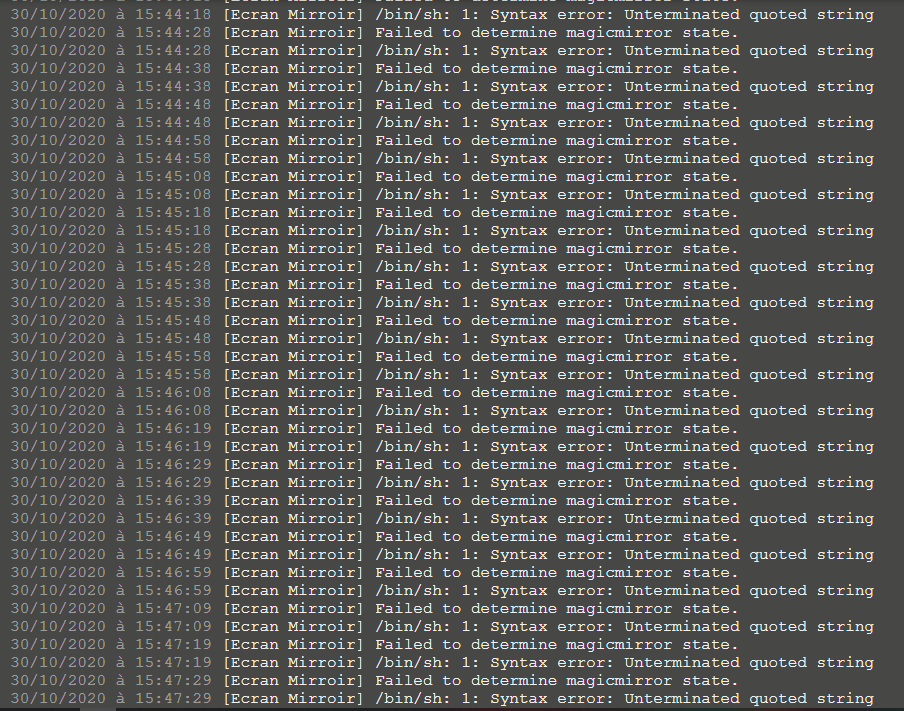
                  I can’t understand why I have this error on the image

                  Yours

                  j’ai cette configuration

                  {
                      "platform": "cmdSwitch2",
                      "name": "Ecran Mirroir",
                      "switches": [
                          {
                              "name": "magicmirror",
                              "on_cmd": "curl -s 'http://192.168.1.2:8080/remote?action=MONITORON'",
                              "off_cmd": "curl -s 'http://192.168.1.2:8080/remote?action=MONITOROFF'",
                              "state_cmd": "sshpass -p 'Armagedon13' ssh -oStrictHostKeyChecking=no pi@192.168.1.2 vcgencmd display_power | grep -q 'HDMI DMT && echo '1'",
                              "polling": true,
                              "interval": 10,
                              "manufacturer": "Raspberry Pi Foundation",
                              "model": "Raspberry Pi 3 Model B"
                          }
                      ]
                  }
                  

                  Capture.PNG

                  S 1 Reply Last reply Reply Quote 0
                  • S Offline
                    sdetweil @amaralia
                    last edited by

                    @amaralia said in MMM-HomeKit | Control your MagicMirror with Apple HomeKit:

                    grep -q 'HDMI DMT && echo ‘1’

                    seems u are missing a single quote (before the && )

                    Sam

                    How to add modules

                    learning how to use browser developers window for css changes

                    1 Reply Last reply Reply Quote 0
                    • B Offline
                      banbutcher
                      last edited by

                      Just installed homekit and its great… i can now have the mirror switch off when i say goodnight using shortcuts, i also have it set to turn off when im not there and switch on when i get home!

                      next step is to get it to switch on my playstation on voice! :)

                      1 Reply Last reply Reply Quote 0
                      • F Offline
                        fragler
                        last edited by

                        Hello,
                        I am trying to setup a Mirror and make it work with homekit. I’m very unexperienced with coding and basically everything here :)
                        I followed the instructions and get the following error.
                        I would appreciate your help a lot!
                        Thank you in advance:

                        [11.12.2020, 17:48:04] Loading 2 platforms…
                        [11.12.2020, 17:48:04] [Config] Initializing config platform…
                        [11.12.2020, 17:48:04] [Config] Running in Service Mode
                        [11.12.2020, 17:48:04] [Raspberry Pi] Initializing cmdSwitch2 platform…
                        [11.12.2020, 17:48:04] Error: Cannot add a bridged Accessory with the same UUID as another bridged Accessory: 74adc578-9ce9-42de-bbbb-5e3d84a287a1
                        at Bridge.Accessory._this.addBridgedAccessory (/usr/lib/node_modules/homebridge/node_modules/hap-nodejs/src/lib/Accessory.ts:416:15)
                        at /usr/lib/node_modules/homebridge/src/server.ts:310:19
                        at Array.filter ()
                        at Server.restoreCachedPlatformAccessories (/usr/lib/node_modules/homebridge/src/server.ts:270:69)
                        at Server.start (/usr/lib/node_modules/homebridge/src/server.ts:158:10)
                        at cli (/usr/lib/node_modules/homebridge/src/cli.ts:80:10)
                        at Object. (/usr/lib/node_modules/homebridge/bin/homebridge:17:22)
                        at Module._compile (internal/modules/cjs/loader.js:1063:30)
                        at Object.Module._extensions…js (internal/modules/cjs/loader.js:1092:10)
                        at Module.load (internal/modules/cjs/loader.js:928:32)

                        S BKeyportB 2 Replies Last reply Reply Quote 0
                        • S Offline
                          sdetweil @fragler
                          last edited by

                          @fragler said in MMM-HomeKit | Control your MagicMirror with Apple HomeKit:

                          : Cannot add a bridged Accessory with the same UUID as another bridged Accessory

                          Sam

                          How to add modules

                          learning how to use browser developers window for css changes

                          1 Reply Last reply Reply Quote 0
                          • BKeyportB Offline
                            BKeyport Module Developer @fragler
                            last edited by

                            @fragler
                            FYI, this non-module is a piece of abandonware.

                            Looks like you’ve got two devices using the same ID.

                            Do you have homebridge on your network already?

                            https://homebridge.io/ is the underlying software, and has moved past what this module had supported. I personally went to a smart plug instead. There’s too many problems with this module to set it up. Took me a solid 3 weeks of debugging to get this to work part of the time.

                            The "E" in "Javascript" stands for "Easy"

                            F 1 Reply Last reply Reply Quote 0
                            • F Offline
                              fragler @BKeyport
                              last edited by

                              @BKeyport Yes I have homebridge online and running. But there is no other device I’m using with homebridge.

                              Okay if this module does not work well, then that’s another story.
                              The problem with the smart plug is that when I turn off the monitor (i.e. kill power) and turn power on again, I need to turn the monitor on with a button as well. So if I were to use a smart plug I could turn on power for the monitor but would still have to press a button :/
                              That’s why I thought this would be a great solution with this module…
                              But thank you all so much for your quick replies!!

                              1 Reply Last reply Reply Quote 0
                              • BKeyportB Offline
                                BKeyport Module Developer
                                last edited by

                                OK, then I think the Homebridge already has the accessory partially or fully defined. Something’s happening that duplicating your install somewhere.

                                The "E" in "Javascript" stands for "Easy"

                                M 1 Reply Last reply Reply Quote 0
                                • M Offline
                                  MajorC Project Sponsor @BKeyport
                                  last edited by

                                  @bkeyport is there a way to show my EVE Weather station data via HomeKit or HomeBridge on the MagicMirror?

                                  BKeyportB 1 Reply Last reply Reply Quote 0
                                  • BKeyportB Offline
                                    BKeyport Module Developer @MajorC
                                    last edited by BKeyport

                                    @majorc I stopped using this, It’s not really a “MagicMirror” module. It’s a basic concept.

                                    I don’t know much about homebridge. You could look at https://homebridge.io/

                                    The "E" in "Javascript" stands for "Easy"

                                    1 Reply Last reply Reply Quote 0
                                    • J Offline
                                      janth
                                      last edited by

                                      Hello :) I have been using th cmdSwitcht2 plugin for the past 3 years. Last weekend I updated homebridge for the (to me) new UI-X and MM and Raspberry Pi OS… I thought it’d take me an hour or so.

                                      I can’t get the on-command to work. I tried different commands like 'vcgencmd display_power 1* and the one that is suggested here. vcgencmd display_power 1 does not work. /opt/vc/bin/tvservice -p; sudo /bin/chvt 6; sudo /bin/chvt 7 works from user pi, but homebridge runs from a different user also called homebridge.

                                      When turning the switch on, it logs the following: "Failed to turn on Spiegelmonitor

                                      [24.9.2021, 09:59:26] [cmdSwitch2] sudo: Kein TTY vorhanden und kein »askpass«-Programm angegeben
                                      

                                      When running tvservice --preferred && sudo chvt 6 && sudo chvt 7 from the console in Homebridge UI X, it says

                                      chvt: ioctl VT_ACTIVATE: Die Operation ist nicht erlaubt
                                      

                                      I tried to give homebridge the same rights in /etc/sudoers and checked /dev/fb0 rights but I don’t fully understand everything I did there. Has anyone had the same issue before?

                                      1 Reply Last reply Reply Quote 0
                                      • J Offline
                                        Jag_k
                                        last edited by

                                        Hello guys! Some days ago, I created a plugin for Homebridge to connect MagicMirror!

                                        Now this plugin can:

                                        • Change brightness of mirror
                                        • Enable/disable monitor

                                        In future, I want add switchers to on/off modules on mirror, CPU/GPU usage, rebooting mirror (hardware and software), CPU temperature and more

                                        Please, give feed-back about this plugin

                                        BKeyportB 1 Reply Last reply Reply Quote 0
                                        • BKeyportB Offline
                                          BKeyport Module Developer @Jag_k
                                          last edited by

                                          @jag_k 404 on the link.

                                          The "E" in "Javascript" stands for "Easy"

                                          1 Reply Last reply Reply Quote 0

                                          Hello! It looks like you're interested in this conversation, but you don't have an account yet.

                                          Getting fed up of having to scroll through the same posts each visit? When you register for an account, you'll always come back to exactly where you were before, and choose to be notified of new replies (either via email, or push notification). You'll also be able to save bookmarks and upvote posts to show your appreciation to other community members.

                                          With your input, this post could be even better 💗

                                          Register Login

                                          • 1
                                          • 2
                                          • 1 / 2
                                          • First post
                                            Last post
                                          Enjoying MagicMirror? Please consider a donation!
                                          MagicMirror created by Michael Teeuw.
                                          Forum managed by Sam, technical setup by Karsten.
                                          This forum is using NodeBB as its core | Contributors
                                          Contact | Privacy Policy

