A New Chapter for MagicMirror: The Community Takes the Lead
Read the statement by Michael Teeuw here.
  • MMM-JAST stopped updating a couple of days ago.

    Unsolved Troubleshooting
    18
    0 Votes
    18 Posts
    270 Views
    1
    Ok, after git pull, had to do a npm ci and that fixes it!
  • MMM-Pages module all showing on one page

    Unsolved Troubleshooting
    24
    0 Votes
    24 Posts
    682 Views
    S
    @hahawoooooo I also recommend using the classes approach to config modules:[ [ "page1"], [ "page2"], ], "fixed": ["fixed"] . Etc Then for the modules you want on page1 Add classes:"page1", In the config below module: line This was so much easier for me
  • MMM-CalendarExt3 Number

    Unsolved Troubleshooting
    12
    1
    0 Votes
    12 Posts
    79 Views
    S
    @Racing88 as I said, not module developer. That’s how I would have made them different
  • Line breaks in Compliments using MMM-Remote-Control

    Unsolved Troubleshooting
    5
    0 Votes
    5 Posts
    23 Views
    S
    @alfi153 not right leaning slash, left leaning, like this “Now is the time\nto come to the aid of your country”
  • MMM-HomeAssistantDisplay Question

    Unsolved Troubleshooting
    5
    0 Votes
    5 Posts
    152 Views
    H
    @uncleroger If your iFrame doesn’t render, in your HA configuration.yaml file, include the following : http: use_x_frame_options: false Restart HA first, wait for it to finish, then restart your MM instance to see if the iFrame shows. I use this older MM iFrame module as it’s straight forward. Within HA, you can also make use of the Kiosk Mode HACS add-on to hide the header and/or sidebars. Once installed, you simply add the following at the top of your dashboard YAML using the Raw configuration editor ( this step is shown in the vid ). kiosk_mode: non_admin_settings: kiosk: true ignore_entity_settings: true If you have solar power or another view of your household electricity use via HA, there’s a super funky card that’s been released : https://github.com/Giorgio866/lumina-energy-card. It can show the flow of power around the house as well as what’s going into the EV. Feel the love for Tron !
  • MMM-Paprika

    Unsolved Troubleshooting
    2
    0 Votes
    2 Posts
    105 Views
    S
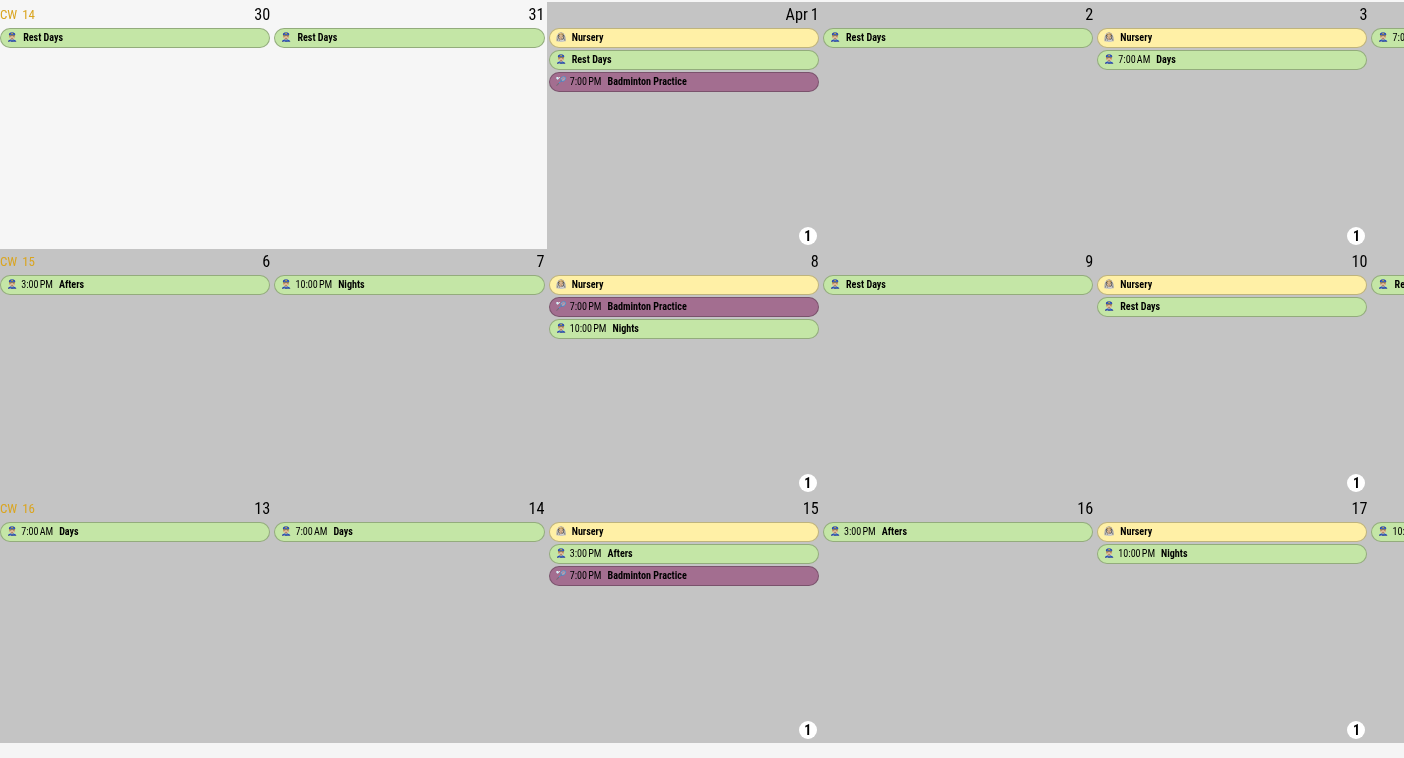
    @Cybex999 this module uses the templating system nunjucks If you Look at the njk you can see it builds a vertical table You could rewrite part of the njk to use th to define columns [image: 1767820201406-img_4658.png]
  • OpenWeather API change to 3.0 - backwards compatible?

    Unsolved Troubleshooting
    2
    0 Votes
    2 Posts
    96 Views
    S
    @ewingfox see https://forum.magicmirror.builders/post/122915
  • 0 Votes
    7 Posts
    236 Views
    wishmaster270W
    @Queasy Great to hear that. As I am using Debian 12 at the moment I am optimistic it is working for older installations, too. I think the topic is solved then.
  • MMM-DynamicWeather Effects do not go away after set period

    Unsolved Troubleshooting
    2
    0 Votes
    2 Posts
    182 Views
    J
    @MikeTheYeti – Yes, I recall having the same or similar issues way back when… I liked the idea of special effects for holidays, birthdays, scheduled vacation trips, etc - but couldn’t get it to work properly. I eventually just gave up.
  • MMM-WindyV2 Layer Rotating

    Solved Troubleshooting
    12
    0 Votes
    12 Posts
    442 Views
    M
    @plainbroke It does, but the test API limits one to wind, temperature, and pressure. Sorry it took 7 days to respond, busy life, I suppose.
  • MMM-temp-ds18b20 temp font size

    Unsolved Troubleshooting
    6
    0 Votes
    6 Posts
    267 Views
    S
    @briantogo what style is it that was inherited? Only need to fix that one I see .MMM-temp-ds18b20 .small.dimmed.w1.w1-thermometer now, the things with . are classes… and the css rules are if the things have NO spaces between them, then ONLY a SPECIFIC element with ALL those thing specified together will be selected… so, small, dimmed, w1 w1-therometer ALL specified as part of class=“…” on the SAME SINGLE element I THINK what you need is to override small looking at the code tempCell.innerHTML = '<i class="' + this.config.iconSize + ' dimmed wi wi-thermometer"></i> '; so I think .MMM-temp-ds18b20 .small .wi-thermometer { fontsize: 2em; }
  • MMM-Mplayer video issues

    Unsolved Troubleshooting
    13
    0 Votes
    13 Posts
    920 Views
    Mr.SpontiM
    @ge I’ve reworked the MMM-RTSPstream module and tried mpv, mplayer and vlc for displaying rtsp-streams from Reolink cameras. Maybe the following command line options are also suitable for your camera. const environ = Object.assign(process.env, { DISPLAY: ":0" }) var opts = { detached: true, env: environ } if (this.player === 'mpv') { // Define the MPV command line flags var args = [`${this.streams[stream].url}`, "--geometry="+this.windowWidth+"+"+this.windowX+"+"+this.windowY, "--ontop", "--title-bar=no", "--border=no", "--vo=gpu", // "--hwdec=drm", "--gpu-context=x11vk", "--ao=null", ] } else if (this.player === 'mplayer') { // Define the Mplayer command line flags var args = [`${this.streams[stream].url}`, "-geometry", `${this.windowX}:${this.windowY}`, "-xy", `${this.windowWidth}`, "-noborder", "-nosound", "-nolirc", "-vo", "xv,gl,gl_nosw,vdpau", "-prefer-ipv4", "-cache", "8192", "-rtsp-stream-over-tcp", "-noconsolecontrols", "-really-quiet", ] } else if (this.player === 'vlc') { // Generate the VLC window var args = ["-I dummy", "--video-on-top", "--no-video-deco", "--no-osd", "--no-embedded-video", "--no-audio", //"--no-video-title-show", //"--network-caching=1000", `${this.streams[stream].url}` ] }
  • MMM-BackgroundSlideShow cutting off top of pics

    Solved Troubleshooting
    12
    0 Votes
    12 Posts
    678 Views
    S
    @RonR said in MMM-BackgroundSlideShow cutting off top of pics: MMM-ImagesPhotos doesn’t have a path property it is hard coded to ‘uploads’
  • Weather.gov problem in default weather module.

    Unsolved Troubleshooting
    3
    0 Votes
    3 Posts
    183 Views
    ankonaskiff17A
    @sdetweil I’ve done that. I intend to follow-up with those folks tomorrow. There are a few NWS API pages that indicate what options are available and while they show various iterations of Forecast, Current is not in the list. They have the api set where you can plug in GPS coordinates, the NWS office that manages those GPS coordinates and it will generate the https address so you just plug it into the module. That is what I did a few years ago when I first built that MM. I am going to look at Observations options at bottom of the picture to see if the have changed the format. [image: 1763336508417-api-picture.jpg]
  • Disable header in MMM-MieleAtHome and MMM-Homeconnect

    Solved Troubleshooting
    14
    1
    0 Votes
    14 Posts
    1k Views
    O
    @sdetweil Sorry. Both ways did´nt work. Only the “display: none !important;” did the trick. Thank you for you support…as always!
  • Calvin and Hobbs - Adjust screen size?

    Unsolved Troubleshooting
    2
    0 Votes
    2 Posts
    130 Views
    plainbrokeP
    @guitartoys Try these settings. You will probably have to adjust the sizes… It fits my 42" TV full screen all directions… Custom.css: .MMM-CalvinAndHobbes .module-content { Margin-top: 10px; Margin-left: 10px; max-width: 1810px; max-height: 1025px; width: 1810px; height: 1025px; overflow: hidden; } #cahcomiccontent { width: 1810px; height: 1025px; } Config.js: { module: "MMM-CalvinAndHobbes", position: "middle_center", config: { invertColors: false, grayScale: false, updateInterval: 7200000, limitComicHeight: -1, maxHeight: "98%" } },
  • MMM-SPOTIFY I cannot for the life of me get this to run propperly

    Unsolved Troubleshooting
    2
    0 Votes
    2 Posts
    161 Views
    S
    @spistachio the Spotify module needs a premium account and you must follow the redirect url rules exactly Then the module will attempt to call your redirect, which doesn’t exist, but the token is in the url shown on the not found page So you copy that out for the value in config
  • MMM-Carousel extra text

    Solved Troubleshooting
    2
    0 Votes
    2 Posts
    268 Views
    msimon360M
    I found the simple fix. I removed the position option from the Carousel module in the config.js file. Doh! I thought it said required but it said “NOT Required”.
  • MMM-AlarmClock popup not appearing when alarm goes off

    Solved Troubleshooting
    3
    0 Votes
    3 Posts
    340 Views
    B
    Hey, I ran into a similar issue before — the popup didn’t appear even though the alarm triggered. In my case, it turned out to be a config issue with the notification settings in the module. Try checking if the showPopup option is enabled and that you don’t have another module overlapping it on the screen. Also, while testing your setup, you can use something like onlinealarm.co to verify your alarm times are correct before syncing it with MagicMirror — makes debugging way easier.
  • News Feed Source Title and Publish Date missing a character

    Unsolved Troubleshooting
    6
    1 Votes
    6 Posts
    371 Views
    jca2112J
    @karsten13 Thank you for the update.