A New Chapter for MagicMirror: The Community Takes the Lead
Read the statement by Michael Teeuw here.
  • Wallberry theme: disable unsplash

    Solved Troubleshooting
    3
    0 Votes
    3 Posts
    318 Views
    M
    Managed to figure it out: just bracketed out the position line in the Wallberry CSS and it’s suppressed [image: 1761328809981-css.png]
  • Need help to install MMM-Face-Multi-User-Recognition-SMAI

    Solved Troubleshooting
    3
    0 Votes
    3 Posts
    482 Views
    A
    Hi @sdetweil , Sorry for the delay and thanks for this info. We’ll test this module.
  • MMM-PlexNowPlaying

    Unsolved Troubleshooting
    3
    0 Votes
    3 Posts
    363 Views
    N
    @karsten13 yes. thank you. it’s commented out. I am seeing that people are using Tautulli in addition to the module. Do I need that?
  • MMM-CalendarExt3 and MMM-MonthlyCalendar blank

    Solved Troubleshooting
    59
    0 Votes
    59 Posts
    17k Views
    O
    @sdetweil Thanks for the quick response. I ended up wiping and reinstalling the 64 bit version so I lost the log. I will try and get that version to work.
  • My module stops MMM-Pages working

    Unsolved Troubleshooting
    13
    0 Votes
    13 Posts
    1k Views
    S
    @Scott-M awesome!
  • Issue with Outlook recurring events

    Solved Troubleshooting
    26
    1
    0 Votes
    26 Posts
    5k Views
    W
    @sdetweil Thanks for the help. I’ll have a play around when I get a chance and see if I can figure out what’s going on.
  • MMM-Config update due to changed 3rd part module list data format

    Solved Troubleshooting
    1
    1 Votes
    1 Posts
    1k Views
    S
    anyone using my MMM-Config for module install, the data format changed, To update git pull in the module folder then npm install and restart MagicMirror
  • MMM-Spotify

    Unsolved Troubleshooting
    6
    0 Votes
    6 Posts
    1k Views
    R
    @MMRIZE said in MMM-Spotify: @J2k3000 said in MMM-Spotify: http://ip:port//api/notification/SPOTIFY_PlAY?context_uri=spotify:track:4iV5W9uYEdYUVa79Axb7Rh this translates in : “notification”:“SPOTIFY_PlAY”,“payload”:{“context_uri”:“spotify:track:4iV5W9uYEdYUVa79Axb7Rh” Maybe “SPOTIFY_PLAY”, not “spotify premium apk_PIAY”? thank
  • MMM-NOAAAlerts

    Unsolved Troubleshooting
    2
    0 Votes
    2 Posts
    1k Views
    S
    @Cono can you show the config for the module from config.js
  • Cal EXT3 - Symbols and colors

    Solved Troubleshooting
    14
    0 Votes
    14 Posts
    5k Views
    _
    Sam, nevermind the problem; I found a sentence in a different question on git, in which it is mentioned shortly; also its kind of written in a config, believe it was the ext3 config. Still a bit annoying that you have to make an entry for the color and on another spot/file you have to set the custom event up. Thanks for your continuous help mate.
  • Default Weather Module Time Incorrect

    Solved Troubleshooting
    5
    0 Votes
    5 Posts
    3k Views
    M
    Thanks! It works!
  • MMM-Todoist

    Solved Troubleshooting
    9
    1
    0 Votes
    9 Posts
    4k Views
    A
    @OwenLars I was able to get the proper project ID by running this command in the terminal. I just set it the module yesterday. curl -s \ -H "Authorization: Bearer xxxxyourapikeyxxxx" \ https://api.todoist.com/rest/v2/projects
  • Newsfeed Show Article Displays Captcha

    Unsolved Troubleshooting
    7
    0 Votes
    7 Posts
    4k Views
    S
    I added the NY times feed to my test MM, and don’t see any problems
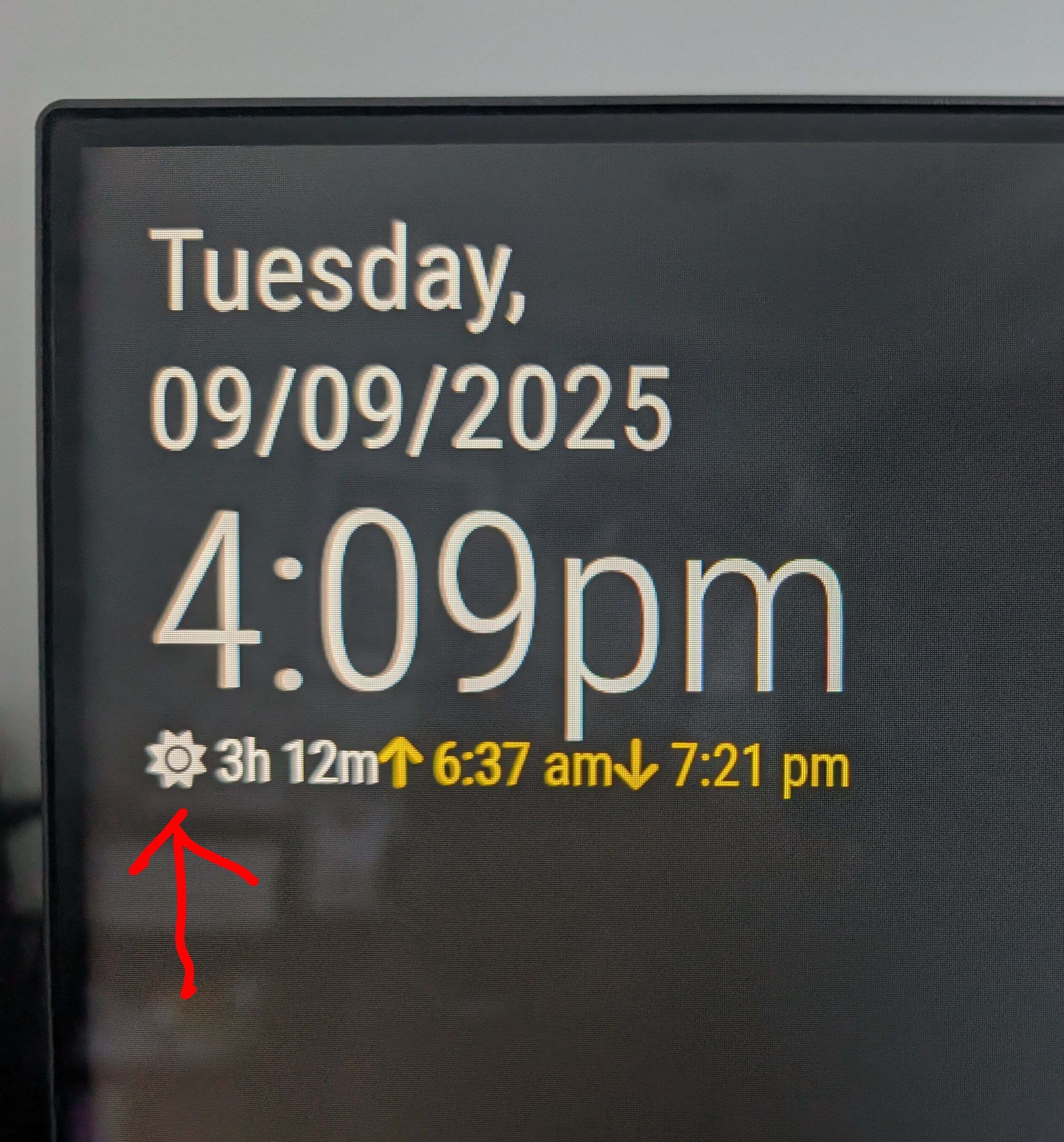
  • Default Clock SunTimes icon - color change?

    Solved Troubleshooting
    4
    1
    1 Votes
    4 Posts
    6k Views
    S
    @brgracer you are welcome… I am the moderator here, and I feel my job is to help, and teach you how to solve problems on your own as much as I can. and as I see recurring problems, try to document them, and find solutions, my install/upgrade scripts, my backup/restore scripts, my MMM-Config module that does form based MM and module config, and module install (MMM-Config allows you to disable a module, effectively same as uninstall)

  • MMM-Tado - Tado API Login no longer working (403 error) — any fix?

    Unsolved Troubleshooting
    17
    0 Votes
    17 Posts
    3k Views
    M
    This is my solution. Just install the https://github.com/daydy16/MMM-Tado In the config file: { module: 'MMM-Tado', position: 'bottom_left', // This can be any of the regions. config: { updateInterval: 900000 // miliseconds-15minutes-96times per day < 100 } }, After you launch your Mirror with “node --run start”, you receive in the terminal this: MMM-Tado: Device authentication required. Please visit the following URL: https://login.tado.com/oauth2/device?user_code=XXXXXX You put that URL in your browser and submit the code. That’s it. Hope it helps!
  • Embed Grafana Charts - xframe issue

    Solved Troubleshooting
    3
    0 Votes
    3 Posts
    2k Views
    R
    @hs said in Embed Grafana Charts - xframe issue: allow_embedding=true For future me and of course anyone else looking for this, the setting is in the [Security] section of /etc/grafana/grafana.ini (Assumes Grafana is hosted on a Pi or other Linux distro)
  • mm watching disabled?

    Solved Troubleshooting
    4
    3
    0 Votes
    4 Posts
    4k Views
    S
    @Periz another thing I didnt mention that could lead you from the pm2 status output The column Uptime tells you how long the app has been running 0 is a bad sign The column to the right of Uptime Shows the count of restarts for the app large numbers are not good
  • Reoccurring events wrong time MyCalendar

    Solved Troubleshooting
    7
    0 Votes
    7 Posts
    3k Views
    S
    @rnieto18 thanks for the feedback
  • Default Modul calendar error

    Solved Troubleshooting
    8
    0 Votes
    8 Posts
    3k Views
    S
    @chris47803 https://www.theregister.com/2025/08/21/microsoft_365_outage/
  • MMM-Spotify having trouble with authentification

    Unsolved Troubleshooting
    7
    0 Votes
    7 Posts
    2k Views
    S
    @kinggiotai did you setup the spotify.config.json from the auth callback example? [ { "USERNAME": "A_NAME_TO_IDENTIFY_YOUR_ACCOUNT", "CLIENT_ID": "PUT_YOUR_SPOTIFY_APP_CLIENT_ID", "CLIENT_SECRET": "PUT_YOUR_SPOTIFY_APP_CLIENT_SECRET", "TOKEN": "./USERNAME_token.json", "AUTH_DOMAIN": "http://YOUR_DEVICES_IP", "AUTH_PORT": "8889" } ] I had to do that just now the domain/port MUST match the callback address in the spotify app config from my app config callback http://localhost:8100/callback json file strings to match domain is http://localhost port is 8100