Read the statement by Michael Teeuw here.
Weatherunderground - currently - hourly - daily - configurable
-
@c502 maybe a unit problem? 13mp/h ~ 20km/h
-
@strawberry-3.141 I’ve checked that also. Everything appears to be in order.
-
Noob issue here. How do I update the program? I get an alert saying to update wunderground, but I don’t know how to do that!
-
@nevint said in Weatherunderground - currently - hourly - daily - configurable:
Noob issue here. How do I update the program? I get an alert saying to update wunderground, but I don’t know how to do that!
In a terminal window go to :
MagicMirror/modules/wunderground
Then type:
git pull
That should update it.
-
@RedNax I’ve tried changing this in the main MMM-WunderGround CSS and custom CSS, but neither seem to affect the font size. (note that my goal is to increase the font size):
.MMM-WunderGround .smaller {
    font-size: 80%;
}
and
.MMM-WunderGround .smaller { font-size: 80%; }Any guidance would be appreciated.
-
@kasperb only the wind direction icon is using the class
smaller, so with your selector you would only change this specific icon. -
Hey guys, Is there any way to troubleshoot this? I’m stuck on “Loading…”
Installed the latest module, config is below. My api works as I’ve tested it with another module.
I’m stuck!
{ module: 'MMM-WunderGround', position: 'top_left', config: { apikey: 'blah', pws: 'pws:INSWTHEO3', hourly: '1', fctext: '1', fcdaycount: "9", fcdaystart: "1", hourlyinterval: "3", hourlycount: "3", alerttime: 30000, alerttruncatestring: "english:", roundTmpDecs: '1', layout: "vertical", windunits: "mph", coloricon: true, sysstat: 0 } }, -
@DeanoAus The only thing I can think of is adding the " " to coloricon value:
coloricon: "true", -
@kasperb Thanks mate, I restarted the pi and it just randomly started working. Nothing in logs to indicate why. shrugs
-
My temperature isnt changing whatsoever, it stays stuck on 17.3 degrees, what could be the issue here? Anyone?
-
@Kimzer Most likely, it’s a problem with the Weather Underground database. If something is preventing them from receiving an update from the weather station they use to provide you with conditions, then they’ll just stay there until they resolve the issue.
You could try shifting the forecast to another location just to verify that the temperature does change over time. If other locations update, then the problem is on their end. If it doesn’t update temperature at all, then come back and we’ll see what we can find.
-
Mine is stuck on 20.0 degrees for a few weeks now…haven’t had time to troubleshoot it either…
-
@cyberphox said in Weatherunderground - currently - hourly - daily - configurable:
Mine is stuck on 20.0 degrees for a few weeks now…haven’t had time to troubleshoot it either…
Try what @bhepler suggested. Try a different
pws:to see if that’s the problem. Here is mine if you want to test with that. It’s working normally.pws: 'pws:KNYNEWYO103', -
Using a different pws worked for me. Now its all good.
Only wondering how i can change the colors of the temperature and the weather forecast text, anyone got some custom css for it? =) -
@Kimzer which part are you looking to change? The big temperature in current conditions? Or the min/max temps in the forecast table? Same question for the forecast text – is this the current day’s forecast (i.e.: grey text above the large current temperature) or the text within the forecast table? Also, are you using the vertical or horizontal layout? If I recall correctly, the class names change slightly with the layout. Let me know and I can get you started with the CSS.
-

The parts marked in red is what i want to change color on (Y)
Thanks for helping j.e.f.f :) -
@Kimzer Try these. Adjust the
colorvalues as you like.For the large temperature display:
.MMM-WunderGround .large .bright {
  color: #FFFFCC;
}
The human-readable text forecast:
.MMM-WunderGround table.small tr:first-child td {
  color: #FFFFCC;
}
The hours in the forecast table:
.MMM-WunderGround .hourv {
  color: #FFFFCC;
}
I applied these style to the MMM-WunderGround module and you can see how these three items are coloured the buttery colour I specified:
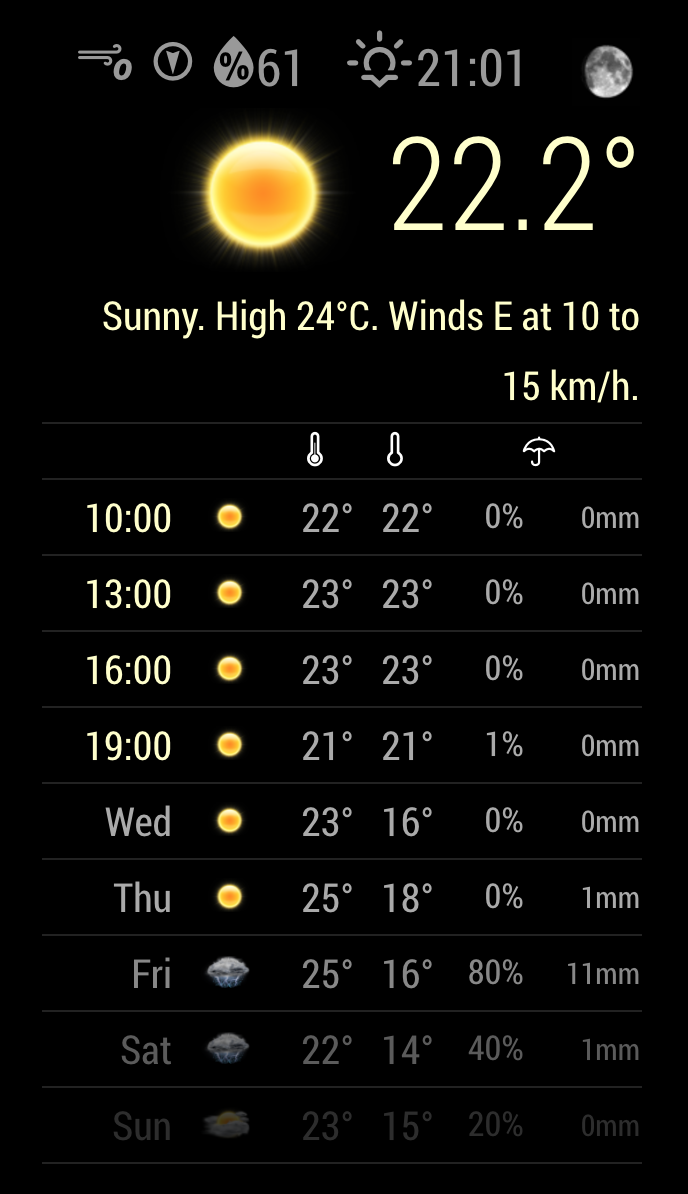
-
Perfect! Thanks alot! :D
-
@j.e.f.f How you make a table style ? i love it !
-
@Fonfon That’s the default for MMM-WunderGround, using the custom styles I posted above. Here’s my config:
    {
        module: 'MMM-WunderGround',
        position: 'top_right',
        config: {
            apikey: 'my_api_key', // private; don't share!
            pws: 'pws:IONTORON421',
            hourly: '1',
            fctext: '1',
            fcdaycount: "5",
            fcdaystart: "0",
            hourlyinterval: "3",
            hourlycount: "2",
            alerttime: 10000,
            alerttruncatestring: "english:",
            roundTmpDecs: 1,
            UseCardinals: 0,
            layout: "vertical",
            sysstat: 0,
            coloricon: true,
        }
    },





Hello! It looks like you're interested in this conversation, but you don't have an account yet.
Getting fed up of having to scroll through the same posts each visit? When you register for an account, you'll always come back to exactly where you were before, and choose to be notified of new replies (either via email, or push notification). You'll also be able to save bookmarks and upvote posts to show your appreciation to other community members.
With your input, this post could be even better 💗
Register Login