MagicMirror Forum
    • Recent
    • Tags
    • Unsolved
    • Solved
    • MagicMirror² Repository
    • Documentation
    • 3rd-Party-Modules
    • Donate
    • Discord
    • Register
    • Login
    A New Chapter for MagicMirror: The Community Takes the Lead
    Read the statement by Michael Teeuw here.

    Help with a couple CSS issues

    Scheduled Pinned Locked Moved Custom CSS
    22 Posts 4 Posters 38.1k Views 7 Watching
    Loading More Posts
    • Oldest to Newest
    • Newest to Oldest
    • Most Votes
    Reply
    • Reply as topic
    Log in to reply
    This topic has been deleted. Only users with topic management privileges can see it.
    • S Do not disturb
      sdetweil @Nneuland
      last edited by sdetweil

      @nneuland time to learn the developers window

      on the MM screen, press ctrl-shift-i, a new window will open beside your mm screen

      select the elements tab
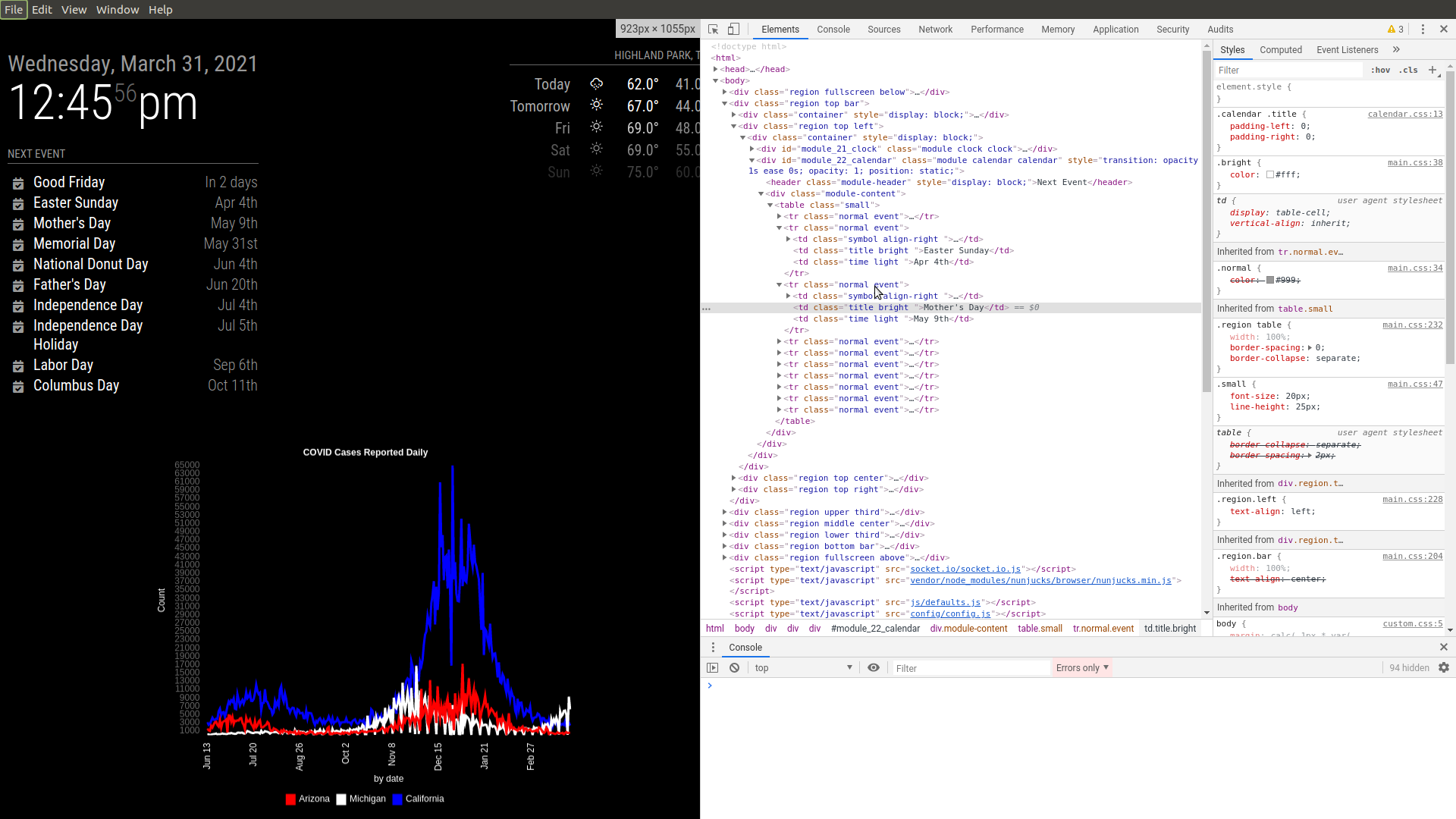
      Screenshot at 2021-03-31 12-45-57.png

      in the upper left corner of the elements page is a pointer symbol (box with mouse pointer in it) , click it with the mouse
      and then use your mouse to locate the content in the MM screen u want to analyze
      (as u navigate, different areas of content will be highlighted)

      click on the content u are interested in… and the web page tree will open to that content (pink). and the bottom of the page will show the class name list left to right(green), with rightmost the one set closest to the content, left most set by MM

      also on the right column is the class hierarchy, closest at the top, furthest MM further down…
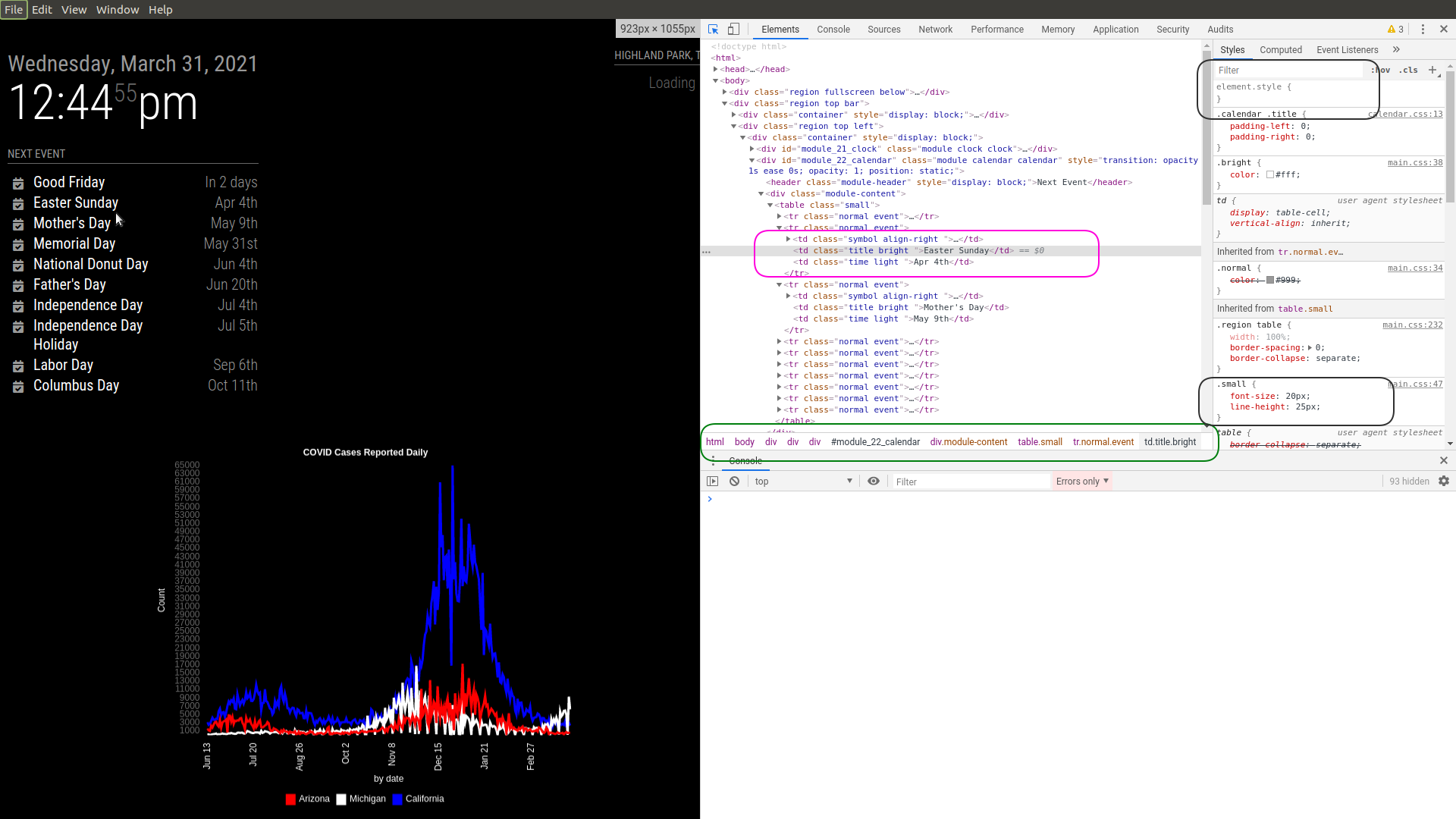
      Screenshot at 2021-03-31 12-44-55.png

      SO, you want to find the class that sets the fontsize, and edit the topmost right column entry (black) field to add a new fontsize and see it change (Mothers day entry in this example is a different font size now)
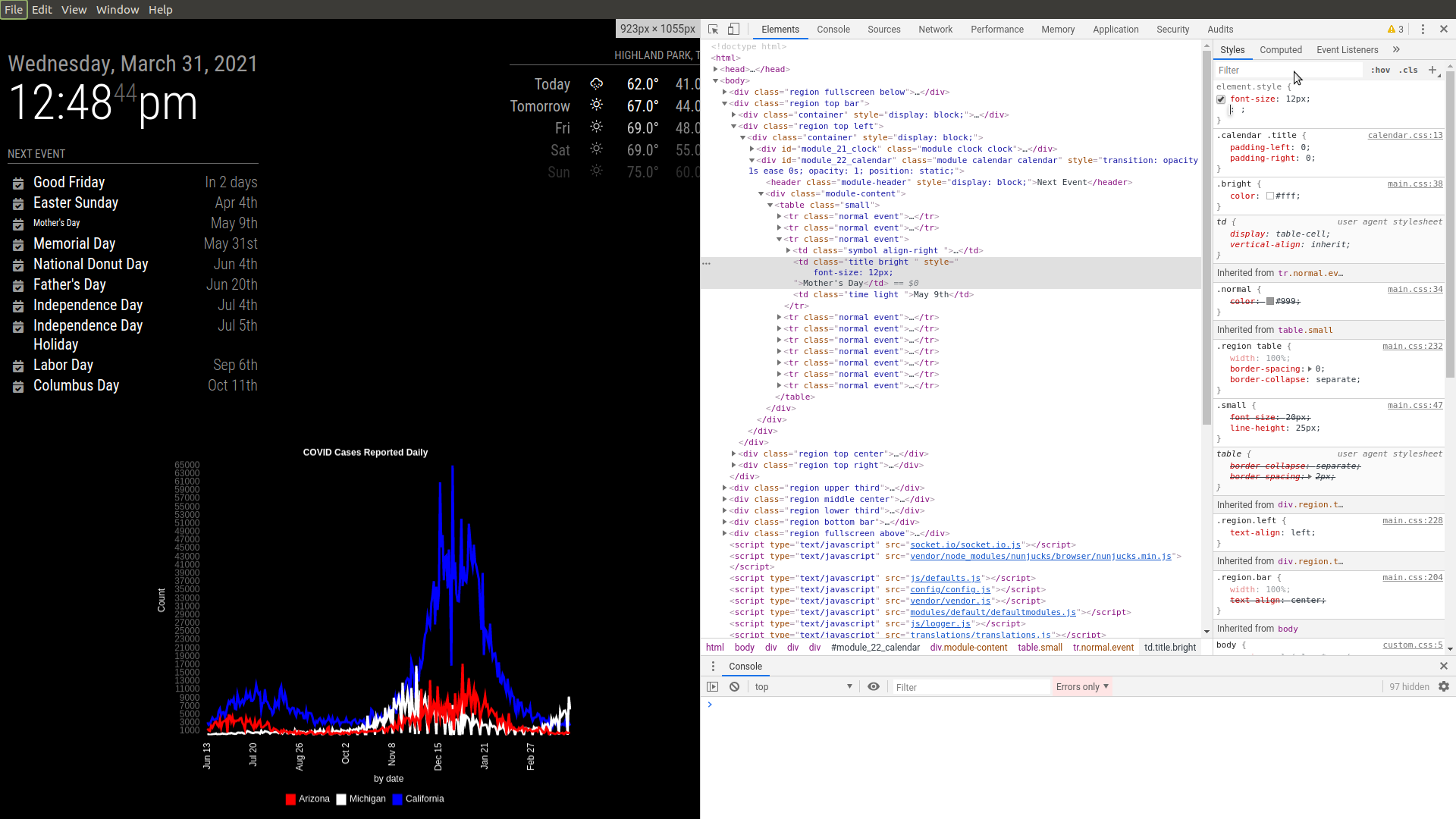
      Screenshot at 2021-03-31 12-48-44.png

      so, now you know what and where

      so, in custom.css you add and entry for that using this pattern

      .modulename .class {
          style_name : value;
      }
      

      so for this module (in topic discussion, not this example)

      .MMM-nyc-transit .small {
         fontsize 12px;
      }
      

      in addition, you can copy/paste everything in the top right styles window into custom.css
      and put a selector wrapper around it

      but in this case, small, might be everything …

      for MMM-Discogs, same approach, BUT the item u want to hide might not be addressable easily . if it IS, then

      .MMM-Discogs ???? { 
          display: none;
      }
      

      if not easily, there are all kinds of css selectors (how to target content) that can be used, div after a page, after a heading of ‘jjj’

      i use this to help me get to the right element
      https://www.w3schools.com/cssref/css_selectors.php

      Sam

      How to add modules

      learning how to use browser developers window for css changes

      N 1 Reply Last reply Reply Quote 1
      • N Offline
        Nneuland @sdetweil
        last edited by

        @sdetweil Sam!

        You’ve been a godsend. I’m going to give this a go when I get home later.
        I can’t thank you enough for your time and patience.

        N

        S 1 Reply Last reply Reply Quote 0
        • S Do not disturb
          sdetweil @Nneuland
          last edited by

          @nneuland to close the developer window u can click the close x in the top right, or ctrl-shift-i again

          Sam

          How to add modules

          learning how to use browser developers window for css changes

          N 1 Reply Last reply Reply Quote 0
          • N Offline
            Nneuland @sdetweil
            last edited by

            @sdetweil
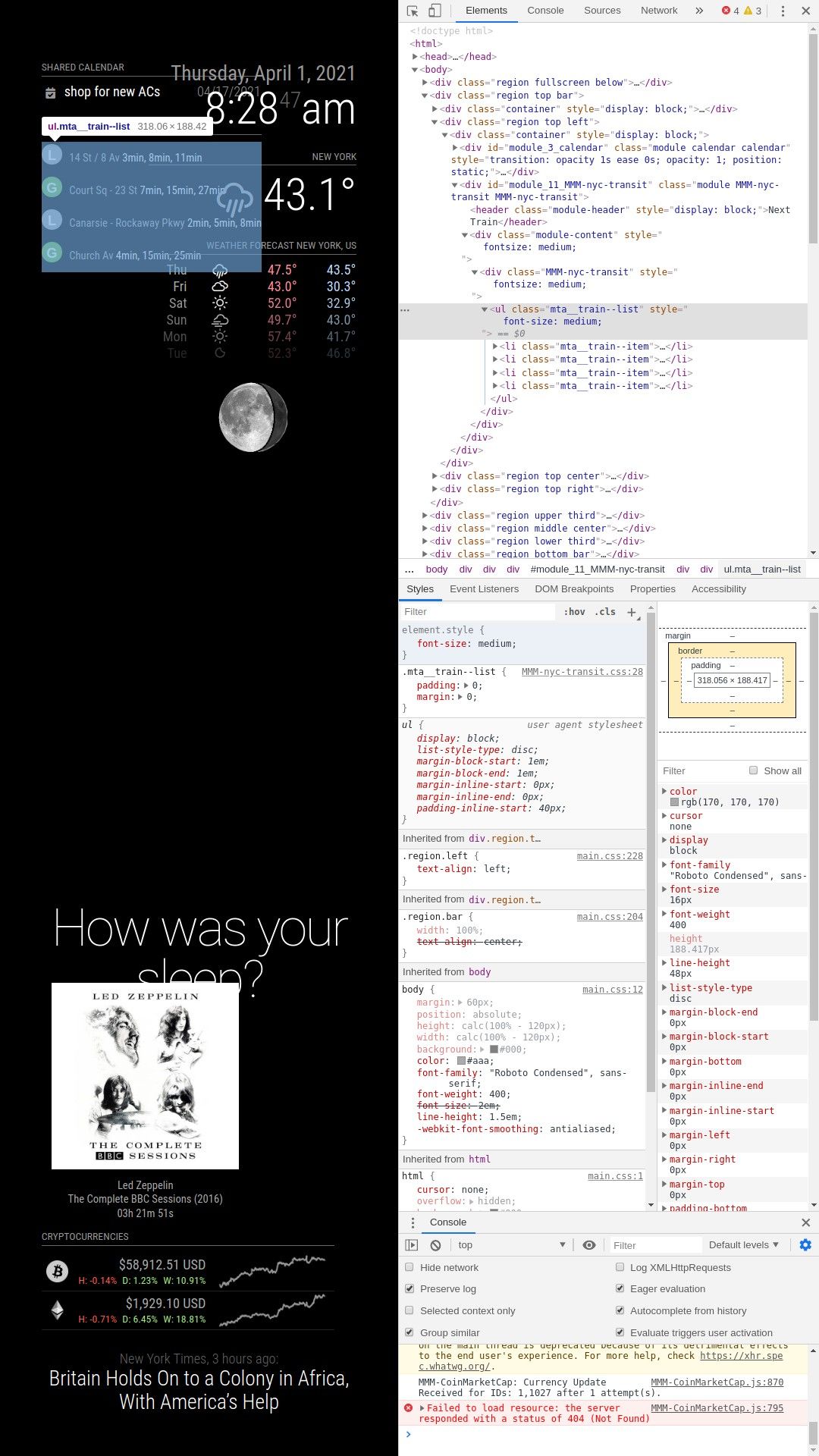
            For the NYC-Transit module Changing the font size within the the developers window was smooth as silk.
            However, scaling in the custom.css has yielded nothing.
            I have attached a screenshot of what I believe is the proper location.

            Removing the duration of individual albums seems more difficult considering every album in the collection is different, or it doesn’t have a location at all due to not being in the description.

            To clarify, I should be modifying the “custom.css” (blank by default) file. not amending the specific mmm-nyc-transit.css or mmm-discogs.css files?Nyc_transit_font.jpg

            S 1 Reply Last reply Reply Quote 0
            • S Do not disturb
              sdetweil @Nneuland
              last edited by sdetweil

              @nneuland so, in custom.css you need this pattern

              .modulename (space) .classname {
                  stylename: value;
              }
              

              SO, in this case from the dev window

              go up to the module_11_MMM-nyc-transit

              remove the module_11_ prefix and add a dot

              .MMM-nyc-transit  
              

              then we need the class name of the element u want to change

              mta__train–list (add a dot in front)

              now we have

              .MMM-nyc-transit   .mta__train--list {
              

              it IS font-size: medium;
              in main.css

              .medium {
                font-size: 30px;
                line-height: 35px;
              }
              

              u want to change that, SO

              .MMM-nyc-transit   .mta__train--list {
                      font-size:   20px;
              }
              

              Sam

              How to add modules

              learning how to use browser developers window for css changes

              1 Reply Last reply Reply Quote 1
              • N Offline
                Nneuland
                last edited by

                @sdetweil

                YES!!! My spacing was allllllll off.
                You’re a genius! Thank you so much.

                You have the patience of a saint

                N

                S 1 Reply Last reply Reply Quote 0
                • S Do not disturb
                  sdetweil @Nneuland
                  last edited by sdetweil

                  @nneuland yes, spacing is critical… it means something else if there are NO spaces between items in the selector list ( stuff before open brace { )

                  something worth reading
                  https://forum.magicmirror.builders/topic/6808/css-101-getting-started-with-css-and-understanding-how-css-works

                  Sam

                  How to add modules

                  learning how to use browser developers window for css changes

                  1 Reply Last reply Reply Quote 0
                  • N Offline
                    Nneuland
                    last edited by

                    @sdetweil
                    Your so knowledgeable with this realm.
                    Can I ask, what you know about the hue module?

                    Specifically, is it only displaying what lights are on, or is it interactive?

                    I’m genuinely curious what your smart mirror looks like.
                    If you have one, I imagine it’s incredible.

                    N

                    S 1 Reply Last reply Reply Quote 0
                    • S Do not disturb
                      sdetweil @Nneuland
                      last edited by

                      @nneuland i am a moderator… i don’t know much about specific modules…

                      I know HOW to do some debugging and some limited css…

                      I also do the scripted installer and upgrader tools

                      i have 5 single board computers running different things… Pi0, Pi3, Pi4, Jetson Nano, and Odroid Xu4. also a vm with Macos catalina, and my desktop running ubuntu.

                      and I know how to google for answers…

                      there are lots of talented folks here… I reference their work. all the time…

                      Sam

                      How to add modules

                      learning how to use browser developers window for css changes

                      N 1 Reply Last reply Reply Quote 1
                      • N Offline
                        Nneuland @sdetweil
                        last edited by

                        @sdetweil
                        That’s great. Can’t thank you enough.

                        1 Reply Last reply Reply Quote 0
                        • M Offline
                          matt216
                          last edited by

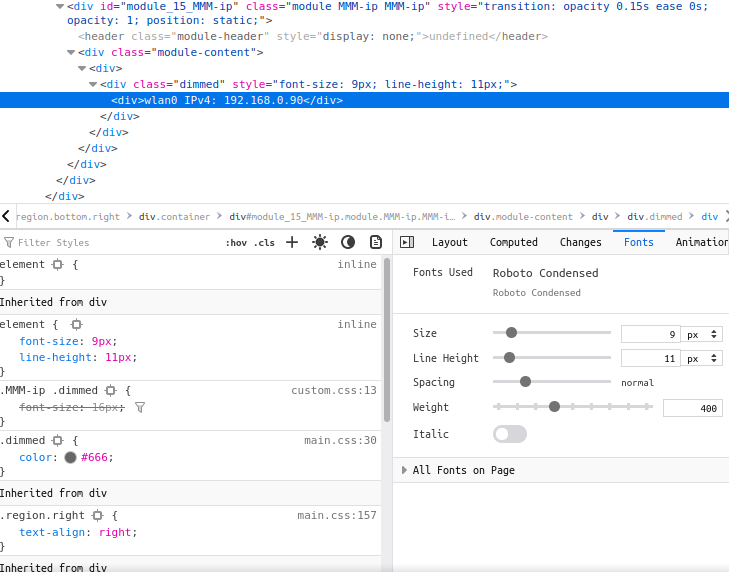
                          @sdetweil I wonder if I can ask for some help? I have MMM-ip module that I’d like the change the font size. Following your instructions with dev tools I can see:
                          mmm-ip font.png

                          So I have put in my custom.css:

                          .MMM-ip .dimmed {
                          font-size: 16px;
                          }


                          But it doesn’t seem to take effect. Any advice?
                          Thanks in advance.
                          Matt

                          S 1 Reply Last reply Reply Quote 0
                          • S Do not disturb
                            sdetweil @matt216
                            last edited by sdetweil

                            @matt216 while in the dev window,

                            u can see the custom.css value is strike thru, cause the div wins
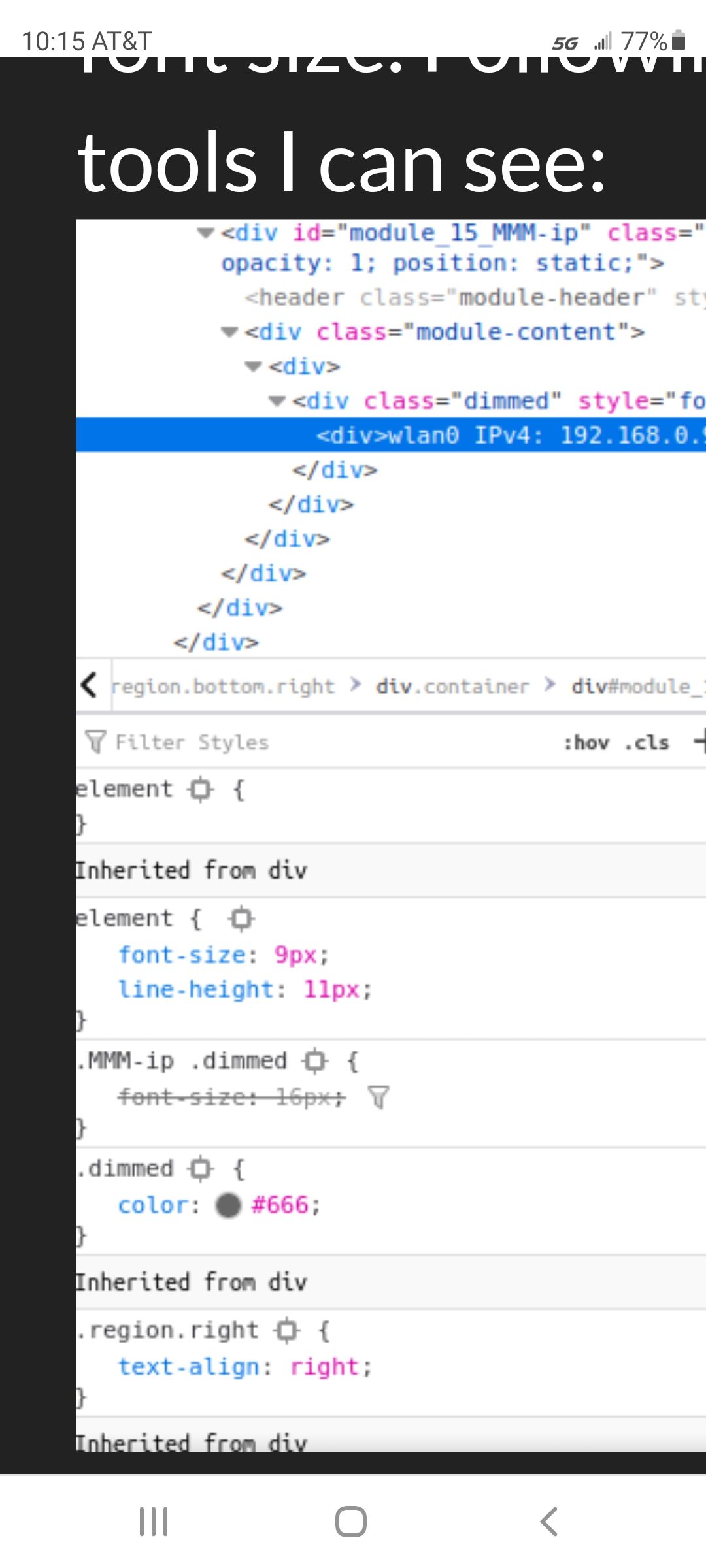
                            Screenshot_20211005-101600_Chrome.jpg

                            so u need to apply the style to the div

                            add it to the element box above.

                            if that works, you can mark/copy that top right box, and paste to custom.css, should have the right targeting syntax

                            Sam

                            How to add modules

                            learning how to use browser developers window for css changes

                            M 1 Reply Last reply Reply Quote 0
                            • M Offline
                              matt216 @sdetweil
                              last edited by

                              @sdetweil Thanks for the help.
                              How do I reference the div in custom.css not the class?
                              Adjusting the value in the element box above successfully adjusts the font, but this looks to adjust the ‘dimmed’ class.

                              S 1 Reply Last reply Reply Quote 0
                              • S Do not disturb
                                sdetweil @matt216
                                last edited by sdetweil

                                @matt216 and when u copy/paste that from the top box to custom.css, what do u get?

                                just swipe mark the element entry, copy

                                here is my favorite cheet sheet on css selectors

                                https://www.w3schools.com/cssref/css_selectors.asp

                                Sam

                                How to add modules

                                learning how to use browser developers window for css changes

                                S 1 Reply Last reply Reply Quote 0
                                • S Do not disturb
                                  sdetweil @sdetweil
                                  last edited by

                                  I’m guessing

                                  .MMM-ip  .dimmed div {
                                       font-size:16px;
                                  }
                                  

                                  Sam

                                  How to add modules

                                  learning how to use browser developers window for css changes

                                  M 1 Reply Last reply Reply Quote 0
                                  • M Offline
                                    matt216 @sdetweil
                                    last edited by

                                    @sdetweil Thank you, this works:

                                    .MMM-ip  .dimmed div {
                                         font-size:16px;
                                    }
                                    
                                    S 1 Reply Last reply Reply Quote 0
                                    • S Do not disturb
                                      sdetweil @matt216
                                      last edited by

                                      @matt216 what did the copy/paste result look like?

                                      Sam

                                      How to add modules

                                      learning how to use browser developers window for css changes

                                      1 Reply Last reply Reply Quote 0
                                      • S sdetweil referenced this topic on
                                      • S sdetweil referenced this topic on
                                      • S sdetweil referenced this topic on
                                      • S sdetweil referenced this topic on
                                      • S sdetweil referenced this topic on
                                      • S sdetweil referenced this topic on
                                      • S sdetweil referenced this topic on
                                      • S sdetweil referenced this topic on
                                      • S sdetweil referenced this topic on
                                      • S sdetweil referenced this topic on
                                      • S sdetweil referenced this topic on
                                      • A Anthony referenced this topic on
                                      • S sdetweil referenced this topic on
                                      • S sdetweil referenced this topic on
                                      • S sdetweil referenced this topic on
                                      • S sdetweil referenced this topic on
                                      • S sdetweil referenced this topic on
                                      • S sdetweil referenced this topic on
                                      • S sdetweil referenced this topic on
                                      • S sdetweil referenced this topic on
                                      • S sdetweil referenced this topic on
                                      • S sdetweil referenced this topic on
                                      • S sdetweil referenced this topic on
                                      • S sdetweil referenced this topic on
                                      • S sdetweil referenced this topic on
                                      • S sdetweil referenced this topic on
                                      • S sdetweil referenced this topic on
                                      • S sdetweil referenced this topic on
                                      • S sdetweil referenced this topic on
                                      • S Offline
                                        Shawangunk
                                        last edited by

                                        I’m a raspi & linux newbie (used C years ago. some Arduino experience) and this is my first post so…
                                        In attempting to modify MM I’ve experienced a number of custom.css failures. I found this @sdetweil post https://forum.magicmirror.builders/topic/14862/help-with-a-couple-css-issues?_=1623901330356 and believe the “developer Tools” will be a big help, but I quickly got lost. The Tool’s built in help doc (kebab>Help>Documentation) appears to be a null link. I tried to find documentation for this tool online without luck. Can anyone provide a documentation link or more detailed tutorial?

                                        S 2 Replies Last reply Reply Quote 0
                                        • S Shawangunk referenced this topic on
                                        • S Do not disturb
                                          sdetweil @Shawangunk
                                          last edited by

                                          @Shawangunk this would be all in the/a browser, nothing w mm.

                                          I have never seen any doc

                                          Sam

                                          How to add modules

                                          learning how to use browser developers window for css changes

                                          1 Reply Last reply Reply Quote 0
                                          • S Do not disturb
                                            sdetweil @Shawangunk
                                            last edited by sdetweil

                                            @Shawangunk see this
                                            https://developer.chrome.com/docs/devtools/

                                            but this will not teach u the DOM, css, html (and attributes)

                                            only provides tool to examine and change Dom element styles

                                            Sam

                                            How to add modules

                                            learning how to use browser developers window for css changes

                                            1 Reply Last reply Reply Quote 0

                                            Hello! It looks like you're interested in this conversation, but you don't have an account yet.

                                            Getting fed up of having to scroll through the same posts each visit? When you register for an account, you'll always come back to exactly where you were before, and choose to be notified of new replies (either via email, or push notification). You'll also be able to save bookmarks and upvote posts to show your appreciation to other community members.

                                            With your input, this post could be even better 💗

                                            Register Login

                                            • 1
                                            • 2
                                            • 1 / 2
                                            • First post
                                              Last post
                                            Enjoying MagicMirror? Please consider a donation!
                                            MagicMirror created by Michael Teeuw.
                                            Forum managed by Sam, technical setup by Karsten.
                                            This forum is using NodeBB as its core | Contributors
                                            Contact | Privacy Policy