Read the statement by Michael Teeuw here.
Help with a couple CSS issues
-
@nneuland so, in custom.css you need this pattern
.modulename (space) .classname {
    stylename: value;
}
SO, in this case from the dev window
go up to the module_11_MMM-nyc-transit
remove the module_11_ prefix and add a dot
.MMM-nyc-transitthen we need the class name of the element u want to change
mta__train–list (add a dot in front)
now we have
.MMM-nyc-transit .mta__train--list {it IS font-size: medium;
in main.css.medium { font-size: 30px; line-height: 35px; }u want to change that, SO
.MMM-nyc-transit .mta__train--list { font-size: 20px; } -
YES!!! My spacing was allllllll off.
You’re a genius! Thank you so much.You have the patience of a saint
N
-
@nneuland yes, spacing is critical… it means something else if there are NO spaces between items in the selector list ( stuff before open brace { )
something worth reading
https://forum.magicmirror.builders/topic/6808/css-101-getting-started-with-css-and-understanding-how-css-works -
@sdetweil
Your so knowledgeable with this realm.
Can I ask, what you know about the hue module?Specifically, is it only displaying what lights are on, or is it interactive?
I’m genuinely curious what your smart mirror looks like.
If you have one, I imagine it’s incredible.N
-
@nneuland i am a moderator… i don’t know much about specific modules…
I know HOW to do some debugging and some limited css…
I also do the scripted installer and upgrader tools
i have 5 single board computers running different things… Pi0, Pi3, Pi4, Jetson Nano, and Odroid Xu4. also a vm with Macos catalina, and my desktop running ubuntu.
and I know how to google for answers…
there are lots of talented folks here… I reference their work. all the time…
-
@sdetweil
That’s great. Can’t thank you enough. -
@sdetweil I wonder if I can ask for some help? I have MMM-ip module that I’d like the change the font size. Following your instructions with dev tools I can see:
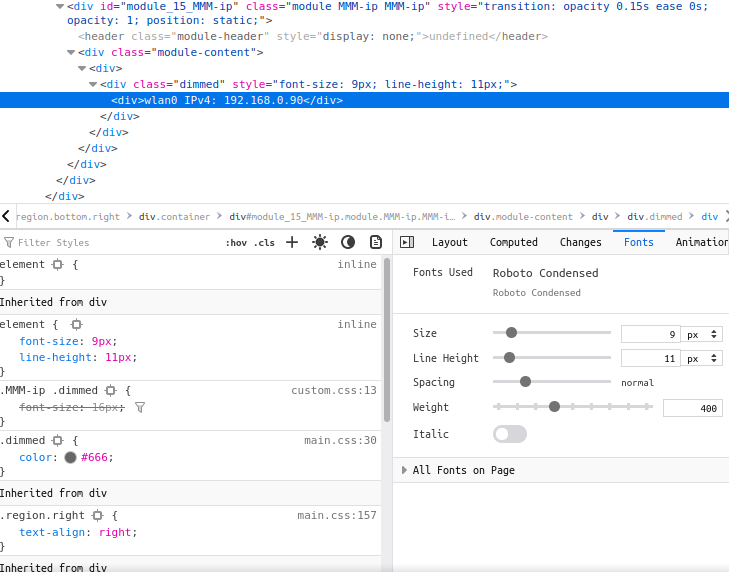
So I have put in my custom.css:
.MMM-ip .dimmed {
font-size: 16px;
}
But it doesn’t seem to take effect. Any advice?
Thanks in advance.
Matt -
@matt216 while in the dev window,
u can see the custom.css value is strike thru, cause the div wins
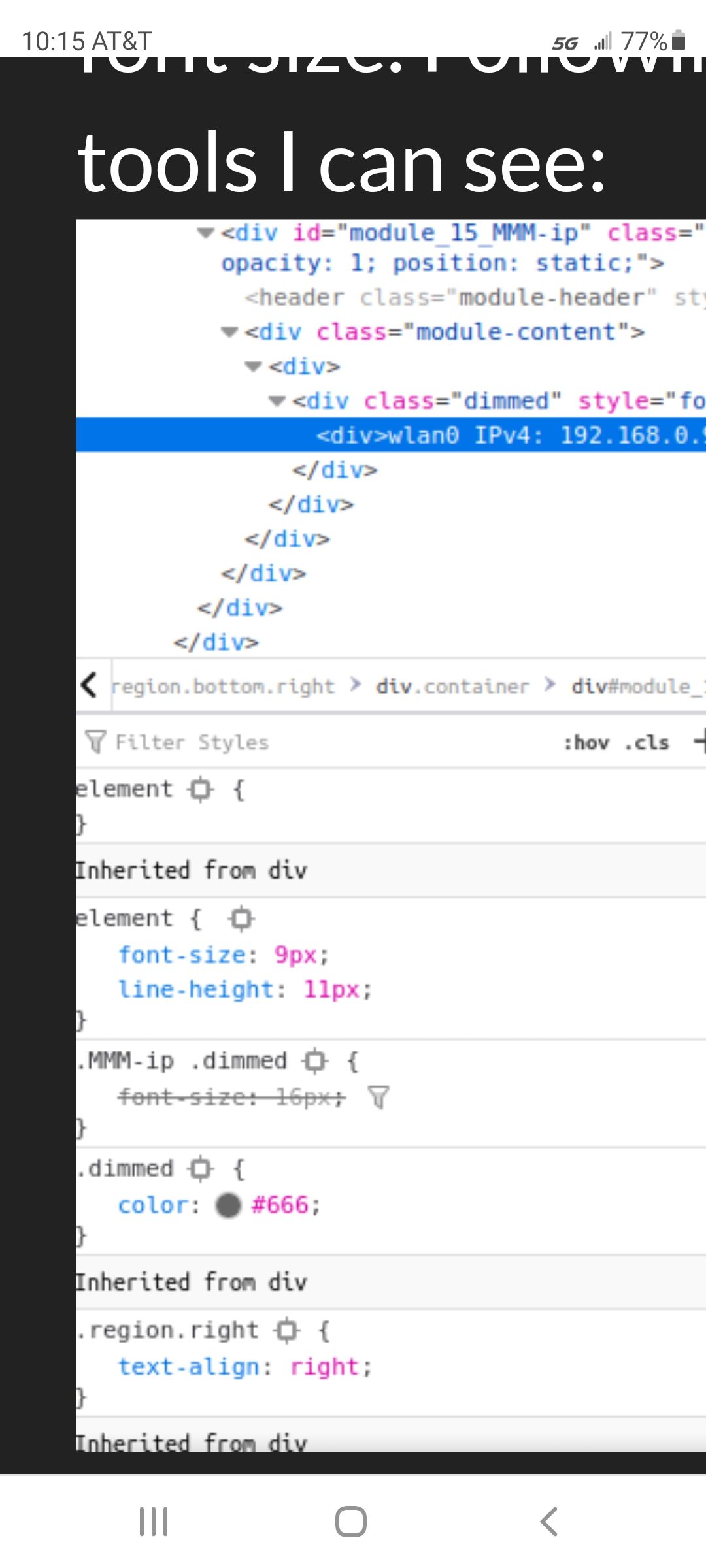
so u need to apply the style to the div
add it to the element box above.
if that works, you can mark/copy that top right box, and paste to custom.css, should have the right targeting syntax
-
@sdetweil Thanks for the help.
How do I reference the div in custom.css not the class?
Adjusting the value in the element box above successfully adjusts the font, but this looks to adjust the ‘dimmed’ class. -
@matt216 and when u copy/paste that from the top box to custom.css, what do u get?
just swipe mark the element entry, copy
here is my favorite cheet sheet on css selectors
-
I’m guessing
.MMM-ip .dimmed div { font-size:16px; } -
@sdetweil Thank you, this works:
.MMM-ip .dimmed div { font-size:16px; } -
@matt216 what did the copy/paste result look like?
-
S sdetweil referenced this topic on
-
S sdetweil referenced this topic on
-
S sdetweil referenced this topic on
-
S sdetweil referenced this topic on
-
S sdetweil referenced this topic on
-
S sdetweil referenced this topic on
-
S sdetweil referenced this topic on
-
S sdetweil referenced this topic on
-
S sdetweil referenced this topic on
-
S sdetweil referenced this topic on
-
S sdetweil referenced this topic on
-
A Anthony referenced this topic on
-
S sdetweil referenced this topic on
-
S sdetweil referenced this topic on
-
S sdetweil referenced this topic on
-
S sdetweil referenced this topic on
-
S sdetweil referenced this topic on
-
S sdetweil referenced this topic on
-
S sdetweil referenced this topic on
-
S sdetweil referenced this topic on
-
S sdetweil referenced this topic on
-
S sdetweil referenced this topic on
-
S sdetweil referenced this topic on
-
S sdetweil referenced this topic on
-
S sdetweil referenced this topic on
-
S sdetweil referenced this topic on
-
S sdetweil referenced this topic on
-
S sdetweil referenced this topic on
-
S sdetweil referenced this topic on
-
I’m a raspi & linux newbie (used C years ago. some Arduino experience) and this is my first post so…
In attempting to modify MM I’ve experienced a number of custom.css failures. I found this @sdetweil post https://forum.magicmirror.builders/topic/14862/help-with-a-couple-css-issues?_=1623901330356 and believe the “developer Tools” will be a big help, but I quickly got lost. The Tool’s built in help doc (kebab>Help>Documentation) appears to be a null link. I tried to find documentation for this tool online without luck. Can anyone provide a documentation link or more detailed tutorial? -
S Shawangunk referenced this topic on
-
@Shawangunk this would be all in the/a browser, nothing w mm.
I have never seen any doc
-
@Shawangunk see this
https://developer.chrome.com/docs/devtools/but this will not teach u the DOM, css, html (and attributes)
only provides tool to examine and change Dom element styles
-
@sdetweil
All help at the bottom of the curve is appreciated. Thank you. Cheers -
S sdetweil referenced this topic on
-
S sdetweil referenced this topic on
-
S sdetweil referenced this topic on
-
S sdetweil referenced this topic on
-
S sdetweil referenced this topic on
-
S sdetweil referenced this topic on
-
S sdetweil referenced this topic on
-
S sdetweil referenced this topic on
-
S sdetweil referenced this topic on
-
K kasperinline referenced this topic on
-
S sdetweil referenced this topic on
-
S sdetweil referenced this topic on
-
S sdetweil referenced this topic on
-
S sdetweil referenced this topic on
-
S sdetweil referenced this topic on
-
R ruff.hi referenced this topic on
-
S sdetweil referenced this topic on
-
S sdetweil referenced this topic on
-
S sdetweil referenced this topic on
-
S sdetweil referenced this topic on
-
S sdetweil referenced this topic on
-
S sdetweil referenced this topic on
-
S sdetweil referenced this topic on
-
S sdetweil referenced this topic on
-
S sdetweil referenced this topic on
-
S sdetweil referenced this topic on
-
M movingfish referenced this topic on
-
C com1cedric referenced this topic on
Hello! It looks like you're interested in this conversation, but you don't have an account yet.
Getting fed up of having to scroll through the same posts each visit? When you register for an account, you'll always come back to exactly where you were before, and choose to be notified of new replies (either via email, or push notification). You'll also be able to save bookmarks and upvote posts to show your appreciation to other community members.
With your input, this post could be even better 💗
Register Login