MagicMirror Forum
    • Recent
    • Tags
    • Unsolved
    • Solved
    • MagicMirror² Repository
    • Documentation
    • 3rd-Party-Modules
    • Donate
    • Discord
    • Register
    • Login
    A New Chapter for MagicMirror: The Community Takes the Lead
    Read the statement by Michael Teeuw here.

    Magic Mirror on the Raspberry Pi 1, agonizingly difficult

    Scheduled Pinned Locked Moved Unsolved Tutorials
    magic mirrorraspberry piraspberry pi 1problems running mmserveronly
    33 Posts 8 Posters 26.9k Views 7 Watching
    Loading More Posts
    • Oldest to Newest
    • Newest to Oldest
    • Most Votes
    Reply
    • Reply as topic
    Log in to reply
    This topic has been deleted. Only users with topic management privileges can see it.
    • ? Offline
      A Former User @MMRPi1
      last edited by

      @MMRPi1 hmmm…

      1. Go to your MagicMirror directory.
      2. Is there package.json file in your MagicMirror directory? (..../MagicMirror/package.json)
      3. If there is, open package.json you can see like this.
      ...
        "dependencies": {
          "body-parser": "^1.17.1",
          "colors": "^1.1.2",
          "electron": "^1.4.7",
          "express": "^4.14.0",
          "express-ipfilter": "latest",
          "feedme": "latest",
       ...
        }
      }
      
      1. Then, you can run npm install in /MagicMirror directory.
      2. See how it goes.
      1 Reply Last reply Reply Quote 1
      • M Offline
        MMRPi1
        last edited by

        I’ve got a progress bar that’s progressing slowly, hopefully it will work, though it ma take a while.
        Updates to follow…

        ? 1 Reply Last reply Reply Quote 0
        • ? Offline
          A Former User @MMRPi1
          last edited by

          @MMRPi1 good luck to you. :D

          1 Reply Last reply Reply Quote 0
          • M Offline
            MMRPi1
            last edited by

            Alright, it says Magic Mirror installation was successful, but I’m not sure what to do next…

            1 Reply Last reply Reply Quote 0
            • M Offline
              MMRPi1
              last edited by

              It worked!!
              Thank you to everyone :-D
              Now all that’s left is screensaver, autostart and all that…
              Thanks again!

              cowboysdudeC 1 Reply Last reply Reply Quote 0
              • cowboysdudeC Offline
                cowboysdude Module Developer @MMRPi1
                last edited by

                @MMRPi1 Thank you for your patience! :) Glad you got it running now some advice…

                IF you have a working config before you make ANY changes to it copy it to config.bak that way you’ll always have a GOOD working config file…

                Good Luck!

                Mykle1M M 2 Replies Last reply Reply Quote 1
                • Mykle1M Offline
                  Mykle1 Project Sponsor Module Developer @cowboysdude
                  last edited by

                  @cowboysdude said in Magic Mirror on the Raspberry Pi 1, agonizingly difficult:

                  IF you have a working config before you make ANY changes to it copy it to config.bak that way you’ll always have a GOOD working config file…

                  This is excellent advice!

                  Create a working config
                  How to add modules

                  1 Reply Last reply Reply Quote 1
                  • M Offline
                    MMRPi1 @cowboysdude
                    last edited by

                    @cowboysdude Thanks.
                    This is the situation:
                    The default config file is working (I have it backed up) though when I run it in server only the clock and weather work fine, but all the other modules say “Loading…”.
                    I did try to customise it, but got the “No config file”, so either I have syntax errors or the sources aren’t right…
                    Talking of, does anyone know of a list of compatible news feeds and the like?
                    Thanks again

                    ? 1 Reply Last reply Reply Quote 1
                    • ? Offline
                      A Former User @MMRPi1
                      last edited by A Former User

                      @MMRPi1
                      Can you show your config.js here? It makes easier.
                      If you got “no config file” however you have a confidence for config.js existence, you might make some syntax error in your config.js.

                      you can find newsfeed rss in most news sites.
                      If some site has links of “RSS”(or small orange squared antenna icon), you can use that url to your newsfeed.
                      By example, If you want to get news from “The Washington Post”, google “washington post rss”. Then the result pages direct you to WP rss page. get a link what you want, apply that to your news-feed module config.
                      Most of the RSS could be compatible with that module. Even RSS of personal blogs also.

                      Some browsers(Firefox, IE7…) support finding RSS on current page. You can see RSS mark in addressbar if current page has valid RSS link.

                      You can check the reference. (I doubt there are some missing links.)
                      https://www.repeatserver.com/RSSFeedList.aspx
                      http://www.uen.org/feeds/lists.shtml

                      1 Reply Last reply Reply Quote 1
                      • M Offline
                        MMRPi1
                        last edited by

                        Good news!
                        The config file is (mostly) working (it needed a reboot) and I’ll configure it until I’m satisfied at which point I need to figure out how to keep it fullscreen, disable screen timeout and do the autostart and all that…
                        In the meantime, thanks to everyone for their help :-D

                        cowboysdudeC 1 Reply Last reply Reply Quote 1
                        • cowboysdudeC Offline
                          cowboysdude Module Developer @MMRPi1
                          last edited by

                          @MMRPi1 said in Magic Mirror on the Raspberry Pi 1, agonizingly difficult:

                          Good news!
                          The config file is (mostly) working (it needed a reboot) and I’ll configure it until I’m satisfied at which point I need to figure out how to keep it fullscreen, disable screen timeout and do the autostart and all that…
                          In the meantime, thanks to everyone for their help :-D

                          You’re very welcome. :) Enjoy!

                          1 Reply Last reply Reply Quote 0
                          • M Offline
                            MMRPi1
                            last edited by

                            Now the software is working I have a few more questions:
                            (Btw I’m running MM in serveronly mode in Chromium.)

                            1. How do I make MM auto run when the Pi turns on, disable screensaver and make it fullscreen?
                            2. Should I be concerned that the RPi gets quite hot in operation, especially as it will be in a frame and in constant operation.
                            3. Is it advisable to turn the raspberry pi off (and turn off the magic mirror) by switching it off at the mains, and if not how would I turn it off and on?
                            ? Mykle1M 2 Replies Last reply Reply Quote 0
                            • M Offline
                              MMRPi1
                              last edited by

                              Also, how do you rotate the screen??

                              Mykle1M 1 Reply Last reply Reply Quote 0
                              • ? Offline
                                A Former User @MMRPi1
                                last edited by A Former User

                                @MMRPi1
                                For autostart, read this
                                Don’t worry about heat unless overclocking. However you can add small pan and ventilatoin holes on your frame.
                                You can use cron for scheduly shutdown or reboot. But you cannot turn on RPI automatically. You need additional hardware for that. You can consider timer switch or outlet.

                                For display rotating, edit /boot/config.txt
                                Add
                                display_rotate=1

                                1 Reply Last reply Reply Quote 0
                                • Mykle1M Offline
                                  Mykle1 Project Sponsor Module Developer @MMRPi1
                                  last edited by

                                  @MMRPi1 said in Magic Mirror on the Raspberry Pi 1, agonizingly difficult:

                                  Also, how do you rotate the screen??

                                  https://github.com/MichMich/MagicMirror/wiki/Configuring-the-Raspberry-Pi

                                  Create a working config
                                  How to add modules

                                  1 Reply Last reply Reply Quote 0
                                  • Mykle1M Offline
                                    Mykle1 Project Sponsor Module Developer @MMRPi1
                                    last edited by

                                    @MMRPi1 said in Magic Mirror on the Raspberry Pi 1, agonizingly difficult:

                                    Is it advisable to turn the raspberry pi off (and turn off the magic mirror) by switching it off at the mains, and if not how would I turn it off and on?

                                    First, shutdown the Pi correctly. Once you’ve shutdown the Pi correctly you can pull the power cord, OR you can install some sort of power switch.

                                    In my case, I simply used a mini power strip inside the mirror itself. Once I’ve shut down my Pi correctly, I simply reach under my mirror and hit the power switch on the mini power strip. This also powers down the fan that I have sitting on the Pi. When you’re ready to start your mirror again, you simply hit the power switch on the mini power strip again and everything comes back on.
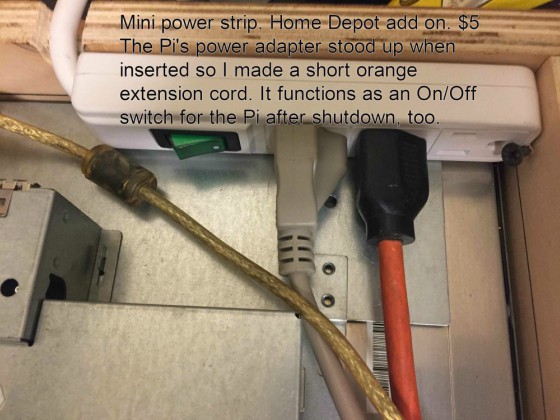
                                    0_1499010903694_strip2.jpg

                                    Create a working config
                                    How to add modules

                                    1 Reply Last reply Reply Quote 0
                                    • R Offline
                                      ROMSY
                                      last edited by

                                      This post is deleted!
                                      1 Reply Last reply Reply Quote 0
                                      • M Offline
                                        MMRPi1
                                        last edited by

                                        Hi again…
                                        Everything works fine but I can’t get the mirror to auto run (in server only mode) at boot.
                                        Any help would be appreciated…
                                        (BTW I tried configuring the LXDE and boot files and all that)

                                        bheplerB 1 Reply Last reply Reply Quote 0
                                        • bheplerB Offline
                                          bhepler Module Developer @MMRPi1
                                          last edited by

                                          @MMRPi1 Did you try the pm2 route from the Auto Starting Magic Mirror? @Sean gave you the link a few days ago.

                                          In your case, you’ll want to change the mm.sh script to start in server-only mode and then launch your web browser. If you really want to bulletproof your installation, you can create a separate script for the mirror in server-only mode and another for keeping the browser up & pointed at the correct location. Let PM2 manage both as separate processes.

                                          M 1 Reply Last reply Reply Quote 0
                                          • M Offline
                                            MMRPi1 @bhepler
                                            last edited by

                                            @bhepler Thanks, but since I’m really clueless I’m not quite sure what to do…
                                            The contents of mm.sh
                                            cd ~/MagicMirror
                                            DISPLAY=:0 npm start
                                            node serveronly
                                            chromium-browser --noerrdialogs --disable-session-crashed-bubble -incognito --kiosk http://localhost:8080

                                            I’'ve also got the following at the end of the LXDE autostart file
                                            @pm2 start mm.sh

                                            BTW: when I run pm2 start mm.sh from the terminal the mirror starts up just fine, so I don’t know why it doesn’t autostart properly…


                                            bheplerB 1 Reply Last reply Reply Quote 0

                                            Hello! It looks like you're interested in this conversation, but you don't have an account yet.

                                            Getting fed up of having to scroll through the same posts each visit? When you register for an account, you'll always come back to exactly where you were before, and choose to be notified of new replies (either via email, or push notification). You'll also be able to save bookmarks and upvote posts to show your appreciation to other community members.

                                            With your input, this post could be even better 💗

                                            Register Login

                                            • 1
                                            • 2
                                            • 2 / 2
                                            • First post
                                              Last post
                                            Enjoying MagicMirror? Please consider a donation!
                                            MagicMirror created by Michael Teeuw.
                                            Forum managed by Sam, technical setup by Karsten.
                                            This forum is using NodeBB as its core | Contributors
                                            Contact | Privacy Policy