MagicMirror Forum
    • Recent
    • Tags
    • Unsolved
    • Solved
    • MagicMirror² Repository
    • Documentation
    • 3rd-Party-Modules
    • Donate
    • Discord
    • Register
    • Login
    A New Chapter for MagicMirror: The Community Takes the Lead
    Read the statement by Michael Teeuw here.

    MMM-forecast-io -- Localized up to the minute weather

    Scheduled Pinned Locked Moved Utilities
    127 Posts 36 Posters 222.8k Views 38 Watching
    Loading More Posts
    • Oldest to Newest
    • Newest to Oldest
    • Most Votes
    Reply
    • Reply as topic
    Log in to reply
    This topic has been deleted. Only users with topic management privileges can see it.
    • Mykle1M Offline
      Mykle1 Project Sponsor Module Developer @henryluyu
      last edited by

      @henryluyu said in MMM-forecast-io -- Localized up to the minute weather:

      I simply put the “MMM-forecast-io-master” folder in /modules/default

      1. Folder name should just be MMM-forecast-io
      2. Goes in modules folder, not the default folder

      I have also put my actual api key, latitude and longtitude values also in MMM-forecast-io.js.

      That is not recommended. Putting those in your config.js will suffice.

      Create a working config
      How to add modules

      1 Reply Last reply Reply Quote 0
      • F Offline
        Fifin404
        last edited by

        Hi, is possible add “C” in all temperatures? Like 21 °C
        and for wind add “km/h” like 8 km/h

        C 1 Reply Last reply Reply Quote 0
        • C Offline
          code999
          last edited by

          Hey all, anyone know how to get rid of the round bar in between the temps? 0_1574871951039_511494cd-8516-4507-93f2-b773a560930b-image.png
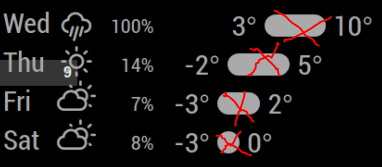
          Thanks in advance.

          morozgrafixM 1 Reply Last reply Reply Quote 0
          • morozgrafixM Offline
            morozgrafix Moderator @code999
            last edited by

            @code999 you can comment out this line forecastBar.appendChild(bar); but it will look kind of bad. Those bars are sort of a default look that you get from darksky/forecast UI.

            C 1 Reply Last reply Reply Quote 0
            • C Offline
              code999 @morozgrafix
              last edited by

              @morozgrafix what file do I edit? I can not find that line to comment it out. Thanks.

              morozgrafixM lavolp3L 2 Replies Last reply Reply Quote 0
              • morozgrafixM Offline
                morozgrafix Moderator @code999
                last edited by

                @code999 it’s line 397 in MMM-fotecast-io.js https://github.com/dmcinnes/MMM-forecast-io/blob/77075e1c9011336f044d35f1c964fc93789a4201/MMM-forecast-io.js#L397

                1 Reply Last reply Reply Quote 1
                • lavolp3L Offline
                  lavolp3 Module Developer @code999
                  last edited by

                  @code999 it’s in the MMM-forecast-io.js file.

                  You can either try to comment out (//) or delete line 397

                  forecastBar.appendChild(bar);
                  

                  (only the bar)
                  or line 402

                  forecastBarWrapper.appendChild(forecastBar);
                  

                  (with temps)

                  But why are you trying to delete it? It really doesn’t make sense to me and will look kind of ugly I guess.

                  How to troubleshoot modules
                  MMM-soccer v2, MMM-AVStock

                  C 1 Reply Last reply Reply Quote 1
                  • C Offline
                    code999 @lavolp3
                    last edited by

                    @lavolp3 @morozgrafix Thank you both. I like an even look and the bar IMO is unless. when there is a large difference in temp it looks ridiculous. I might add something between numbers to give it some space and cleaner look. I did it mainly for space. I have it on the right side with my calendar taking up most of the screen. Anyway thanks again.
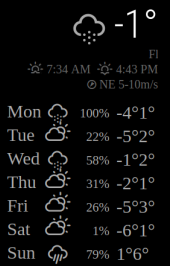
                    0_1575301420462_79b125bf-5adb-4b86-85f4-71246bef148e-image.png

                    1 Reply Last reply Reply Quote 0
                    • C Offline
                      code999 @Fifin404
                      last edited by

                      @Fifin404 I would like this also. Did you get it to show?

                      F lavolp3L 2 Replies Last reply Reply Quote 0
                      • F Offline
                        Fifin404 @code999
                        last edited by

                        @code999 NO, I use another module

                        1 Reply Last reply Reply Quote 0
                        • lavolp3L Offline
                          lavolp3 Module Developer @code999
                          last edited by lavolp3

                          @code999 @Fifin404

                          You can add the “C” by putting this into your custom.css

                          .MMM-forecast-io .bright:after {
                            content: "C";
                          }
                          

                          That adds a “C” after the content of every element with the class “bright”. Luckily the temperature seems to be the only one.

                          For the km/h, you would need to change the code of the main .js file, because wind is apparently calculated in m/s and you have to add the conversion factor 3.6 to convert to km/h.
                          It’s possible of course but you should then consider forking the whole module and/or create a PR for that.

                          How to troubleshoot modules
                          MMM-soccer v2, MMM-AVStock

                          1 Reply Last reply Reply Quote 0
                          • C Offline
                            ChickenBeard
                            last edited by

                            Is it possible to have the precipitation graph ONLY? I enabled it (and disabled the general “Forecast”). But it seems like the graph doesn’t update. It will load the “current” graph and just stay there until I restart MM.

                            lavolp3L 1 Reply Last reply Reply Quote 0
                            • lavolp3L Offline
                              lavolp3 Module Developer @ChickenBeard
                              last edited by

                              @ChickenBeard How did you disable the forecast? Via CSS or by commenting it out in the code?

                              How to troubleshoot modules
                              MMM-soccer v2, MMM-AVStock

                              C 1 Reply Last reply Reply Quote 0
                              • C Offline
                                ChickenBeard @lavolp3
                                last edited by lavolp3

                                @lavolp3 in ~/MagicMirror/config/config.js:

                                module: 'MMM-forecast-io',
                                                       disabled:false,
                                                       position: 'bottom_center',  // This can be any of the regions.
                                                       config: {
                                                               // See 'Configuration options' for more information.
                                                               apiKey: 'xxxxx', // Dark Sky API key.
                                                               // Only required if geolocation doesn't work:
                                                               latitude:   xxxx,
                                                               longitude: xxxx,
                                                               ***enablePrecipitationGraph: true,***
                                                               ***showForecast:false,***
                                                               precipitationGraphWidth: 325,
                                                               showWind: false,
                                                               showSunriseSunset: false,
                                                               ***alwaysShowPrecipitationGraph:true,***
                                                               
                                                       }
                                
                                lavolp3L 1 Reply Last reply Reply Quote 0
                                • lavolp3L Offline
                                  lavolp3 Module Developer @ChickenBeard
                                  last edited by

                                  @ChickenBeard I can’t see why it wouldn’t update. showForecast only determines if the forecast div is added to the DOM. I have currently no idea.
                                  Any error messages in the console?
                                  Maybe try

                                  debug: true
                                  

                                  in the config?

                                  How to troubleshoot modules
                                  MMM-soccer v2, MMM-AVStock

                                  C 1 Reply Last reply Reply Quote 0
                                  • C Offline
                                    ChickenBeard @lavolp3
                                    last edited by

                                    @lavolp3 Will do! Which log does it write to?

                                    lavolp3L 1 Reply Last reply Reply Quote 0
                                    • lavolp3L Offline
                                      lavolp3 Module Developer @ChickenBeard
                                      last edited by

                                      @ChickenBeard usually this gives extended output to the server-side console in case of node_helper.js or to the browser console in case of the MMM-forecast-io.js.

                                      How to troubleshoot modules
                                      MMM-soccer v2, MMM-AVStock

                                      1 Reply Last reply Reply Quote 0
                                      • lavolp3L Offline
                                        lavolp3 Module Developer
                                        last edited by

                                        For anyone interested:
                                        I have played around with this module quite intensively, implemented the chartjs library and did a few other tweaks and it looks like this now on my mirror.

                                        https://imgur.com/ZqJBGLp

                                        https://imgur.com/JmxnJ3p

                                        Most important changes:

                                        • the graph now shows several things:
                                          – cloud cover in the background
                                          – day and night cycle through different colors
                                          – rain amount in the foreground
                                        • temperature bars are colored according to temperature scale (currently only °C)
                                        • rain amount instead of rain percentage for daily forecast

                                        Anyone interested can try out my fork
                                        https://github.com/lavolp3/MMM-forecast-io

                                        If you install it, don’t forget to do a npm install in the module folder after cloning the module. The Readme has not yet been brought up to date.

                                        How to troubleshoot modules
                                        MMM-soccer v2, MMM-AVStock

                                        1 Reply Last reply Reply Quote 1

                                        Hello! It looks like you're interested in this conversation, but you don't have an account yet.

                                        Getting fed up of having to scroll through the same posts each visit? When you register for an account, you'll always come back to exactly where you were before, and choose to be notified of new replies (either via email, or push notification). You'll also be able to save bookmarks and upvote posts to show your appreciation to other community members.

                                        With your input, this post could be even better 💗

                                        Register Login

                                        • 1
                                        • 2
                                        • 3
                                        • 4
                                        • 5
                                        • 6
                                        • 7
                                        • 4 / 7
                                        • First post
                                          Last post
                                        Enjoying MagicMirror? Please consider a donation!
                                        MagicMirror created by Michael Teeuw.
                                        Forum managed by Sam, technical setup by Karsten.
                                        This forum is using NodeBB as its core | Contributors
                                        Contact | Privacy Policy


