MagicMirror Forum
    • Recent
    • Tags
    • Unsolved
    • Solved
    • MagicMirror² Repository
    • Documentation
    • 3rd-Party-Modules
    • Donate
    • Discord
    • Register
    • Login
    A New Chapter for MagicMirror: The Community Takes the Lead
    Read the statement by Michael Teeuw here.

    MMM-NOAA - Another Weather Module

    Scheduled Pinned Locked Moved System
    690 Posts 77 Posters 2.9m Views 70 Watching
    Loading More Posts
    • Oldest to Newest
    • Newest to Oldest
    • Most Votes
    Reply
    • Reply as topic
    Log in to reply
    This topic has been deleted. Only users with topic management privileges can see it.
    • tbbearT Offline
      tbbear Module Developer @nobita
      last edited by

      @nobita said in MMM-NOAA - Another Weather Module:

      @tbbear said in MMM-NOAA - Another Weather Module:

      Please double check ur 2 diff. apikeys
      What does it means ,I don’t understand. give me for detail,Thanks for your answer

      Ok, so u can enter 2 api keys one is the key from wundermap and the other is the airkey if u are using this so in read.me u can find where u can get the keys

      Robert the Bear

      1 Reply Last reply Reply Quote 0
      • Nystro0mN Offline
        Nystro0m @nobita
        last edited by Nystro0m

        @nobita As tbear said. Also make sure your PWK is set corect.

        This is the part of the config we are talking about:

        
        	apiKey: "YOUR API KEY",    // https://www.wunderground.com/weather/api  select the middle plan... 
        	useAir: false,             // set to false if you do not want to use Air Quality Index
        	airKey: "YOUR API KEY",    // IF you want Air Quality Index
        	pws: "KNYELMIR13",         // go here to find your pws: https://www.wunderground.com/wundermap
        

        You dont need the airKey if you have it set to false. You only need this if you want the Air-data.

        N 1 Reply Last reply Reply Quote 0
        • N Offline
          nobita @Nystro0m
          last edited by

          @Nystro0m and @tbbear Thanks for your help,it work . I delete first line in config (disabled: false,)
          Thanks

          1 Reply Last reply Reply Quote 0
          • N Offline
            nobita @cowboysdude
            last edited by

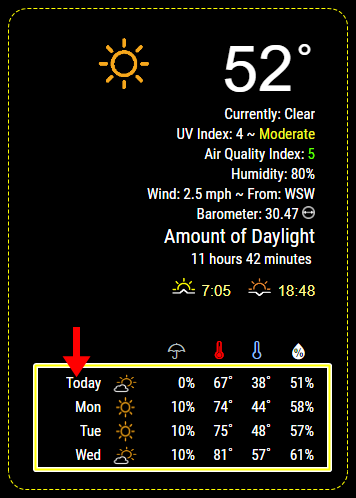
            @cowboysdude I have three questions

            1. How to Adjust font size and color in this border photo
              0_1508159123792_github.png

            2. If I would like don’t display or show some line such as hPa , Amount of Daylight
              how to do?
              3 What is hPa?

            Thanks for your all kind

            cowboysdudeC 1 Reply Last reply Reply Quote 0
            • tbbearT Offline
              tbbear Module Developer
              last edited by

              @nobita i can answer ur questions:

              1. u can change font and color in a .css file, but this is own programming
              2. u can configure a lot of features (check read.me) but some makes the style of a module so its part of internal programming
              3. hPa = hectoPascal this is the normal european unit for Airpressure

              Robert the Bear

              cowboysdudeC 1 Reply Last reply Reply Quote 1
              • cowboysdudeC Offline
                cowboysdude Module Developer @tbbear
                last edited by

                @tbbear Thank you!

                1 Reply Last reply Reply Quote 1
                • cowboysdudeC Offline
                  cowboysdude Module Developer @nobita
                  last edited by

                  @nobita Would have to make them config options which I can do at some point just VERY busy so give me a few days…

                  1 Reply Last reply Reply Quote 1
                  • B Offline
                    barnosch
                    last edited by

                    Would be nice. but no hurry.
                    I uncommented the UV, Air , Wind and the Barometer thing aswell, because it is not mandatory for me. (and i need to save space ;) )
                    but if then a update comes, i need to delete my changes to get the new updates.
                    Then do it all over again. No big deal, bnut if it is not necessary anymore… the better.
                    So it would be nice to have options for it.
                    It’s not a big deal for you, i know, IF you have time.

                    1 Reply Last reply Reply Quote 0
                    • N Offline
                      nobita @cowboysdude
                      last edited by

                      @cowboysdude About airvisual.com ,After register i will get airkey , have 2 question

                      1. I would like to know airvisual how to know my location (no lat,long data in register)
                      2. what is different US AQI vs China AQI

                      Thanks for all help

                      cowboysdudeC 1 Reply Last reply Reply Quote 0
                      • cowboysdudeC Offline
                        cowboysdude Module Developer @nobita
                        last edited by

                        @nobita said in MMM-NOAA - Another Weather Module:

                        @cowboysdude About airvisual.com ,After register i will get airkey , have 2 question

                        1. I would like to know airvisual how to know my location (no lat,long data in register)
                        2. what is different US AQI vs China AQI

                        Thanks for all help

                        1. It gets it from the weather api … I did that way so you didn’t have to put it in…easier
                        2. I really have no idea what the difference is between US and China… that’s a question for Airvisual :)
                        N 1 Reply Last reply Reply Quote 0
                        • R Offline
                          Reotch2
                          last edited by

                          2 “hopefully” quick questions:

                          1. Is there any way to incorporate the AirVisual icons into this module? The colored text becomes harder to read during periods of “REALLY” bad air quality. (Like during the California fires last week)
                          2. My weather icon is showing above the temperature, but most of screenshots show it to the left. Is this a module width issue in my CSS? or something I have set in my config?

                          Thanks all.

                          cowboysdudeC 1 Reply Last reply Reply Quote 0
                          • cowboysdudeC Offline
                            cowboysdude Module Developer @Reotch2
                            last edited by

                            @Reotch2

                            1. If you can find the icons I can see how it looks. The problem for most is lack of space :)
                            2. Not sure what has caused that for you… you are the 1st :) do you have the latest update?
                            R 1 Reply Last reply Reply Quote 0
                            • N Offline
                              nobita @cowboysdude
                              last edited by

                              @cowboysdude About Air Quality Index
                              when data (Air Quality Index) show is number
                              Normally general people not understand what does’t it means
                              If can convert number to easy wording description like as
                              0-50 convert to Good
                              51-100 convert to moderate
                              101-150 convert to Unhealthy
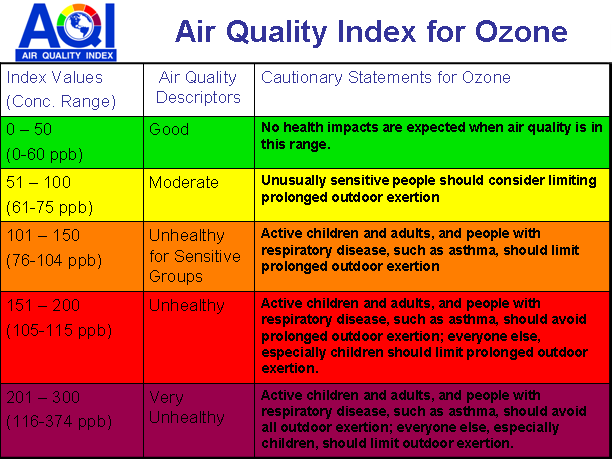
                              0_1508808625140_aqi_chart.png
                              How to Convert in module?

                              Thanks for your help

                              cowboysdudeC 1 Reply Last reply Reply Quote 0
                              • cowboysdudeC Offline
                                cowboysdude Module Developer @nobita
                                last edited by

                                @nobita That’s why the numbers are color coded ;) BUT can do what I did with the UV Index and use

                                Good
                                Moderate
                                Unhealthy
                                UNHEATHLY
                                VERY UNHEATHLY

                                Mykle1M 1 Reply Last reply Reply Quote 1
                                • Mykle1M Offline
                                  Mykle1 Project Sponsor Module Developer @cowboysdude
                                  last edited by

                                  @cowboysdude said in MMM-NOAA - Another Weather Module:

                                  Good
                                  Moderate
                                  Unhealthy
                                  UNHEATHLY
                                  VERY UNHEATHLY

                                  And DEAD

                                  Create a working config
                                  How to add modules

                                  cowboysdudeC 1 Reply Last reply Reply Quote 1
                                  • cowboysdudeC Offline
                                    cowboysdude Module Developer @Mykle1
                                    last edited by

                                    @Mykle1 said in MMM-NOAA - Another Weather Module:

                                    @cowboysdude said in MMM-NOAA - Another Weather Module:

                                    Good
                                    Moderate
                                    Unhealthy
                                    UNHEATHLY
                                    VERY UNHEATHLY

                                    And DEAD

                                    and The Walking Dead…

                                    1 Reply Last reply Reply Quote 0
                                    • R Offline
                                      Reotch2
                                      last edited by Reotch2

                                      @cowboysdude

                                      Thoughts? These are pulled directly off of the air visual site.

                                      https://www.airvisual.com/images/aqi4.png (aq1-5)

                                      alt text
                                      alt text
                                      alt text
                                      alt text
                                      alt text

                                      1 Reply Last reply Reply Quote 0
                                      • cowboysdudeC Offline
                                        cowboysdude Module Developer
                                        last edited by cowboysdude

                                        Well depends on what you’re looking for… number and icon, just icon?

                                        I would have to adjust the icons because the tab sticking out on the right would be a pain to deal with ;)0_1508811075014_aqi1.png

                                        Not opposed to these but the numbers mean more to me because it tells me more… safe is 0 to 50… if the aqi is 49 the green picture really doesn’t tell me anything so let me see what I can do…

                                        R 1 Reply Last reply Reply Quote 0
                                        • R Offline
                                          Reotch2 @cowboysdude
                                          last edited by

                                          @cowboysdude Begging and choosing… I know… but maybe

                                          config:
                                          Air_qual: “icon”, // icon, text, or both

                                          Not many people will likely find themselves in my shoes… But once you get to an Air Quality >300, the dark text was impossible to read on the black background through the mirror.

                                          cowboysdudeC 1 Reply Last reply Reply Quote 0
                                          • cowboysdudeC Offline
                                            cowboysdude Module Developer @Reotch2
                                            last edited by

                                            @Reotch2 said in MMM-NOAA - Another Weather Module:

                                            @cowboysdude Begging and choosing… I know… but maybe

                                            config:
                                            Air_qual: “icon”, // icon, text, or both

                                            Not many people will likely find themselves in my shoes… But once you get to an Air Quality >300, the dark text was impossible to read on the black background through the mirror.

                                            YES that I know is a problem… for some reason those colors don’t do well on black… so like I said let me see what I can do :)


                                            1 Reply Last reply Reply Quote 0

                                            Hello! It looks like you're interested in this conversation, but you don't have an account yet.

                                            Getting fed up of having to scroll through the same posts each visit? When you register for an account, you'll always come back to exactly where you were before, and choose to be notified of new replies (either via email, or push notification). You'll also be able to save bookmarks and upvote posts to show your appreciation to other community members.

                                            With your input, this post could be even better 💗

                                            Register Login

                                            • 1
                                            • 2
                                            • 10
                                            • 11
                                            • 12
                                            • 13
                                            • 14
                                            • 34
                                            • 35
                                            • 12 / 35
                                            • First post
                                              Last post
                                            Enjoying MagicMirror? Please consider a donation!
                                            MagicMirror created by Michael Teeuw.
                                            Forum managed by Sam, technical setup by Karsten.
                                            This forum is using NodeBB as its core | Contributors
                                            Contact | Privacy Policy