MagicMirror Forum
    • Recent
    • Tags
    • Unsolved
    • Solved
    • MagicMirror² Repository
    • Documentation
    • 3rd-Party-Modules
    • Donate
    • Discord
    • Register
    • Login
    A New Chapter for MagicMirror: The Community Takes the Lead
    Read the statement by Michael Teeuw here.

    I have some problems about config file

    Scheduled Pinned Locked Moved Troubleshooting
    configproblem
    16 Posts 5 Posters 9.9k Views 4 Watching
    Loading More Posts
    • Oldest to Newest
    • Newest to Oldest
    • Most Votes
    Reply
    • Reply as topic
    Log in to reply
    This topic has been deleted. Only users with topic management privileges can see it.
    • A Offline
      AlexHpoin
      last edited by

      Last two weeks,I have began my project.But until now,I have faced a hard problems.
      My config.js has gone through the check without any problem.
      but It still can not work.
      Could someone help me find out where is wrong?
      THANK YOU VERY MUCH!!!

      
      var config = {
      	port: 8080,
      	ipWhitelist: [], // Set [] to allow all IP addresses
      	                                                       // or add a specific IPv4 of 192.168.1.5 :
      	                                                       // ["127.0.0.1", "::ffff:127.0.0.1", "::1", "::ffff:192.168.1.5"],
      	                                                       // or IPv4 range of 192.168.3.0 --> 192.168.3.15 use CIDR format :
      	                                                       // ["127.0.0.1", "::ffff:127.0.0.1", "::1", "::ffff:192.168.3.0/28"],
      
      	language: "zh",
      	timeFormat: 24,
      	units: "metric",
      
      	modules: [
      		{
      			module: "alert",
      		},
      		{
      			module: "updatenotification",
      			position: "top_bar"
      		},
      		{
      			module: "clock",
      			position: "top_left"
      		},
      		{
      			module: "calendar",
      			header: "US Holidays",
      			position: "top_left",
      			config: {
      				calendars: [
      					{
      						symbol: "calendar-check-o ",
      						url: "webcal://www.calendarlabs.com/templates/ical/US-Holidays.ics"
      					}
      				]
      			}
      		},
      		{
      			module: "compliments",
      			position: "lower_third"
      		},
      		{
      			module: "currentweather",
      			position: "top_right",
      			config: {
      				location: "New York",
      				locationID: "1809062",  //ID from http://www.openweathermap.org/help/city_list.txt
      				appid: "c8d34ea2cd422XXXX4b1101e96e894d1"
      			}
      		},
      		{
      			module: "weatherforecast",
      			position: "top_right",
      			header: "Weather Forecast",
      			config: {
      				location: "New York",
      				locationID: "1809062",  //ID from http://www.openweathermap.org/help/city_list.txt
      				appid: "c8d34ea2cd422XXXXXXX101e96e894d1"
      			}
      		},
      		{
      			module: "newsfeed",
      			position: "bottom_bar",
      			config: {
      				feeds: [
      					{
      						title: "New York Times",
      						url: "http://www.nytimes.com/services/xml/rss/nyt/HomePage.xml"
      					}
      				],
      				showSourceTitle: true,
      				showPublishDate: true
      			}
      		},
      	]
      
      };
      
      /*************** DO NOT EDIT THE LINE BELOW ***************/
      if (typeof module !== "undefined") {module.exports = config;}
      
      
      T 1 Reply Last reply Reply Quote 0
      • T Offline
        tomyboy96 Project Sponsor @AlexHpoin
        last edited by

        @AlexHpoin What happens when you boot it up?

        A 1 Reply Last reply Reply Quote 0
        • A Offline
          AlexHpoin @tomyboy96
          last edited by

          @tomyboy96
          It shows please create a config file.
          Thank you

          Mykle1M T 2 Replies Last reply Reply Quote 0
          • Mykle1M Offline
            Mykle1 Project Sponsor Module Developer @AlexHpoin
            last edited by

            @AlexHpoin said in I have some problems about config file:

            It shows please create a config file.

            Are you sure it’s named config.js ?

            I just copied what you posted and it fired right up.

            Create a working config
            How to add modules

            1 Reply Last reply Reply Quote 0
            • T Offline
              tomyboy96 Project Sponsor @AlexHpoin
              last edited by

              @AlexHpoin Have u saved the config file in the right place?

              1 Reply Last reply Reply Quote 0
              • G Offline
                greda
                last edited by

                Hello,

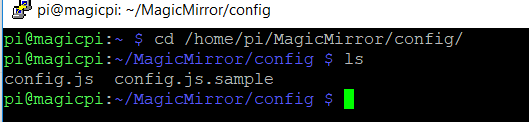
                You must to have config.js in this path : cd /MagicMirror/config!
                If you use Putty
                0_1502824906699_config.PNG
                If you use WinSCP
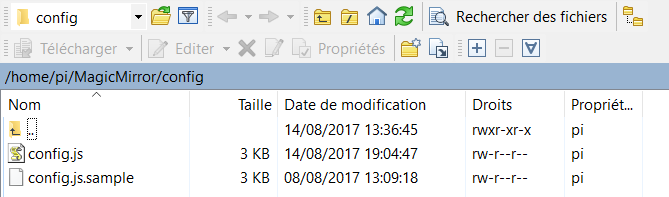
                0_1502825013524_WinSCP.PNG

                If it does not work. I advise you to copy the original config.js.

                A 2 Replies Last reply Reply Quote 0
                • cowboysdudeC Offline
                  cowboysdude Module Developer
                  last edited by

                  @AlexHpoin said in I have some problems about config file:

                  var config = {
                  port: 8080,
                  ipWhitelist: [], // Set [] to allow all IP addresses
                  // or add a specific IPv4 of 192.168.1.5 :
                  // [“127.0.0.1”, “::ffff:127.0.0.1”, “::1”, “::ffff:192.168.1.5”],
                  // or IPv4 range of 192.168.3.0 --> 192.168.3.15 use CIDR format :
                  // [“127.0.0.1”, “::ffff:127.0.0.1”, “::1”, “::ffff:192.168.3.0/28”],

                  language: “zh”,
                  timeFormat: 24,
                  units: “metric”,

                  modules: [
                  {
                  module: “alert”,
                  },
                  {
                  module: “updatenotification”,
                  position: “top_bar”
                  },
                  {
                  module: “clock”,
                  position: “top_left”
                  },
                  {
                  module: “calendar”,
                  header: “US Holidays”,
                  position: “top_left”,
                  config: {
                  calendars: [
                  {
                  symbol: "calendar-check-o ",
                  url: “webcal://www.calendarlabs.com/templates/ical/US-Holidays.ics”
                  }
                  ]
                  }
                  },
                  {
                  module: “compliments”,
                  position: “lower_third”
                  },
                  {
                  module: “currentweather”,
                  position: “top_right”,
                  config: {
                  location: “New York”,
                  locationID: “1809062”, //ID from http://www.openweathermap.org/help/city_list.txt
                  appid: “c8d34ea2cd422XXXX4b1101e96e894d1”
                  }
                  },
                  {
                  module: “weatherforecast”,
                  position: “top_right”,
                  header: “Weather Forecast”,
                  config: {
                  location: “New York”,
                  locationID: “1809062”, //ID from http://www.openweathermap.org/help/city_list.txt
                  appid: “c8d34ea2cd422XXXXXXX101e96e894d1”
                  }
                  },
                  {
                  module: “newsfeed”,
                  position: “bottom_bar”,
                  config: {
                  feeds: [
                  {
                  title: “New York Times”,
                  url: “http://www.nytimes.com/services/xml/rss/nyt/HomePage.xml”
                  }
                  ],
                  showSourceTitle: true,
                  showPublishDate: true
                  }
                  },
                  ]

                  };

                  Did MagicMirror install without any errors?

                  A 1 Reply Last reply Reply Quote 0
                  • Mykle1M Offline
                    Mykle1 Project Sponsor Module Developer
                    last edited by

                    It is for just this type of situation that I wrote this:

                    How to create a working config - For absolute beginners

                    Create a working config
                    How to add modules

                    1 Reply Last reply Reply Quote 0
                    • A Offline
                      AlexHpoin @cowboysdude
                      last edited by

                      @cowboysdude

                      npm WARN prefer global coffee-script@1.10.0 should be installed with -g
                      npm WARN prefer global jsonlint@1.6.2 should be installed with -g
                      npm WARN prefer global colorguard@1.2.0 should be installed with -g
                      
                      > uws@0.14.5 install /var/www/html/node_modules/uws
                      > node-gyp rebuild > build_log.txt 2>&1 || exit 0


                      1 Reply Last reply Reply Quote 0
                      • A Offline
                        AlexHpoin @greda
                        last edited by

                        @greda YES.I have saved my config.js to the right place```
                        /config/config.js

                        1 Reply Last reply Reply Quote 0
                        • A Offline
                          AlexHpoin @greda
                          last edited by

                          @greda I use :

                          sudo mv /var/www/html/config/config.js.sample /var/www/html/config/config.js


                          to create my config file,and then reboot.

                          cowboysdudeC 1 Reply Last reply Reply Quote 0
                          • cowboysdudeC Offline
                            cowboysdude Module Developer @AlexHpoin
                            last edited by

                            @AlexHpoin You should just be in the directory

                            ~MagicMirror/config
                            and type

                            cp config.js.sample config.js

                            Mykle1M A 2 Replies Last reply Reply Quote 1
                            • Mykle1M Offline
                              Mykle1 Project Sponsor Module Developer @cowboysdude
                              last edited by

                              @cowboysdude

                              Isn’t it crazy?

                              Create a working config
                              How to add modules

                              1 Reply Last reply Reply Quote 2
                              • A Offline
                                AlexHpoin @cowboysdude
                                last edited by

                                @cowboysdude I did…but it does not work…

                                cowboysdudeC 1 Reply Last reply Reply Quote 0
                                • cowboysdudeC Offline
                                  cowboysdude Module Developer @AlexHpoin
                                  last edited by

                                  @AlexHpoin At this point I would just start over.

                                  There’s really no way of telling what happened. There seems to be an error of some kind, whether it’s file permission or something didn’t install correctly.

                                  1 Reply Last reply Reply Quote 1
                                  • Mykle1M Offline
                                    Mykle1 Project Sponsor Module Developer
                                    last edited by Mykle1

                                    I’m curious. Did you even try or look at this?

                                    https://forum.magicmirror.builders/topic/4528/how-to-create-a-working-config-for-absolute-beginners


                                    Create a working config
                                    How to add modules

                                    1 Reply Last reply Reply Quote 0

                                    Hello! It looks like you're interested in this conversation, but you don't have an account yet.

                                    Getting fed up of having to scroll through the same posts each visit? When you register for an account, you'll always come back to exactly where you were before, and choose to be notified of new replies (either via email, or push notification). You'll also be able to save bookmarks and upvote posts to show your appreciation to other community members.

                                    With your input, this post could be even better 💗

                                    Register Login

                                    • 1 / 1
                                    • First post
                                      Last post
                                    Enjoying MagicMirror? Please consider a donation!
                                    MagicMirror created by Michael Teeuw.
                                    Forum managed by Sam, technical setup by Karsten.
                                    This forum is using NodeBB as its core | Contributors
                                    Contact | Privacy Policy