MagicMirror Forum
    • Recent
    • Tags
    • Unsolved
    • Solved
    • MagicMirror² Repository
    • Documentation
    • 3rd-Party-Modules
    • Donate
    • Discord
    • Register
    • Login
    A New Chapter for MagicMirror: The Community Takes the Lead
    Read the statement by Michael Teeuw here.

    MMM-Tools : System stat monitoring and commanding (ATB Supported)

    Scheduled Pinned Locked Moved System
    38 Posts 7 Posters 20.8k Views 6 Watching
    Loading More Posts
    • Oldest to Newest
    • Newest to Oldest
    • Most Votes
    Reply
    • Reply as topic
    Log in to reply
    This topic has been deleted. Only users with topic management privileges can see it.
    • randomnoiseR Offline
      randomnoise
      last edited by randomnoise

      Tried this module, even with a default config it doesn’t seem to display any of the actual values, just the titles:

      Running Rpi3 Raspian Jesse

      No errors during startup:

      Starting MagicMirror: v2.1.2
      Loading config ...
      Loading module helpers ...
      No helper found for module: alert.
      Initializing new module helper ...
      Module helper loaded: updatenotification
      No helper found for module: clock.
      Initializing new module helper ...
      Module helper loaded: calendar
      Initializing new module helper ...
      Module helper loaded: MMM-Tools
      No helper found for module: compliments.
      No helper found for module: currentweather.
      No helper found for module: weatherforecast.
      Initializing new module helper ...
      Module helper loaded: newsfeed
      All module helpers loaded.
      Starting server on port 8080 ... 
      Server started ...
      Connecting socket for: updatenotification
      Connecting socket for: calendar
      Starting node helper for: calendar
      Connecting socket for: MMM-Tools
      Connecting socket for: newsfeed
      Starting module: newsfeed
      Sockets connected & modules started ...
      Launching application.
      Create new calendar fetcher for url: http://www.calendarlabs.com/templates/ical/US-Holidays.ics - Interval: 300000
      Create new news fetcher for url: http://www.nytimes.com/services/xml/rss/nyt/HomePage.xml - Interval: 300000
      Use existing news fetcher for url: http://www.nytimes.com/services/xml/rss/nyt/HomePage.xml
      

      Config used:

      {
      		  module: 'MMM-Tools',
      		  position: 'bottom_right',
      		  config: {
      			device : "RPI", // "RPI" is also available
      			refresh_interval_ms : 10000,
      			warning_interval_ms : 1000 * 60 * 5,
      			enable_warning : true,
      			warning : {
      			  CPU_TEMPERATURE : 65,
      			  GPU_TEMPERATURE : 65,
      			  CPU_USAGE : 75,
      			  STORAGE_USED_PERCENT : 80,
      			  MEMORY_USED_PERCENT : 80
      			}
      		  }
      		},
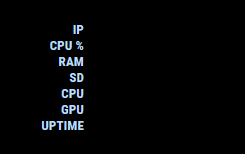
      

      0_1504303845653_Untitled.png

      ? 1 Reply Last reply Reply Quote 0
      • Mykle1M Offline
        Mykle1 Project Sponsor Module Developer @Guest
        last edited by

        @Sean

        I just reinstalled MMM-Tool and it is working now. I don’t know why it didn’t work the first time. shrug

        • Pi 3 Model B, 1GB, Hardware : BCM2709, Revision = a02082, (Sony, UK)
        • Raspbian Jessie
        {
          	module: 'MMM-Tools',
          	position: 'top_center',
          	config: {
        		device : "RPI", // "RPI" is also available
        	        refresh_interval_ms : 10000,
        		warning_interval_ms : 1000 * 60 * 5,
        		enable_warning : false,
        		    warning : {
        		    CPU_TEMPERATURE : 65,
        		    GPU_TEMPERATURE : 65,
        		    CPU_USAGE : 75,
        		    STORAGE_USED_PERCENT : 80,
              		    MEMORY_USED_PERCENT : 80,
            	},
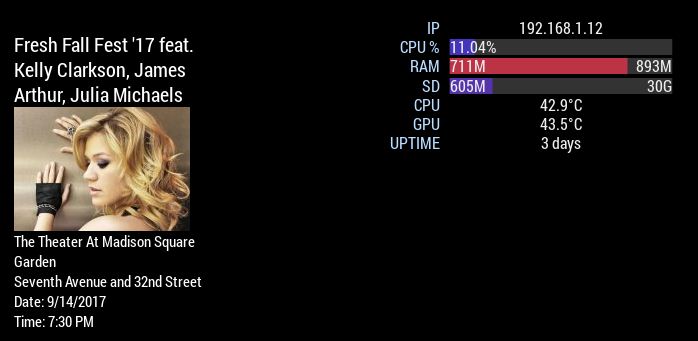
        

        0_1504306500135_22.JPG

        Create a working config
        How to add modules

        1 Reply Last reply Reply Quote 0
        • ? Offline
          A Former User @randomnoise
          last edited by

          @randomnoise only label is displayed, when module is stopped before getting results of script execution of node_helper. Possible suspicious point is…

          • module(including your other modules) has error, so front electron halts.

          npm start dev, see the browser dev console. If there is no suspicious message(usually red lines), hmmmm…

          1 Reply Last reply Reply Quote 0
          • KimzerK Offline
            Kimzer
            last edited by

            The issue seems pretty straightforward.
            If i place it top_center. It works fine.
            bottom_right (where i want it) without any other modules there, it displays the text only. No bars etc. If i re-add the module i already have there it doesnt show at all…

            ? randomnoiseR 2 Replies Last reply Reply Quote 0
            • ? Offline
              A Former User @Kimzer
              last edited by

              @Kimzer that might be related with width vlaue. That might be not bug. I don’t assume how much width user assign to my module. So you could adjust your GOOD view with css by yourself. Give your favorite width or min-width to the module in css.

              Anyway, someone could feel embarrassed with this inconvenient approach, I’ll add default min-width value in next commit.
              Thanks for your advice.

              1 Reply Last reply Reply Quote 0
              • randomnoiseR Offline
                randomnoise @Kimzer
                last edited by

                @Kimzer @Sean

                Yup, can confirm it works just fine in top_left… my top left width happens to be manually set to be 480px due to another module I’m running so that’s probably why its happy now.

                BTW I forgot to set to RPI, but it actually still worked just fine when set to ATB by default.

                ? 1 Reply Last reply Reply Quote 0
                • ? Offline
                  A Former User @randomnoise
                  last edited by

                  @randomnoise screen controlling and measuring temperatures are different between rpi and atb.

                  randomnoiseR 1 Reply Last reply Reply Quote 0
                  • KimzerK Offline
                    Kimzer
                    last edited by

                    Probably not a bug at all, may be my custom css that is causing issues.
                    Tried min-width and width but really didnt fix anything.

                    ? 1 Reply Last reply Reply Quote 0
                    • randomnoiseR Offline
                      randomnoise @Guest
                      last edited by

                      @Sean I’m not using the screen controls so that’s fair enough. I just compared the temp from MMM-Tools to that from MMM-system stats and yes you’re correct the values are wrong if I set the type to ATB. Forgive my rambling :)

                      1 Reply Last reply Reply Quote 0
                      • ? Offline
                        A Former User @Kimzer
                        last edited by

                        @Kimzer ok, tomorrow i’ll try testing widely and can provide better settings. Sorry for inconvenience of all and thanks for your interesting. After work, I’ll post about that.

                        1 Reply Last reply Reply Quote 0
                        • KimzerK Offline
                          Kimzer
                          last edited by

                          Great stuff! :) Seems like i can run the module fine anywhere but the bottom rows.

                          ? 2 Replies Last reply Reply Quote 0
                          • ? Offline
                            A Former User @Kimzer
                            last edited by

                            @Kimzer You are right. that is so weird, only in the bottom region, it won’t works. I’d never imagined this.
                            But, now I catch this error, I believe I can solve this problem.

                            1 Reply Last reply Reply Quote 0
                            • ? Offline
                              A Former User @Kimzer
                              last edited by

                              @Kimzer Here is hotfix.
                              open MMM-Tools.css, find below section, add margin-top:0; there.

                              .Tools .status_item .container {
                                width: 75%;
                                order: 2;
                                height:100%;
                                overflow:hidden;
                                margin-top:0;
                              }
                              

                              MM’s default main.css set margin-top:25px; to .bottom .bar, It makes collision with my css.

                              1 Reply Last reply Reply Quote 0
                              • KimzerK Offline
                                Kimzer
                                last edited by

                                Perfect. I just included it in my custom.css
                                Thanks for the fix! :D

                                1 Reply Last reply Reply Quote 0
                                • KimzerK Offline
                                  Kimzer
                                  last edited by

                                  Any way to make the bars showing ram be transparent?

                                  ? 1 Reply Last reply Reply Quote 0
                                  • ? Offline
                                    A Former User @Kimzer
                                    last edited by

                                    @Kimzer in css, change #xxx to rgba(00,00,00,0.5) which you want.
                                    Ex) rgba(255,0,0,0.5) will be half-transparent red.

                                    1 Reply Last reply Reply Quote 0
                                    • KimzerK Offline
                                      Kimzer
                                      last edited by

                                      Went another way and used opacity. Worked great :)

                                      1 Reply Last reply Reply Quote 0
                                      • lavolp3L Offline
                                        lavolp3 Module Developer
                                        last edited by

                                        @Sean Hi Sean,
                                        the module does not show correct values for SD card space for me.
                                        Actual values:
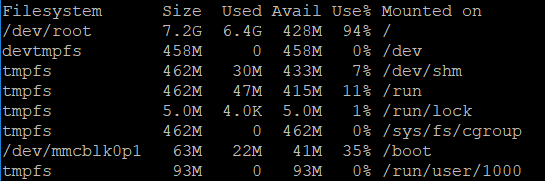
                                        0_1539591563535_d0ced4d6-6142-4912-b89b-5992871c112d-image.png

                                        Shown values:
                                        0_1539591612744_1d87abff-1bb9-4159-abf3-6bd16f7b6a22-image.png

                                        Any idea?

                                        How to troubleshoot modules
                                        MMM-soccer v2, MMM-AVStock

                                        1 Reply Last reply Reply Quote 0
                                        • lavolp3L Offline
                                          lavolp3 Module Developer
                                          last edited by

                                          I think you need to use sudo du -hs / instead of du -hs to show usage of all folders. This shows me the 6.5G my system is using instead of the 1.5G which is not enough and supposedly only valid for part of the system.

                                          How to troubleshoot modules
                                          MMM-soccer v2, MMM-AVStock

                                          ? 1 Reply Last reply Reply Quote 0
                                          • ? Offline
                                            A Former User @lavolp3
                                            last edited by

                                            @lavolp3
                                            Thanks for information. I’ll fix it later, however you can modify the source on line 34 of node_helper.js.

                                            lavolp3L 1 Reply Last reply Reply Quote 0

                                            Hello! It looks like you're interested in this conversation, but you don't have an account yet.

                                            Getting fed up of having to scroll through the same posts each visit? When you register for an account, you'll always come back to exactly where you were before, and choose to be notified of new replies (either via email, or push notification). You'll also be able to save bookmarks and upvote posts to show your appreciation to other community members.

                                            With your input, this post could be even better 💗

                                            Register Login

                                            • 1
                                            • 2
                                            • 1 / 2
                                            • First post
                                              Last post
                                            Enjoying MagicMirror? Please consider a donation!
                                            MagicMirror created by Michael Teeuw.
                                            Forum managed by Sam, technical setup by Karsten.
                                            This forum is using NodeBB as its core | Contributors
                                            Contact | Privacy Policy