MagicMirror Forum
    • Recent
    • Tags
    • Unsolved
    • Solved
    • MagicMirror² Repository
    • Documentation
    • 3rd-Party-Modules
    • Donate
    • Discord
    • Register
    • Login
    A New Chapter for MagicMirror: The Community Takes the Lead
    Read the statement by Michael Teeuw here.

    Need help with internet monitor-module

    Scheduled Pinned Locked Moved Solved Troubleshooting
    20 Posts 5 Posters 9.9k Views 6 Watching
    Loading More Posts
    • Oldest to Newest
    • Newest to Oldest
    • Most Votes
    Reply
    • Reply as topic
    Log in to reply
    This topic has been deleted. Only users with topic management privileges can see it.
    • schlachtkreuzer6S Offline
      schlachtkreuzer6 @duedahlb
      last edited by

      @duedahlb
      Please post your config here (don’t forget to delete your APIs, addresses and any other privacy related info) thanks

      D 1 Reply Last reply Reply Quote 0
      • D Offline
        duedahlb
        last edited by

        The script below is the one i want to put in “top_right” corner
        modules: [
        {
        module: ‘internet-monitor’,
        position: ‘top_center’,
        header: ‘Internet Monitor’,
        config:{
        type: ‘’,
        maxTime: 20000,
        updateInterval: 0,
        verbose: false,
        displayStrength: true,
        displaySpeed: true,
        strengthIconSize: 80,
        maxGaugeScale: 100,
        wifiSymbol:{
        size: 50,
        fullColor: ‘#3afc25’,
        almostColor: ‘#ffff0c’,
        halfColor: ‘#ff8c00’,
        noneColor: ‘#ff1111’
        },
        },
        }
        ]

        /* Magic Mirror Config Sample
        *

        • By Michael Teeuw http://michaelteeuw.nl
        • MIT Licensed.
        • For more information how you can configurate this file
        • See https://github.com/MichMich/MagicMirror#configuration

        */

        var config = {
        address: “localhost”, // Address to listen on, can be:
        // - “localhost”, “127.0.0.1”, “::1” to listen on loopback interface
        // - another specific IPv4/6 to listen on a specific interface
        // - “”, “0.0.0.0”, “::” to listen on any interface
        // Default, when address config is left out, is “localhost”
        port: 8080,
        ipWhitelist: [“127.0.0.1”, “::ffff:127.0.0.1”, “::1”], // Set [] to allow all IP addresses
        // or add a specific IPv4 of 192.168.1.5 :
        // [“127.0.0.1”, “::ffff:127.0.0.1”, “::1”, “::ffff:192.168.1.5”],
        // or IPv4 range of 192.168.3.0 --> 192.168.3.15 use CIDR format :
        // [“127.0.0.1”, “::ffff:127.0.0.1”, “::1”, “::ffff:192.168.3.0/28”],

        language: "en",
        timeFormat: 24,
        units: "metric",
        
        modules: [
        	{
        		module: "alert",
        	},
        	{
        		module: "updatenotification",
        		position: "top_bar"
        	},
        	{
        		module: "clock",
        		position: "top_left"
        	},
        	{
        		module: "calendar",
        		header: "US Holidays",
        		position: "top_left",
        		config: {
        			calendars: [
        				{
        					symbol: "calendar-check-o ",
        					url: "webcal://www.calendarlabs.com/templates/ical/US-Holidays.ics"
        				}
        			]
        		}
        	},
        	{
        		module: "compliments",
        		position: "lower_third"
        	},
        	{
        		module: "currentweather",
        		position: "top_right",
        		config: {
        			location: "New York",
        			locationID: "",  //ID from http://www.openweathermap.org/help/city_list.txt
        			appid: "YOUR_OPENWEATHER_API_KEY"
        		}
        	},
        	{
        		module: "weatherforecast",
        		position: "top_right",
        		header: "Weather Forecast",
        		config: {
        			location: "New York",
        			locationID: "5128581",  //ID from http://www.openweathermap.org/help/city_list.txt
        			appid: "YOUR_OPENWEATHER_API_KEY"
        		}
        	},
        	{
        		module: "newsfeed",
        		position: "bottom_bar",
        		config: {
        			feeds: [
        				{
        					title: "New York Times",
        					url: "http://www.nytimes.com/services/xml/rss/nyt/HomePage.xml"
        				}
        			],
        			showSourceTitle: true,
        			showPublishDate: true
        		}
        	},
        ]
        

        };

        /*************** DO NOT EDIT THE LINE BELOW ***************/
        if (typeof module !== “undefined”) {module.exports = config;}

        schlachtkreuzer6S 1 Reply Last reply Reply Quote 0
        • D Offline
          duedahlb @schlachtkreuzer6
          last edited by

          @schlachtkreuzer6 I uploaded the standard file now… and the script module i want to use too

          1 Reply Last reply Reply Quote 0
          • schlachtkreuzer6S Offline
            schlachtkreuzer6 @duedahlb
            last edited by

            @duedahlb

            Check your quotes. Change this: ’ to this: " and apply the missing quotes @

            Maxtime
            update … Etc.

            1 Reply Last reply Reply Quote 1
            • D Offline
              doubleT Module Developer
              last edited by

              And please check the following link: https://forum.magicmirror.builders/topic/4247/how-to-post-code-on-the-forum-for-absolute-beginners/2

              Right now, the config.js you posted is near-unreadable.

              1 Reply Last reply Reply Quote 1
              • yawnsY Offline
                yawns Moderator
                last edited by

                Both schlachtkreuzer6 and doubleT are totally right. I tried to change the post with your config, but akismet.com flags this as spam.
                Besides wrong quotes the position of your added module was incorrect.
                Please try this config:

                /* Magic Mirror Config Sample
                
                By Michael Teeuw http://michaelteeuw.nl
                MIT Licensed.
                For more information how you can configurate this file
                See https://github.com/MichMich/MagicMirror#configuration
                */
                
                var config = {
                address: "localhost",
                port: 8080,
                ipWhitelist: ["127.0.0.1", "::ffff:127.0.0.1", "::1"], // Set [] to allow all IP addresses
                
                language: "en",
                timeFormat: 24,
                units: "metric",
                
                modules: [
                	{
                		module: "alert",
                	},
                	{
                		module: "updatenotification",
                		position: "top_bar"
                	},
                	{
                		module: "clock",
                		position: "top_left"
                	},
                	{
                		module: "calendar",
                		header: "US Holidays",
                		position: "top_left",
                		config: {
                			calendars: [
                				{
                					symbol: "calendar-check-o ",
                					url: "webcal://www.calendarlabs.com/templates/ical/US-Holidays.ics"
                				}
                			]
                		}
                	},
                	{
                		module: "compliments",
                		position: "lower_third"
                	},
                	{
                		module: "currentweather",
                		position: "top_right",
                		config: {
                			location: "New York",
                			locationID: "",  //ID from http://www.openweathermap.org/help/city_list.txt
                			appid: "YOUR_OPENWEATHER_API_KEY"
                		}
                	},
                	{
                		module: "weatherforecast",
                		position: "top_right",
                		header: "Weather Forecast",
                		config: {
                			location: "New York",
                			locationID: "5128581",  //ID from http://www.openweathermap.org/help/city_list.txt
                			appid: "YOUR_OPENWEATHER_API_KEY"
                		}
                	},
                	{
                		module: "newsfeed",
                		position: "bottom_bar",
                		config: {
                			feeds: [
                				{
                					title: "New York Times",
                					url: "http://www.nytimes.com/services/xml/rss/nyt/HomePage.xml"
                				}
                			],
                			showSourceTitle: true,
                			showPublishDate: true
                		}
                	},
                	{
                		module: "internet-monitor",
                		position: "top_center",
                		header: "Internet Monitor",
                		config: {
                			type: "",
                			maxTime: 20000,
                			updateInterval: 0,
                			verbose: false,
                			displayStrength: true,
                			displaySpeed: true,
                			strengthIconSize: 80,
                			maxGaugeScale: 100,
                			wifiSymbol: {
                				size: 50,
                				fullColor: "#3afc25",
                				almostColor: "#ffff0c",
                				halfColor: "#ff8c00",
                				noneColor: "#ff1111"
                			},
                		},
                	},
                ]
                };
                
                /*************** DO NOT EDIT THE LINE BELOW ***************/
                if (typeof module !== "undefined") {module.exports = config;}
                
                D 2 Replies Last reply Reply Quote 1
                • D Offline
                  duedahlb @yawns
                  last edited by

                  @yawns wow, thanks!, but now my screen is just black… tried rebooting:/ anu suggestions?

                  1 Reply Last reply Reply Quote 0
                  • D Offline
                    doubleT Module Developer
                    last edited by doubleT

                    Might not be the problem (as modern browser are pretty forgiving about this) but the last property of an object (or array) doesn’t get a trailing comma.

                    			}
                    		}
                    	}
                    ]
                    };
                    

                    Other than that I don’t see any obvious problems. A black screen is better than a config error because it might load the basic MM but just not the modules.

                    Now, what I can suggest and what a developer would do is:

                    • Reduce the config.js to the basics or the originally suggested example.
                    • Add one module after another, always checking if it works or not.
                    • If one doesn’t work or breaks something, note it down, remove it, try the next one. Or figure out directly why it doesn’t work.

                    But that way you can easily point to where it breaks. Everything else is guesswork.

                    1 Reply Last reply Reply Quote 0
                    • D Offline
                      duedahlb @yawns
                      last edited by

                      @yawns it gives me the damn config error… plz help!

                      schlachtkreuzer6S 1 Reply Last reply Reply Quote 0
                      • schlachtkreuzer6S Offline
                        schlachtkreuzer6 @duedahlb
                        last edited by

                        @duedahlb do you change the quotes and the missing quotes? than upload your config again pls.

                        D 1 Reply Last reply Reply Quote 0
                        • D Offline
                          duedahlb @schlachtkreuzer6
                          last edited by

                          @schlachtkreuzer6 it’s just the standard file, with one extra module…

                          /* Magic Mirror Config Sample
                           *
                           * By Michael Teeuw http://michaelteeuw.nl
                           * MIT Licensed.
                           *
                           * For more information how you can configurate this file
                           * See https://github.com/MichMich/MagicMirror#configuration
                           *
                           */
                          
                          var config = {
                          	address: "localhost", // Address to listen on, can be:
                          	                      // - "localhost", "127.0.0.1", "::1" to listen on loopback interface
                          	                      // - another specific IPv4/6 to listen on a specific interface
                          	                      // - "", "0.0.0.0", "::" to listen on any interface
                          	                      // Default, when address config is left out, is "localhost"
                          	port: 8080,
                          	ipWhitelist: ["127.0.0.1", "::ffff:127.0.0.1", "::1"], // Set [] to allow all IP addresses
                          	                                                       // or add a specific IPv4 of 192.168.1.5 :
                          	                                                       // ["127.0.0.1", "::ffff:127.0.0.1", "::1", "::ffff:192.168.1.5"],
                          	                                                       // or IPv4 range of 192.168.3.0 --> 192.168.3.15 use CIDR format :
                          	                                                       // ["127.0.0.1", "::ffff:127.0.0.1", "::1", "::ffff:192.168.3.0/28"],
                          
                          	language: "en",
                          	timeFormat: 24,
                          	units: "metric",
                          
                          	modules: [
                          		{
                          			module: "alert",
                          		},
                          		{
                          			module: "updatenotification",
                          			position: "top_bar"
                          		},
                          		{
                          			module: "clock",
                          			position: "top_left"
                          		},
                          		{
                          			module: "calendar",
                          			header: "US Holidays",
                          			position: "top_left",
                          			config: {
                          				calendars: [
                          					{
                          						symbol: "calendar-check-o ",
                          						url: "webcal://www.calendarlabs.com/templates/ical/US-Holidays.ics"
                          					}
                          				]
                          			}
                          		},
                          		{
                          			module: "compliments",
                          			position: "lower_third"
                          		},
                          		{
                          			module: "currentweather",
                          			position: "top_right",
                          			config: {
                          				location: "New York",
                          				locationID: "",  //ID from http://www.openweathermap.org/help/city_list.txt
                          				appid: "YOUR_OPENWEATHER_API_KEY"
                          			}
                          		},
                          		{
                          			module: "weatherforecast",
                          			position: "top_right",
                          			header: "Weather Forecast",
                          			config: {
                          				location: "New York",
                          				locationID: "5128581",  //ID from http://www.openweathermap.org/help/city_list.txt
                          				appid: "YOUR_OPENWEATHER_API_KEY"
                          			}
                          		},
                          		{
                          			module: "newsfeed",
                          			position: "bottom_bar",
                          			config: {
                          				feeds: [
                          					{
                          						title: "New York Times",
                          						url: "http://www.nytimes.com/services/xml/rss/nyt/HomePage.xml"
                          					}
                          				],
                          				showSourceTitle: true,
                          				showPublishDate: true
                          			}
                          		},
                          
                          		{
                          	    	module: 'internet-monitor',
                                      	position: 'top_center',
                                      	header: 'Internet Monitor',
                                      	config:{
                                          	type: '',
                                          	maxTime: 20000,
                                          	updateInterval: 0,
                                          	verbose: false,
                                          	displayStrength: true,
                                          	displaySpeed: true,
                                          	strengthIconSize: 80,
                                          	maxGaugeScale: 100,
                          			wifiSymbol:{
                                              		size: 50,
                                              		fullColor: '#3afc25',
                                              		almostColor: '#ffff0c',
                                              		halfColor: '#ff8c00',
                          	            		noneColor: '#ff1111'
                          				},
                                      		},
                          		}
                          
                          
                          	]
                          
                          };
                          
                          /*************** DO NOT EDIT THE LINE BELOW ***************/
                          if (typeof module !== "undefined") {module.exports = config;}
                          
                          Mykle1M 1 Reply Last reply Reply Quote 0
                          • Mykle1M Offline
                            Mykle1 Project Sponsor Module Developer @duedahlb
                            last edited by

                            @duedahlb

                            did you install the dependencies as per the readme? I just installed this, installed the dependencies, and it fired right up.

                            Create a working config
                            How to add modules

                            D 2 Replies Last reply Reply Quote 0
                            • D Offline
                              duedahlb @Mykle1
                              last edited by

                              @Mykle1 said in Need help with internet monitor-module:

                              @duedahlb

                              did you install the dependencies as per the readme? I just installed this, installed the dependencies, and it fired right up.

                              yes i did, but i can do it again:)

                              1 Reply Last reply Reply Quote 0
                              • D Offline
                                doubleT Module Developer
                                last edited by

                                I don’t see any problem with it. But to be on the safe side, I changed the single quotes in the config object for the internet-monitor to double quotes (as the rest of the file), what Schlachtkreuzer said. Again, shouldn’t be an issue – unless it’s conflicting with single quotes in a different place.

                                ,{
                                    module: "internet-monitor",
                                    position: "top_center",
                                    header: "Internet Monitor",
                                    config:{
                                        type: "",
                                        maxTime: 20000,
                                        updateInterval: 0,
                                        verbose: false,
                                        displayStrength: true,
                                        displaySpeed: true,
                                        strengthIconSize: 80,
                                        maxGaugeScale: 100,
                                        wifiSymbol:{
                                            size: 50,
                                            fullColor: "#3afc25",
                                            almostColor: "#ffff0c",
                                            halfColor: "#ff8c00",
                                            noneColor: "#ff1111"
                                        }
                                    }
                                }
                                

                                What happens if you leave out that module? Does it work then?
                                Are there any errors listed in the console where you start the mirror? Any errors listed in the browser’s console (if you start it with npm start dev)?

                                1 Reply Last reply Reply Quote 0
                                • schlachtkreuzer6S Offline
                                  schlachtkreuzer6
                                  last edited by schlachtkreuzer6

                                  Try this

                                      module: "internet-monitor",
                                      position: "top_center",
                                      header: "Internet Monitor",
                                      config:{
                                          type: "",
                                          maxTime: "20000",
                                          updateInterval: "0",
                                          verbose: "false",
                                          displayStrength: "true",
                                          displaySpeed: "true",
                                          strengthIconSize: "80",
                                          maxGaugeScale: "100",
                                                  wifiSymbol:{
                                                  size: "50",
                                                  fullColor: "#3afc25",
                                                  almostColor: "#ffff0c",
                                                  halfColor: "#ff8c00",
                                                  noneColor: "#ff1111"
                                          }
                                      }
                                  }
                                  
                                  1 Reply Last reply Reply Quote 0
                                  • D Offline
                                    doubleT Module Developer
                                    last edited by doubleT

                                    That doesn’t make sense, the functions are expecting integer and boolean, not strings.

                                    But maybe I found something while checking the module’s readme for the variables and default config:

                                    “Please note that updateInterval has to be greater than maxTime”

                                    https://github.com/ronny3050/internet-monitor

                                    Mykle1M 1 Reply Last reply Reply Quote 1
                                    • Mykle1M Offline
                                      Mykle1 Project Sponsor Module Developer @doubleT
                                      last edited by

                                      My config entry:

                                      {
                                      	    module: 'internet-monitor',
                                                  position: 'top_center',
                                                  header: 'Internet Monitor',
                                                  config:{
                                                      type: '',
                                                      maxTime: 20000,
                                                      updateInterval: 0,
                                                      verbose: false,
                                                      displayStrength: true,
                                                      displaySpeed: true,
                                                      strengthIconSize: 80,
                                                      maxGaugeScale: 100,
                                                  }
                                      	},
                                      

                                      And my result:
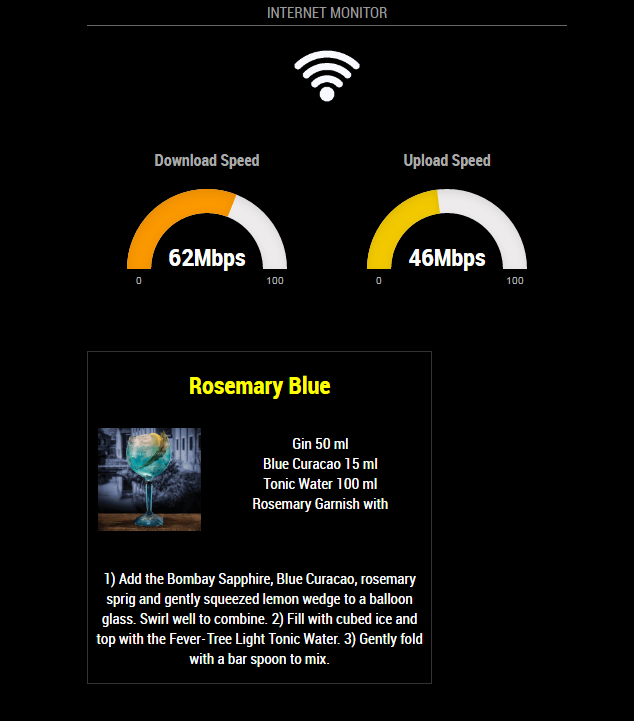
                                      0_1516055182288_3.PNG

                                      Create a working config
                                      How to add modules

                                      1 Reply Last reply Reply Quote 1
                                      • D Offline
                                        duedahlb @Mykle1
                                        last edited by

                                        @Mykle1 I got it now! I just reinstalled it, tnx:)

                                        Mykle1M 1 Reply Last reply Reply Quote 0
                                        • Mykle1M Offline
                                          Mykle1 Project Sponsor Module Developer @duedahlb
                                          last edited by

                                          @duedahlb

                                          Well done, mate.

                                          Create a working config
                                          How to add modules

                                          1 Reply Last reply Reply Quote 0

                                          Hello! It looks like you're interested in this conversation, but you don't have an account yet.

                                          Getting fed up of having to scroll through the same posts each visit? When you register for an account, you'll always come back to exactly where you were before, and choose to be notified of new replies (either via email, or push notification). You'll also be able to save bookmarks and upvote posts to show your appreciation to other community members.

                                          With your input, this post could be even better 💗

                                          Register Login

                                          • 1 / 1
                                          • First post
                                            Last post
                                          Enjoying MagicMirror? Please consider a donation!
                                          MagicMirror created by Michael Teeuw.
                                          Forum managed by Sam, technical setup by Karsten.
                                          This forum is using NodeBB as its core | Contributors
                                          Contact | Privacy Policy
