Read the statement by Michael Teeuw here.
-
Description:
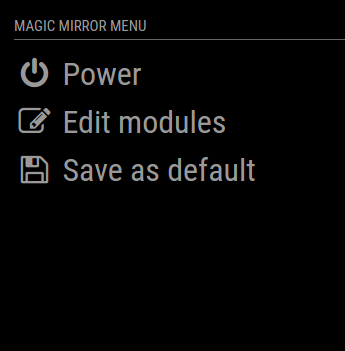
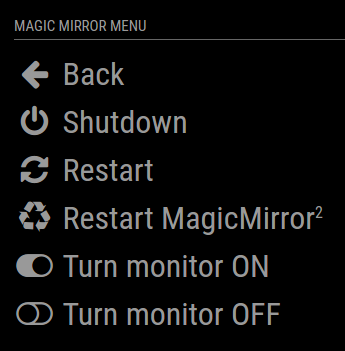
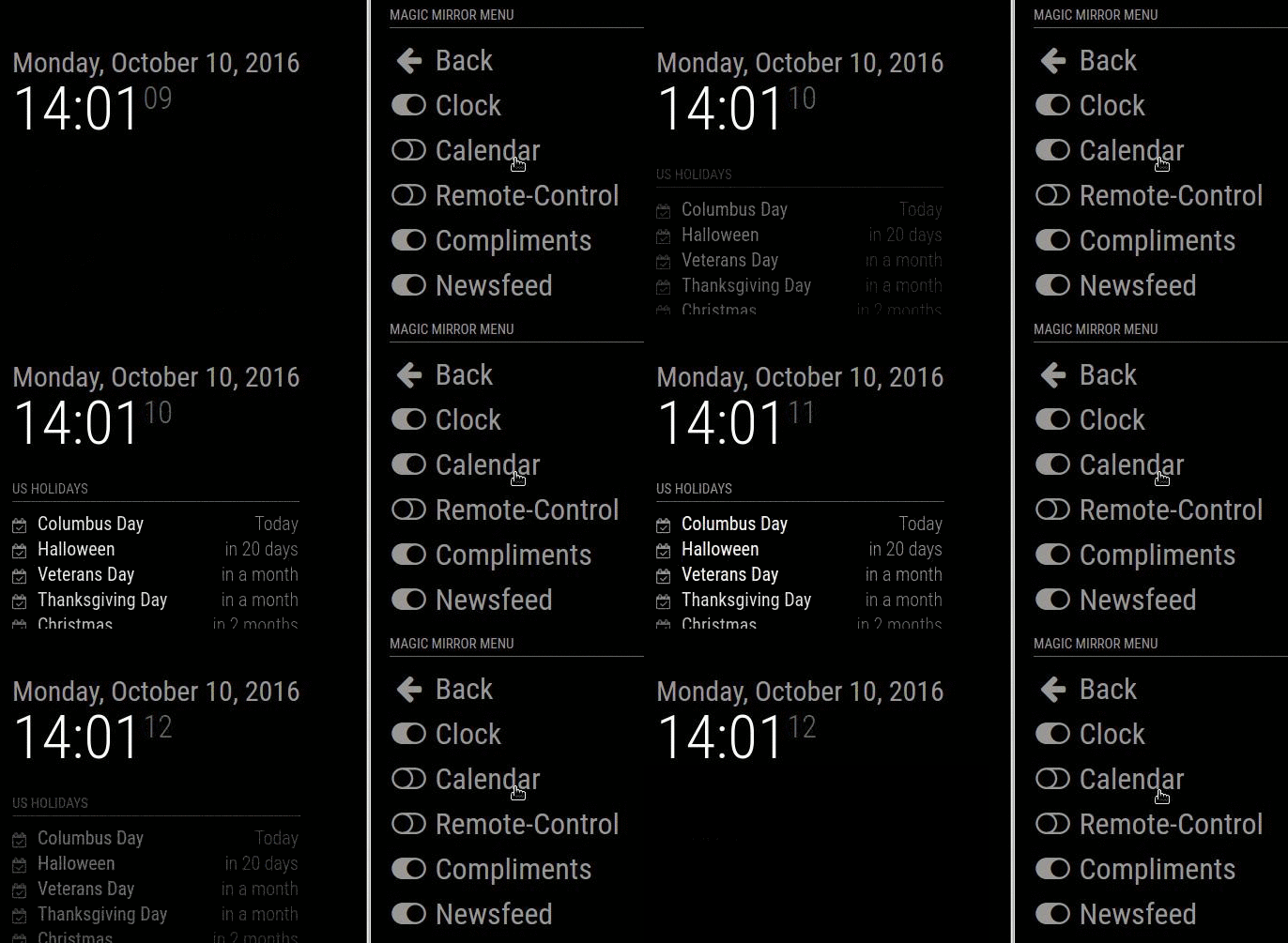
This module for the Magic Mirror² allows you to quickly shutdown your mirror through a web browser. The website should work fine on any device (desktop, smart phone, tablet, …). Additionally you can hide and show modules on your mirror, send alerts and do more cool stuff in the future.
Screenshots:
Download:
[card:Jopyth/MMM-Remote-Control]
FAQ:
Can not access the remote website (and the MagicMirror in general) at all (MagicMirror Version > 2.1.3)
Possible solution: Change address in config
White screen issues (after updating)?
Possible solution: Run npm install
Error: Cannot GET /remote.html
Possible solution: [MMM-Remote-Control] Can not access remote control module
“This device is not allowed to access your mirror. Please check your config.js or config.js.sample to change this.”
Solution: ipWhitelist HowTo
Changelog
[2.1.0] - 2020-11-01
Hello! Ezequiel here. Just wanted to say thanks for trust in me, in the past days I made a lot of changes into the code, adding some functions that’ll surely be in a future release, and also putting everything together in my fork. I answered almost every issue raised, and tried to help every person that use this module. Today, I’m glad to be able to share everything I learned to all of you. I apologize for some fast and uncommented commits, I just thinked that some things needed to be fixed ASAP.
See you in future commits, issues and PRs :DFixed
- A typo in
estranslation - A few typos in README.md (#134 and #149) and API/README.md (#179)
- Delayed commands should now work (#190)
- Typo on remote_action (#184)
- IP now showing (#194)
- MM restart button don’t just stop anymore (#126)
- Saving config should work as expected now (#153)
- installer.sh now detects where’s the node instalation (#222)
Added
- Danish translation (#157)
- Italian translation (#162)
- Port now showing according to config.js (#98)
- Custom commands for shutdown and reboot
Changed
- Overwrite of local changes when updating from a repository
- Now requires MagicMirror version 2.12
[2.0.1] - 2020-10-28
Huge thanks to @ezeholz who has offered to maintain the module fron now on!
Credit for this (and future) versions and releases goes to @ezeholz (unless noted otherwise).Now requires MagicMirror version 2.7.
Fixed
- Path to font awesome icons
- A few typos in
caandestranslations - Updates to
remote.htmlto support newbasePathfeature in MMconfig.js, follow up to this MM issue, related to #185
[2.0.0] - 2019-02-21
Huge shoutout to shbatm for his work on this new major version, which brings a new API, custom menus and commands and lots of other stuff:
Added
- REST API interface for controlling all aspects of the MagicMirror from HTTP RESTful-style GET and POST calls, based on principles from MMM-Api
- Full API Documentation at API/README.md
- Live daily updates of
modules.jsonfrom the MagicMirror wiki, based on principles from MMM-Remote-Control-Repository. - Incorporated some features found in MMM-OnScreenMenu that were not originally in this module.
- Monitor (Connected Screen) On-Off Status and Toggle
- Delayed calls (“DELAYED” Query option and
.../delayAPI paths) - If using Electron: Open Dev Tools, Minimize, Toggle Fullscreen
- Configuration Option to send custom shell commands to use. Currently, only custom monitor on/off/status commands are supported.
- Module Control menu - Automatically generated from the API to control the different modules you have installed, based on their
notificationReceivedfunction. - Custom menu items. See Custom Menu Items in README
- Norsk bokmål translation
Changed
- Updates to
remote.htmland thenode_helper.jsto use direct SocketIO communication back and forth instead of separate HTTP calls.- Future framework for following PM2 logs and more live update options.
- General clean-up and standardization of status reporting for GET and POST calls, to original URLs and to new API URLs.
- Updated to ES2015 (ES Version 6) function calls in most locations.
- Added USER_PRESENCE controls from AgP42
- Added/updated french translations from BKeyport and Mysh3ll
- Added SHOW/HIDE/TOGGLE ALL modules option per request from Rene1709
Upcoming Changes
- Add additional MMM-OnScreenMenu features:
- Moving modules’ positions
- PM2 Log Follower / Terminal Window
- Added Notification Echo option to config to echo all Module Notifications to the remote’s DevTools console for debugging.
- Allow for text input in the Module Controls menu to be able to provide a notification payload.
[1.1.5] - 2018-05-14
Added
- French translation
Fixed
- Updated documentation to new MagicMirror version
- Fix error on updating MagicMirror
[1.1.4] - 2017-09-17
Added
- Dutch translation
- Updating a module tries to install dependencies with
npm install - Module identifier is shown if a module is locked with lock strings
- Confirmation dialog before restart and shutdown
Fixed
- Internal save file format and mistakenly hiding modules which were hidden by other modules
- Restart should work for new installations
Changed
- German translation for power menu changed from “Ausschalten” to “Energieoptionen”
[1.1.3] - 2017-04-23
Added
- Portuguese translation
- Indonesian translation
- Support for iOS Icon and Webapp
Changed
- Installation no longer needs a temporary file
Fixed
- Icon paths adapted to changes in Magic Mirror² 2.1.0
[1.1.2] - 2017-02-01
Note: Since version 1.1.0 this module uses (new) dependencies, check the Updating section in the README.md.
Added
- Swedish translation
Changed
- Installation process updated in README.md
- Automatic installer/updater includes hint to restart Magic Mirror²
Fixed
- Issues with not applying shown and hidden status correctly to modules
- Issues where lockstrings were missing
- Modules sometimes did not show correctly in the UI as hidden or shown:
- This is due to a bug in Magic Mirror²
- PR #659 to fix this was made in the project, will be released in the next version
[1.1.0] - 2017-01-26
Added
- First version of installer script
- Menu to send Alerts and/or Notifications to your mirror
- Menu to update your MagicMirror installation and your modules (through
git pull) - Menu to change the
config.js- Modules can be installed, added, removed, configured
- There will be backups of the five last versions of the
config.jsin theconfigfolder - Some of these parts are hidden behind an “exprimental” warning, do not ignore that warning
- NOTIFICATION action, see README.md for details
Changed
- Menu structure
- Old “Edit” and “Settings” are now under “Edit view”
- Smaller font sizes in lists
Fixed
- Issues coming from disabled modules since MM version 2.1.0
[1.0.0] - 2016-10-24
Added
- Changelog
- New buttons in user interface
- Hide/show all modules
- Link to MagicMirror² homepage
- Option to adapt brightness (making the mirror brighter than 100% can be limited to certain modules)
- Contributing hints
- Internal versioning of saved config (current version: 1)
- Added action
MODULE_DATAto return module data in JSON format
Changed
- Internal timeout for commands increased from 5 to 8 seconds
- Symbols for display on and off
- Internal changes in preparation for Magic Mirror version
2.1.0
Helpful sticky: How to troubleshoot
- A typo in
-
@Jopyth I think this is a really cool module! Thank you!
[EDIT: Nevermind… Wrong thread and I didn’t restart. Works great!]
-
@rvdgeer Glad you like it. :)
By the way I am also looking for new ideas, if anyone wants to a do a certain thing via this interface, I would happy to add it, if it is possible.
Helpful sticky: How to troubleshoot
-
Really nice. I used a physical Button to shutdown the pi before, but this is much more easier. Thank you for creating this cool module ;)
-
This is awesome. No more commenting modules out when I do not need them. This is way more convenient.
-
Ideas:
Perhaps ablity to turn off HDMI ‘sleep’, then maybe also can turn down and up brightness aka CSS white color. -
@Jopyth It would be great to be able to disable a module on startup, so you can enable it later with the remote control. Or even better: have a ‘save settings’ option on the remote control, so you can make the disabled modules stick after a reboot/reload.
-
@Mr.Meeseeks You mean like with a PIR sensor? Fiddling with CSS would be possible I think, I will look into that.
@rvdgeer good idea I wanted something similar like this too.
Helpful sticky: How to troubleshoot
-
@Jopyth said in MMM-Remote-Control:
@rvdgeer Glad you like it. :)
By the way I am also looking for new ideas, if anyone wants to a do a certain thing via this interface, I would happy to add it, if it is possible.
How about the ability to send a message to display on the mirror? It would be funny if someone was standing in front of it and it said Hi and their name LOL Just throwing it out there…
-
@cowboysdude, evil, just pure evil.
Unsuspecting friend visits, friend goes to bathroom, you whip out phone and “text” the mirror … friend comes running out screaming.
-
@KirAsh4 said in MMM-Remote-Control:
@cowboysdude, evil, just pure evil.
Unsuspecting friend visits, friend goes to bathroom, you whip out phone and “text” the mirror … friend comes running out screaming.
Yes but funny none the less LOL
-
“Hey [NAME], you did not wash your hands.”
“Turn the damn fan on!”
-
@KirAsh4 said in MMM-Remote-Control:
“Hey [NAME], you did not wash your hands.”
“Turn the damn fan on!”
LOL
-
@Jopyth ya like what the pir sensor does but just as a manual toggle, so you can turn it ‘off’ at night. I currently don’t have pir sensor yet.
-
I might try to tinker in a config editor and maybe even a command to git clone modules remotely.
-
Ok, that’s a nice modul :-)
I’ve insert an restart function for the MM app and the ability to turn you monitor on and off:
insert in node_helper.js at line 54:
				if (query.action === 'RESTART')
				{
					res.send({'status': 'success'});
					exec('pm2 restart mm', function(error, stdout, stderr){ callback(stdout); });
					return;
				}
				if (query.action === 'MONITORON')
				{
					res.send({'status': 'success'});
					exec('/opt/vc/bin/tvservice -p', function(error, stdout, stderr){ callback(stdout); });
					return;
				}
				if (query.action === 'MONITOROFF')
				{
					res.send({'status': 'success'});
					exec('/opt/vc/bin/tvservice -o', function(error, stdout, stderr){ callback(stdout); });
					return;
				}
in remote.js on line 131:
    'restart-mm-button': function () {
        Remote.getWithStatus("action=RESTART");
    },
    'monitor-on-button': function () {
        Remote.getWithStatus("action=MONITORON");
    },
    'monitor-off-button': function () {
        Remote.getWithStatus("action=MONITOROFF");
    }
in remote.html on line 40:
<!-- MagicMirror menu -->
		<div id="restart-mm-button" class="menu-button power-menu">
                    <span class="fa fa-recycle" aria-hidden="true"></span>
                    <span class="text">%%TRANSLATE:RESTARTMM%%</span>
                </div>
		<div id="monitor-on-button" class="menu-button power-menu">
                    <span class="fa fa-toggle-on" aria-hidden="true"></span>
                    <span class="text">%%TRANSLATE:MONITORON%%</span>
                </div>
                <div id="monitor-off-button" class="menu-button power-menu">
                    <span class="fa fa-toggle-off" aria-hidden="true"></span>
                    <span class="text">%%TRANSLATE:MONITOROFF%%</span>
                </div>
and the translations/en.json and de.json on line 8 ff:
    "RESTARTMM": "Restart MagicMirror2",
    "MONITORON": "Turn monitor ON",
    "MONITOROFF": "Turn monitor OFF",
"RESTARTMM": "Starte MagicMirror2 neu", "MONITORON": "Bildschirm einschalten", "MONITOROFF": "Bildschirm ausschalten",I think thats it.
The evil this is a must for my mirror… so thats next. I think we can do this like the IFTTT module does it.
Install modules remotly will be the next big thing… :-) -
@Bangee can you make a pull request also? Would be nice.
Edit: Otherwise I will add it to the base module, with your permission, when I get back from vacation.
-
@cowboysdude This is what I am doing with my Trello module basically. :)
-
@Jopyth I never did this before but I’ll try ;-)
-
Hello everyone,
actually i’m building my first Magic Mirror and i have installed the Remote Control Modul which works very well and i also have implemented the changes from Bangee. Everything works fine.
Now i want to use this modul for interacting with my home automation systen “homematic”. Therefore i need to call the URLs directly.
Can anybody help me which i URL i have to call? I already have tried
http://192.168.xxx.xxx:8080/remote.html?action=RESTART
but it doesnt work :-(Thanks in advance for your help :)






Hello! It looks like you're interested in this conversation, but you don't have an account yet.
Getting fed up of having to scroll through the same posts each visit? When you register for an account, you'll always come back to exactly where you were before, and choose to be notified of new replies (either via email, or push notification). You'll also be able to save bookmarks and upvote posts to show your appreciation to other community members.
With your input, this post could be even better 💗
Register Login