MagicMirror Forum
    • Recent
    • Tags
    • Unsolved
    • Solved
    • MagicMirror² Repository
    • Documentation
    • 3rd-Party-Modules
    • Donate
    • Discord
    • Register
    • Login
    A New Chapter for MagicMirror: The Community Takes the Lead
    Read the statement by Michael Teeuw here.

    Rpi 3B+, can't install

    Scheduled Pinned Locked Moved Solved Troubleshooting
    19 Posts 6 Posters 9.8k Views 5 Watching
    Loading More Posts
    • Oldest to Newest
    • Newest to Oldest
    • Most Votes
    Reply
    • Reply as topic
    Log in to reply
    This topic has been deleted. Only users with topic management privileges can see it.
    • E Offline
      epi
      last edited by

      so I did

      mv MagicMirror MagicMirror3
      git clone https://github.com/MichMich/MagicMirror
      npm start


      and I see

      Segmentation fault
      
      
      1 Reply Last reply Reply Quote 0
      • M Offline
        MadScientist
        last edited by

        Try git clone https://github.com/MichMich/MagicMirrorthen cd MagicMirrorfollowed by npm install.
        Looks to me you tried to start the MagicMirror before installing it.

        1 Reply Last reply Reply Quote 0
        • E Offline
          epi
          last edited by

          Segmentation fault

          1 Reply Last reply Reply Quote 0
          • E Offline
            epi
            last edited by

            I have set up WAN Port Forwarding to RPi, if there is somebody willing to help me.

            J 1 Reply Last reply Reply Quote -1
            • J Offline
              JRCelis @epi
              last edited by

              @epi
              I got the same issue and I installed manually.

              1. install the latest Node.js version.
              • Updates Debian apt package repository to include the NodeSource packages.
                curl -sL https://deb.nodesource.com/setup_10.x | sudo -E bash -

              • install Node.js
                sudo apt install -y nodejs

              • Check your node version ( should be V 10.10.0)
                node -v

              1. Clone the repository and check out the master branch: git clone https://github.com/MichMich/MagicMirror
              2. Enter the repository: cd MagicMirror/
              3. Install and run the app with: npm install && npm start
              4. create a working config.
              1 Reply Last reply Reply Quote 0
              • Mykle1M Offline
                Mykle1 Project Sponsor Module Developer
                last edited by

                https://forum.magicmirror.builders/search?term=how to install mm manually&in=titlesposts

                Create a working config
                How to add modules

                1 Reply Last reply Reply Quote 0
                • E Offline
                  epi
                  last edited by

                  Still doesn’t work for me.
                  What I did is

                  1. Install fresh RASPBIAN STRETCH WITH DESKTOP
                  2. After install, configure wifi credentials and enable SSH access
                  3. Connect via SSH and proceed with

                  curl -sL https://deb.nodesource.com/setup_10.x | sudo -E bash -

                  sudo apt install -y nodejs

                  node -v

                  (got answer “v10.10.0”)

                  git clone https://github.com/MichMich/MagicMirror

                  cd MagicMirror/

                  npm install && npm start
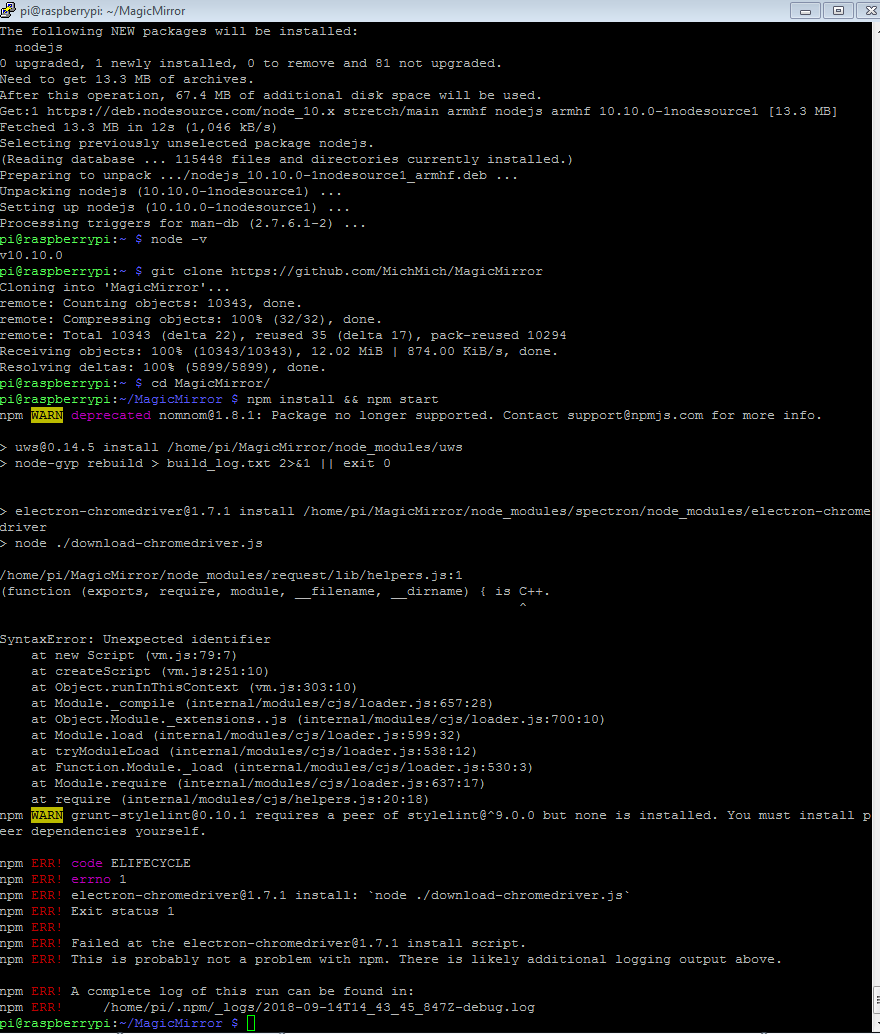
                  0_1536936874227_c2c52d1e-4fbc-490b-8755-5f456847073b-image.png

                  1 Reply Last reply Reply Quote 0
                  • E Offline
                    epi
                    last edited by

                    any clue what to do next?

                    1 Reply Last reply Reply Quote 0
                    • M Offline
                      MadScientist
                      last edited by MadScientist

                      Not sure this will help but you could try npm install -g electron within your MagicMirror directory.

                      If that doesn’t work, try npm install electron@2.0.0 inside your MM directory.

                      1 Reply Last reply Reply Quote 0
                      • E Offline
                        epi
                        last edited by

                        Issue found, everything works now.
                        Problem was my SD card, it, is (becomes) corrupt at some point.

                        1 Reply Last reply Reply Quote 0
                        • M Offline
                          MadScientist
                          last edited by

                          That’s why I run mine from a cheap SSD (Kingston A400, 120GB iirc). Much faster and no risk of corrupting it. I paid 27€ for my SSD. At this price I think it is worth considering buying one.

                          1 Reply Last reply Reply Quote 1
                          • A Offline
                            Ajay1889 @epi
                            last edited by

                            Please try the following

                            sudo apt-get remove nodejs nodejs-legacy nodered
                            

                            after that

                            curl -sL https://deb.nodesource.com/setup_8.x | sudo -E bash -
                            sudo apt-get install -y nodejs
                            sudo npm install -g npm@latest
                            

                            after that enter in the repository with

                            cd MagicMirror
                            

                            If have not install MM, use this from github

                             bash -c "$(curl -sL https://raw.githubusercontent.com/MichMich/MagicMirror/master/installers/raspberry.sh)"
                            

                            then install and run the app with

                            npm install && npm start
                            

                            This method worked for me.

                            Credit: @NoNameRo

                            1 Reply Last reply Reply Quote 0

                            Hello! It looks like you're interested in this conversation, but you don't have an account yet.

                            Getting fed up of having to scroll through the same posts each visit? When you register for an account, you'll always come back to exactly where you were before, and choose to be notified of new replies (either via email, or push notification). You'll also be able to save bookmarks and upvote posts to show your appreciation to other community members.

                            With your input, this post could be even better 💗

                            Register Login

                            • 1 / 1
                            • First post
                              Last post
                            Enjoying MagicMirror? Please consider a donation!
                            MagicMirror created by Michael Teeuw.
                            Forum managed by Sam, technical setup by Karsten.
                            This forum is using NodeBB as its core | Contributors
                            Contact | Privacy Policy