MagicMirror Forum
    • Recent
    • Tags
    • Unsolved
    • Solved
    • MagicMirror² Repository
    • Documentation
    • 3rd-Party-Modules
    • Donate
    • Discord
    • Register
    • Login
    A New Chapter for MagicMirror: The Community Takes the Lead
    Read the statement by Michael Teeuw here.

    MMM-DarkSkyForecast - Yet ANOTHER weather module

    Scheduled Pinned Locked Moved Utilities
    334 Posts 67 Posters 835.3k Views 74 Watching
    Loading More Posts
    • Oldest to Newest
    • Newest to Oldest
    • Most Votes
    Reply
    • Reply as topic
    Log in to reply
    This topic has been deleted. Only users with topic management privileges can see it.
    • J Offline
      j.e.f.f Project Sponsor Module Developer @lavolp3
      last edited by j.e.f.f

      @lavolp3 said in MMM-DarkSkyForecast - Yet ANOTHER weather module:

      If you want to ONLY show the wind direction you would have to manipulate the .js file manually in line 429

      Or you can write rules to hide things in your custom.css file. That way your change doesn’t get overwritten by a module update. I’ve wrapped everything in a css class, so you can pick and choose what is displayed. Start MM in dev mode and you can use the inspector to figure out the class names, or examine MMM-DarkSkyForecast.njk to see the HTML layout and the classes applied.

      For example, let’s say you wanted the wind direction, but not the max wind speed. First set concise: false in the module’s config. Then hide the max speed as follows:

      MMM-DarkSkyForecast .wrapper.tiled .forecast-container .forecast-item .wind-gusts {
          display: none;
      }
      

      Make sure to take a look at .MMM-DarkSkyForecast.css to see hoe specific the existing rule is. Yours needs to be at least as specific if you want it to override the default. For example, this would not have worked:

      MMM-DarkSkyForecast .wind-gusts {
          display: none;
      }
      

      since the existing rule is more specific:

      MMM-DarkSkyForecast .wrapper.tiled .forecast-container .forecast-item .wind-gusts {
          display: block;
      }
      
      1 Reply Last reply Reply Quote 1
      • J Offline
        j.e.f.f Project Sponsor Module Developer @jackoliver361
        last edited by

        @jackoliver361 said in MMM-DarkSkyForecast - Yet ANOTHER weather module:

        Hey i have your module working but when i also add the MMM-Awsome-alexa module it moves to this location even though ive set it to display in the top_right. It goes into the right location when mmm-awesome-alexa is removed. Any ideas ?

        This is strange behaviour… Does this happen regardless of where you specify awesome-alexa to be? For example if you specify that it should be bottom_center does it still mess up Dark Sky?

        J 1 Reply Last reply Reply Quote 0
        • B Offline
          btorres79
          last edited by

          Sorry for this noob question but is it possible to change the temperature display from celsius to farenheit?

          J 1 Reply Last reply Reply Quote 0
          • N Offline
            nobita @j.e.f.f
            last edited by

            from your info " …this module requires MagicMirror version 2.2.0 or later…"
            so How can I know my version of Magic Mirror?
            Thanks so much

            J 1 Reply Last reply Reply Quote 0
            • J Offline
              j.e.f.f Project Sponsor Module Developer @btorres79
              last edited by

              @btorres79 said in MMM-DarkSkyForecast - Yet ANOTHER weather module:

              Sorry for this noob question but is it possible to change the temperature display from celsius to farenheit?

              yep. Set units: "us" in your config.

              B 1 Reply Last reply Reply Quote 0
              • B Offline
                btorres79 @j.e.f.f
                last edited by

                @j-e-f-f Thanks for the info. I will give it a go. Thanks for creating an awesome module.

                1 Reply Last reply Reply Quote 0
                • R Offline
                  robiv8
                  last edited by

                  and how can I doit this for german?
                  and when you say “…Set units: “us” in your config.”
                  where comes this in the config?
                  please take a look at my sample config

                  {
                    module: "MMM-DarkSkyForecast",
                    header: "Weather",
                    position: "top_right",
                    classes: "default everyone",
                    disabled: false,
                    config: {
                      apikey: "SUPER SECRET!!!",
                      latitude: "51.506130",
                      longitude: "-0.090270",      
                      iconset: "4c",
                      concise: false,
                      forecastLayout: "table",
                      units: "auto", < - - #### is this so right for german?
                      language: "de" < - - #### is this so right for german?
                    }
                  },
                  
                  J 1 Reply Last reply Reply Quote 0
                  • J Offline
                    j.e.f.f Project Sponsor Module Developer @robiv8
                    last edited by j.e.f.f

                    @robiv8 said in MMM-DarkSkyForecast - Yet ANOTHER weather module:

                    and how can I doit this for german?
                    and when you say “…Set units: “us” in your config.”
                    where comes this in the config?
                    please take a look at my sample config

                    {
                      module: "MMM-DarkSkyForecast",
                      header: "Weather",
                      position: "top_right",
                      classes: "default everyone",
                      disabled: false,
                      config: {
                        apikey: "SUPER SECRET!!!",
                        latitude: "51.506130",
                        longitude: "-0.090270",      
                        iconset: "4c",
                        concise: false,
                        forecastLayout: "table",
                        units: "auto", < - - #### is this so right for german?
                        language: "de" < - - #### is this so right for german?
                      }
                    },
                    

                    My module doesn’t support the auto parameter for units, even though it’s valid for calling Dark Sky’s API directly. My thinking was that it’s ambiguous as to what you might get, and everyone will know exactly which units of measure they want. So you need to specify one of the four explicit options for units:

                    si : metric units. (temp in Celcius, wind measured in m/s)
                    ca: same as si but wind measured in km/h
                    uk2: same as si, but wind measured in mph
                    us : imperial units. (temp in Farhenheit, wind in mph)

                    If you specify anything else or omit the units config, the module defaults to ca. (Oh Canada!)

                    As for the language config, this is independent of units. This will determine editorial content that the API returns such as the weather summary, and eventually when I get around to adding it, weather alerts. If you leave it blank, it will use the language config for MagicMirror, so if you’ve already got MM configured for German, then you don’t need to set the language parameter to get this content in German. The parameter is there in case for some reason you want a language other than what you have MM configured for, or maybe MM doesn’t support your preferred language, but Dark Sky does, for example x-pig-latin for Pig Latin. (Seriously… try it!)

                    1 Reply Last reply Reply Quote 0
                    • swvalentiS Offline
                      swvalenti Project Sponsor
                      last edited by

                      When I installed this module it did not import current region settings etc based on pi software install as I had to change them all in the config. I just thought I was an idiot and did something wrong when installing module and didn’t want to look like a fool posting an issue. HA!

                      1 Reply Last reply Reply Quote 0
                      • R Offline
                        robiv8
                        last edited by

                        Thanks for the explanation.
                        Without extra entries in the config, the weather and the text is in German.
                        But the time on US like 7pm 1pm and so on …
                        How can I change that and where?

                        J 1 Reply Last reply Reply Quote 0
                        • J Offline
                          j.e.f.f Project Sponsor Module Developer @nobita
                          last edited by

                          @nobita said in MMM-DarkSkyForecast - Yet ANOTHER weather module:

                          from your info " …this module requires MagicMirror version 2.2.0 or later…"
                          so How can I know my version of Magic Mirror?
                          Thanks so much

                          Two ways you can tell… When you start MM with npm start you’ll see the version number of MagicMirror. Otherwise, just try running the module. If you get weird gibberish on the screen that looks like default non-specific module content then you need to upgrade. Otherwise, if you see weather content, then you’re fine.

                          If you’ve installed Magic Mirror somewhat recently, then likely your version is adequate.

                          1 Reply Last reply Reply Quote 0
                          • J Offline
                            j.e.f.f Project Sponsor Module Developer @robiv8
                            last edited by

                            @robiv8 said in MMM-DarkSkyForecast - Yet ANOTHER weather module:

                            But the time on US like 7pm 1pm and so on …
                            How can I change that and where?

                            In the README file there are a few config options you’ll be interested in:

                            label_maximum
                            label_high
                            label_low
                            label_timeFormat
                            label_days
                            label_ordinals
                            

                            These can be used to customize text to your exact liking.

                            Read about all of the config parameters here:
                            https://github.com/jclarke0000/MMM-DarkSkyForecast/blob/master/README.md

                            1 Reply Last reply Reply Quote 0
                            • J Offline
                              jackoliver361 @j.e.f.f
                              last edited by

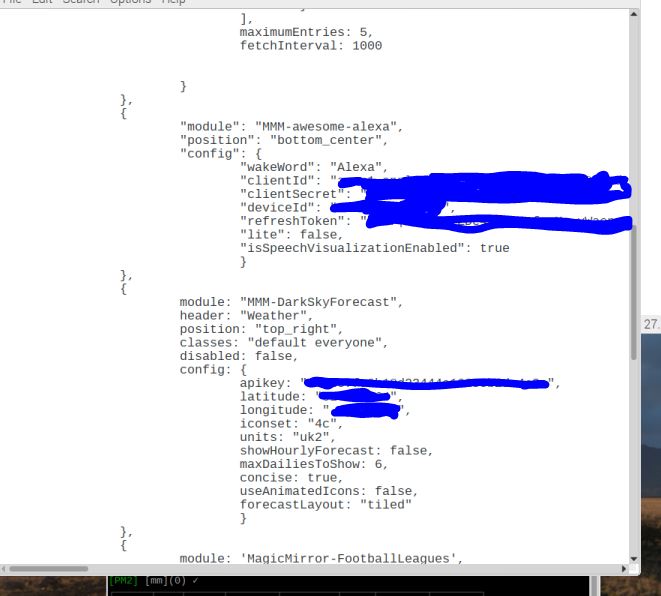
                              @j-e-f-f 0_1548845698182_problem.JPG it still does it even though alexa is in bottom center, here is my config file.

                              1 Reply Last reply Reply Quote 0
                              • R Offline
                                robiv8
                                last edited by robiv8

                                Thanks for the tip. Now it working in German.

                                1 Reply Last reply Reply Quote 0
                                • N Offline
                                  nobita @lavolp3
                                  last edited by

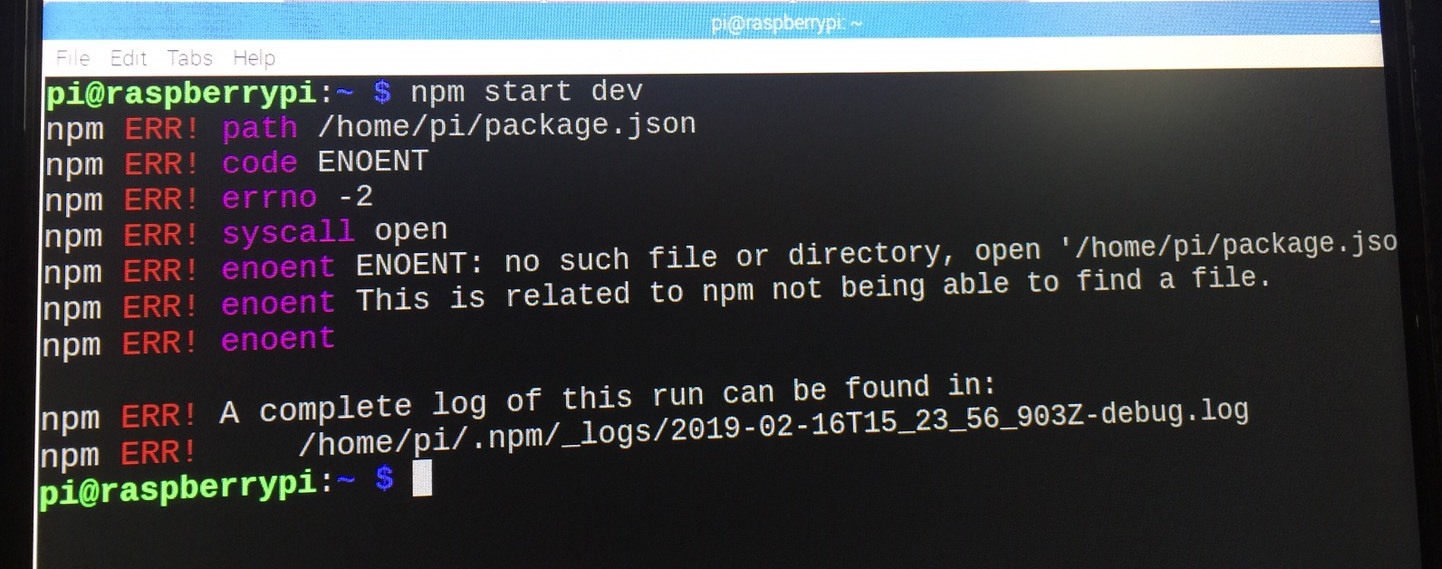
                                  @lavolp3 ,after install DarkSkyForecast only “Loading…” display and use " npm start dev"
                                  Error happen like this
                                  0_1550331109203_S__2957315.jpg
                                  someone help me please,how to solve it

                                  Mykle1M S 2 Replies Last reply Reply Quote 0
                                  • Mykle1M Offline
                                    Mykle1 Project Sponsor Module Developer @nobita
                                    last edited by Mykle1

                                    @nobita

                                    You have to cd into the MagicMirror directory first, then run npm start dev

                                    pop@HPEu:~$ cd MagicMirror/
                                    pop@HPEu:~/MagicMirror$ npm start dev
                                    

                                    Create a working config
                                    How to add modules

                                    N 1 Reply Last reply Reply Quote 0
                                    • R Offline
                                      robiv8
                                      last edited by robiv8

                                      You must be in your MagicMirror folder!
                                      and then type: npm start dev
                                      Oh! Sorry @Mykle1
                                      Did not see that you have already answered.

                                      Mykle1M 1 Reply Last reply Reply Quote 1
                                      • Mykle1M Offline
                                        Mykle1 Project Sponsor Module Developer @robiv8
                                        last edited by

                                        @robiv8

                                        No worries. I like your answer so much that I’m upvoting it! :thumbsup:

                                        Create a working config
                                        How to add modules

                                        1 Reply Last reply Reply Quote 1
                                        • S Do not disturb
                                          sdetweil @nobita
                                          last edited by

                                          This post is deleted!
                                          1 Reply Last reply Reply Quote 0
                                          • N Offline
                                            nobita @Mykle1
                                            last edited by

                                            @mykle1 Thank so much,Beacuse I’m Beginner and my mistake

                                            Mykle1M 1 Reply Last reply Reply Quote 1

                                            Hello! It looks like you're interested in this conversation, but you don't have an account yet.

                                            Getting fed up of having to scroll through the same posts each visit? When you register for an account, you'll always come back to exactly where you were before, and choose to be notified of new replies (either via email, or push notification). You'll also be able to save bookmarks and upvote posts to show your appreciation to other community members.

                                            With your input, this post could be even better 💗

                                            Register Login

                                            • 1
                                            • 2
                                            • 3
                                            • 4
                                            • 5
                                            • 6
                                            • 16
                                            • 17
                                            • 4 / 17
                                            • First post
                                              Last post
                                            Enjoying MagicMirror? Please consider a donation!
                                            MagicMirror created by Michael Teeuw.
                                            Forum managed by Sam, technical setup by Karsten.
                                            This forum is using NodeBB as its core | Contributors
                                            Contact | Privacy Policy