@witschi87 Did you follow the installation instructions in the module’s readme.md file? Because it sure looks like you do not have PocketSphinx installed.
B
Offline
A New Chapter for MagicMirror: The Community Takes the Lead
Read the statement by Michael Teeuw here.
Read the statement by Michael Teeuw here.
Posts
-
RE: MMM-voice
-
RE: Show two weather and forecast modules on the same screen
@frog Don’t forget to put each copy of the module in a different location!
-
RE: Show two weather and forecast modules on the same screen
@frog I just whipped one up and it wasn’t a problem. A couple things to check:
- Make sure that you’re configuring the entire module twice.
- Make sure that you put each instance of the module in a different location (top_left, bottom_left, etc.)
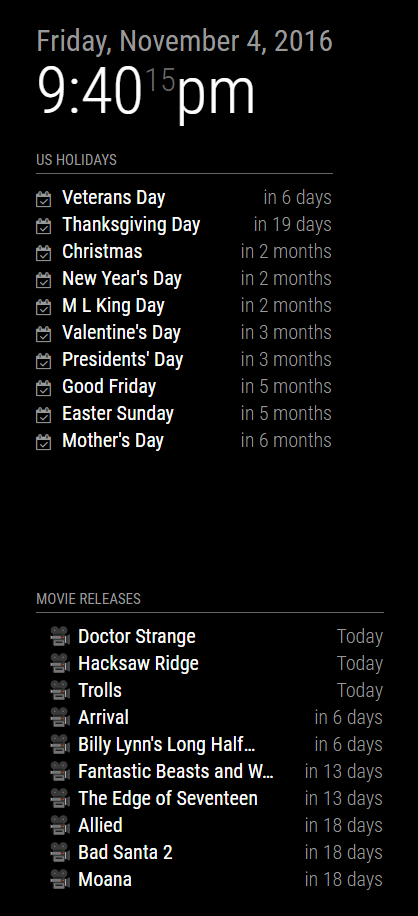
Here’s an example with the calendar module:
{ module: 'calendar', header: 'US Holidays', fetchInterval: 3600000, position: 'top_left', config: { fade: false, calendars: [ { symbol: 'calendar-check-o ', url: 'webcal://www.calendarlabs.com/templates/ical/US-Holidays.ics', }, ], } }, module: 'calendar', header: 'Movie Releases', fetchInterval: 3600000, position: 'bottom_left', config: { fade: false, calendars: [ { symbol: 'imdb', url: 'https://www.google.com/calendar/ical/pfutdblf1gi8jmfsvroh76f6jg%40group.calendar.google.com/public/basic.ics' }, ], } }, -
RE: Changing compliments?
@artworks79 Sure, no problem.
For starters, you probably copied theconfig.js.samplefile toconfig.jsto get you started. That’s great, as theconfig.jsfile is what the Magic Mirror software reads in order to arrange and configure the various modules. For future installations, I recommend making a local copy of theconfig.jsfile and then dropping that in your new mirrors.In the
config.jsfile, you’ll see an entry for the compliments module that tells the system which module to load (compliments), where to place it and what configuration values to pass into the module (config: {...}). This part of the config.js file modifies how the Magic Mirror software treats the compliments module.Inside that config section, you can modify the behavior of the module itself. You can change the update interval or change the compliments themselves. Here’s the one pulled from my
config.js.{ module: 'compliments', position: 'bottom_center', config: { updateInterval: 30000, compliments: { morning: [ "Good morning, sunshine!" ], afternoon: [ "It's a pretty day outside. Go play in it!" ], evening: [ "Wasn't the sunset beautiful?", "Wasn't the day just spectacular?" ] } } },Inside the
config: {...}section there is a variable calledcompliments. The value of this variable must be an array, as specified by themorning:structure. Please note that arrays require square brackets. Each compliment must be enclosed in double quotes"and each compliment is separated by a comma. You can have as many compliments as you like in each array. In thecompliments:{...}variable you are allowed a morning array, an afternoon array and an evening array. No other array names will have any effect. -
RE: Motion Detector
@bibi Based on that pull request, it looks like it’s in the
config.txtof your Pi. So/boot/config.txt -
RE: Calendar Not Loading
@clumsy_ninja Is there a reason why the URL in your config file is different than the one in your log file? The one in your log file gives me a 404.
-
RE: Please help
@moris The basic installation of MagicMirror includes a sample
config.jsfile. It’s located at~/MagicMirror/config/config.sample.jsIf you copy or rename that file to
config.jsthat should help get you started.cp ~/MagicMirror/config/config.sample/js ~/MagicMirror/config/config.jsOnce you have it copied, you can restart your mirror and it should use that simple config.js to run the mirror software.Installing other modules is pretty simple. Navigate to the modules directory:
cd ~/MagicMirror/modulesand then clone the module repositorygit clone [module url]. Follow the directions at the GitHub repository for that module in case there is anything special about installing that module. -
RE: MMM-Tube-Status (London Underground)
@djbenny07 Is that the entire config file? I ask because it’s not closed properly.
Please put the module configuration that you’re trying to get to work back in and post the entire file for us so we can check it all. We’ll get you running.
-
RE: Unable to install dependencies, NPM install not working
All right. It looks like the next step is to copy the sample config.js file to it’s final location and then run this puppy.
Are you doing this directly on the Pi or via SSH?
-
RE: Calendar - maximumNumberOfDays
@clumsy_ninja First, I just want to say you sent me down a really interesting rabbit hole.
At first, I couldn’t get it to work. My development environment has the mirror mounted on the wall and I SSH into the Pi. I run a browser tab in Chrome with the developer options on so I can see the logs. This was surprisingly frustrating as I could not get the
maximumNumberOfDaysparameter to work. After much thrashing about, I discovered that the only way to get that parameter to work was to restart the mirror process, not just reload the browser page.So this configuration in my
config.jsworks:{ module: 'calendar', header: 'US Holidays', position: 'top_left', config: { maximumNumberOfDays:120, calendars: [ { symbol: 'calendar-check-o ', url: 'webcal://www.calendarlabs.com/templates/ical/US-Holidays.ics', }, { symbol: 'imdb', url: 'https://www.google.com/calendar/ical/pfutdblf1gi8jmfsvroh76f6jg%40group.calendar.google.com/public/basic.ics', } ], } },Which is all well and good, but the
maximumNumberOfDayswould not take effect until I restarted the mirror process:pm2 restart 0. After that, the mirror would show the correct events and refreshing the browser would also show the correct number of events. I’m guessing that the calendar module is creating acalendarfetcherat the beginning of the MagicMirror process and any changes to the config file will only take effect whenever the calendar interval hits (or when you restart the Mirror process). If you make your change and wait for the calendar module to refresh your calendar, your changes to themaximumNumberOfDaysshould take effect then. -
RE: Is there a module to display webpage widgets?
The HelloWorld module may be able to do it. If you check out the Halloween Video thread, you’ll see that we’re dropping all sorts of HTML onto the UI. Just replace the
<VIDEO>tag stuff we’re doing with your embed code. It may take some fine tuning. -
RE: Monitor saying 'No Signal'
When the Pi is plugged in, can you SSH to it?
-
RE: MMM-WorldTides - show high and low water for your region
@wjdw87 Just based on what you quoted, you have not properly closed your
configsection. You’re missing a close bracket just after the API KEY value.{ module: 'MMM-WorldTides', position: 'top_right', config: { longitude: '8.134', //longitude and latitude need to be written with . instead of , latitude: '98.299', appid: 'APIKEY' //appid needs to be requested from worldtides.info } }, -
RE: Please help
@moris said in Please help:
Pi @ raspberrypi: ~ $ cd MagicMirror
Pi @ raspberrypi: ~ / MagicMirror $ cp config / config.js.samaple config / config.js
Cp: target ‘config.js’ is not a directory
Pi @ raspberrypi: ~ / MagicMirror $There’s a problem in your second command. There should be no space between
configand the slash. There needs to be a period at the end of sample. It should read like so:cp config/config.js.sample config/config.jsThat line breaks down into command-source-destination. “Copy”-“sample file”-“destination file”.
cpconfig/config.js.sampleconfig/config.js -
RE: Thin, Frameless Mirror
@Diddern How difficult was it to drill the holes in the mirror? That’s a fantastic look you’ve created and I’m hoping to do something similar in the future.
@PaulB If I read his write-up correctly, he’s not using a monitor. He’s using a replacement laptop screen, which I presume is much lighter than a monitor of equal size. Electrical tape and glue seems to be his attachment method.
-
RE: Halloween mirror ghouls anyone?
@strawberry-3.141 You’re going to turn me into a Javascript developer with crazy talk like that.
-
RE: Motion Detector
I’m still working this problem. To help with @paphko 's concern about processor utilization, I finally figured out how and where to put a delay in the main image comparison loop. @alexyak is using the RequestAnimationFrame feature to run the comparison as fast as the browser can render the UI.
If you wish to include a delay, modify your
motion.jsfile’s main function to read as such:function main(frequency) { render(); if(rendering == true) { setTimeout(function() { raf(main.bind(this)); }, 500); } }That last number (the 500) is the milliseconds between each image comparison. I think half a second between comparisons is enough to keep the CPU usage down and the effectiveness up.