@slaeyer99 I personally use MMM-EmbedURL - and just directly grab either the stream (via MotionOS) or individual frames.
A New Chapter for MagicMirror: The Community Takes the Lead
Read the statement by Michael Teeuw here.
Read the statement by Michael Teeuw here.
 B
Offline
B
Offline
Posts
-
RE: How are people viewing camera snapshots on their MM?
-
RE: CalendarExt3 - Event transformer wildcard
@sdetweil perfection, thanks. Never even thought about direct replacement - only seen more complex solutions.
-
RE: CalendarExt3 - Event transformer wildcard
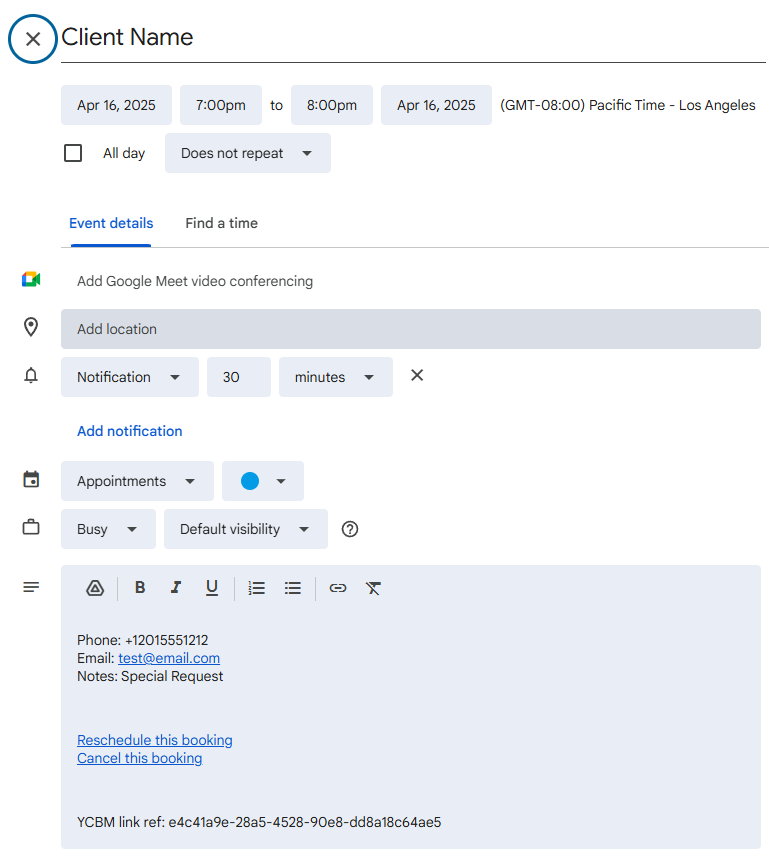
BEGIN:VEVENT
DTSTART:20250417T020000Z
DTEND:20250417T030000Z
DTSTAMP:20250215T064845Z
UID:sla6c0fbp2f6m06mscbt8961hg@google.com
CREATED:20250215T064259Z
DESCRIPTION:<p>Phone: +12015551212<br />Email: test@email.com<br />Notes: S
 pecial Request</p>\n<p><a href="">Reschedule this booking</a><br /><a href="">Cance
 l this booking</a></p>\n<p>YCBM link ref: e4c41a9e-28a5-4528-90e8-dd8a18c64
 ae5</p>
LAST-MODIFIED:20250215T064333Z
SEQUENCE:0
STATUS:CONFIRMED
SUMMARY:Client Name
TRANSP:OPAQUE
END:VEVENT
Web links removed, Test client deleted, so no clicky. The event title is solely the client name, but that can be adjusted if need be, I think.
-
RE: CalendarExt3 - Event transformer wildcard
@sdetweil What I meant is to replace the Client’s name with “Client” - it’s a wildcard.
The “YCBM” is in the event description to help my booking manager (YouCanBook.ME) to track the bookings for me.
-
CalendarExt3 - Event transformer wildcard
I’m wanting to take a match of “YCBM” in the description, and make whatever the title is change to “Client”. Can someone help me write the if statement to add to my transformer?
eventTransformer: (ev) => { if (ev.title.search("🏠") > -1) { ev.title = ev.title.replace("🏠 Personal Commitment", "Personal Event"); ev.color = 'yellow'; } if (ev.title.search("✈ Flight") > -1) { ev.title = ev.title.replace("✈ Flight", "Personal Event"); ev.color = 'yellow'; } return ev } -
RE: installation of modules
@sdetweil indeed it does that, but I believe this may be the wrong approach.
No matter what, MM should start, IMO. In the case of config error, could we get an error screen like above, except for have it show the output of config checker?
This would help in server/client environments like mine, or PM2 or any number of scenarios where the logs may not be in the right spot.
-
RE: MM stopped working with Electron Error
@sdetweil ooh, I forgot about that.
-
RE: MM stopped working with Electron Error
@wyovino I suspect some heavy memory corruption - could be anywhere - I’d copy over your config.js and custom.css to another drive and try a new SD card if it continues.
If it continues after that, I’d get a new device…
-
RE: MM stopped working with Electron Error
@sdetweil isn’t SIGSEGV a segmentation fault?
-
RE: Monitor recommendation
@danybony Monitors without any on/off logos is gonna be a tough one - You’ll want to use HDMI sleep to power up and down the monitor or simply blank it (I’d go for the latter if you’re concerned about a “No Signal” image).
As for the others - you’ll have to experiment - sadly.
General advice:
Get a monitor with a bezel on all sides - why? No lopsided display when you pull it out of frame.
Get a monitor with the cables pointing out one side or the bottom. Why? Pointing out the back will cause issues in install and make it harder to make it compact.
Get a monitor with a built in power converter (110v/220v direct into monitor) - why? For compactness reasons - less work to build frame behind it.
-
RE: Calendar Logic Changes
@sdetweil That fix helped. A minor configuration error fix helped too. I think I’ve got it back working the way I wanted it.
-
RE: Calendar Logic Changes
Ok, Sam - here’s what I got so far:
The calendar marked “No data” isn’t currently working from host, It can be ignored.
The calendar marked “Parsing” is spitting out data in debug mode, but when calendar turns around and broadcasts, it’ll broadcast zero entries. Only truly private URL has been blanked.here’s my config - minus the calendars:
{ module: "calendar", // Built in //position: "top_center", // Currently hidden classes: "page1 page2 page3", config: { animationSpeed: 0, broadcastEvents: true, broadcastPastEvents: true, fetchInterval: 60000, // minimum 1 minute. maximumEntries: 999999, -
RE: Calendar Logic Changes
@sdetweil I see the problem, I think.
The logs I was using was in the console, those logs don’t show the source - PM2’s logs do.
I think something has changed in how it’s putting together the entries.
It used to be that
maximumEntries: 99- now it’s appearing to sort different or reach back further, so I needmaximumEntries: 999to see all my calendars show up.I do have past events active - as I like to see where I had things happen, just in case I need it…
-
RE: Please commit your changes or stash them before you merge?
-
Calendar Logic Changes
What’s changed in the logic for calendar loading for 2.30?
99 entries used to be enough to display all my calendars, now I’m getting like 820 entries loading.
Curious if there’s a bug somewhere, or what. I’ve also noticed that the notices in the log indicating which calendar is loading is gone. Would be nice to have that back, at least in debug mode, so that we can tell what calendar is pushing # of entries.
Thanks!
-
RE: MMM-Multimonth
@Niggich The default CSS keeps it tight - because that’s how I like it.
However, it’s easy to change.
in your
magicmirror/cssdirectory, there should be a file namedcustom.css- in that file, paste the following, and modify it to suit./* Month Padding */ .MMM-Multimonth .month { padding: 0px; }Cheers.
-
RE: MMM-Pages - Fade/Animation
@sdetweil I’ve given up as other methods smoothed out the transitions anyway (The website that took too long to reload).
-
RE: MMM-EmbedURL with MMM-Pages - Website reload....
I put them both in, and that fixed it - thanks, Tom.
-
RE: MMM-EmbedURL with MMM-Pages - Website reload....
Tom, is it updateDomOnShow or updateDomOnResume ?
Documentation shows the latter.
-
RE: MMM-EmbedURL with MMM-Pages - Website reload....
It shows, then resets, takes 2-3 seconds to show back up, then runs normally. The problem is that it’s just annoying to have it flash in and then blank, then come up and run.