@bhepler
Yeah, I know what you mean!!!
I has hoping for a virtual-assassinator! :pistol: :pistol: :pistol:
(yes, I know a Glock is a pistol and not a revolver, but there isn’t a pistol emoji!)
A New Chapter for MagicMirror: The Community Takes the Lead
Read the statement by Michael Teeuw here.
Read the statement by Michael Teeuw here.
 Offline
Posts
-
RE: MMM-Glock
-
RE: MMM-NewsFeedTicker
Apologies!
Looks like I did tell you wrong about the position…
Here is the css that makes it work for me, try them and let me know…@keyframes marquee { 0% {left: 100%;} 100% {left: -100%;} } .MMM-NewsFeedTicker { width: 100%; height: 100px; line-height: 100%; overflow: hidden; background: none; margin-left: 20%; } .MMM-NewsFeedTicker .tickerbody { position: relative; bottom: 0; left: 0; vertical-align: middle; white-space: nowrap; text-align: left; animation: marquee 31s linear; } .MMM-NewsFeedTicker .headline { padding-top: 15px; margin: 0 auto; white-space: nowrap; } .MMM-NewsFeedTicker .image { position: absolute; display: inline-block; vertical-align: middle; bottom: 10; margin-left: 0; height: 100px; z-index: 10; background-color: #FFF; } -
RE: MMM-NewsFeedTicker
ok,
change background-color to
background: none;
and,
change position back to relative under the image sectionshould work for you…

-
RE: help converting code for module...
I need to know how to reconfigure the second line for this work in an MM module…
getTemperature: function() {
	var t = getWmiObject = MSAcpi_ThermalZoneTemperature(Namespace = "root/wmi" | where (Property = instancename) && (EQ = "ACPI\ThermalZone\TZ01_0"));
	currentTempKelvin = t.CurrentTemperature / 10;
	currentTempCelsius = currentTempKelvin - 273.15;
	currentTempFahrenheit = (9/5) * currentTempCelsius + 32;
	return currentTempCelsius + " C " + currentTempFahrenheit + " F : " + currentTempKelvin + "K";
},
I’m pretty sure rest of the function is ok. But, I could be wrong! :disappointed_face:
-
RE: help converting code for module...
@strawberry-3-141
yeah, sorry, I see some of the errors, but not all of them.
Want to hint me a little?
-
RE: Some Calendar Icons Missing
‘cross’ and 'church aren’t in the font-awesome.css library for MagicMirror.
the MM code is still set for version 4.7 and not yet for version 5.
but even still, if it is not in the library, it wont work.Maybe you can put in a request to the developer?
-
help converting code for module...
Anybody know how I can turn the following :
function Get-Temperature {
$t = Get-WmiObject MSAcpi_ThermalZoneTemperature -Namespace "root/wmi" | where -Property instancename -EQ "ACPI\ThermalZone\TZ01_0"

$currentTempKelvin = $t.CurrentTemperature / 10
$currentTempCelsius = $currentTempKelvin - 273.15

$currentTempFahrenheit = (9/5) * $currentTempCelsius + 32

return $currentTempCelsius.ToString() + " C : " + $currentTempFahrenheit.ToString() + " F : " + $currentTempKelvin + "K"
}
into MM module fomat?
I tried this:
getTemperature: function() {
		t = getWmiObject = MSAcpi_ThermalZoneTemperature (Namespace = "root/wmi" | where (Property = instancename) (EQ = "ACPI\ThermalZone\TZ01_0"));

	    currentTempKelvin = $t.CurrentTemperature / 10;
		currentTempCelsius = $currentTempKelvin - 273.15;

		currentTempFahrenheit = (9/5) * $currentTempCelsius + 32;

		return currentTempCelsius.ToString() + " C : " + currentTempFahrenheit.ToString() + " F : " + currentTempKelvin + "K";
	},
didn’t get any errors, but didn’t get any resulting expected outcome either…
Any hints would be greatly appreciated!!!
Thanks in advance! :upside-down_face: -
RE: Change newsfeed title to image/logo?
@striiker said in Change newsfeed title to image/logo?:
opacity: 1.0;
Well, you might think about changing the color or having no color.
I just worked with it going all the way down to 0.1 and this is the result:

this is without a background color…

just change
background-color: maroon;tobackground: none; -
RE: Change newsfeed title to image/logo?
Thanks for the heads-up on the error. I have it fixed now.
Much Appreciated!!! :smiling_face_with_sunglasses: -
RE: Change newsfeed title to image/logo?
Another apology…
When I was working with this module I had the font set to xlarge or large in the MMM-NewsFeedTicker.js file.
It makes it easier for these old eyes to see changes,
So, in the following section of the js file…
var headline = document.createElement("span"); headline.setAttribute("style", "padding-bottom:25px"); headline.className = "bold xlarge bright"; headline.innerHTML = "<font color= #ffaa00>" + moment(new Date(this.newsItems[this.activeItem].pubdate)).fromNow() + ": " + "</font>" + this.newsItems[this.activeItem].title + " || " + this.newsItems[this.activeItem].description; tickerBody.appendChild(headline);Change the ‘xlarge’ to small
-
RE: Change newsfeed title to image/logo?
My Apologies for the issues you are having, but, I am looking over the code to make these fixes and I am not seeing any of the problems you are describing…
Any way you could show me the specific places these errors are occurring?
I ran it through an error checker and it’s not finding any errors…
-
MMM-PC-Stats issue...
Ok, I want to apologize up front because this is probably going to be a long post… :unamused_face:
the module: MMM-PC-Stats has an issue with the sensors.
My laptop is running Ubuntu and has a Dual-Core CPU.
the following shows the terminal output of the sensors…
jim@jim-Aspire-4520:~/MagicMirror$ sensors
k8temp-pci-00c3
Adapter: PCI adapter
Core0 Temp:   +69.0°C
Core0 Temp:   +67.0°C
Core1 Temp:   +69.0°C
Core1 Temp:   +68.0°C

acpitz-virtual-0
Adapter: Virtual device
temp1:        +71.0°C  (crit = +100.0°C)

nouveau-pci-0090
Adapter: PCI adapter
GPU core:     +1.20 V  (min =  +1.00 V, max =  +1.20 V)
temp1:        +64.0°C  (high = +95.0°C, hyst =  +3.0°C)
                       (crit = +105.0°C, hyst =  +2.0°C)
                       (emerg = +135.0°C, hyst =  +5.0°C)
But, the module pulls the temp from the ‘Virtual Device’ showing only one temp for both cores:
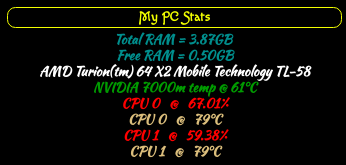
Yes, it does show the temps for 2 cores, but
temp1is pulled from the computer and is the same output for both cores…var core0TempCheck = Sensors["acpitz-virtual-0"]["Virtual device"]; if (typeof core0TempCheck !== 'undefined'){ // core0Temp var core0Temp = document.createElement("div"); core0Temp.classList.add("large", "bright", "core0Temp"); core0Temp.innerHTML = Stats.cpu.threads[i].name + " @ " + Sensors["acpitz-virtual-0"]["Virtual device"].temp1.value + "°C"; wrapper.appendChild(core0Temp); }What we want to know is if anyone would know how to pull the temp values from the ‘PCI adapter’.
This is the developer console:
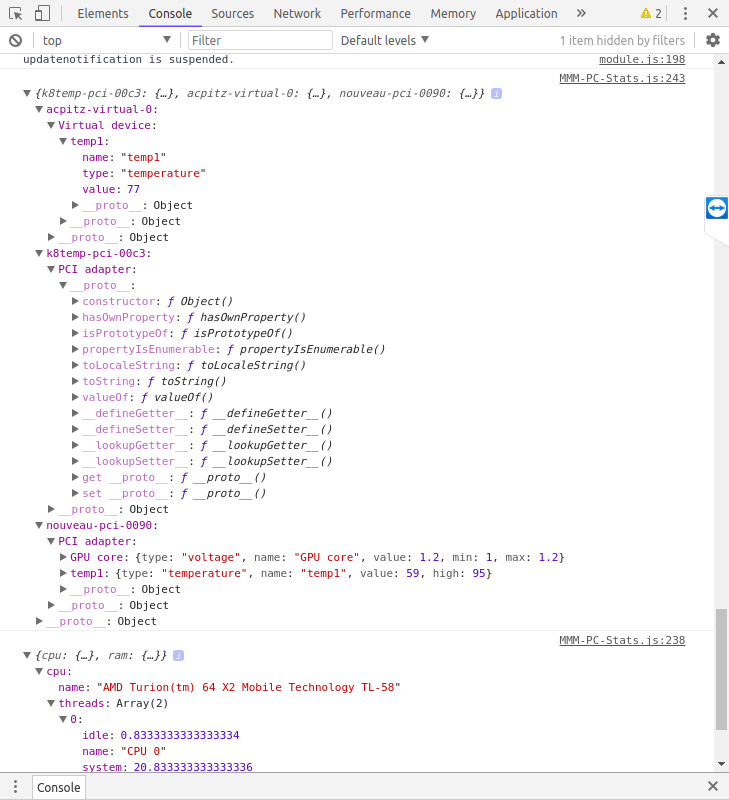
As you can see, both the PCI adapter and the Virtual device are shown, but only the virtual device has a temp whereas the PCI adapter doesn’t show the Core Temps as seen in the terminal…
Would anyone know how to pull the temps from the PCI adapter?
On the same note…
Would anyone know how to get the sensor info from a Windows OS?
Or, at least how to find out the name and type of sensors being used? -
RE: MMM-PC-Stats
Another question…
How can be changed to show F°?
Not really a big deal, mostly just curious… :upside-down_face:
-
RE: MMM-PC-Stats
So, when I use the code you sent last night, It gives error regarding
.temp2.valuebeing that the ‘Virtual device’ only has 1 output value.
My changes will always show the ‘temp value’ as the same for all CPU’s
When I run ‘sensors’ in MM, it showed a ‘Core0 Temp’ and a ‘Core1 Temp’, It actually showed 2 temps for each one.
jim@jim-Aspire-4520:~/MagicMirror$ sensors
k8temp-pci-00c3
Adapter: PCI adapter
Core0 Temp:   +69.0°C
Core0 Temp:   +67.0°C
Core1 Temp:   +69.0°C
Core1 Temp:   +68.0°C

acpitz-virtual-0
Adapter: Virtual device
temp1:        +71.0°C  (crit = +100.0°C)

nouveau-pci-0090
Adapter: PCI adapter
GPU core:     +1.20 V  (min =  +1.00 V, max =  +1.20 V)
temp1:        +64.0°C  (high = +95.0°C, hyst =  +3.0°C)
                       (crit = +105.0°C, hyst =  +2.0°C)
                       (emerg = +135.0°C, hyst =  +5.0°C)
With this being a Dual Core CPU, why can’t I get it to use the ‘PCI adapter’ to give the output?