@spitzlbergerj
I love your work. Could you recommend any tipps on how to build a mirror in the bath? I would like to do this as my next project. So are there any Best Practices regarding any silicone or electronics?.
Greetings from Germany :)
P
Offline
A New Chapter for MagicMirror: The Community Takes the Lead
Read the statement by Michael Teeuw here.
Read the statement by Michael Teeuw here.
Posts
-
RE: Bathroom Magic Mirror
-
RE: Bathroom Magic Mirror
WOW! That looks so professional. Great work. Hope you have a lot of fun with the mirror :)
-
RE: [Remote-Control] Shutdown, Configure and Update your MagicMirror
Dear MM-Builders,
does someone know how to solve attached problem?
Thanks in advace :-)
-
Hamburg transportation-HVV
Dear fellow MM-Builders,
does someone work on a module which shows the Hamburg Subway Transportation (HVV)?
I have been working on it but the HVV won’t let me use an API.
Any recommendations?
Kind regards,
Paul -
RE: Fifa World Cup overview
I just get npm ERR! messages. Therefore i assume I am doing something wrong.
Which command, do I have to enter (sorry…for asking but I am a newbie )
Thank you very much in advance! :-)
-
RE: Fifa World Cup overview
@AxLed , thank for providing your code.
Unfortunately the module is shown while runnin MM but no data is loaded. I have adjusted the config,js as well as node_helper.js as you said. Do you have an idea what could ve been wrong?
Kind regards,
Paul -
RE: Fifa World Cup overview
Hey guys,
how do you enter the node_helper.js?
When I enter the code “sudo nano /home/pi/MagicMirror/MMM-SoccerLiveScore/node_helper.js” it will create a new file. So therefore the node_helper.js has to be stored in a folder.
Does anyone know which folder this is or how to find the file?Kind regards,
Paul -
RE: How to hide mouse icon in running MM?
@conkhidot thank you very much! :)
-
How to hide mouse icon in running MM?
Dear fellow MM-builders,
does anyone know how to hide the mouse icon while MM is running?
Thank you very much in advance!
Many greetings from Hamburg :)
-
RE: [MMM-Remote-Control] Can not access remote control module
thanks :-D
call me dumb hahahahahahaha
Unfortunately the modules are not loading now.
But whats interesting is that if your Ip adress is like “12.10.0.xxx”, the module won’t accept it. If you give your devices a new static IP adress like “12.10.0.xx” then the module works fine. But shows a black screen.
-
RE: [MMM-Remote-Control] Can not access remote control module
Dear @Mykle1,
my config.js file looks like this:
var config = {
        adress: "0.0.0.0",
        port: 8080,
        ipWhitelist: [],
        language: 'de',
        timeFormat: 24,
        units: 'metric',
Unfortunately, my screen went black after I 've changed the config file and rebooted.
Could you make a guess, where the problem is located?
-
RE: MMM-DHT-Sensor - Get temperature & humidity values from a DHT sensor
@weee99,
It looks like the module is working, so it has to be a problem with your pins.
I would recommend to try it this way: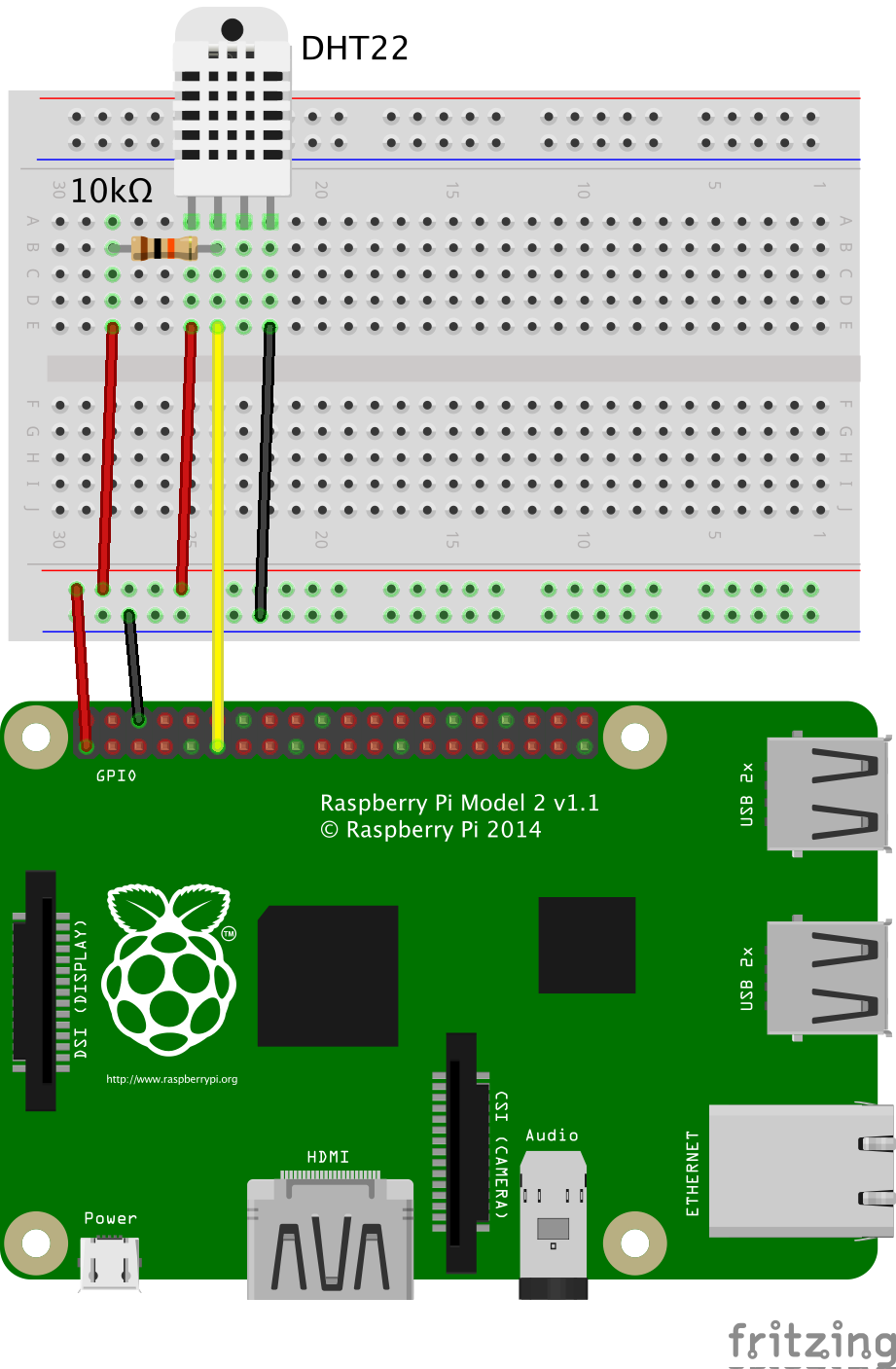
-
RE: [MMM-Remote-Control] Can not access remote control module
Hi fellow MM-builders,
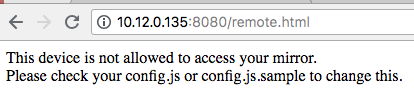
the same problem occured with my build but instead a 192.168.xxx.xxx I use 10.12.0.135:8080.html
Unfortunately it shows following message:‘This device is not allowed to access your mirror.
Please check your config.js or config.js.sample to change this’My steps to solve this issue were:
- change ipWhitelist to ipWhitelist:[ ]
- change ipWhitelist to ipWhitelist: [0.0.0.0]
3.change ipWhitelist to the specific IP adresses of my devices.
Unfortunately, none of this steps solved the error.
Maybe you guys have a tip or trick on how to solve that.
Thank you in advance :) -
RE: direct notification to your MM
thank you for your quick answer. I am going to try that and keep you updated. :)
-
RE: Paul's second mirror :)
Thank you very much :)
It it mounted on the wall via a wall mount which is connected to the screen.
The whole frame is connected to the screen through a frame made of wood.The DHT-22 as well as the PIR Sensor are located on the right, right behind the frame.
I did not find a good solution on how to “hide” the PIR Sensor, so I though I should hide it a little bit. -
direct notification to your MM
Dear fellow MM-builders,
I would like to know if there is a module that enables you to sent notifications like push-notifications to your MM via mobilephone or internet site.
I would like to sent instant messages to the screen. For example if a friend walks by the MM shows a personalized message which you have sent before via your wifi.
Maybe you have seen such a thing before. :)
-
Paul's second mirror :)
Dear fellow MM-builders,
I would like to show you the build to my second MagicMirror.
Unfortunately the glas broke during a move to another city, so I decided that it was time for a second try.This time I used following parts:
-
picture frame Ribba from IKEA 50cm*70cm
–> it includes a neat passepartout which was useful to hide some of the cracks in the mirror
-24" monitor Acer KA241bid
–> a cheap monitor which is also very thin and has a HDMI output -
then I 've cut some of the parts of my old mirror which weren’t cracked
–> I used a glas cutting tool and watched a lot of DIY youtube videos on how to cut glas, because I not such a craftsman :-D -
If you want a more cheap solution instead of buying an actual mirror, you can use the Polycarbonat plat which is included in the Ribba frame from IKEA and use silver reflection folie
-
a short HDMI cable
-
for wifi connection I used the CSL - 300 Mbit/s USB 2.0 WLAN
–> you just have to install the software from CSL (raspberry Pi needs a LAN connection) after that its super easy :) -
wood from the local store as well as screws
-
male to female wires
-
a DHT22-Sensor as well as a PIR sensor
I was a lot of fun putting it all together and doing a little bit of programming by myself.
As always, you guys helped me a lot in doing so!Thank you very much :)
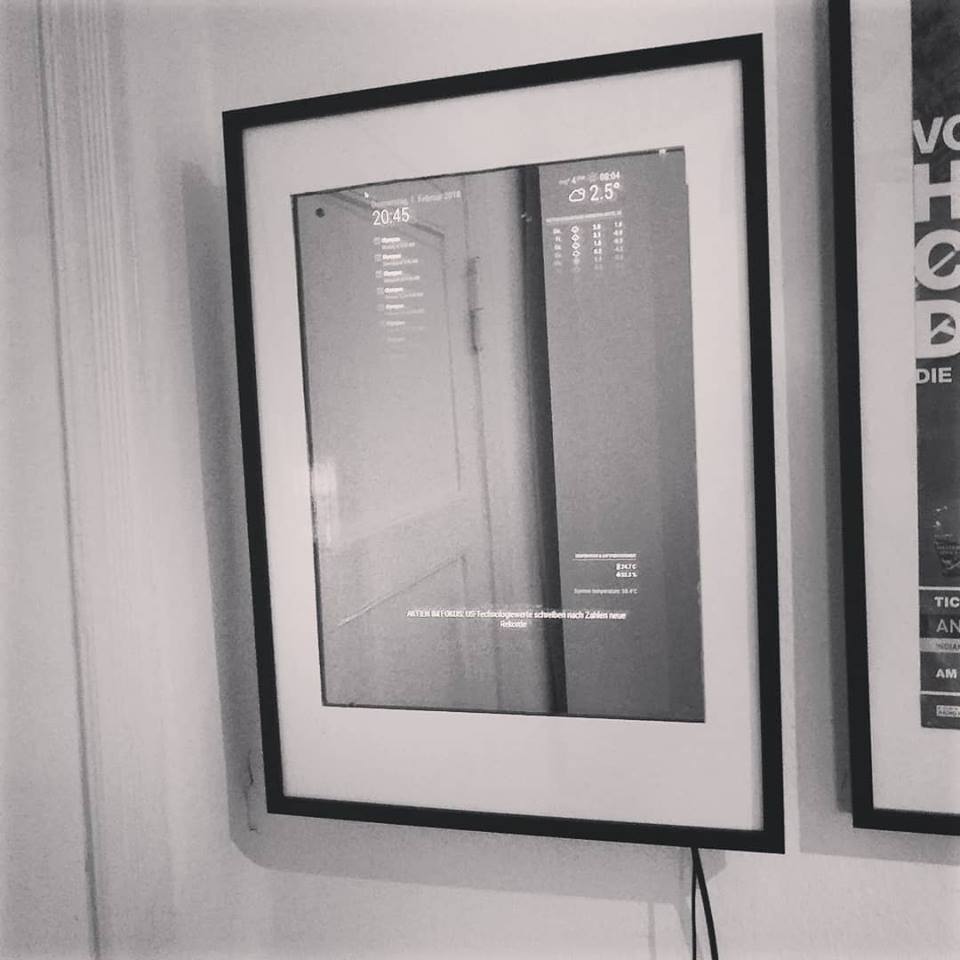
-
-
RE: Stop the screensaver!
Hey guys,
there is another option on disabling the screensaver, which worked perfectly for me.
Just disable the screensaver in the option menu of debian.Hope this helps someone :)