@darrene there are face and voice recognition modules already built
 S
Offline
S
Offline
A New Chapter for MagicMirror: The Community Takes the Lead
Read the statement by Michael Teeuw here.
Read the statement by Michael Teeuw here.
Posts
-
RE: Introduce yourself!
-
RE: Garage Door Detectors
@istepgueu you need a getDom function where you render your images.
then in the notification received save the state in variables then call updateDom.
in getDom you render the images based on the state
-
RE: MMM-NFL
@Mykle1 without any modifications this is only possible with mmm-voice
-
RE: Is there a place where people can share their config files?
@1uke_ you maybe want to checkout the showroom section, people sometimes share their config there too. If you see something interesting on pictures, you can ask the authors for their config.
-
RE: Module to reset some modules
@theusu5k config option
message_read_timehttps://github.com/mjtice/MMM-Pushbullet#configuration-options -
RE: MMM-traffic - used 12 hour to get it work but can not....
@ironman_DK problem solved. Somehow he modified the module directory name to lowercase and the system couldn’t find the module.
-
RE: Grunt - Warning?
@Damian don’t worry, that’s just needed if you want to develop. also it’s just a warning and no error, so everything will work for you as you expect
-
RE: Bad question
@Fonfon you are in the wrong directory
cd ~/MagicMirror -
RE: Slack integration
@hartattack I think @morozgrafix is pretty familiar with slack isn’t he :D
-
RE: [MMM-PIR-Sensor] Install failing
@STEFF92 none is not a valid js value either use
{
  module: 'MMM-PIR-Sensor',
  config: {
    sensorPIN: 23,
    powerSaving: true,
    relayPIN: false,
    relayOnState: 1
  }
},
or like this, because
relayPINis set to false by default{ module: 'MMM-PIR-Sensor', config: { sensorPIN: 23, powerSaving: true, relayOnState: 1 } }, -
RE: Can't figure out how to change timezone
{
  module: "clock",
  position: "top_left",
  config: {
    timezone: 'Etc/GMT-5'
  }
}
but if this is your actual timezone, then you just should change the timezone settings on your pi itself
-
RE: [MMM-PIR-Sensor] Install failing
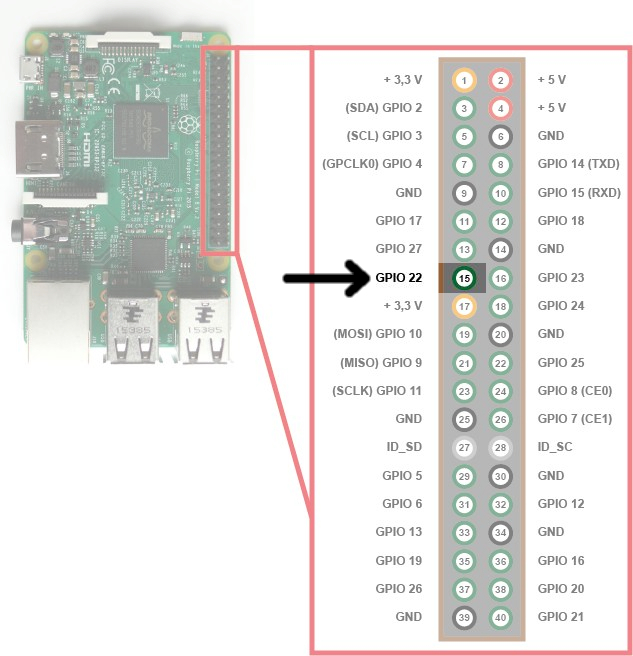
@STEFF92 I guess you might defined the wrong pin number according on your setup you use gpio23 which is pin 16 in this diagram https://forum.magicmirror.builders/uploads/files/1485851152518-raspberry-pi-15b.jpg, but I never did something with the gpio of the pi
-
RE: What's the difference?
@Mykle1 just do that in easypix
if (notification === 'HIDE_LUCY') { this.hide(1000); } -
RE: Complete set up Tutorial (Typos?)
@qqqqqqqq this command is only about the MagicMirror itself, which is included in the tutorial as well, but the tutorial also include setting up the raspberry pi. When I first read this thread i thought the qutes were there to mark code, but it’s already highlighted with markdown syntax, so it’s probably better to remove them. @Global-Moderators
-
RE: Quotation of the day
@cowboysdude would be cool if the module would support multiple apis,
for english http://quotesondesign.com
for german http://www.zitate-online.deand then the api gets selected by the global language defined in the config file with english as fallback for a non supported language
-
RE: Wunderlist - your todos on the mirror
@Mar there is a new dependency, so you have to run
npm installin the MMM-Wunderlist directory -
RE: What's the difference?
@Mykle1 never tried to install it on windows, you need ti install all dependencies manually if they even exist for windows, then make sure when they get used that the path etc is correct