A New Chapter for MagicMirror: The Community Takes the Lead
Read the statement by Michael Teeuw here.
  • black page...

    2
    0 Votes
    2 Posts
    1k Views
    Mykle1M
    @cruze09 Are there any errors being generated, whether in the terminal of Ubuntu or dev tools. I’ve installed MM on Ubuntu successfully. I think I remember having to update both node and npm. Check that you are running the latest version of each.
  • Calendar show incorrect entry

    1
    1
    0 Votes
    1 Posts
    1k Views
    C
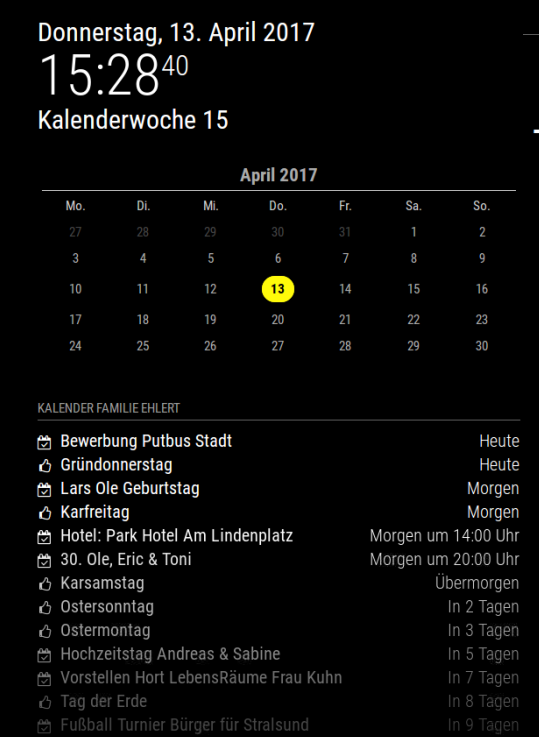
    My calendar displays incorrect entries. Strangely between 08:00 and 12:00 everything is correct. Between 12:00 and 08:00 it displays entries on wrong days. I’ve tried it with different calendars. ICloud or Goolge, the error is always the same. Like I have on another Pi again the Magic Mirror installed, synonymous here is the error 1: 1 the same. The screenshot time my calendar - for all non-German, “Karsamstag” is in 2 days with übermorgen, “Ostersonntag” in 3 not in 2 days. Why is here if he already says in 2 days not indicated also overmorning? [image: 1492090159002-upload-ebeb7d97-d419-460e-bbfd-d878619f0756.png]
  • This topic is deleted!

    1
    0 Votes
    1 Posts
    41 Views
  • Absolute date

    9
    0 Votes
    9 Posts
    6k Views
    M
    @daikaiju it’s on line 245 in the current release. Keep in mind that if you upgrade you’ll lose those changes (as I did exactly 2 days after I made that post…).
  • MMM-Traffic config

    7
    0 Votes
    7 Posts
    7k Views
    FlatPepsiF
    @ironman_DK Not sure what my problem was, but rebooting once or twice seem to solve it. I’m wondering if there was some installed module that didn’t get initialized or something. When in doubt reboot.
  • Brightness

    3
    0 Votes
    3 Posts
    3k Views
    daenickD
    Thanks! I totally forgot the brightness control on MMM-Remote-Control, thank you @Anhalter42
  • MagicMirror as a schoolproject

    2
    0 Votes
    2 Posts
    1k Views
    A
    I’m curious, isn’t this a bit too costly for a school project? (The two-way mirror alone may be around 150€ here in Europe) However, I suggest to elaborate further what exactly you don’t understand or to give an example. From your question, I can’t tell whether you look for “How to start” tips or deep developer knowledge…
  • 0 Votes
    3 Posts
    2k Views
    P
    @yawns Thank you! vcgencmd display_power 0 and vcgencmd display_power 1 worked for me!
  • This topic is deleted!

    5
    0 Votes
    5 Posts
    151 Views
  • MMM-WunderGround: Add a second weatherstation (pws id)?

    1
    0 Votes
    1 Posts
    975 Views
    MedoM
    Hey guys! I would like to add a second weatherstation (pws id) in case that the one i declared over at config.js stops working (for reasons like not available any more or something). Where (if) can i store a second pws-id? Is this possible? Thanks in advance Medo
  • This topic is deleted!

    1
    0 Votes
    1 Posts
    64 Views
  • This topic is deleted!

    5
    0 Votes
    5 Posts
    57 Views
  • Calendar stuck at 'Loading...' after 2.1.1 update

    5
    0 Votes
    5 Posts
    3k Views
    C
    @Chadeus Replying to myself, but wanted this for the community. It was about fixing the rrule-alt file and I changed it from 1970 to 1900 per the above link. Specifically: /home/pi/MagicMirror/node_modules/rrule-alt/lib/rrule.js Change: ORDINAL_BASE: new Date(1900, 0, 1), /* changed from 1970 to 1900 */ Also, I generated a fresh private url for my Google Calendar. Not sure if that plays into it or not, but it worked after the changes plus getting a new url.

  • Clocks and Two Time Zones

    8
    0 Votes
    8 Posts
    7k Views
    R
    @roramirez Well for test this feature fail https://travis-ci.org/roramirez/MagicMirror/builds/220155902 Commit: https://github.com/roramirez/MagicMirror/commit/05d7c9556e773bf2b941035953200ff327efb476 Apparently if we load moment-timezone with nodeIntegration will be fail
  • Total Noob - Successful Install on a Pi 3 B - How do I open it?

    13
    0 Votes
    13 Posts
    6k Views
    O
    for future people who stumble here: “npm start” was what I was missing to get things started up I had a weird black electron pop up - realized it was a config file issue - for mine it ended up being a random address in the “address” section above the ipwhite list. Thanks to Mykle for the help!
  • Compliments setup

    14
    1
    0 Votes
    14 Posts
    10k Views
    G
    @Richard238 I live with the idea that “if it work, dont ask why”. So I can’t explain why config.js dont work.
  • Autostart Issue and No Interface

    7
    0 Votes
    7 Posts
    3k Views
    D
    I think I found the problem ! It was a problem with Electron. I followed some advice giving in this thread: https://github.com/MichMich/MagicMirror/issues/145 “running “sudo npm install electron” (after the error message) in the terminal on the gui it worked starting in the terminal on the gui.”
  • mirror size

    5
    0 Votes
    5 Posts
    2k Views
    D
    @johnnyboy thx man
  • Update & commits

    2
    0 Votes
    2 Posts
    3k Views
    yawnsY
    Welcome to this forum. To perform an update of the magicmirror itself you open a terminal (either directly on the raspberry or via ssh), change into the magicmirror folder with cd ~/MagicMirror and run git pull. Afterwards you run npm install
  • My own fonts

    Solved
    9
    0 Votes
    9 Posts
    4k Views
    Z
    Thanks - I didn’t saw the misspell … sorry The font is SHOTGUNN.TTF and nothing else. Problem is solved and thanks again.