A New Chapter for MagicMirror: The Community Takes the Lead
Read the statement by Michael Teeuw here.
  • MM2 modules work in developer mode, but "loading" without.

    Unsolved
    3
    2
    0 Votes
    3 Posts
    1k Views
    S
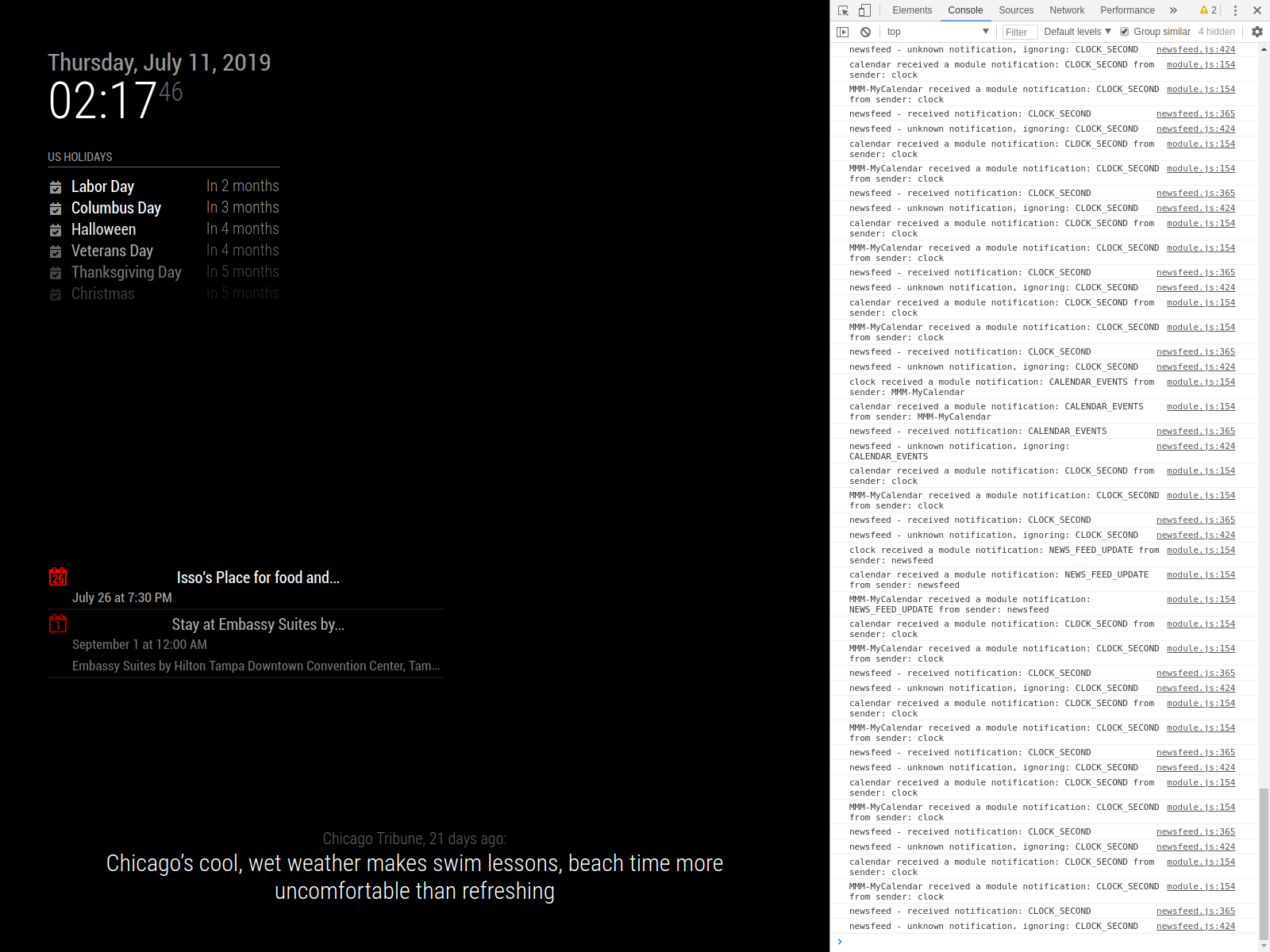
    I’m not sure if that is the case. When using npm start dev, the modules load in about 30-45 seconds. I took the second picture using “npm start” after waiting approximately 3 minutes. And even looking at the US Holidays, nothing comes up. Maybe after a certain time it just stops trying to load, but it shouldn’t say No Events because it’s for 365 days to bring up holidays.
  • Scheduler for showing photos

    Unsolved
    1
    0 Votes
    1 Posts
    509 Views
    F
    Hello, has anyone seen a module that allows you to display a local file based on a specific time of day? I’m thinking sort of something like a “now playing” that will show a logo/image. At 8am it’s this image at 8:30am it’s a different image. My idea is taking and building a mix of MMM-simplelogo and MMM-ScriptScheduler. The MMM-Scriptscheduler is pretty close to what I need but instead of an icon from fontastic that it is pulling I want it to display a photo from a local folder, so basically merging those two different modules together. I am completely new to programming and I will try my best to figure out how to blend those two together but I would love anyone’s opinions and advice, or if you have seen something else that would work for me.
  • mmm-moon-phase not showing pictures

    Solved
    4
    0 Votes
    4 Posts
    1k Views
    Mykle1M
    @tcsabina All is well then. You might also like https://github.com/mykle1/MMM-Lunartic. Beside pictures being provided by the USNO, there is some cool information that can be displayed in various ways.
  • MMM -SoccerLiveScore changes Tables and scoreboard much to fast

    Unsolved
    1
    0 Votes
    1 Posts
    340 Views
    StoffbeuteluweS
    Hello, folks I have successfully installed the module MMM-LiveSoccerScore. It works so well. But after some time, the display of table and results changes every second … much much too fast. In the config I have set a minute. Hope it can help someone thank you …
  • pm2 do not work after v2.8.0 Update

    Solved
    12
    0 Votes
    12 Posts
    6k Views
    S
    @Ivanov_d pm2 stop 0 Then pm2 remove 0
  • MMM-Sonos Roomname only on bottom

    Solved
    6
    0 Votes
    6 Posts
    2k Views
    StoffbeuteluweS
    @johnnyboy ohh 😀 yes everything is fine …thanks
  • Mirroring via Browser (non-zero)?

    Unsolved
    3
    0 Votes
    3 Posts
    2k Views
    bheplerB
    I would try putting the IP address of your Raspberry Pi in to the address field. I’m not entirely sure what effect is has on the Magic Mirror process, since the web server should listen on a port as opposed to a particular IP. I do know that I’ve had success with putting the IP address there and accessing my mirrors via web browser. You can find your Pi’s IP address by typing ip address at the command prompt on the Pi. Assuming that you’re using the WiFi connection to connect to your network, look for the entry wlan0. If that still doesn’t work, I have some further troubleshooting ideas for you. For starters, try viewing your mirror’s interface while you’re at home. Grab your laptop and point its browser at your mirror’s IP address & port. If that works, then at least you know the Pi is serving up pages to you. Try disconnecting from your home network, firing up your VPN with a shared cellular connection (or any other connection that is not your home network) and try it again. Restarting in server mode will only prevent the Magic Mirror interface from using electron to display the mirror via the HDMI jack on the Pi. The Magic Mirror framework is essentially a hosted website. Electron is used to display that website on the local display. However: Any changes you make to the config.js file will require you to restart the Magic Mirror process for the changes to take effect.
  • update help.

    Unsolved
    1
    0 Votes
    1 Posts
    456 Views
    J
    Trying to install an update and I keep getting an error with merging. I tried to git reset and… error: Pulling is not possible because you have unmerged files. hint: Fix them up in the work tree, and then use 'git add/rm <file>' hint: as appropriate to mark resolution and make a commit. fatal: Exiting because of an unresolved conflict. pi@raspberrypi:~/MagicMirror $ git merge package-lock.json error: Merging is not possible because you have unmerged files. hint: Fix them up in the work tree, and then use 'git add/rm <file>' hint: as appropriate to mark resolution and make a commit. fatal: Exiting because of an unresolved conflict. pi@raspberrypi:~/MagicMirror $ git reset Unstaged changes after reset: M .eslintignore M .eslintrc.json D .stylelintrc M CHANGELOG.md M Gruntfile.js M README.md M clientonly/index.js M config/config.js.sample M dangerfile.js M installers/raspberry.sh M js/app.js M js/class.js M js/electron.js M js/loader.js M js/main.js M js/module.js M js/server.js M js/translator.js M modules/README.md M modules/default/alert/alert.js M modules/default/calendar/README.md M modules/default/calendar/calendar.js M modules/default/calendar/calendarfetcher.js M modules/default/calendar/debug.js M modules/default/calendar/node_helper.js M modules/default/calendar/vendor/ical.js/.travis.yml M modules/default/calendar/vendor/ical.js/example.js M modules/default/calendar/vendor/ical.js/ical.js M modules/default/calendar/vendor/ical.js/node-ical.js M modules/default/calendar/vendor/ical.js/package.json M modules/default/calendar/vendor/ical.js/readme.md M modules/default/calendar/vendor/ical.js/test/test.js M modules/default/clock/README.md M modules/default/clock/clock.js M modules/default/compliments/compliments.js M modules/default/currentweather/README.md M modules/default/currentweather/currentweather.js M modules/default/helloworld/helloworld.js M modules/default/newsfeed/README.md M modules/default/newsfeed/fetcher.js M modules/default/newsfeed/newsfeed.js M modules/default/updatenotification/node_helper.js M modules/default/updatenotification/updatenotification.js M modules/default/weather/README.md M modules/default/weather/current.njk M modules/default/weather/forecast.njk M modules/default/weather/providers/README.md M modules/default/weather/providers/darksky.js M modules/default/weather/providers/openweathermap.js M modules/default/weather/providers/weathergov.js M modules/default/weather/weather.js M modules/default/weather/weatherobject.js M modules/default/weather/weatherprovider.js M modules/default/weatherforecast/README.md M modules/default/weatherforecast/weatherforecast.css M modules/default/weatherforecast/weatherforecast.js M package-lock.json M package.json M tests/configs/check_config.js M tests/configs/env.js M tests/configs/modules/positions.js M tests/configs/port_8090.js M tests/e2e/dev_console.js M tests/e2e/env_spec.js M tests/e2e/fonts.js M tests/e2e/global-setup.js M tests/e2e/ipWhistlist_spec.js M tests/e2e/modules/calendar_spec.js M tests/e2e/modules/clock_es_spec.js M tests/e2e/modules/clock_spec.js M tests/e2e/modules/compliments_spec.js M tests/e2e/modules/helloworld_spec.js M tests/e2e/modules/newsfeed_spec.js M tests/e2e/modules_position_spec.js M tests/e2e/port_config.js M tests/e2e/translations_spec.js M tests/e2e/vendor_spec.js M tests/e2e/without_modules.js M tests/servers/basic-auth.js M tests/unit/classes/class_spec.js M tests/unit/classes/deprecated_spec.js M tests/unit/classes/translator_spec.js M tests/unit/classes/utils_spec.js M tests/unit/functions/calendar_spec.js M tests/unit/functions/cmp_versions_spec.js M tests/unit/functions/currentweather_spec.js M tests/unit/functions/newsfeed_spec.js M tests/unit/functions/weatherforecast_spec.js M tests/unit/global_vars/defaults_modules_spec.js M tests/unit/global_vars/root_path_spec.js M translations/en.json M translations/fi.json M translations/ru.json M translations/sv.json M translations/translations.js D vendor/package-lock.json D vendor/package.json M vendor/vendor.js pi@raspberrypi:~/MagicMirror $ git reset --hard HEAD is now at 078d406 commit pi@raspberrypi:~/MagicMirror $ git pull && npm install error: The following untracked working tree files would be overwritten by merge: .github/stale.yml .stylelintrc.json modules/default/calendar/vendor/ical.js/example_rrule.js modules/default/calendar/vendor/ical.js/examples/example_rrule.ics modules/default/calendar/vendor/ical.js/test/test12.ics modules/default/calendar/vendor/ical.js/test/test13.ics modules/default/calendar/vendor/ical.js/test/test14.ics modules/default/weather/providers/ukmetoffice.js Please move or remove them before you merge. Aborting Any help would be appreciated.
  • Fresh install, Cannot find module 'depd'

    Unsolved
    11
    0 Votes
    11 Posts
    4k Views
    S
    @alborzs weird…
  • MMM-networconnection wrong data

    Unsolved
    1
    0 Votes
    1 Posts
    413 Views
    StoffbeuteluweS
    Since 2 days I have highspeed internet but the module shows the same slow connection than before. Can anybody help me?
  • MMM-AssistantMk2 / MMM-Hotword Issue

    Unsolved
    28
    0 Votes
    28 Posts
    12k Views
    B
    Hey @JonoGee, mate I have been researching but to no avail. Sorry mate on that. I’m just not too familiar with your set up. The Mic and Speakers I got are just some cheap USB type models. Speakers | Mic If you do go by this type of setup then the previous code I placed up should work #fingersCrossed ;-)
  • Black Screen After v2.8.0 Update

    Unsolved
    3
    0 Votes
    3 Posts
    2k Views
    bheplerB
    After you updated the MagicMirror framework, did you rebuild your modules? Go into each module folder and rebuild with npm install. The restart your MagicMirror process and see if that gets you up & running.
  • Failed at the magicmirror@2.7.1 start script.

    Unsolved npm issues magic mirror 2.7.1
    21
    0 Votes
    21 Posts
    9k Views
    V
    Hi, I have tried what u said and what the link you provided said and i still cannot get it to work
  • Change configuration for Calendar

    Unsolved
    1
    0 Votes
    1 Posts
    429 Views
    U
    I updated my MagicMirror, and apparently there was a breaking change in the calendar configuration for some reason, because when I remove it from my config, the mirror works. Here’s what I have: { module: "calendar", header: "Upcoming Events", position: "top_left", config: { timeFormat: "absolute", getRelative: 0, urgency: 0, showEnd: false, maximumEntries: 10, calendars: [ { symbol: "calendar-check-o ", url: "webcal://p62-calendars.icloud.com/published/2/hkgslOqBKyBGC-S.... } ] } }, Can someone tell me where I’ve gone wrong?
  • Can't upgrade MM 2.7.0 on Raspberry Pi Zero W

    Unsolved
    9
    0 Votes
    9 Posts
    4k Views
    qu1queQ
    Again the same problem when updating to 2.8.0 version
  • Getting an error on update

    Solved
    4
    0 Votes
    4 Posts
    1k Views
    swvalentiS
    I just removed those files out of MagicMirror by adding them to the desktop and ran the commands with no issue as well.
  • How to configure more than one calendar?

    Solved
    3
    0 Votes
    3 Posts
    2k Views
    C
    Thanks! Works perfectly.
  • weird black screen/startup problem

    Unsolved
    1
    0 Votes
    1 Posts
    457 Views
    C
    so i am running MM on a Rpi3 and it works just fine for several days.After 7-8 days more or less suddenly the screen blacks showing only my MMM-RTSPStream feed using vlc.Tried to restart it with pm2 and it seems it runs fine but i only get the same black screen.If i open mm remotely to chrome browser for example,it shows up and working fine.I only get black at Rpi.If i restart Rpi pm2 seems to start mm but nothing shows up.If i “npm start” from MagicMirror directory log shows that MM and all modules are running fine but i still get nothing on screen.Now the weird part,if i “sudo apt-get update—> sudo apt-get upgrade” and reboot then everything is magically working like before.Any ideas?
  • Hidden modules still playing in the background

    Unsolved
    4
    0 Votes
    4 Posts
    819 Views
    S
    @ronafios edit the file MMM-EmbedYoutube.js, add routine for suspend: function(){ // add specifics here }, resume: function(){ // add specifics here } I don’t know how the module works… so, you will have to learn that to update… if u fork the original repo, then clone that, you will be able to push your changes back to github and submit a pull request back to the MMM-EmbedYoutube author to enable this capability for others
  • Black Desktop after installing PIR-Sensor

    Unsolved
    1
    0 Votes
    1 Posts
    450 Views
    K
    Hello, unfortunately I have a problem with my PIR-Sensor. I followed the instructions of MagicMirrorCentral (https://www.magicmirrorcentral.com/pir-sensor-raspberry-pi-magic-mirror/). Now the PIR sensor also works. But after I installed that and restarted the Raspi, my desktop is black. But only the desktop. The application, MagicMirror, is displayed. When I minimize MM with Ctrl + M, I only see a black desktop. The mouse pointer is displayed and can be moved. But I can not click on anything. Of course I already tried the option with “vcgencmd display_power 1”. Unfortunately with the same result. I would really appreciate, if you could help me. Thank you in advance. Lars





